

Class 12 Informatics Practices Solved Model Papers: CBSE Class 12 Informatics Practices Sample Paper 2015 Set 09
Review targeted exam resources with the CBSE Class 12 Informatics Practices Sample Paper 2015 Set 09. Built according to official CBSE standards for the 2026-27 academic year, these downloadable Class 12 Informatics Practices sample papers support effective revision and performance tracking.
Download Class 12 Informatics Practices Sample Paper PDF
View or download the dedicated CBSE Class 12 Informatics Practices Sample Paper 2015 Set 09 resource below. Engaging with these sample papers under timed conditions ensures continuous academic progress and mastery of the 2026-27 exam format.
more in areas which carry more marks.
Section A
Q1. Answer the following questions:
(a) What are the differences between hardware, software and firmware?
(b) What is the difference between an interpreter and a compiler?
(c) What do you understand by a message and an event?
(d) Write all Operator Names in Java with short description?
(e) What is meant by implicit and explicit type conversion?
(f) What is Selection Statement? Describe each statement with syntax?
(g) What are iteration statements? Name the iteration statements provided by java?
(h) Write Name the component classes of Swing API for the following components-
(i) frame (ii) button
(i)What is the difference between a text field and a password field when both obtain text from user ?
(j)What is Focus? When do FOCUS_GAINED AND FOCUS_LOST occur?
(k)What is a list ? How is it different from combo box?
(l) What is return statement describe with example ?
(m) Which keyword retains duplicate output rows in a query result?
(n) What is Alter Statement? Describe with example?
Section B
Develop an Application in javanetbeans for calculating Amount
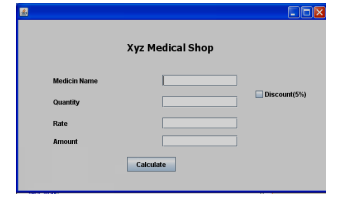
Please refer to attached file for CBSE Class 12 Informatics Practices Sample Paper 2015 Set I
Free study material for Informatics Practices
Download CBSE Sample Papers: Class 12 Informatics Practices
Get Started with CBSE Class 12 Informatics Practices Sample Paper 2015 Set 09 (CBSE)
Access structured sample papers for Class 12 Informatics Practices. Solving the CBSE Class 12 Informatics Practices Sample Paper 2015 Set 09 provided above helps students understand official exam blueprints and tackle anticipated question formats with confidence.
Why Practice Class 12 Informatics Practices Sample Papers?
- Original Practice Material: Access unique questions for Informatics Practices designed to challenge your understanding.
- Self-Assessment: Evaluate scores per set to pinpoint weak zones in Class 12 Informatics Practices.
- Exam Completion Skills: Routine problem sets train you to manage test duration efficiently without stress.
Steps to Follow After Completing CBSE Class 12 Informatics Practices Sample Paper 2015 Set 09
- Self-Evaluation: Score your answers using official guidance to track your academic progress.
- Mistake Correction: Class 12 pupils must re-solve questions answered incorrectly to master the correct method.
- Continuous Practice: Take additional Informatics Practices sample modules online to maximize preparedness for CBSE evaluations.
FAQs
You can download the complete PDF for CBSE Class 12 Informatics Practices Sample Paper 2015 Set 09 for free from StudiesToday.com. Our resources for Class 12 Informatics Practices are updated for the latest academic session and follow the official exam pattern.
Yes, CBSE Class 12 Informatics Practices Sample Paper 2015 Set 09 comes with detailed, teacher-verified solutions. We have provided step-by-step answers for Informatics Practices to help students of Class 12 understand correct methodology and marking scheme.
Practicing this Informatics Practices paper helps in time management and identifying important topics. For Class 12, solving mock papers is the best way to gain confidence and reduce exam-day anxiety.
Yes, all our study materials for Class 12 Informatics Practices are provided in a mobile-friendly PDF format. You can easily download CBSE Class 12 Informatics Practices Sample Paper 2015 Set 09 on your mobile device.