

Here is the latest CBSE Class 12 Informatics Practices Syllabus, ready for 2026-27. It details the full course structure, unit weightage, and internal assessment guidelines. Class 12 students should use this to stay aligned with the current CBSE pattern and books.
Informatics Practices Curriculum and Weightage - Class 12
Below is the official CBSE Class 12 Informatics Practices curriculum for the current 2026-27 academic year. Studying as per this latest curriculum, and understanding the marks breakup by topic, helps you prepare properly for the exam ahead.
Informatics Practices Syllabus for Class 12 (2026-27)
Follow the most recent Class 12 Informatics Practices curriculum changes for 2026-27.
Informatics Practices
CLASS XII
Code No. 065
2023-2024
1. Prerequisite: Informatics Practices – Class XI
2. Learning Outcomes
At the end of this course, students will be able to:
● Create Series, Data frames and apply various operations.
● Visualize data using relevant graphs.
● Design SQL queries using aggregate functions.
● Import/Export data between SQL database and Pandas.
● Learn terminology related to networking and internet.
● Identify internet security issues and configure browser settings.
● Understand the impact of technology on society including gender and disability issues.
3. Distribution of Marks and Periods
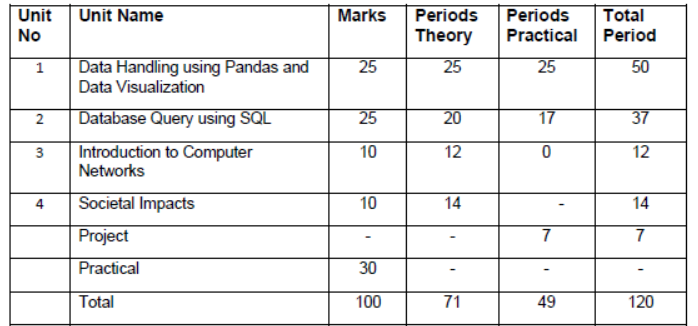
4. Unit Wise syllabus
Unit 1: Data Handling using Pandas -I
Introduction to Python libraries- Pandas, Matplotlib.
Data structures in Pandas - Series and Data Frames.
Series: Creation of Series from – ndarray, dictionary, scalar value; mathematical operations; Head and Tail functions; Selection, Indexing and Slicing.
Data Frames: creation - from dictionary of Series, list of dictionaries, Text/CSV files; display; iteration; Operations on rows and columns: add, select, delete, rename; Head and Tail functions; Indexing using Labels, Boolean Indexing;
Importing/Exporting Data between CSV files and Data Frames.
Data Visualization
Purpose of plotting; drawing and saving following types of plots using Matplotlib – line plot, bar graph, histogram
Customizing plots: adding label, title, and legend in plots.
Unit 2: Database Query using SQL
Revision of database concepts and SQL commands covered in class XI
Math functions: POWER (), ROUND (), MOD ().
Text functions: UCASE ()/UPPER (), LCASE ()/LOWER (), MID ()/SUBSTRING ()/SUBSTR (),
LENGTH (), LEFT (), RIGHT (), INSTR (), LTRIM (), RTRIM (), TRIM ().
Date Functions: NOW (), DATE (), MONTH (), MONTHNAME (), YEAR (), DAY (), DAYNAME ().
Aggregate Functions: MAX (), MIN (), AVG (), SUM (), COUNT (); using COUNT (*).
Querying and manipulating data using Group by, Having, Order by.
Working with two tables using equi-join
Unit 3: Introduction to Computer Networks
Introduction to networks, Types of network: PAN, LAN, MAN, WAN.
Network Devices: modem, hub, switch, repeater, router, gateway
Network Topologies: Star, Bus, Tree, Mesh.
Introduction to Internet, URL, WWW, and its applications- Web, email, Chat, VoIP
Website: Introduction, difference between a website and webpage, static vs dynamic web page, web server and hosting of a website.
Web Browsers: Introduction, commonly used browsers, browser settings, add-ons and plug-ins, cookies.
Unit 4: Societal Impacts
Digital footprint, net and communication etiquettes, data protection, intellectual property rights (IPR), plagiarism, licensing and copyright, free and open source software (FOSS), cybercrime and cyber laws, hacking, phishing, cyber bullying, overview of Indian IT Act.
E-waste: hazards and management.
Awareness about health concerns related to the usage of technology.
Project Work
The aim of the class project is to create tangible and useful IT application. The learner may identify a real-world problem by exploring the environment. e.g. Students can visit shops/business places, communities or other organizations in their localities and enquire about the functioning of the organization, and how data are generated, stored, and managed.
The learner can take data stored in csv or database file and analyze using Python libraries and generate appropriate charts to visualize.
Learners can use Python libraries of their choice to develop software for their school or any other social good.
Learners should be sensitized to avoid plagiarism and violation of copyright issues while working on projects. Teachers should take necessary measures for this. Any resources (data, image etc.) used in the project must be suitably referenced.
The project can be done individually or in groups of 2 to 3 students. The project should be started by students at least 6 months before the submission deadline.
Practical Marks Distribution
S. No. Unit Name Marks
1 Programs using Pandas and Matplotlib 8
2 SQL Queries 7
3 Practical file (minimum of 15 programs based 5
on Pandas, 4 based on Matplotlib and 15
SQL queries must be included) 5
4 Project Work (using concepts 5
learned in class XI and XII)
5 Viva-Voce
TOTAL 30
5. Suggested Practical List
5.1 Data Handling
1. Create a panda’s series from a dictionary of values and a ndarray
2. Given a Series, print all the elements that are above the 75th percentile.
3. Create a Data Frame quarterly sales where each row contains the item category, item name, and expenditure. Group the rows by the category and print the total expenditure per category.
4. Create a data frame for examination result and display row labels, column labels data types of each column and the dimensions
5. Filter out rows based on different criteria such as duplicate rows.
6. Importing and exporting data between pandas and CSV file
5.2 Visualization
1. Given the school result data, analyses the performance of the students on different parameters, e.g subject wise or class wise.
2. For the Data frames created above, analyze, and plot appropriate charts with title and legend.
3. Take data of your interest from an open source (e.g. data.gov.in), aggregate and summarize it. Then plot it using different plotting functions of the Matplotlib library.
5.3 Data Management
1. Create a student table with the student id, name, and marks as attributes where the student id is the primary key.
2. Insert the details of a new student in the above table.
3. Delete the details of a student in the above table.
4. Use the select command to get the details of the students with marks more than 80.
5. Find the min, max, sum, and average of the marks in a student marks table.
6. Find the total number of customers from each country in the table (customer ID, customer Name, country) using group by.
7. Write a SQL query to order the (student ID, marks) table in descending order of the marks
Free study material for Informatics Practices
FAQs
The complete and updated syllabus for Class 12 Informatics Practices for the 2026-27 academic session is available on StudiesToday.com with detailed chapter-wise marks issued by CBSE.
Yes, several topics have been rationalized to reduce the academic load on Class 12 students. The Informatics Practices syllabus highlights the deleted topics section and is as per 2026 Exam format.
For Class 12 Informatics Practices, the evaluation is split into an 80-mark theory paper and a 20-mark internal assessment (Project/ASL).
The Class 12 Informatics Practices curriculum focuses on 50% competency-based questions.
We have provided the Class 12 Informatics Practices curriculum in a bilingual format where applicable for 2026-27 session.
Our team has carefully updated all resources based on the latest circulars from the official CBSE website. The Class 12 Informatics Practices syllabus is 100% authentic and aligned with the 2026-27 academic calendar.