

Download CBSE Class 12 Informatics Practices Assignments
Review targeted academic assignments with the CBSE Class 12 Informatics Practices Internet and Web Assignment. Built according to official CBSE standards for the 2026-27 term, these downloadable Class 12 Informatics Practices worksheets support effective daily practice for Chapter 05 Internet and Web.
Access CBSE School Assignments and Answers
Access the complete assignment PDF for Class 12 Informatics Practices below. Regular practice with these targeted academic tasks builds familiarity with standard question patterns and helps secure higher marks in final school evaluations.
Very Short Answer Type Questions :
Question: Expand URL and WWW.
Answer: Uniform Resource Locator
World Wide Web
Question: What are the common browser available in market?
Answer: Google Chrome, Mozilla Firefox, Microsoft Edge, Microsoft Internet Explorer, Netscape Navigator, Apple Safari, Opera, MOSAIC etc.
Question: What do you understand by the ‘Web Browser’?
Answer: A program / App to visit websites using their URL address on the internet and displays the contents of those websites. They access resources from www – the hypertext files.
Question: Define browser add-ons / plug-ins / extensions.
Answer: add-ons are software component to add additional functionalities to web browser.
Question: What do you understand by the ‘Web Browser’?
Answer: A program / App to visit websites using their URL address on the internet and displays the contents of those websites. They access resources from www – the hypertext files.
Question: Example commonly used plug-ins.
Answer: Antivirus, pdf reader, Google TrAnswer:late, document reader, changing browser location, To-Do List, Emoji etc.
Question: Which device is known as intelligent hub?
Answer: Switch
Question: Name the device which is used to connect two similar network?
Answer: Gateway
Question: Name the device which is used to connect two similar network?
Answer: Bridge
Question: Define website.
Answer: A set of related web pages located under a single domain name, typically produced by a single person or organization.
Question: What is cookie?
Answer: A cookie is a small text file stored in user’s computer by the website to store basic information about that website.
Question: Which device is used to amplify the signals ?
Answer: Repeater
Question: Which wired is best suited for high quality and low disturbance?
Answer: Optical fibre
Short Answer Type Questions :
Question. Identify the following devices:
(i) An intelligent device that connects several nodes to form a network and redirects the received information only to intended node(s).
(ii) A device that regenerates (amplifies) the received signal and re-transmits it to its destinations.
(iii) A device that is used to connect different types of networks. It performs the necessary translation so that the connected networks can communicate properly.
(iv) A device that converts data from digital bit stream into an analog signal and vice-versa.
Answer: (i) Switch
(ii) Repeater
(iii) Router
(iv) Modem
Question. When would you prefer
(i) hubs over repeaters,
(ii) bridges over hubs and
(iii) switch over other network devices?
Answer: (i) We would prefer hubs over repeaters when the distance are short.
(ii) We would prefer bridges over hubs when we need to connect multiple networks.
(iii) We would prefer switch over other network devices when we want to segment networks into different sub-networks to prevent traffic overloading.
Question. Define hub and write its functions and types.
Answer: A hub connects several computers together and acts as a central node or server.
Functions of a Hub
♦ Interconnects number of computers or users.
♦ All the incoming data packets received by the hub are send to all hub ports and from their, the data is sent to all the computers, connected in a hub network.
Hub are of two types
(i) Active Hub It acts as repeater. It amplifies the signal as these move from one device to another.
(ii) Passive Hub It simply passes the signal from one connected device to another.
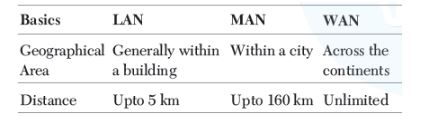
Question. Write down any two points of differences between LAN, MAN and WAN.
Answer: Two major points of differences among LAN, MAN and WAN are as follows:
Question. Write a short note on mesh topology.
Answer: In a mesh topology, every device is connected to another device via a particular channel.
Every device is connected with another via dedicated channels. These channels are known as links.
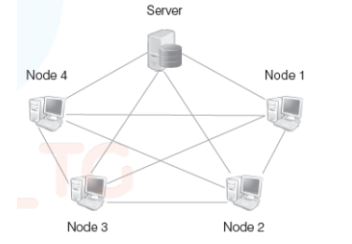
Advantages of mesh Topology
♦ It is robust.
♦ The fault is diagnosed easily. Data is reliable because data is transferred among the devices through dedicated channels or links.
♦ Provides security and privacy.
Disadvantages of mesh Topology
♦ Installation and configuration are difficult.
♦ The cost of cables is high as bulk wiring is required, hence suitable for less number of devices.
♦ The cost of maintenance is high.
Question. Mr. Kavye Shastri, General Manager of Unit Nations corporate recently discovered that the communication between his company’s accounts office and HR office is extremely slow and signals drop quite frequently. These offices are 120 m away from each other and connected by an ethernet cable.
(i) Suggest him a device which can be installed in between the offices for smooth communication.
(ii)What type of network is formed by having this kind of connectivity out of LAN, MAN and WAN?
Answer: (i) The device that can be installed between the office for smooth communication is repeater.
(ii) The type of network is Local Area Network (LAN).
Question. When the computer network uses telephone lines as communication channel then MODEM is used as a data communication device. Now, explain the working of MODEM.
Answer: Modem performs the task of modulation at sender’s site and Demodulation at the receiver’s site. Basically, our computer generates data in the form of digital signals, which need to be forwarded to the receiver through telephone lines. Since, telephone lines can carry only analog signals. So, digital signals need to be converted to analog signals at sender’s site, this is called modulation.
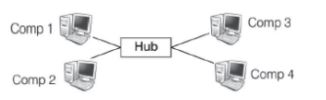
Question. Write one advantage of bus topology of network. Also, illustrate how four computers can be connected with each other using star topology of network?
Answer: Advantage of Bus Topology In bus topology, computers can be connected with each other using server (host) along a single length of cable.
Four computers can be connected with each other using star topology in the following way:
Question. Define repeaters with its two types.
Answer: Repeaters are used to amplify the signals, when they are transported over a long distance.
Repeaters are of two types
(i) Amplifier It amplifies or boosts the incoming signals. So, it amplifies both the signal and any concurrent noise.
(ii) Signal Repeater It only amplifies the signal and filters out the noise signals. So, we get only the clear signal at the receiver end.
Question. Which device is used to connect dissimilar networks?
Answer: A gateway is a device, which is used to connect dissimilar networks. The gateway establishes an intelligent connection between a local network and external network, which are completely different in structure. Gateway also serve as proxy server and a firewall system that prevents the unauthorised access.
Question. Define the following terms:
(i) Baud
(ii) Hubs
(iii) Repeaters
Answer: (i) Baud Baud is a unit of measurement for the information-carrying capacity of a communication channel.
(ii) Hubs In computer networking, a hub is a small, simple, low-cost device that joins multiple computers together.
(iii) Repeaters It is a device that amplifies and restores the signal before it gets degraded and transmits the original signal back to the destination. A repeater is a re-generator and not an amplifier.
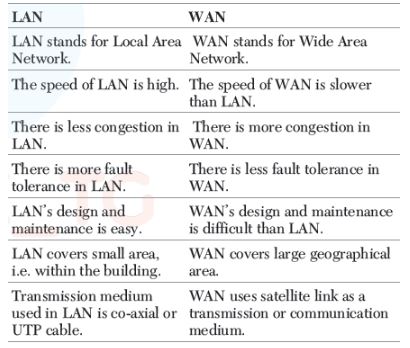
Question. In networking, what isWAN? How is it different from LAN?
Answer: The network which connects the different countries is known as WAN.
Differences between LAN and WAN are as follows:
Question. Write one advantage of star topology over bus topology and one advantage of bus topology over star topology.
Answer: Advantage of star topology over bus topology The star topology is the most reliable as there is a direct connection of every nodes in the network with the central node, so any problem in any node will affect the particular node only.
While in bus topology, if problem exists in common medium, it will affect the entire node.
Advantage of bus topology over star topology Extension of network is very easy in bus topology. We can connect new node along its length. While in star topology, it is difficult to expand, as the new node has to connect all the way to central node and there is not available port in central node.
Long Answer Type Questions :
Question. Eduminds University of India is starting its first campus in a small town Parampur of central India with its centre admission office in Delhi. The university has three major buildings comprising of Admin Building, Academic Building and Research Building in the 5 km area campus. As a network expert, you need to suggest the network plan as per (i) to (iii) to the authorities keeping in mind the distances and other given parameters.
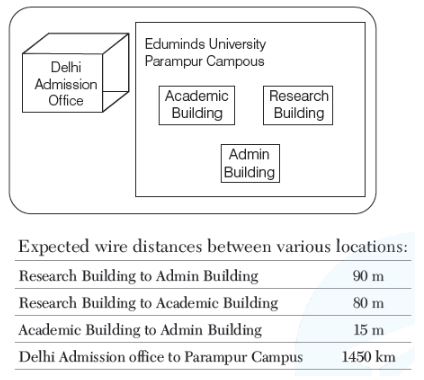
Expected wire distances between various locations:
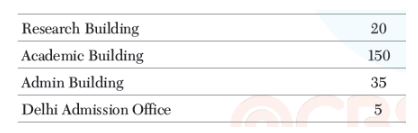
(i) Suggest the authorities, the cable layout amongst various buildings inside the university campus for connecting the building.
(ii) Suggest the most suitable place (i.e. building) to house the server of this organisation, with a suitable reason.
(iii) Suggest an efficient device from the following to be installed in each of the buildings to connect all computers.
(a) Gateway
(b) Modem
(c) Switch
Answer: (i) The suggested cable layout is as follows :
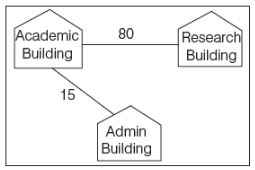
(ii) The most suitable place (i.e. block) to house the server of this university is Academic Block, because there are maximum number of computers in this block and according to 80-20 rule 80% of traffic in a network should be local.
(iii) (c)The efficient device to be installed in each of the blocks to connect all the computers is switch.
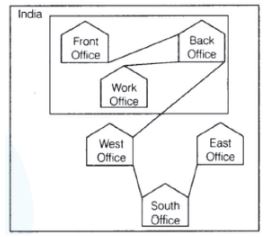
Question. Bhartiya Connectivity Association is planning to spread their offices in four major cities of India to provide regional IT infrastructure support in the field of education and culture.
The company has planned to setup their head office in New Delhi in three locations and have named their New Delhi offices as Front Office, Back Office and Work Office. The company has three more regional offices as three major cities of India.
A rough layout of the same is as follows:
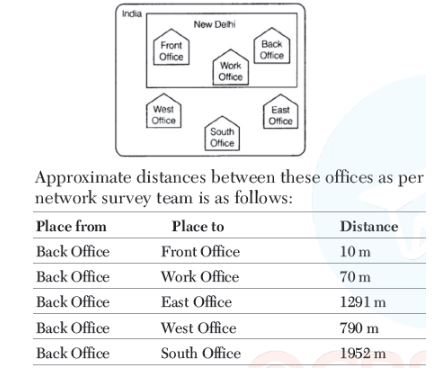
In continuation of the above, the company experts have planned to install the following number of computers in each of their offices.
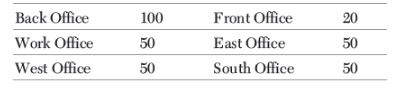
(i) Suggest the network type (out of LAN, MAN, WAN) for connecting each of the following set of the their offices.
(a) Back Office and Work Office
(b) Back Office and South Office
(ii) Which device will you suggest to be procured by the company for connecting all the computers with each of their offices out of the following devices?
(a) Switch/Hub
(b) Modem
(c) Telephone South Office, East Office and West Office located with offices located in New Delhi
(iii) Suggest the cable/wiring layout for connecting the company’s local offices located in New Delhi. Also, suggest an effective method for connecting the company’s regional offices East Office, West Office and South Office with offices located in New Delhi.
Answer: (i) (a) The type of network between the Back Office and the Work Office is LAN (Local Area Network).
(b) The type of network between the Back Office and the South Office is WAN (Wide Area Network).
(ii) (a) The suitable device for connecting all the computers in each of their offices is switch/hub.
(iii) The suggested layout for connection is as follows:
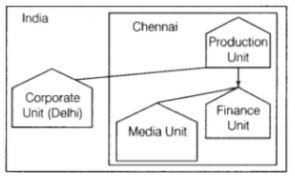
Question. China Middleton Fashion is planning to expand their network in India, starting with two cities to provide infrastructure for distribution of their products.
The company has planned to setup their main office in Chennai at three different locations and have named their offices as Production Unit, Finance Unit and Media Unit. The company has its Corporate Unit in Delhi.
A rough layout of the same is as follows:
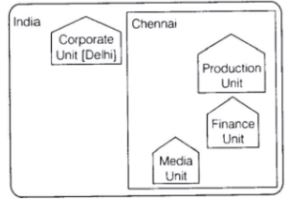
In continuation of the above, the company experts have planned to install the following number of computers in each of these units.
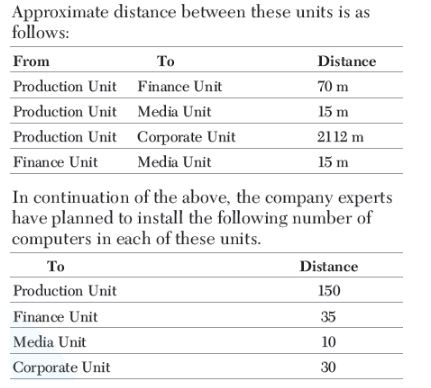
(i) Suggest the kind of network required (out of LAN, MAN, WAN) for each of the following units.
(a) Production Unit and Media Unit
(b) Production Unit and Finance Unit
(ii) Which of the following devices will you suggest for connecting all computers with each of their office units?
(a) Switch/Hub
(b) Modem
(c) Telephone
(iii) Suggest a cable/wiring layout for connecting the company’s local office units located in Chennai. Also, suggest an effective method/technology for connecting the company’s office unit located in Delhi.
Answer: (i) (a) The type of network between the Production Unit and Media Unit is MAN (Metropolitan Area Network).
(b) The type of network between Production Unit and Finance Unit is LAN (Local Area Network).
(ii) (a) The suitable device for connecting all the computers within each of their office units is switch/hub.
(iii) The cable/wiring layout for connection is as follows
 :
:
Question. Hindustan Connecting World Association is planning to start their offices in four major cities in India to provide regional IT infrastructure support in the field of education and culture. The company has planned to setup their head office in New Delhi in three different locations and have named their New Delhi offices as Sales Office, Head Office and Tech Office. The company’s regional offices are located at Coimbatore, Kolkata and Ahmedabad.
A rough layout of the same is as follows:
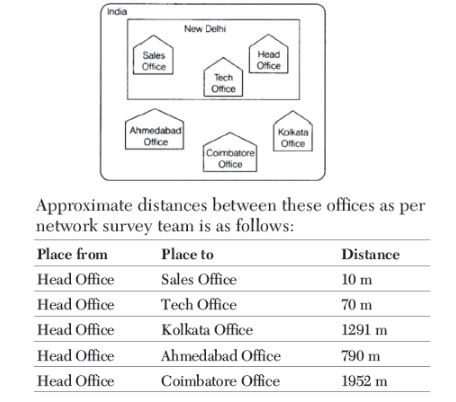
In continuation of the above, the company experts have planned to install the following number of computers in each of their offices.
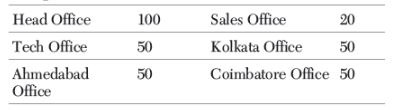
(i) Suggest the network type (out of LAN, MAN, WAN) for connecting each of the following set of their offices.
(a) Head Office and Tech Office
(b) Head Office and Coimbatore Office
(ii) Which device will you suggest to be procured by the company for connecting all computers within each of their offices out of the following devices?
(a) Modem
(b) Telephone
(c) Switch/Hub
(iii) Suggest the cable/wiring layout for connecting the company’s local offices located in New Delhi.
Also, suggest an effective method/technology for connecting the company’s regional offices at Kolkata, Coimbatore and Ahmedabad.
Answer: (i) (a) The type of network between the Head Office and Tech Office is LAN (Local Area Network).
(b) The type of network between the Head Office and Coimbatore Office is WAN (Wide Area Network).
(ii) (c) The suitable device for connecting all the computers in each of their offices is switch/hub.
(iii) The suggested layout for connection is as follows:
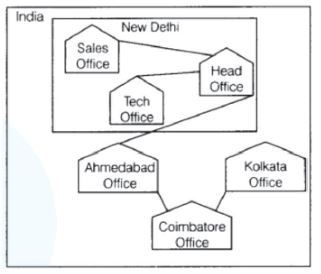
Question. Bias Methodologies is planning to expand their network in India starting with three cities in India to build infrastructure for research and development of their chemical products. The company has planned to setup their main office in Pondicherry at three different locations and have named their offices as Back Office, Research Lab and Development Unit.
The company has one more research office namely Corporate Unit in Mumbai. A rough layout of the same is as follows:
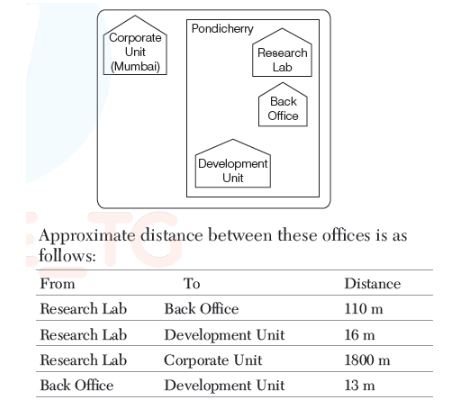
Approximate distance between these offices is as follows:
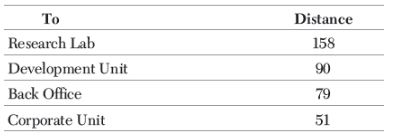
(i) Suggest the kind of network required (out of LAN, MAN, WAN) for connection each of the following office unit.
(a) Research Lab and Back Office
(b) Research Lab and Development Unit
(ii) Which of the following devices will you suggest for connecting all the computers with each of their office units?
(a) Switch/Hub
(b) Modem
(c) Telephone
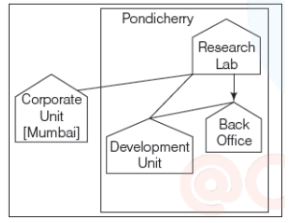
(iii) Suggest a cable/wiring layout for connecting the company’s local office units located in Pondicherry. Also, suggest an effective method/technology for connecting the company’s office located in Mumbai.
Answer: (i) (a) The type of network between the Research Lab and the Back Office is LAN (Local Area Network).
(b) The type of network between Research Lab and Development Unit is MAN (Metropolitan Area Network).
(ii) (a) The suitable device for connecting all the computers within each of their office units is switch/hub.
(iii) The cable/wiring layout for connection is as follows:
Free study material for Informatics Practices
Chapter 05 Internet and Web Printable Assignments & Solutions for Class 12 Informatics Practices
Class 12 Informatics Practices Chapter 05 Internet and Web Printable Assignments
Access structured practice assignments for Chapter 05 Internet and Web designed in alignment with the latest CBSE curriculum for Class 12 Informatics Practices. These printable sets cover objective and descriptive problem types to support thorough revision.
Why Practice Class 12 Informatics Practices Assignments?
- Curriculum Standards: Assignments match modern CBSE sample formats to ensure relevant preparation.
- Thorough Revision: Detailed problem sets reinforce core concepts and eliminate conceptual weak spots.
- Execution Speed: Timed practice with assignment sets sharpens overall response timing.
Steps to Complete Chapter 05 Internet and Web Assignments Successfully
- Textbook Review: Always study the core NCERT book for Class 12 Informatics Practices prior to beginning the assignment.
- Independent Attempt: Solve Chapter 05 Internet and Web questions on your own initially before cross-checking with expert solutions.
- Error Tracking: Record challenging concepts in a dedicated notebook and practice online MCQ tests for revision.
FAQs
You can download free PDF assignments for Class 12 Informatics Practices Chapter 05 Internet and Web from StudiesToday.com. These practice sheets have been updated for the 2026-27 session covering all concepts from latest NCERT textbook.
Yes, our teachers have given solutions for all questions in the Class 12 Informatics Practices Chapter 05 Internet and Web assignments. This will help you to understand step-by-step methodology to get full marks in school tests and exams.
Yes. These assignments are designed as per the latest CBSE syllabus for 2026. We have included huge variety of question formats such as MCQs, Case-study based questions and important diagram-based problems found in Chapter 05 Internet and Web.
Practicing topicw wise assignments will help Class 12 students understand every sub-topic of Chapter 05 Internet and Web. Daily practice will improve speed, accuracy and answering competency-based questions.
Yes, all printable assignments for Class 12 Informatics Practices Chapter 05 Internet and Web are available for free download in mobile-friendly PDF format.