

Download CBSE Class 12 Informatics Practices Assignments
Access comprehensive school assignments for Chapter 02 Data Handling using Pandas I using the CBSE Class 12 Informatics Practices Data Handling using Pandas Assignment Set 03. Designed to align with the 2026-27 CBSE academic guidelines, these practice sets help Class 12 Informatics Practices students reinforce core concepts and improve their problem-solving accuracy.
Access CBSE School Assignments and Answers
Navigate directly to the solved Informatics Practices assignments using the digital viewer below. Each practice set includes detailed step-by-step solutions, allowing students to instantly cross-check their work and identify areas requiring further revision.
Question: Write import Statement for Pandas Module
Answer: import pandas as pd
Question: Difference between a list and a series.
Answer: In Lists, index value can not be changed eg. [10, ‘Hello’, True]
In Series, index value can be changed.
s2 = pd.Series([‘Hello’, 10, True], index=[2,1,3])
2 Hello
1 10
3 True
Question: Create an empty series.
Answer: import pandas as pd
s=pd.Series()
print(s)
Question: What will be output of the following:
s = pd.Series([1,2,3,4,5])
s.size
Answer: 5 # s.size gives numbers of elements
Question: CSV stands for ________________________________________
Answer: Comma separated values.
Question:_______________Return the sum over requested axis in Data Frame Df.
Answer: Df.sum
Question:__________________Return the minimum over requested axis in Data Frame Df.
Answer: Df.min
Question: Create a series from dictionary.
Answer: import pandas as pd
data = {‘a’ : 0., ‘b’ : 1., ‘c’ : 2.}
s = pd.Series(data)
print(s)
Question: What will be output of the following:
s = pd.Series([1,2,3,4,5])
s.ndim
Answer: 1 # ndim gives the dimension of series
Question: __________________ function returns first n rows from the object based on position.
Answer: head()
Question: __________________ function returns last n rows from the object based on position.
Answer: tail()
Question: Predict the Output:
import pandas as pd
L=[[‘Rahul’,17],[‘Mohit’,18]]
Df=pd.DataFrame(L, columns=[‘Name’,’Age’])
print(Df)
Answer: Name Age
0 Rahul 17
1 Mohit 18
Question: _____________ is used to check the Null values in a Data Frame.
Answer: isnull ( )
Question: Which of the following is used to replace Null values in a Data Frame?
Answer: fillna ( )
Question: What does DataFrame df.columns give?
Answer: Shows the columns name of Data Frame df.
Question: Axis=1 in a Data Frame represents.
Answer: columns
Question: Axis=0 in a Data Frame represents
Answer: Rows
Question: The file extension of a csv file is _________________
Answer: csv
Question: The library to be imported to export and import DataFrame to and from a csv file is_____________
Answer: pandas
Question: CSV stands for ________________________________________
Answer: Comma separated values.
Question: How many Data Structures available in Pandas?
Answer: Two Data Structures available in Pandas
1. Data Series / Series 2. Data Frame
Question: Create a series which contains 5 numbers and alphabets as index.
Answer: import pandas as pd
s = pd.Series([1,2,3,4,5],index = [‘a’,’b’,’c’,’d’,’e’])
Question: Create a series and multiply every element by 2
Answer: import pandas as pd
s = pd.Series([1,2,3,4,5])
print(s*2)
Question: Create a series which contains names of person.
Answer: import pandas as pd
s=pd.Series([‘suman’,’ravi’,’swati’])
print(s)
Question: By default a csv file opens with __________________
Answer: excel
Question: Write a python program to export the DataFrame ‘df1’ to a csv file ‘file1.csv’ in the current folder.
Answer: import pandas as pd
df1.to_csv(‘file1.csv’)
Question: Write a python program to export the DataFrame ‘df1’ to a csv file ‘file1.csv’ in ‘mycsv’ folder under ‘D’ drive.
Answer: import pandas as pd
df1.to_csv(‘d:/mycsv/file1.csv’)
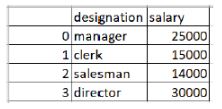
Question: Study the following program, then write the output if we open the file ‘file1.csv’ in excel.
import pandas as pd
d={‘designation’:[‘manager’,’clerk’,’salesman’, ‘director’]
,’salary’:[25000,15000,14000,30000]}
df=pd.DataFrame(d)
df.to_csv(‘file1.csv’)
Answer:
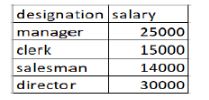
Question: Study the following program, then write the output if we open the file ‘file1.csv’ in excel.
import pandas as pd
d={‘designation’:[‘manager’,’clerk’,’salesman’,’director’]
,’salary’:[20000,15000,22000,30000]}
df=pd.DataFrame(d)
df.to_csv(‘file1.csv’, index=False)
Answer:
Question: Write a python program to export the DataFrame ‘df1’ to a csv file ‘file1.csv’ in ‘mycsv’ folder under ‘D’ drive without index of the Dataframe.
Answer: import pandas as pd
df1.to_csv(‘d:/mycsv/file1.csv’, index=False)
Question: Write a python program to export the DataFrame ‘df1’ to a csv file ‘file1.csv’ in the current folder without index of the Dataframe.
Answer: import pandas as pd
df1.to_csv(‘file1.csv’, index=False)
Free study material for Informatics Practices
CBSE Class 12 Informatics Practices Assignments for Chapter 02 Data Handling using Pandas I
Class 12 Informatics Practices Chapter 02 Data Handling using Pandas I Printable Assignments
Review targeted chapter assignments for Class 12 Informatics Practices Chapter 02 Data Handling using Pandas I. Built according to official CBSE guidelines, these downloadable problem sets help students build accuracy and prepare effectively for school tests.
Why Practice Class 12 Informatics Practices Assignments?
- Syllabus Compliance: Sets reflect current CBSE evaluation criteria and official marking frameworks.
- Multi-Format Practice: Includes varied problem types designed to deepen comprehension across all sub-topics.
- Time Management: Routine practice optimizes pacing to finish school examinations comfortably within schedule.
How to Approach Informatics Practices Chapter 02 Data Handling using Pandas I Assignments
- Initial Reading: Begin by reading the NCERT book for Class 12 Informatics Practices to build a baseline understanding.
- Independent Testing: Attempt assignment questions unassisted, then verify work using provided answer keys.
- Supplementary Aids: Leverage revision notes and worksheets whenever you encounter difficult topics.
FAQs
You can download free PDF assignments for Class 12 Informatics Practices Chapter 02 Data Handling using Pandas I from StudiesToday.com. These practice sheets have been updated for the 2026-27 session covering all concepts from latest NCERT textbook.
Yes, our teachers have given solutions for all questions in the Class 12 Informatics Practices Chapter 02 Data Handling using Pandas I assignments. This will help you to understand step-by-step methodology to get full marks in school tests and exams.
Yes. These assignments are designed as per the latest CBSE syllabus for 2026. We have included huge variety of question formats such as MCQs, Case-study based questions and important diagram-based problems found in Chapter 02 Data Handling using Pandas I.
Practicing topicw wise assignments will help Class 12 students understand every sub-topic of Chapter 02 Data Handling using Pandas I. Daily practice will improve speed, accuracy and answering competency-based questions.
Yes, all printable assignments for Class 12 Informatics Practices Chapter 02 Data Handling using Pandas I are available for free download in mobile-friendly PDF format.