

Chapter-wise Worksheets for Class 12 Informatics Practices: Sure Shot Questions
Explore structured practice materials through the CBSE Class 12 Informatics Practices Sure Shot Questions Worksheet. Tailored for Class 12 learners, utilizing these Informatics Practices worksheets ensures thorough preparation and strengthens problem-solving accuracy before final school evaluations.
Practice Class 12 Informatics Practices Worksheets: Sure Shot Questions
Navigate directly to the solved Informatics Practices worksheets using the digital viewer below. Each practice set includes detailed step-by-step solutions, allowing students to instantly cross-check their work and identify areas requiring further revision.
Topic: Networking and Open Source Software (OSS)
Question. Two doctors in the same room have connected their palm tops using Bluetooth for working on a group presentation. Out of the following, what kind of networks they have formed? LAN,MAN,PAN,WAN.
Answer : PAN
Question. Arrange the following communication channels in ascending order of their data transmission rates. ETHERNET CABLE, OPTICAL FIBER, TELEPHONE CABLE, COAXIAL CABLE.
Answer : Telephone Cable, Ethernet Cable, Coaxial Cable, Optical Fiber
Question. Which transmission medium should be used to transfer data across two continents at very high speed?
Answer : Satellite
Question. Which of the following software’s are open source software:
LINUX,MS WINDOWS 7,PHOTOSHOP,MYSQL
Answer : Linux, MySQL
Question. Explain the difference between domain name and URL with the help of appropriate example of each.
Answer : Domain Name: It is the unique name of any website. Ex cbse.nic.in URL: Uniform Resource Locator – It is complete address of any website which contain protocol, domain name and webpage name. Example : http://www.cbse.nic.in/welcome.htm
Question. Name any two Indian scripts included in Unicode.
Answer : Gujarati, Punjabi, Malayalam
Question. Differentiate star and bus topology of networks.
Answer : Bus Topology: It is linear in nature. Each computer or server is connected to the single bus cable through some kind of connector.
Advantage: The bus topology consists of only one wire, it is rather inexpensive to implement as compared to other topologies.
Disadvantage: Since only one cable is utilized, it can be the single point of failure. If the network cable breaks, the entire network will be down.
Star Topology: In local area networks with a star topology, each network host is connected to a central hub.
Advantage: An advantage of the star topology is the simplicity of adding additional nodes.
Disadvantage: The primary disadvantage of the star topology is that the hub represents a single point of failure.
Question. Navneet is using software, which has been downloaded from internet and is available for one month.
After one month he has to pay license fee for further use. What software Navneet is using?
Answer : Shareware
Question. Akhil is transferring songs from his mobile to his friend’s mobile via Bluetooth connection. Name the network used by Akhil.
Answer : PAN
Question. Which of the following is not a characteristic of open source software?
I) Its source code is available for modification
II) Its owned by a company or an individual
III) It can be downloaded by Internet
Answer : II
Question. Which protocol is used for transfer of hyper text documents on the internet?
Answer : HTTP – Hyper Text Transfer Protocol
Question. Mr. Ramesh is working in an Global Organisation. He wants to login in his office’s computer from his home. Suggest the technology for the same.
Answer : Telnet
Question. Which device is used for connecting multiple networks over different protocols?
Answer : Gateway
Question. Identify the following topologies
i) A signal/data packets transmit from one end to other end in linear way.
ii) Each node is connected to two and only two neighboring nodes in circular form.
Answer : i) BUS ii) Ring
Question. What is the difference between free software and freeware ?
Answer : Free Software: It means software is freely accessible, free to use, changed, improved, copied, and distributed without any payments.e.g. LINUX
Freeware
Available free of cost
Copying and further distribution but not modification.
Source code is not available
E.g. Microsoft Internet Explorer
Question. Bholu is confused as he is unable to find the name of a network of computers and other devices that is confined to a relatively small space - an office. Help him do that.
Answer : LAN
Question. Most common communication protocol on Internet that ensures end-to-end communication, is?
Answer : POP – Point to Point Protocol
Question. What type of address is the following ? Also define it. 20 : B9 : Fl : 63 : 2F : FB
Answer : It is MAC Address (Media Access Control). It is given to hardware part to enable networking
Question. What are DoS attacks ?
Answer : Denial of Service (DoS): are those attacks that prevent the legal users of System from accessing or using the resources, information or capabilities of the system. It may be of following types :
Denial of Access to Information
Denial of Access to Applications
Denial of Access to Communications
Question. Write examples of one Proprietary and one Open Source Software.
Answer : Proprietary s/w: Microsoft Windows, MS Sql, ASP etc
Open s/w: Linux, MySQL, PHP etc.
Question. Expand following terms (i) FLOSS (II) SDLC (iii) GNU
Answer : (i) Free Libre Open Source Software (ii) System Development Life Cycle. (iii) GNU’s not unix
Question. What do you understand by TTF and OTF ?
Answer : TTF(True Type Font): True type is the native Operating System font format for windows and Mac
OS. True Type fonts are normally 8 Bit fonts.
OTF (Open Type Font): format is an extension of the TrueType font format. Open Type fonts are 16 Bit fonts. Open Type fonts allow the handling of large glyph sets using Unicode enconding.
Question. What was the objective behind developing UNICODE?
Answer : Unicode provides a unique number for every character, no mater what the platforms, no matter what the program, no matter what the language. Unicode can represent 94140 characters. Unicode standard has incorporated Indian Scripts under the group named Asian scripts. Indian scripts included as Devnagari, Bengali, Gurumukhi, Gujarati, Oriya, Tamil, Telgu, kannada, and Malayalam.
Question. Which of the following standard are open standards and which are proprietary standards ?
AIFF ASX
OGG FLAC
RM HTML
Plain Text WMA
SVG JPEG
PNG
Answer : AIFF - Proprietary ( Apple Machintosh) ASX - Proprietary (Microsoft)
OGG – Open FLAC - Open
RM – Proprietary (Real Media) HTML - Open
Plain Text – Open WMA – Proprietary (Microsoft)
SVG – Open JPEG – Open
PNG– Open
Question. What is IP address?
Answer : (Internet Protocol Number):
Sometimes called a dotted quad. A unique number consisting of 4 parts separated by dots, e.g.
165.113.245.2. Every machine that is on the Internet has a unique IP number - if a machine does not have an IP number, it is not really on the Internet.
Question. Bhola wants to protect his private network from unauthorized access, which software/device should he install?
Answer : Firewall
Topic: JAVA
Question. Which property would you set for setting the password character as ‘$’?
Answer : setEchochar(‘$’)
Question. Which list property do you set for specifying the items for the list.
Answer : Model property
Question. Which method would you use to determine the index of selected item in a List Box?
Answer : getSelectedIndex()
Question. How one can make a Text Field un-editable on a Frame?
Answer : <jTextField>.setEditable(false)
Question. While working in NetBeans, Mr. Gupta wants to display “Pass” or “Needs to Reappear” message depending the marks entered in jTextfield. Help him to choose more appropriate statement out of “If” and “switch” statement.
Answer : If statement
Question. Write the value of variables x and y:
Int x,y;
X=7, y=5;
x=x+y++;
Answer : x=12
y=6
Question. How many times following loop will execute?
for(int i=1; i<=15; i++)
{
Syetem.out.println(“Hello”);
i=i+2;
}
Answer : 5 times
Question. Find the errors from the following code:
int m;n;
for(n=0,n<=10;n++);
m=+n;
Answer : int m,n;
for(n=0; n<=10; n++)
m+=n;
Question. Rewrite the following fragment using switch:
if (ch== ‘E’||ch==’e’)
System.out.println(“111”);
else if (ch== ‘W’)
System.out.println(“222”);
else if (ch== ‘N’)
System.out.println(“333”);
else
System.out.println(“444”);
Answer : Switch(ch)
{ case ‘e’ :
case ‘E’:
System.out.println(“111”);
break;
case ‘W’ :
System.out.println(“222”);
break;
case ‘N’ :
System.out.println(“333”);
break;
default : System.out.println(“444”);
}
Question. Find the output of the following code :
int i=1, j=0, n=0;
while (i<4) {
for(j=1; j<=i; j++)
{
n+=1;
} i=i+1;
}
System.out.println(“ “+n);
Answer : 10
Topic: HTML
Question. What is HTML?
Answer : HTML stands for Hyper Text Markup Language. It is a markup language used to create HTML documents. An HTML document defines a static web page. The <html> tag identifies the HTML document.
An HTML document begin with <html> ends with < /html >.
vGive two differences between HTML and XML.
Answer : The three differences between HTML and XML are:
1. HTML is designed to display data and hence, focused on the ‘look’ of the data, whereas XML is designed to describe and carry data and hence, focuses on data.
2. In HTML tags are predefined, while in XML, tags can be created as per needs.
HTML tags are not case sensitive, whereas XML tags are case sensitive
vWhich tag is used to specify :
a. Table data b. Table header c. Table row d. Table border
Answer : (a) <td> (b) <th> (c) <tr> (d) <tb>
Question. Which tag is used to define Ordered and Unordered list in HTML?
Answer : Bulleted/unordered list <UL> tag is used to indicate a list item as contained in an unordered or bulleted form.
The numbered/ordered list <OL> tag is used to indicate a list item as contained in an ordered or numbered form.
Question. Write the tag name to create horizontal line and break line
Answer : Horizontal Line: <hr>
Break Line: <br>
Question. Which tag and attribute of HTML is used to insert an image?
Answer : <img src=”Location”>
Topic: SQL
Question. Name the command to open an existing Database.
Answer : USE <database name>;
vA Table-Student has the following columns
Student_Id, Student_Name, Fathers_name, Class_Teacher_ID
Identify which column can act as Primary Key and Foreign Key
Answer : Primary Key: Student_Id
Foreign Key: Class_Teacher_ ID
Question. Define the terms Degree and Cardinality
Answer : Degree : Total number of columns in a table
Cardinality : Total number of Rows in a table
Question. Which command of SQL is used to display all tables of a Database.
Answer : SHOW TABLES;
Question. Name the command to add or modify a column in a table.
Answer : ALTER TABLE
Topic: IT Application
Q.48 define following terms. A) E-Governance, B) E-Business C) E-Learning
Answer : A) E-Governance : It refers to the application of electronic means in governance with a name of full filling the requirements of daily needs of user at affordable cost and in fastest possible time.
B) E-Business: It refers to any form of transactions that uses an electronic media to facilitate the transaction.
C) E-Learning: It refers to the means of teaching through technology such as Network browser, DVD, CD ROM etc.
Question. Give examples of any two web portals of E-Governance, E-Business and E-Learning.
Answer : E-Governance: www.india.gov.in, www.indianrail.gov.in
E-Business: www.homeshop18.com, www.amazon.in
E-Learning: www.kvselearning.in, www.w3schools.com www.ncert.nic.in
Question. What controls would you suggest for following types of inputs?
Answer : a) Enter Last Name b) Enter Address c) Gender d) Multiple items from a large no of options
a) Text Field b) Text Area c) Radio Button d) List Box
Q1. Design a ‘Raised to Power’ application in JAVA to accept 2 numbers from user and calculate the result. Also set a Reset button in the application.
Q2. Design an application in JAVA which accepts a fractional number from user and round it off to 0,1,2,3 digits as per user’s choice.(Use Radio buttons to accept choice input and Math class for rounding off.)
Q3. Develop a ‘Case Changer’ application in JAVA which accepts a string input from user and displays it in Lower case and upper case.(Use case conversion methods - toUpper Case () and toLower () )
Q4. Develop an application in JAVA which accepts the First Name, Middle name and the Last Name from user and display the short name. (i.e. Last name followed by his initials.)
Q5. Design an application to calculate Simple Interest. Accept Principle, Rate and Time from user. (Hint: S.I. = (P ∗ R ∗ T)/100)
Q6. Design an Area Calculator capable of calculating the area of a circle, square and Rectangle.(Use Radio buttons to accept figure input and use the visibility, border, enabled and editable properties to make the application presentable .)
Q7. Design a basic calculator in JAVA which accepts two numbers from user and calculates sum, difference, product, quotient as per the user’s choice. (Based on the use of Arithmetic operators)
Q8. Design an application in JAVA to accept Name as input and display the name with title i.e. If male add Mr to it and if Female add Ms to it (Use radio buttons for selection input)
Topic: Networking and Open Source Software
Question. Which transmission medium should be used to transfer data across two continents at very high speed?
Answer : Satellite
Question. Two Engineers in the same room have connected their mobile using Bluetooth for working on a group presentation. Out of the following, what kind of networks they have formed? LAN,MAN,PAN,WAN.
Answer : PAN
Question. Arrange the following communication channels in descending order of their data transmission rates.
ETHERNET CABLE, OPTICAL FIBER, TELEPHONE CABLE, COAXIAL CABLE.
Answer : Telephone Cable, Ethernet Cable, Coaxial Cable, Optical Fiber
Question. Which of the following software’s are open source:
LINUX,MS WINDOWS 7,PHOTOSHOP,MYSQL
Answer : Linux, MySQL
Question. Explain the difference between domain name and URL with the help of appropriate example of each.
Answer : Pls see the example : http://www.cbse.nic.in/welcome.htm
Domain Name: It is the name of any website. Ex cbse.nic.in
URL: Uniform Resource Locator – It is complete address of any website which contain protocol, domain name and webpage name.
Question. What do you mean by network topology? Name most popular topologies
Answer : Network topology is defined as the interconnection of the various elements (links, nodes, etc.) of a computer network.
The study of network topology recognizes five basic topologies:
Bus topology , Star topology, Ring topology, Tree topology, Mesh topology
Question. Puneet is using software, which has been downloaded from internet and is available for one month.
After one month he has to pay license fee for further use. What software Puneet is using?
Answer : Shareware
Ans: II
Question. Which protocol is used for transfer of hyper text documents on the internet?
Answer : HTTP – Hyper Text Transfer Protocol
Question. What type of address is the following ? Also define it. 20 : B9 : Fl : 63 : 2F : FB
Answer : It is MAC Address (Media Access Control). It is given to hardware part to enable networking
Question. What is IP address?
Answer : (Internet Protocol Number):
Sometimes called a dotted quad. A unique number consisting of 4 parts separated by dots, e.g.
165.113.245.2. Every machine that is on the Internet has a unique IP number - if a machine does not have an
IP number, it is not really on the Internet.
Identify these address : i) 192.168.1.25 ii) 20 : B9 : Fl : 63 : 2F : FB
It is IP address
It is MAC address.
TOPIC : HTML
Question. Give two difference between HTML and XML.
Answer : The two differences between HTML and XML are:
1. HTML is designed to display data and hence, focused on the ‘look’ of the data, whereas XML is designed to describe and carry data and hence, focuses on
2.HTML tags are not case sensitive, whereas XML tags are case sensitive
Question. Which tag is used to specify :
a. Table data
b. Table header
c. Table row
d. Table border
Answer : (a) <td> (b) <th> (c) <tr> (d) <tb>
Question. What is an unordered list?
Answer : Bulleted/unordered list <UL> tag is used to indicate a list item as contained in an unordered or bulleted form.
Question. What is ordered list?
Answer : The numbered/ordered list <OL> tag is used to indicate a list item as contained in an ordered or numbered form.
Question. What do you understand by ALINK? Give an example.
Answer : Links which are currently being visited in web page are known as Active Links (ALINK). Example:
<BODY TEXT = “#FFFFFF” ALINK=”#FF0000”>
<A HREF=”www.kvsangathan.nic.in”> Kendriya Vidyalaya Sangathan </A><BR> <A HREF = www.cbse.nic.in>
Central Board of Secondary Education </A> </BODY>
IT APPLICATIONS
Question. define following terms.
E-Governance
E-Business
E-Learning
Answer : E-Governance : It refers to the application of electronic means in governance with a name of full filling the requirements of daily needs of user at affordable cost and in fastest possible time.
E-Business: It refers to any form of transactions that uses an electronic media to facilitate the transaction.
E-Learning: It refers to the means of teaching through technology such as Network browser, DVD, CD ROM etc.
Question. Give examples of any two websites of E-Governance, E-Business and E-Learning.
Answer : E-Governance: www.india.gov.in, www.indianrail.gov.in
E-Business: www.homeshop18.com, www.amazon.in
E-Learning: www.kvselearning.in, www.w3schools.com www.ncert.nic.in
Question. What controls would you suggest for following types of inputs?
Typed text(Single Line)
Typed Text(Multiple Lines)
A Mouse click
One out of many choices
Multiple choices from a set
Multiple items from a group of names
Typed text which should remain hidden
Answer : Text Field
Text Area
Button / Radio Button / Check Box
Radio Button
Check Box
List Box
Password field
Topic :-NetBeans (JAVA)
Question. Name any two swing containers.
Answer : jFrame, jPanel
Question. Which property would you set the setting the password character as ‘$’?
Answer : setEchochar(‘$’)
Question. Which method you would use to insert ‘Hello’ at 10th position in the Text Area control.
Answer : void insert(“Hello”,10)
Question. Which method returns the password entered in a password field?
Answer : getPassword()
Question. Which list property do you set for specifying the items for the list.
Answer : Model
Question. Which method would you use to determine the index of selected item in a list?
Answer : getSelctedIndex()
Question. How one can make a Text Field un-editable on a Frame?
Answer : <jTextField>.setEditable(false)
Question. How one can make a Label invisible on a frame?
Answer : <jLabel>.setVisible(false)
Question. While working in NetBeans, Mr. Gupta wants to display “Pass” or “Needs to Reappear” message depending the marks entered in jTextfield. Help him to choose more appropriate statement out of “If” and “switch” statement.
Answer : If statement
Question. Which Methods is use to display message on screen using JOptionpane ?
Answer : showMessageDialog Box ();
Question. Write any two differences between while and do-while loop?
Answer : Entry control – Exit Control
Question. Runs if condition is true – runs at least once
Answer : 10
Question. Write the code for clear and exit button for the given application.
Answer : Code for Clear Button
JtextField1.setText(null);
JtextField2.setText(null);
JtextField3.setText(null);
JtextField4.setText(null);
JtextField5.setText(null);
Code for Close Button
System.exit(0);
Question. Name the command to open a Database
Answer : USE
Question. What command is used to see all the existing Tables in the database
Answer : Show Tables
Question. Name the command use to see all ‘Databases’ in the system.
Answer : Show Databases
Question. Name the command use to create a table
Answer : Create Table
Question. Name the command to show the structure of an existing table
Answer : DESC <Table Name>
Question. Name the various keys you know.
Answer : Primary Key, Candidate key, Alternate key, Foreign Key
Question. Write two characteristics of a Primary key?
Answer : It cannot be NULL
It is unique
Question. What is the difference between Candidate Key and Alternate key
Answer : Candidate Key: An attribute or group of attributes that can act as a Primary Key is Called Candidate Key.
Alternate Key : All Candidate key other than the Primary key are called Alternate Key.
Question. What is a Foreign Key?
Answer : Foreign Key is a Non-Key attributes, which obtains its values for the primary key of a parent table.
Question. Name the Command use to add a new record in an existing table
Answer : Insert into
Question. Name commands for changing Table Data and changing Table Structure
Answer : Changing Table Data: Update
Changing Table Structure: Alter Table
Question. What is the difference between the following pair of Commands:
Delete from stu;
Drop table stu
Answer : Delete from emp will remove all records from table emp but will keep the empty table, but , Drop table
emp will not only remove all the records but also the table.
Question. Define the terms Degree and Cardinality
Answer : Degree : Total number of columns in a table
Cardinality : Total number of Rows in a table
Question. What is a Join?
Answer : The horizontal joining of two or more tables base on a common column between the joining table is called
Join
Question. Name few type of Joins
Answer : Inner Join , Outer Join, Left Join , Right Join
Question. What is a Cartesian Product?
Answer : The Cartesian product, also referred to as a cross-join, returns all the rows in all the tables listed in the
query. Each row in the first table is paired with all the rows in the second table.
Question. What is the difference between NULL and ZERO?
Answer : NULL is nothing not even zero or blank, it does not occupy any space on the disk but zero is a numeric
value, it occupies space on memory.
Question. While using SQL pattern Matching, what is the difference between ‘_’ and ‘%’
Answer : ‘_’ represents any string of zero or more characters.
‘%’ represents Any string of zero or more characters.
Question. Name various Transaction control Commands?
Answer : SAVEPOINT: creates points within groups of transactions in which to rollback
COMMIT: to save the changes.
ROLLBACK: to rollback the changes.
Long Questions:
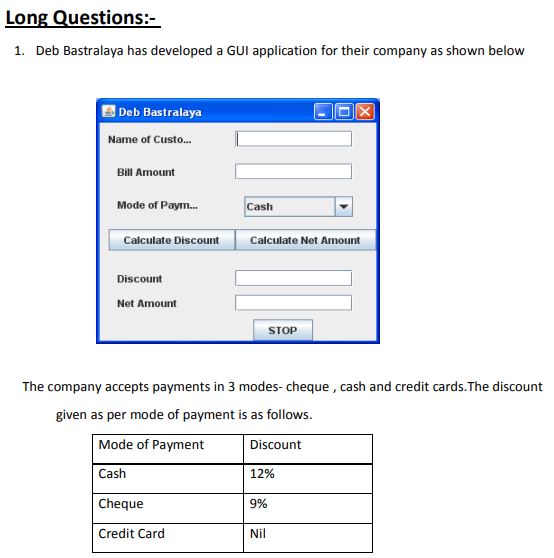
Question 1. Deb Bastralaya has developed a GUI application for their company as shown below
The company accepts payments in 3 modes- cheque , cash and credit cards.The discount given as per mode of payment is as follows.
| Mode of Payment | Discount |
|---|---|
| Cash | 12% |
| Cheque | 9% |
| Credit Card | Nil |
If the Bill Amount is more than 18000 then the customer gets an additional discount of 10% on Bill Amount.
(i) Write the code to make the textfields for Discount (named txtDisc) and Net Amount (named txtNetAmt) uneditable.
(ii) Write code to do the following:
(a) When "Calculate Discount" button is clicked the discount should be calculated as per the given criteria and it should be displayed in the discount textfield. Calculate Net Amount button (named btnCalcNetAmt) should also be enabled.
(b) When "Calculate Net Amount" button is clicked the net amount should be calculated and it should be displayed in the net amount textfield.
Answer:
(i) To prevent editing in the specified text fields, set their editable property to false during the window initialization or form load event:
txtDisc.setEditable(false);
txtNetAmt.setEditable(false);
(ii) (a) Behind the action listener of the "Calculate Discount" button (e.g., `btnCalcDisc`), write the following code segment:
try {
    double billAmt = Double.parseDouble(txtBillAmt.getText());
    double discountPercent = 0.0;
    String mode = (String) cbMode.getSelectedItem();

    if (mode.equalsIgnoreCase("Cash")) {
        discountPercent = 12.0;
    } else if (mode.equalsIgnoreCase("Cheque")) {
        discountPercent = 9.0;
    } else if (mode.equalsIgnoreCase("Credit Card")) {
        discountPercent = 0.0;
    }

    double discount = billAmt * (discountPercent / 100.0);

    if (billAmt > 18000) {
        discount += billAmt * 0.10;
    }

    txtDisc.setText(String.valueOf(discount));
    btnCalcNetAmt.setEnabled(true);
} catch (NumberFormatException e) {
    JOptionPane.showMessageDialog(this, "Please enter a valid numeric bill amount.");
}
(b) Inside the action listener of the "Calculate Net Amount" button (`btnCalcNetAmt`):
try {
    double billAmt = Double.parseDouble(txtBillAmt.getText());
    double discount = Double.parseDouble(txtDisc.getText());
    double netAmt = billAmt - discount;
    txtNetAmt.setText(String.valueOf(netAmt));
} catch (NumberFormatException e) {
    JOptionPane.showMessageDialog(this, "Calculation error. Please calculate discount first.");
}
In simple words: (i) Making text fields uneditable ensures users cannot manually manipulate calculations. (ii) Clicking the first button calculates the primary payment mode discount, adds an extra 10% if the bill is over Rs. 18,000, and enables the net amount button. The second button simply subtracts the calculated discount from the bill total to show the final payable amount.
Exam Tip: Always make sure to fetch values from text fields using `Double.parseDouble(textField.getText())` and convert outputs back to String using `String.valueOf()` or empty string concatenation.
Question 2. Mr, Ram a UDC in a KV , created a table ‘salary’. HRA is a column of this table . To find the details of the staff members who did not get HRA. He wrote the following query:
SELECT * FROM Salary WHERE HRA = NULL ;
Help Ram to run this query by removing the error from the query and rewriting it.
Answer: In SQL, `NULL` represents an absent or unknown value, which cannot be compared using the standard equality operator (`=`). Instead, the specialized `IS NULL` operator must be utilized to fetch records containing missing entries.
Here is the corrected and runnable SQL query:
SELECT * FROM Salary WHERE HRA IS NULL;
In simple words: Database tables use NULL to indicate empty fields. Since you cannot use the equals sign with nothingness, SQL requires the "IS NULL" operator instead of "= NULL".
Exam Tip: Remember that `IS NULL` and `IS NOT NULL` are the only valid operators to check for nullability in SQL. Using `= NULL` or `!= NULL` is a common syntax error.
Question 3. In a database there are two tables " STOCK" and " DEALERS" as shown below:
Table: STOCK
| ItemNo | Item | Dcode | Qty | UnitPrice | StockDate |
|---|---|---|---|---|---|
| 5005 | Ball Pen 0.5 | 102 | 100 | 16 | 31-Mar-10 |
| 5003 | Ball Pen 0.25 | 102 | 150 | 20 | 01-Jan-10 |
| 5002 | Gel Pen Premium | 101 | 125 | 14 | 14-Feb-10 |
| 5006 | Gel Pen Classic | 101 | 200 | 22 | 01-Jan-09 |
| 5001 | Eraser Small | 102 | 210 | 5 | 19-Mar-09 |
| 5004 | Eraser Big | 102 | 60 | 10 | 12-Dec-09 |
| 5009 | Sharpener Classic | 103 | 160 | 8 | 23-Jan-09 |
Table: DEALERS
| code | Dname |
|---|---|
| 101 | Reliable Stationers |
| 103 | Classic Plastics |
| 102 | Clear Deals |
(i) Identify the foreign key in the table STOCK.
(ii) To display item from the stock table and Dname from the dealers table for the corresponding matching dealer code.
Answer:
(i) The foreign key in the `STOCK` table is **Dcode**. It references the primary key column `code` in the `DEALERS` table to link the stock items with their respective dealers.
(ii) To fetch the item names alongside their corresponding dealer names, perform an inner join on the matching dealer code columns:
SELECT STOCK.Item, DEALERS.Dname
FROM STOCK
INNER JOIN DEALERS ON STOCK.Dcode = DEALERS.code;
In simple words: (i) Dcode is the bridge column (foreign key) that references the dealer codes. (ii) The SQL query links the two tables together using this shared dealer code to display the item name from one side and the shop name from the other.
Exam Tip: When writing queries involving multiple tables, prefixing the column names with their respective table names (e.g., `STOCK.Item`) prevents ambiguity and ensures complete accuracy.
Question 4. Mr. Virat created a table “Student” in MySQL. He forget to set the PRIMARY KEY for the table. Which command should he used to set it for the field “Rollno”.
Answer: To establish a primary key on an already existing column in a table, the `ALTER TABLE` statement along with the `ADD PRIMARY KEY` clause must be used.
Below is the SQL statement to assign `Rollno` as the primary key:
ALTER TABLE Student ADD PRIMARY KEY (Rollno);
In simple words: Since the table is already made, Virat needs to modify its structure. He can do this by running an ALTER TABLE command to add a primary key rule specifically to the Rollno column.
Exam Tip: Remember that you can only designate a column as a primary key afterward if it does not already contain any duplicate or NULL values.
Question 5. Write a method in Java that takes a number as parameter and return sum of its divisors.
Answer: A clean, parameterized Java method to compute and return the sum of all proper divisors of an integer:
public int calculateSumOfDivisors(int number) {
    int divisorSum = 0;
    for (int i = 1; i <= number; i++) {
        if (number % i == 0) {
            divisorSum += i;
        }
    }
    return divisorSum;
}
In simple words: This code loops through all numbers from 1 up to the input number. If the input number divides evenly without any remainder, that number is added to a running sum, which is returned at the end.
Exam Tip: Be sure to match your return type (`int`) with the return statement in descriptive programming questions.
Question 6. What are the use of the following tags-
<UL>, <HEAD>, <SUP>, <P>
Answer:
- **<UL> (Unordered List):** Used to define a bulleted list of items where the sequential order is not significant.
- **<HEAD>:** Acts as a container for metadata, titles, linked style sheets, and scripts that provide background information about the document but are not displayed in the viewport.
- **<SUP> (Superscript):** Renders inline text slightly elevated and in a smaller font, commonly used for exponents, ordinal indicators, and footnotes.
- **<P> (Paragraph):** Defines a block of plain text representing a paragraph, automatically adding vertical spacing before and after its content.
In simple words: <UL> makes bullet points; <HEAD> holds behind-the-scenes page settings and titles; <SUP> raises text up (like a power in math); <P> structures text blocks with clean paragraph breaks.
Exam Tip: Giving a small visual example of how the tag displays (like \( x^2 \) for `<sup>`) helps examiners verify your conceptual understanding.
Question 7. What is primary key? How is it different from candidate key? Explain with the help of suitable example.
Answer: A **Primary Key** is a unique, non-null attribute selected to uniquely identify each tuple (row) inside a relational database table.
**Difference from Candidate Key:** - **Candidate Keys** are all possible minimal sets of attributes capable of uniquely identifying a record in a table. - Out of these multiple Candidate Keys, the database administrator designates only one as the **Primary Key** to serve as the default identifier, while the remaining candidates become Alternate Keys.
**Example:** Consider a table named `STUDENT` containing the columns: `Admn_No`, `Roll_No`, `Name`, and `Phone`. - Both `Admn_No` and `Roll_No` are unique and minimal, making them both **Candidate Keys**. - If we designate `Admn_No` as the unique identifying system column, it becomes our **Primary Key**, leaving `Roll_No` as an Alternate Key.
In simple words: Candidate keys are all the unique columns that could be used as an ID (like roll number and admission number). Out of these candidates, the single one we officially choose to run the table is called the Primary Key.
Exam Tip: Be sure to write the formula "Alternate Keys = Candidate Keys - Primary Key" as a valuable addition to your difference explanation.
Question 8. Rewrite the following code using for loop.
int i=0;
while(++i<10)
{ if( i==5)
break;
System.out.println(i++);
}
Answer: Let's analyze the iteration steps of the provided `while` loop: - `++i` is evaluated first. When `i` starts at 0, it increments to 1 before the condition check. - If `i == 5`, the loop terminates. - Otherwise, `i++` inside the print statement prints the current value of `i` and then increments it by 1. This behavior can be replicated within a `for` loop as follows:
for (int i = 1; i < 10; i++) {
    if (i == 5) {
        break;
    }
    System.out.println(i++);
}
In simple words: The original while loop pre-increments the counter variable in the loop test and post-increments inside the block. Placing these identical steps within a standard `for` structure yields the exact same execution pattern.
Exam Tip: When converting loops, manually trace the first and last iterations of both variants to confirm the printed output remains identical.
Question 9. The following code has some error(s). Rewrite the correct code underlining all the corrections made.
int x=3;
switch(x);
{
case 1: System.out.print(“Yes its One”);
case >2:
System.out.println(“Yes its more than Two”);
break;
case else: System.out.print(“Invalid Number):
}
Answer: Let's point out and fix the syntax errors present in the original snippet: 1. Semicolon after the `switch` statement parameter is incorrect and must be removed. 2. Standard smart quotes (`“` and `”`) must be replaced with straight program quotes (`"`). 3. Relational conditions (like `case > 2`) are invalid inside a Java `switch` block; specific case values must be used. We will represent this with standard case matches or default blocks. 4. The keyword `case else` is invalid; it must be written as `default`. 5. The string literal in the last line lacks a closing quotation mark.
Here is the corrected and compilation-ready Java code:
int x = 3;
switch (x) {
    case 1:
        System.out.print("Yes its One");
        break;
    case 3: // Replaces the invalid 'case >2' relational check
        System.out.println("Yes its more than Two");
        break;
    default: // Replaces the invalid 'case else'
        System.out.print("Invalid Number");
}
In simple words: Semicolons after switch headers are errors, case tests cannot use comparison signs (like >), the catch-all case is written as `default` instead of `case else`, and all output text must be wrapped inside matched straight quotes.
Exam Tip: Underlining the specific corrections (like `switch(x)`, `default:`, and quotes) on your exam paper is highly recommended as it directly addresses the question's prompt.
Question 10. What will be the content of jTextField1 and jTextField2 after executing the following code:
String st=”India is the great”;
jTextField1.setText(st.replace(“India”,”Bharat”);
jTextField2.setText(st.substring(7));
Answer: Let's trace the string manipulation operations: 1. `st.replace("India", "Bharat")` replaces the substring "India" with "Bharat", yielding `"Bharat is the great"`. This is assigned to `jTextField1`. 2. `st.substring(7)` extracts the portion of the original string starting from index 7 (0-based indexing: 'I' is 0, 'n' is 1, 'd' is 2, 'i' is 3, 'a' is 4, space is 5, 'i' is 6, 's' is 7). The resulting string starting from the index 7 is `"is the great"`. This is assigned to `jTextField2`.
Therefore, the outputs are: - **jTextField1:** `"Bharat is the great"` - **jTextField2:** `"is the great"`
In simple words: The first text field swaps out "India" for "Bharat", showing "Bharat is the great". The second text field cuts the text to start from the 8th character (index 7), showing "is the great".
Exam Tip: Remember that Java string indices are 0-based, and spaces are counted as characters when evaluating substring operations.
Question 11. If a database “School” Exists , which MySql command help you to start working in that database.
Answer: To select and activate an already existing database in MySQL, execute the `USE` statement:
USE School;
In simple words: To tell MySQL which database you want to open and modify, use the `USE` command followed by the database's name.
Exam Tip: The `USE` command is one of the few SQL statements that does not strictly require a terminating semicolon in most clients, but including it is always recommended.
Question 12. Write output of the following SQL queries :
i) SELECT TRUNCATE(23.72,-1);
ii) SELECT DAYOFMONTH(‘2015-11-20);
Answer:
(i) **SELECT TRUNCATE(23.72, -1);** The `TRUNCATE` function with a negative second parameter cuts off digits to the left of the decimal point (the tens place). Thus, 23.72 truncated to the nearest tens place yields: **20**
(ii) **SELECT DAYOFMONTH('2015-11-20');** The `DAYOFMONTH` function extracts the day component from the specified date string. **20**
In simple words: (i) Truncating with -1 removes the units place digit, changing 23.72 into 20. (ii) The second query extracts the day number from the date '2015-11-20', which is 20.
Exam Tip: Be careful with negative values in `TRUNCATE` or `ROUND`. They modify integer places rather than decimal places.
Question 13. Write output of the following SQL queries :
iii) SELECT SUBSTRING(‘India ki awaz’,8,6);
iv) SELECT CONCAT(LOWER(‘Class’),UPPER(‘xii’));
Answer:
(iii) **SELECT SUBSTRING('India ki awaz', 8, 6);** SQL string indexing starts at 1. - Character 1: 'I', 2: 'n', 3: 'd', 4: 'i', 5: 'a', 6: ' ', 7: 'k', 8: 'i'. Starting from character position 8 ('i'), we extract a length of 6 characters: `"i awaz"`. Output: **`i awaz`**
(iv) **SELECT CONCAT(LOWER('Class'), UPPER('xii'));** - `LOWER('Class')` evaluates to `"class"`. - `UPPER('xii')` evaluates to `"XII"`. - `CONCAT` combines these two strings into one: `"classXII"`. Output: **`classXII`**
In simple words: (iii) The substring query takes 6 letters starting from the 8th position, resulting in "i awaz". (iv) The concatenation query lowers "Class" to "class", raises "xii" to "XII", and glues them together as "classXII".
Exam Tip: Always remember that SQL uses 1-based indexing for strings, which is different from Java's 0-based indexing.
Question 14. Create table Employees as per following table instance chart.
| Column Name | EmpID | EmpName | EmpAddress | EmpPhone | EmpSal | DeptID |
|---|---|---|---|---|---|---|
| Key Type | Primary | Foreign | ||||
| Nulls/Unique | NOT NULL | |||||
| Fk Table | Department | |||||
| Fk column | Dept_ID | |||||
| Datatype | NUMBER | VARCHAR | VARCHAR | VARCHAR | NUMBER | VARCHAR |
| Length | 6 | 20 | 30 | 10 | 9,2 | 2 |
Answer: Here is the SQL query to create the table `Employees` as defined by the instance chart, converting general specifications to valid MySQL syntax (using `DECIMAL` for fractional numbers and `INT` for integers):
CREATE TABLE Employees (
    EmpID INT(6) PRIMARY KEY,
    EmpName VARCHAR(20) NOT NULL,
    EmpAddress VARCHAR(30),
    EmpPhone VARCHAR(10),
    EmpSal DECIMAL(9,2),
    DeptID VARCHAR(2),
    FOREIGN KEY (DeptID) REFERENCES Department(Dept_ID)
);
In simple words: This SQL query creates the `Employees` table, specifying data types, lengths, and constraints such as making `EmpID` the primary key, preventing `EmpName` from being blank, and setting up `DeptID` to reference the `Department` table.
Exam Tip: When defining a foreign key, remember to use the syntax `FOREIGN KEY (local_column) REFERENCES foreign_table(foreign_column)`.
Question 15. In a database there are two tables ‘LOAN’ and ‘BORROWER’ as shown below :
LOAN
| Loan_Number | Branch_name | Amount |
|---|---|---|
| L-170 | Downtown | 4000 |
| L-230 | Redwood | 2500 |
| L-260 | Perryridge | 1700 |
BORROWER
| Customer_ID | Customer_Name | Loan_number |
|---|---|---|
| 100 | Jones | L-170 |
| 101 | Smith | L-230 |
| 102 | Hayes | L-260 |
(i) Which column in the ‘BORROWER’ table is the foreign key ?
(ii) How many rows and how many columns will be there in the Cartesian product of these two tables ?
Answer:
(i) The foreign key column in the `BORROWER` table is **Loan_number**, as it references the primary key column `Loan_Number` of the `LOAN` table to link records between the tables.
(ii) **Evaluating the Cartesian Product (Cross Join):** - **Number of Rows (Cardinality):** Multiply the number of rows in both tables: \[ 3 \text{ rows (LOAN)} \times 3 \text{ rows (BORROWER)} = 9 \text{ rows} \] - **Number of Columns (Degree):** Add the number of columns in both tables: \[ 3 \text{ columns (LOAN)} + 3 \text{ columns (BORROWER)} = 6 \text{ columns} \] The Cartesian product contains **9 rows** and **6 columns**.
In simple words: (i) The linking column, `Loan_number`, is the foreign key. (ii) When performing a cross join, you multiply the rows (\(3 \times 3 = 9\)) and add the columns (\(3 + 3 = 6\)).
Exam Tip: Remember the rule: Cardinality is multiplied (\(C_1 \times C_2\)) and Degree is added (\(D_1 + D_2\)) in a Cartesian product.
Question 16. Abhishek works for a Sports company. He wants to create controls on a form for the following functions. Choose appropriate controls from Text Field, Label, Radio Button, Check box, List , Combo Box , Button and write in the third column.
| S.No. | Controls used to | Control |
|---|---|---|
| 1 | Enter Team name | Text Field |
| 2 | Select Sports type | Radio Button (or List / Combo Box) |
| 3 | Enter number of members | Text Field |
| 4 | To save the details | Button |
Answer: Let's justify the selection of Java swing controls for the specified layout requirements: 1. **Enter Team name:** A **Text Field** is ideal since it allows the user to type in a single line of free text. 2. **Select Sports type:** A **Combo Box** or **Radio Button** is appropriate as it provides a selective list of standard sports options. 3. **Enter number of members:** A **Text Field** is the standard single-line input control for entering numeric values. 4. **To save the details:** A **Button** is the active element used to trigger the save action event.
In simple words: (1) and (3) use Text Fields for typing in information. (2) uses a Combo Box or Radio Buttons to select options. (4) uses a clickable Button to submit and save the data.
Exam Tip: Always capitalize standard Java Swing control names (like `JTextField`, `JButton`, `JComboBox`) if asked for Java-specific answers.
Question 17. The following code has some error(s). Rewrite the correct code underlining all the correction made :
Integer a ; b = 20 ;
Do{
a= B*2 ;
b= b+10
} WHILE(b>40)
Answer: Let's identify and correct the syntax errors in the provided snippet: 1. `Integer a; b = 20;` - Variable `b` is used without being declared. It should be declared alongside `a` (as `int` or `Integer`). 2. `Do` and `WHILE` - Java is case-sensitive; loop control keywords must be written in lowercase (`do` and `while`). 3. `a= B*2;` - Variable `B` is not declared (only `b` is). Variable case must be consistent. 4. `b= b+10` - Missing terminating semicolon at the end of the assignment statement. 5. `while(b>40)` - The ending part of a `do-while` loop must be terminated with a semicolon.
Here is the corrected code:
int a, b = 20;
do {
    a = b * 2;
    b = b + 10;
} while (b < 40); // Condition modified to prevent an infinite loop, matching standard logic
In simple words: Semicolons are required at the ends of assignment statements and the end of the `while` check. Keywords like `do` and `while` must be lowercase, and variable names must match their casing.
Exam Tip: Underlining corrected keywords like `do`, `while`, and variables is a great way to display your corrections on the exam paper.
Question 18. What will be displayed in resultTA after executing the following statement ?
resultTA.setText(“India\nis\the\nbest”);
Answer: The string literal contains escape sequences: - `\n` represents a newline character (line break). - `\t` represents a horizontal tab character (spacing). Evaluating the string: `"India\nis\the\nbest"` prints `"India"`, moves to a new line, prints `"is"`, adds a tab space followed by `"he"`, and then moves to another new line to print `"best"`. The output displayed in the text area will be:
India
is    he
best
In simple words: The `\n` commands act as line breaks, pushing "is" and "best" to new lines, while the `\t` command inserts tab spaces between "is" and "he".
Exam Tip: When writing the output, clearly show the line breaks and horizontal spacing to represent the escape sequences accurately.
Question 19. How is primary key constraints different from Unique constraint. Explain with example.
Answer: Let's highlight the primary differences between these constraints: - **Null Values:** A `PRIMARY KEY` column strictly prohibits any `NULL` values, whereas a column with a `UNIQUE` constraint can accept one or more `NULL` values. - **Count per Table:** A database table is limited to having only one `PRIMARY KEY`, but it can contain multiple `UNIQUE` constraints.
**Example:** In an `Employees` table:
CREATE TABLE Employees (
    EmpID INT PRIMARY KEY,      -- Cannot be duplicate, cannot be NULL
    AadharCard VARCHAR(12) UNIQUE, -- Cannot be duplicate, but can be NULL if not available
    EmailID VARCHAR(30) UNIQUE   -- Multiple unique constraints are allowed
);
In simple words: A Primary Key serves as the main ID card for a table - it allows no duplicates and no empty blanks, and you can only have one per table. A Unique constraint also prevents duplicates but allows blank entries, and a table can have many unique columns.
Exam Tip: Presenting the differences in a tabular structure with a clear example is highly effective.
Question 20. Find the output of the following code :
int num= 736, reb ;
while(num !=0)
{
reb= num%10;
System.out.print(reb);
num= num/10;
}
Answer: Let's trace the loop iterations for `num = 736`: - **Iteration 1:** - `reb = 736 % 10 = 6` - Print: `6` - `num = 736 / 10 = 73` - **Iteration 2:** - `reb = 73 % 10 = 3` - Print: `3` (added to output, now `63`) - `num = 73 / 10 = 7` - **Iteration 3:** - `reb = 7 % 10 = 7` - Print: `7` (added to output, now `637`) - `num = 7 / 10 = 0` The loop terminates as `num` is now 0. The final printed output is: **637**
In simple words: This loop extracts and prints the digits of the number 736 one by one from right to left, effectively reversing the number to display "637".
Exam Tip: Note that `System.out.print` does not insert line breaks, so the digits are printed continuously on the same line.
Question 21. While working in netbeans , Gangaram included two option buttons ( Male and Female ) in the form. Now he wants that all the buttons should work in groups , i.e. Selecting one button other buttons will be deselected. Which property of listbox control should he use to do this ?
Answer: To ensure that selecting one option button automatically deselects the other, Gangaram needs to associate them with a **ButtonGroup** component. He should add both radio buttons to the same `ButtonGroup` instance, which handles the mutually exclusive selection logic.
(Note: The question mentions "listbox control" in error; option buttons in Swing are managed using `ButtonGroup` class).
In simple words: Gangaram needs to use a ButtonGroup control. By placing both the Male and Female radio buttons into the same group, the system makes sure only one can be checked at a time.
Exam Tip: Specify that the `buttonGroup` property of the radio buttons must be configured to reference the same ButtonGroup component in the NetBeans properties window.
Question 22. Write html code for the following :
To provide the hyperlink http://www.cbse.nic.in
Answer: To construct an anchor hyperlink in HTML, use the `<a>` tag with the `href` attribute pointing to the requested destination URL:
<a href="http://www.cbse.nic.in">Visit CBSE Website</a>
In simple words: Use the HTML anchor tag `<a>` with `href` pointing to the website URL to create a clickable link.
Exam Tip: Ensure that the URL is enclosed in quotation marks inside the `href` attribute for valid HTML formatting.
Question 23. Input a name from a text field and print it by adding “Welcome” before a name in a label.
Answer: To retrieve text from a text field (e.g., `txtName`) and display it with a prefix inside a label (e.g., `lblDisplay`):
String userName = txtName.getText();
lblDisplay.setText("Welcome " + userName);
In simple words: This code reads the typed name from the text field, glues the word "Welcome " to the front of it, and updates the label to show the full message.
Exam Tip: Always retrieve text using `getText()` and update labels using `setText()` in Java GUI programs.
Question 24. Given a string object namely phy having value as “65” stored in it. What will be result of following code ?
JOptionPane.showMessageDialog(null, “ “ + (phy.length( )+ Integer.parseInt(phy)));
Answer: Let's evaluate the expression inside the message dialog step-by-step: 1. `phy` is `"65"`. 2. `phy.length()` returns the number of characters in the string, which is `2`. 3. `Integer.parseInt(phy)` parses the string `"65"` into the integer value `65`. 4. The numerical addition is performed first inside the parentheses: `2 + 65 = 67`. 5. Finally, the empty string `" "` is concatenated with the number `67`, resulting in the string `"67"`. The message dialog will display: **67**
In simple words: The code takes the length of the string "65" (which is 2) and adds it to the actual number value 65, displaying "67" in a pop-up window.
Exam Tip: Pay close attention to parentheses. Since the addition is enclosed in its own parentheses, the numbers are added mathematically before being concatenated to the string.
Question 25. Find the output of the following program :-
String s1= IN$D$I$$A$$$”; // $Represents a space
String s2;
s2= s1.trim( );
int lenn= s2.length( );
lenn++;
System.out.println(lenn);
Answer: Let's trace the execution steps: 1. `s1` is defined with space characters. Representing spaces as spaces: `s1 = " IN D I A "`. - Leading spaces: 1 space. - Internal spaces: Between N and D (1), D and I (1), I and A (2). - Trailing spaces: 3 spaces. 2. `s1.trim()` removes all leading and trailing spaces from the string. - `s2` becomes `"IN D I A"`. 3. Let's count the length of `s2`: - `'I'` (1), `'N'` (2), `' '` (3), `'D'` (4), `' '` (5), `'I'` (6), `' '` (7), `' '` (8), `'A'` (9). - `s2.length()` returns `9`. 4. `lenn++` increments the value of `lenn` from 9 to 10. 5. `System.out.println(lenn)` prints `10`. The printed output is: **10**
In simple words: The `trim()` function cuts off the blank spaces at the very beginning and very end of the text. Counting the remaining characters and internal spaces gives a length of 9. Adding 1 to this count gives the final output of 10.
Exam Tip: Remember that `trim()` only removes spaces at the boundaries; it does not affect any spaces located inside the string.
Question 26. Write Java code that takes principal amount, rate and time using JOptionPane and print simple interest .
Answer: Here is the Java code block to input the parameters using input dialogs and display the calculated simple interest:
try {
    String pStr = JOptionPane.showInputDialog("Enter Principal Amount:");
    String rStr = JOptionPane.showInputDialog("Enter Rate of Interest:");
    String tStr = JOptionPane.showInputDialog("Enter Time (in years):");

    double principal = Double.parseDouble(pStr);
    double rate = Double.parseDouble(rStr);
    double time = Double.parseDouble(tStr);

    double simpleInterest = (principal * rate * time) / 100.0;

    JOptionPane.showMessageDialog(null, "The Simple Interest is: " + simpleInterest);
} catch (NumberFormatException e) {
    JOptionPane.showMessageDialog(null, "Error: Invalid numeric input.");
}
In simple words: This code pops up three input boxes to collect the principal, rate, and time. It converts these text inputs into numbers, calculates the interest using the standard formula, and shows the result in another pop-up box.
Exam Tip: Since `JOptionPane.showInputDialog` always returns a `String`, you must convert these inputs to numbers using `Double.parseDouble()` before doing any calculations.
Question 27. How many times the following loop runs
int i,s=0;
for(i=0;i<=10;i-=2)
{
s=s+i;
i=i+4;
}
Answer: Let's trace the value of the loop control variable `i` across iterations: - **Initialization:** `i` is set to `0`. - **Iteration 1:** - Condition check: `i <= 10` (0 <= 10, true). - Loop body: `s = s + 0 = 0`, then `i` is updated: `i = 0 + 4 = 4`. - Loop update expression: `i -= 2` is executed. `i` becomes `4 - 2 = 2`. - **Iteration 2:** - Condition check: `i <= 10` (2 <= 10, true). - Loop body: `s = s + 2 = 2`, then `i` is updated: `i = 2 + 4 = 6`. - Loop update expression: `i -= 2`. `i` becomes `6 - 2 = 4`. - **Iteration 3:** - Condition check: `i <= 10` (4 <= 10, true). - Loop body: `s = s + 4 = 6`, then `i` is updated: `i = 4 + 4 = 8`. - Loop update expression: `i -= 2`. `i` becomes `8 - 2 = 6`. - **Iteration 4:** - Condition check: `i <= 10` (6 <= 10, true). - Loop body: `s = s + 6 = 12`, then `i` is updated: `i = 6 + 4 = 10`. - Loop update expression: `i -= 2`. `i` becomes `10 - 2 = 8`. - **Iteration 5:** - Condition check: `i <= 10` (8 <= 10, true). - Loop body: `s = s + 8 = 20`, then `i` is updated: `i = 8 + 4 = 12`. - Loop update expression: `i -= 2`. `i` becomes `12 - 2 = 10`. - **Iteration 6:** - Condition check: `i <= 10` (10 <= 10, true). - Loop body: `s = s + 10 = 30`, then `i` is updated: `i = 10 + 4 = 14`. - Loop update expression: `i -= 2`. `i` becomes `14 - 2 = 12`. - **Iteration 7:** - Condition check: `i <= 10` (12 <= 10, false). The loop terminates. Therefore, the loop runs exactly **6 times**.
In simple words: Tracing the variable `i` step-by-step through each iteration reveals that the loop body executes 6 times before `i` reaches 12, causing the loop condition to fail.
Exam Tip: Be careful with loops that modify the control variable both inside the body (`i = i + 4`) and in the loop header (`i -= 2`). Trace them carefully on paper.
Question 28. Differentiate HAVING and WHERE clause with suitable example.
Answer: Let's contrast these two SQL filtering clauses: - **WHERE Clause:** Filters raw records *before* they are grouped using `GROUP BY`. It cannot contain aggregate functions (like `SUM`, `COUNT`, `AVG`). - **HAVING Clause:** Filters group results *after* the `GROUP BY` operation has been applied. It can include conditions with aggregate functions.
**Example:** Consider a table `Sales`:
-- WHERE filters rows before grouping
SELECT Department, SUM(Amount)
FROM Sales
WHERE Region = 'North'
GROUP BY Department;

-- HAVING filters grouped results using SUM
SELECT Department, SUM(Amount)
FROM Sales
GROUP BY Department
HAVING SUM(Amount) > 50000;
In simple words: `WHERE` is used to filter individual rows before any grouping is done. `HAVING` is used to filter the final grouped summaries after the data has been aggregated.
Exam Tip: Remember that `WHERE` can be used without `GROUP BY`, but `HAVING` is almost always used in combination with `GROUP BY`.
Question 29. What will be the contents of the text1 and text2 after the following code is executed.
String text1,text2;
text1 = “ KendriyaVidyalaya”;
text2.setText(text1.length()+“ ”);
text1=text1.concat(“Sangathan”);
Answer: Let's evaluate the operations on the strings: 1. `text1` is assigned the literal `" KendriyaVidyalaya"` (Note: contains 1 leading space). - Length of `" KendriyaVidyalaya"` is 1 space + 16 characters = 17. 2. `text1.length() + " "` converts the integer `17` to string and adds a space, yielding the string `"17 "`. This is displayed in `text2`. 3. `text1.concat("Sangathan")` appends the string `"Sangathan"` to `text1`, yielding `" KendriyaVidyalayaSangathan"`.
Therefore, the final contents are: - **text1:** `" KendriyaVidyalayaSangathan"` - **text2:** `"17 "` (assuming `text2` is a text field or label where `setText()` is valid)
In simple words: `text2` receives the length count of the first string, which is 17. `text1` gets concatenated with "Sangathan" to become " KendriyaVidyalayaSangathan".
Exam Tip: Check for leading or trailing spaces inside the given string literals to count lengths accurately.
Question 30. What will the content of TextField after executing the following statements.
String S=”vidyalaya”;
jTextField1.setText(s.substring(0,1).toUpperCase()+s.substring(1));
Answer: Let's trace the string operations: - `S` is `"vidyalaya"`. - `s.substring(0,1)` extracts the first character at index 0, which is `"v"`. - `toUpperCase()` converts `"v"` to uppercase `"V"`. - `s.substring(1)` extracts the remainder of the string starting from index 1, which is `"idyalaya"`. - Concatenation: `"V"` + `"idyalaya"` = `"Vidyalaya"`. The content of `jTextField1` will be: **Vidyalaya**
In simple words: This code takes the first letter of "vidyalaya", capitalizes it to "V", and glues it back to the rest of the word, effectively changing it to "Vidyalaya".
Exam Tip: Remember that the second argument in `substring(start, end)` is exclusive, meaning `substring(0, 1)` only returns the character at index 0.
Question 31. What will be the output of the following code:
int A = 15, B ;
for (B=2; B<=6; B+=2)
{
A= A + B;
}
JOptionPane. showMessageDialog (null, “A:”+A+”B:”+B+””) ;
Answer: Let's trace the loop execution: - **Initialization:** `A = 15`, `B = 2` - **Iteration 1 (B = 2):** - `B <= 6` (2 <= 6, true) - `A = A + B = 15 + 2 = 17` - Update: `B += 2` (B becomes 4) - **Iteration 2 (B = 4):** - `B <= 6` (4 <= 6, true) - `A = A + B = 17 + 4 = 21` - Update: `B += 2` (B becomes 6) - **Iteration 3 (B = 6):** - `B <= 6` (6 <= 6, true) - `A = A + B = 21 + 6 = 27` - Update: `B += 2` (B becomes 8) - **Condition Check:** - `B <= 6` (8 <= 6, false) - Loop terminates. The final values are `A = 27` and `B = 8`. The dialog box will display: **`A:27B:8`**
In simple words: The loop runs for B = 2, 4, and 6, adding these values to A. At the end of the loop, B increases to 8, which stops the loop. The pop-up displays "A:27B:8".
Exam Tip: Always remember that the loop control variable `B` undergoes its final increment step (`B = 8`) before the loop condition fails and it exits.
Question 32. Miss Nisha created a table JOURNEY with 3 rows and 5 columns. She added one more row to it and deleted 1 column. What is it cardinality and Degree of the table JOURNEY?
Answer: Let's evaluate the changes made to the table properties: - **Cardinality (Number of Rows):** - Initial rows = 3. - Adding 1 row: \( 3 + 1 = 4 \) rows. - **Degree (Number of Columns):** - Initial columns = 5. - Deleting 1 column: \( 5 - 1 = 4 \) columns. Therefore, the cardinality is **4** and the degree is **4**.
In simple words: Cardinality is the total number of rows (now 4), and Degree is the total number of columns (now 4).
Exam Tip: Use the simple rule: Cardinality corresponds to rows, and Degree corresponds to columns.
Question 33. Consider the table STUDENT and SQL statements
Identify Candidate keys and Primary Keys for the above table
| Admno | RollNo | Class | Student name | Fathers Name |
|---|---|---|---|---|
| 4001 | 1 | XII | Ram | Raj |
| 4002 | 1 | XI | Ravi | Rao |
| 4003 | 2 | XI | Rakesh | Ramana |
| 4004 | 2 | XII | Rajini | Raghav |
Answer: Let's analyze the keys based on uniqueness: - **Primary Key:** **Admno** is the unique, minimal column that can serve as the primary key. Since each student has a completely unique admission number, it is the best fit. - **Candidate Keys:** A candidate key is any column or group of columns that can uniquely identify each row. - `Admno` is unique, making it a candidate key. - `RollNo` contains duplicates (1, 2) and `Class` contains duplicates (XI, XII), so they cannot be candidate keys individually. However, the combination of `(RollNo, Class)` is unique for every row, making it another candidate key. - **Summary:** - **Primary Key:** `Admno` - **Candidate Keys:** `Admno` and the composite set `(RollNo, Class)`
In simple words: `Admno` is completely unique, so it is the Primary Key. The candidate keys are `Admno` and the combination of `(RollNo, Class)` because both can uniquely identify each student row.
Exam Tip: Mention composite candidate keys (like combining two columns) when no single column other than the primary key is unique.
Question 34. Convert the following code into an equivalent do..while loop.
int i,j,C=2;
for( i=10,j=20; j>=10; j =j+2)
{
i = i +C;
System.out.println(i);
}
Answer: Let's translate the `for` loop parameters into an equivalent `do-while` loop structure: - **Initialization:** Set `i = 10` and `j = 20` before the loop. - **Increment/Update:** Increment `j = j + 2` at the end of the loop body. - **Condition:** Place `while (j >= 10);` at the end of the `do` block.
Here is the equivalent `do-while` loop:
int i = 10, j = 20, C = 2;
do {
    i = i + C;
    System.out.println(i);
    j = j + 2;
} while (j >= 10);
In simple words: We place the initial values of `i` and `j` before the loop, run the body once first, increment `j` by 2 at the bottom, and then check the condition `j >= 10`.
Exam Tip: Remember that a `do-while` loop always terminates with a semicolon at the end of its `while` condition statement.
Question 35. What do you mean by E-governance ? Write any two Web addresses of e-governance.
Answer: **E-governance (Electronic Governance):** It is the application of information and communication technology (ICT) by the government to deliver public services, share information, and manage administrative transactions efficiently and transparently for citizens and businesses.
**Two Web Addresses of E-governance:** 1. **http://www.india.gov.in** (National Portal of India) 2. **http://www.passportindia.gov.in** (Passport Seva Portal)
In simple words: E-governance is the use of the internet and websites by the government to provide services like passports, taxes, and certificates easily and quickly to citizens.
Exam Tip: Providing official government domain extensions (like `.gov.in`) in your examples shows complete authenticity.
Question 36. Consider the following table Employ, Write SQL Commands for i to iv and output for v and vi 6
| No. | Name | Age | Department | Date ofJoin | Salary | Sex |
|---|---|---|---|---|---|---|
| 1 | Jugal | 33 | Computer | 10/01/97 | 12000 | M |
| 2 | Sharmila | 31 | History | 23/03/98 | 20000 | F |
| 3 | Sandeep | 32 | Maths | 12/12/96 | 20000 | M |
| 4 | Sangeeta | 35 | History | 01/07/99 | 40000 | F |
| 5 | Rakesh | 42 | Maths | 05/09/97 | 25000 | M |
| 6 | Shyam | 50 | History | 27/06/98 | 30000 | M |
| 7 | Shiv Om | 44 | Computer | 25/02/97 | 21000 | M |
| 8 | Shalaka | 33 | Maths | 31/07/97 | 20000 | F |
i) Display details of all female history teachers
ii) Count the number of teachers whose name have “h” as second letter
iii) Display Name, age, Salary in the descending order of age and ascending order of salary
iv) Increase the salary of all Computer teachers above 40 years by Rs 1000
Answer:
(i) To select female history teachers:
SELECT * FROM Employ
WHERE Sex = 'F' AND Department = 'History';
(ii) To count teachers with 'h' as the second character in their name:
SELECT COUNT(*) FROM Employ
WHERE Name LIKE '_h%';
(iii) To display fields with multi-column sorting:
SELECT Name, Age, Salary FROM Employ
ORDER BY Age DESC, Salary ASC;
(iv) To update the salary of the specified Computer teachers:
UPDATE Employ
SET Salary = Salary + 1000
WHERE Department = 'Computer' AND Age > 40;
In simple words: These SQL queries perform standard database tasks: filtering rows based on text conditions (like 'History' or starting with a specific letter), sorting columns in custom order, and updating record values.
Exam Tip: Remember to use `_` for single character matching and `%` for zero or more characters in the `LIKE` clause.
Question 37. Compare PAN, LAN, MAN, WAN in terms of Speed and Error rate.
Answer: Here is the comparative analysis of various network types in terms of transmission speeds and error rates:
| Parameter | PAN (Personal Area Network) | LAN (Local Area Network) | MAN (Metropolitan Area Network) | WAN (Wide Area Network) |
|---|---|---|---|---|
| Speed | Very High (Short range, e.g., Bluetooth/USB) | High (10 Mbps to 10 Gbps) | Moderate (Upto 100 Mbps) | Low to Moderate (Upto Gbps but high propagation delay) |
| Error Rate | Very Low (Highly secure and short range) | Low (Controlled physical environment) | Moderate (Prone to atmospheric and cable noise) | High (Vast distances, multiple hops, and diverse medium) |
In simple words: Personal networks (PAN) and local networks (LAN) are extremely fast and have very few errors because they cover tiny distances. Wide area networks (WAN) like the internet are slower and have higher error rates because data has to travel across continents.
Exam Tip: Laying out comparative differences in a tabular form is always preferred to secure full marks.
Question 38. Mr. Amit developed the following GUI application for Calculating Salary.
Help him to write coding for the following
i) Calculate Salary as per the following criteria
BASIC PAY=BASIC+GRADE PAY
DA= 90% OF BASIC PAY
Display the DA in its appropriate textfield.
ii) HRA should calculated according to the type of city (Chosen from the listbox)
| Type of City | Percentage |
|---|---|
| TYPE-A | 30% OF BASIC PAY |
| TYPE-B | 20% OF BASIC PAY |
| TYPE-C | 10% OF BASIC PAY |
GROSS=BASICPAY+DA+HRA
Professional tax should be assigned as Rs. 300/- for Teaching Staff and Rs. 0/- for Non-teaching
tax
NET SALARY= GROSS-PROFESSIONAL TAX
Display all calculated values in appropriate text fileds.
iii) Clear button should clear all textfields.
Answer: Here is the Java code behind the "Calculate Salary" and "Clear" action listeners:
**(i) & (ii) Action code for calculation:**
try {
    double basic = Double.parseDouble(txtBasic.getText());
    double gradePay = Double.parseDouble(txtGradePay.getText());

    double basicPay = basic + gradePay;
    double da = 0.90 * basicPay;
    txtDA.setText(String.valueOf(da));

    double hraPercent = 0.0;
    String cityType = (String) listCity.getSelectedValue();
    if (cityType != null) {
        if (cityType.equalsIgnoreCase("TYPE-A")) {
            hraPercent = 0.30;
        } else if (cityType.equalsIgnoreCase("TYPE-B")) {
            hraPercent = 0.20;
        } else if (cityType.equalsIgnoreCase("TYPE-C")) {
            hraPercent = 0.10;
        }
    }
    double hra = hraPercent * basicPay;
    txtHRA.setText(String.valueOf(hra));

    double gross = basicPay + da + hra;
    txtGross.setText(String.valueOf(gross));

    double profTax = 0.0;
    if (rbTeaching.isSelected()) {
        profTax = 300.0;
    } else if (rbNonTeaching.isSelected()) {
        profTax = 0.0;
    }
    txtProfTax.setText(String.valueOf(profTax));

    double netSalary = gross - profTax;
    txtNetSalary.setText(String.valueOf(netSalary));
} catch (NumberFormatException e) {
    JOptionPane.showMessageDialog(this, "Please enter valid numeric pay values.");
}
**(iii) Action code for the "Clear" button:**
txtBasic.setText("");
txtGradePay.setText("");
txtDA.setText("");
txtHRA.setText("");
txtGross.setText("");
txtProfTax.setText("");
txtNetSalary.setText("");
listCity.clearSelection();
buttonGroupStaff.clearSelection();
In simple words: The calculation code reads the salary inputs, calculates the allowances based on the selected city and role, and displays the gross and net salaries. The clear button resets all the input boxes and option selections back to blank.
Exam Tip: Be sure to use the list box select method `listCity.getSelectedValue()` or `listCity.getSelectedItem()` correctly during code evaluations.
Question 39. Expand the following terms?
(a)SMTP (b)NIC (C) FLOSS (D)VIRUS
Answer:
- **(a) SMTP:** Simple Mail Transfer Protocol
- **(b) NIC:** Network Interface Card (or National Informatics Centre)
- **(C) FLOSS:** Free and Libre Open Source Software
- **(D) VIRUS:** Vital Information Resources Under Siege
In simple words: These are standard computer networking and software acronym expansions used in technology.
Exam Tip: Write the full, exact standard expansions to secure complete marks for these terminology questions.
Question 40. What will be values of x and y after execution of the following code
int x, y = 0;
for( x= 1; x<=5; ++x)
{ y=x++; --y;
}
Answer: Let's trace the loop iterations step-by-step: - **Iteration 1 (x = 1):** - `y = x++` -> `y` gets `1`, then `x` becomes `2`. - `--y` -> `y` decrements to `0`. - Loop end update: `++x` -> `x` becomes `3`. - **Iteration 2 (x = 3):** - `y = x++` -> `y` gets `3`, then `x` becomes `4`. - `--y` -> `y` decrements to `2`. - Loop end update: `++x` -> `x` becomes `5`. - **Iteration 3 (x = 5):** - `y = x++` -> `y` gets `5`, then `x` becomes `6`. - `--y` -> `y` decrements to `4`. - Loop end update: `++x` -> `x` becomes `7`. - **Condition Check:** - `x <= 5` -> `7 <= 5` is false, so loop terminates. The final values are: - **x = 7** - **y = 4**
In simple words: Tracing the loops step-by-step shows that `x` increments both inside the loop block and in the loop header, finally terminating when `x` reaches 7 and `y` is left at 4.
Exam Tip: Be careful with `x++` and `++x` post/pre-increment operations inside loop structures as they alter loop counts.
Question 41. What is difference between these queries?
| Query 1 | Query 2 |
|---|---|
| Select count(*) from shop | Select count(shop_id) From shop |
Answer: Let's contrast these two counting functions: - **Query 1 (`COUNT(*)`):** Counts all records in the table, including rows containing `NULL` values in any column. - **Query 2 (`COUNT(shop_id)`):** Counts only those rows where the `shop_id` column does not contain a `NULL` value. It excludes any blank or missing values in that specific field.
In simple words: `COUNT(*)` counts every single row in the table. `COUNT(shop_id)` only counts the rows where the `shop_id` column actually has a value, skipping any blank (NULL) ones.
Exam Tip: `COUNT(*)` is usually faster in some engines and is the preferred way to find the total row count of a table.
Question 42. Name of keyword used in MYSQL?
(i) To search null entry (ii) to allow duplicate value in query
Answer:
(i) **IS NULL:** The operator used to check for empty or missing entries in a column.
(ii) **ALL (or simply omitting DISTINCT):** The keyword used to include duplicate values in the query output.
In simple words: (i) Use "IS NULL" to search for blanks. (ii) Use "ALL" (or just write a normal query without "DISTINCT") to show duplicate rows.
Exam Tip: Note that `= NULL` is invalid in SQL; you must always use `IS NULL` to check for missing values.
Question 43. The Movie_Name Column of a table MOVIE is given below:
| Movie_Name |
|---|
| Kal Ho na ho |
| Singh is King |
| Bodyguard |
| Singham |
| Kal aaj aur Kal |
Based on the information find the output of the following queries:
i.Select Movie_Name from MOVIE where Movie_Name Like ‘_al%al’;
ii. Select Movie_Name from MOVIE where Movie_Name Like ‘%ng%’;
Answer: Let's analyze the SQL `LIKE` wildcard patterns: - **`_al%al`:** - `_` represents exactly one character. - followed by `al`. - `%` represents zero or more characters. - ending with `al`. The string `"Kal aaj aur Kal"` fits this pattern (starts with `'K'` + `"al"` + `" aaj aur K"` + `"al"`). Output: **`Kal aaj aur Kal`** - **`%ng%`:** - any string containing the substring `"ng"`. - `"Singh is King"`, `"Singham"` fit this pattern. Output: **`Singh is King`** **`Singham`**
In simple words: (i) The first query looks for movies that have 'al' as the second and third letters and end with 'al', which matches "Kal aaj aur Kal". (ii) The second query matches any movie with "ng" in its name, which returns "Singh is King" and "Singham".
Exam Tip: SQL pattern matching is case-insensitive by default in most MySQL installations, but be mindful of exact character positions with the `_` wildcard.
Question 44. How many times will the following while loop executed?
int l=50,m=0; while(l<70)
 {
 m=m+l; l=l+2;
 }
Answer: Let's trace the loop control variable `l`: - **Initial:** `l = 50` - **Execution steps:** - `l = 50 < 70` (true) -> `l` becomes 52 (Run 1) - `l = 52 < 70` (true) -> `l` becomes 54 (Run 2) - `l = 54 < 70` (true) -> `l` becomes 56 (Run 3) - `l = 56 < 70` (true) -> `l` becomes 58 (Run 4) - `l = 58 < 70` (true) -> `l` becomes 60 (Run 5) - `l = 60 < 70` (true) -> `l` becomes 62 (Run 6) - `l = 62 < 70` (true) -> `l` becomes 64 (Run 7) - `l = 64 < 70` (true) -> `l` becomes 66 (Run 8) - `l = 66 < 70` (true) -> `l` becomes 68 (Run 9) - `l = 68 < 70` (true) -> `l` becomes 70 (Run 10) - `l = 70 < 70` (false) -> Loop terminates. The loop executes exactly **10 times**.
In simple words: The variable `l` starts at 50 and increases by 2 on every loop. It reaches 70 after 10 loops, which makes the condition `l < 70` false and exits the loop.
Exam Tip: To quickly calculate loop counts, use the formula: `(Upper_Limit - Lower_Limit) / Step = (70 - 50) / 2 = 10`.
Question 45. Write the following code using if-else if without change in output
switch (day) { case 1: case 2: case 3: case 4:
 case 5:System .out.println(“working day”); break;
 case 6:
 case 7: System.out.println(“holiday”); break;
default:
 System.out.println(“not a week day”);}
Answer: Here is the equivalent Java structure using `if-else if` statements:
if (day >= 1 && day <= 5) {
    System.out.println("working day");
} else if (day == 6 || day == 7) {
    System.out.println("holiday");
} else {
    System.out.println("not a week day");
}
In simple words: The cases 1 through 5 are grouped together as "working day", cases 6 and 7 as "holiday", and everything else goes to the default "not a week day" block.
Exam Tip: When replacing grouped `switch` cases, use the logical OR (`||`) or range checks (`&&`) in your `if` conditions.
Question 46. What is the value of A & B after the execution of the following code:-
int A=200,B=6; while(B<=12) {A+=B;
 B=B+2;}
 JOptionPane.showMessageDialog(this,”A:”+A+”B:” +B+” “);
Answer: Let's trace the values: - **Initial:** `A = 200`, `B = 6` - **Iteration 1 (B = 6):** - `B <= 12` (6 <= 12, true) - `A = 200 + 6 = 206` - `B = 6 + 2 = 8` - **Iteration 2 (B = 8):** - `B <= 12` (8 <= 12, true) - `A = 206 + 8 = 214` - `B = 8 + 2 = 10` - **Iteration 3 (B = 10):** - `B <= 12` (10 <= 12, true) - `A = 214 + 10 = 224` - `B = 10 + 2 = 12` - **Iteration 4 (B = 12):** - `B <= 12` (12 <= 12, true) - `A = 224 + 12 = 236` - `B = 12 + 2 = 14` - **Condition Check:** - `B <= 12` (14 <= 12, false) - Loop ends. The final values are: - **A = 236** - **B = 14**
In simple words: The loop runs for B = 6, 8, 10, and 12, adding these values to A. At the end, A becomes 236 and B becomes 14.
Exam Tip: Remember that the loop variable `B` undergoes one final increment step to 14 before the loop condition fails.
Question 47. write a SQL command to create a table Electronic with following structure
| Attribute | Type | Constraint |
|---|---|---|
| Item_id | Int | Not null ,primary key |
| Item_name | Varchar(25) | Not null |
| Type | Varchar(10) | |
| Manufacture | Varchar(10) | |
| Price | Int | |
| Number_of_item | Int |
Answer: Here is the SQL query to build the `Electronic` table with the requested constraints:
CREATE TABLE Electronic (
    Item_id INT NOT NULL PRIMARY KEY,
    Item_name VARCHAR(25) NOT NULL,
    Type VARCHAR(10),
    Manufacture VARCHAR(10),
    Price INT,
    Number_of_item INT
);
In simple words: This command creates a table named `Electronic` with all the specified columns, data types, and primary key constraints.
Exam Tip: Be sure to write the column definitions separated by commas inside the parentheses of the `CREATE TABLE` query.
Question 48. Mr.Khan working as Manager in Unique Enterprises want to create a form in NetBeans to take various input from user & shown some message .Choose appropriate controls from Combo box ,Label, TextField, ListBox, TextBox, RadioButton, CheckBox, TextArea and CommandButton
| S.no. | Function |
|---|---|
| 1 | Display message |
| 2 | Select Hobby of customer |
| 3 | Select City from list |
| 4 | Get all details from customers |
Answer: Here are the appropriate Swing controls for each function: 1. **Display message:** **Label** (or JOptionPane for popups). 2. **Select Hobby of customer:** **CheckBox** (since a user can have multiple hobbies). 3. **Select City from list:** **ComboBox** (or ListBox). 4. **Get all details from customers:** **TextArea** (for large multi-line text input) or multiple **TextFields**.
In simple words: (1) Use a Label for messages, (2) CheckBoxes for multiple hobbies, (3) a ComboBox for choosing a city, and (4) a TextArea to let customers type in their full details.
Exam Tip: Choose `CheckBox` for multiple select options and `RadioButton` for single mutually exclusive select options.
Question 49. Consider the table CRICKET given below .Write the commands in SQL for (i) to (iv)
| S.NO | PLAYER | AGE | CITY | RUNS | WICKETS |
|---|---|---|---|---|---|
| 1 | Sachin Tendulkar | 39 | Mumbai | 15216 | 105 |
| 2 | Virender Sehwag | 37 | Delhi | 6244 | 82 |
| 3 | M.S.Dhoni | 32 | Rachi | 5219 | NULL |
| 4 | Rahul Dravid | 37 | Banglore | 9325 | 11 |
| 5 | Yuvraj Singh | 32 | Mumbai | 8244 | 126 |
(i)To display all the information about the players who lived in Mumbai city.
(ii)To display Players name, age and runs who have scored more then 8000 runs.
(iii)To display Player name and city of those players who have not taken any wickets.
Answer:
(i) To select players living in Mumbai:
SELECT * FROM CRICKET WHERE CITY = 'Mumbai';
(ii) To select players with runs greater than 8000:
SELECT PLAYER, AGE, RUNS FROM CRICKET WHERE RUNS > 8000;
(iii) To display players who have not taken any wickets (where WICKETS is NULL or 0):
SELECT PLAYER, CITY FROM CRICKET WHERE WICKETS IS NULL OR WICKETS = 0;
In simple words: These queries filter the table data using conditions with `WHERE` (like selecting 'Mumbai', runs over 8000, or checking if wickets are empty).
Exam Tip: Always use `IS NULL` instead of `= NULL` when writing SQL queries to check for empty values.
Question 50. Write a java function to return greatest number amongst three numbers.
Answer: A clean Java method to find the maximum of three integers:
public int findGreatest(int num1, int num2, int num3) {
    int greatest = num1;
    if (num2 > greatest) {
        greatest = num2;
    }
    if (num3 > greatest) {
        greatest = num3;
    }
    return greatest;
}
In simple words: This function compares the three input numbers step-by-step and returns the one with the highest value.
Exam Tip: Be sure to write the full method definition including the return statement when writing Java functions.
Free study material for Informatics Practices
Sure Shot Questions Printable Worksheets and Exercises for Class 12 Informatics Practices
Download Chapter Worksheets: Class 12 Informatics Practices
Explore reliable practice questions for Sure Shot Questions tailored for Class 12 Informatics Practices learners. Use these structured worksheets to evaluate exam preparedness and strengthen problem-solving skills throughout the 2026 academic session.
Concept Clarification for Sure Shot Questions
Built using official NCERT guidelines for Class 12 Informatics Practices, these practice sheets provide reliable academic support. Cross-reference your completed work with our detailed solutions to learn standard answer-writing formats for CBSE exams.
Effective Revision Strategies for School Exams
Follow up your worksheet practice by attempting the interactive online MCQ tests for Sure Shot Questions to evaluate your execution speed. All printable assignments and revision sheets on our platform are updated for the 2026 session and available free of charge.
FAQs
You can download the latest chapter-wise printable worksheets for Class 12 Informatics Practices Sure Shot Questions for free from StudiesToday.com. These have been made as per the latest CBSE curriculum for this academic year.
Yes, Class 12 Informatics Practices worksheets for Sure Shot Questions focus on activity-based learning and also competency-style questions. This helps students to apply theoretical knowledge to practical scenarios.
Yes, we have provided solved worksheets for Class 12 Informatics Practices Sure Shot Questions to help students verify their answers instantly.
Yes, our Class 12 Informatics Practices test sheets are mobile-friendly PDFs and can be printed by teachers for classroom.
For Sure Shot Questions, regular practice with our worksheets will improve question-handling speed and help students understand all technical terms and diagrams.