

Class 12 Informatics Practices Practice Sheet: CBSE Class 12 Informatics Practices Database Connectivity To MySQL Worksheet
Explore structured practice materials through the CBSE Class 12 Informatics Practices Database Connectivity To MySQL Worksheet. Tailored for Class 12 learners, utilizing these Informatics Practices worksheets ensures thorough preparation and strengthens problem-solving accuracy before final school evaluations.
Download Database Connectivity To MySQL Worksheet PDF with Answers
Navigate directly to the solved Informatics Practices worksheets using the digital viewer below. Each practice set includes detailed step-by-step solutions, allowing students to instantly cross-check their work and identify areas requiring further revision.
CBSE Class 12 Informatics Practices Database Connectivity To Mysql. Students can download these worksheets and practice them. This will help them to get better marks in examinations. Also refer to other worksheets for the same chapter and other subjects too. Use them for better understanding of the subjects.
CHAPTER 8: DATABASE CONNECTIVITY TO MYSQL
MYSQL provides connectivity for client applications developed in the Java programming language
via JDBC driver, which is called “MYSQL Connector/J”.
There are four main classes in the JDBC API for database connectivity:
(i) Driver Manager Class: It locates and logs on to the database and returns a connection object.
(ii) Connection Class: It manages the communication between Java & MySQL.
(iii) Statement Class: It contains SQL string that is submitted to the database. An SQL Select
statement returns a ResultSet object that contains the data retrieved as the result of SQL
statement.
(iv) ResultSet Class: A result set is the logical set of records that are fetched from the database by
executing a query and made available to the application program. It accesses, analyzes and
converts data values returned by the SQL select statement.
Steps for Creating Database Connectivity Application:
(i) Import the package required for database programming:
import java.sql.Connection;
import java.sql.DriverManager; or import java.sql.*
import java.sql.Statement;
import java.sql.ResultSet;
(ii) Register the JDBC driver with Driver Manager:
Class.forName(“java.sql.Driver”); or Class.forName(“com.mysql.jdbc.Driver”);
(iii) Open a connection:
Connection conn = DriverManager.getConnection(“jdbc:mysql://localhost:3306/test”, “root”,
“tiger”);
Test is the name of SQL database, root is user id and tiger is MySQL password.
(iv) Execute a query: Create an object of type Statement using createStatement() method. Then
execute the SQL statement using executeQuery( ) method, in case of SELECT query, or
executeUpdate() method, in case of UPDATE, INSERT or DELETE or Create Table query. It returns an
object of resultSet type.
Statement stmt = conn.createStatement();
String sql= “Select id, name from employee”;
ResultSet rs = stmt.executeQuery(sql);
sql = “delete from employee”;
ResultSet rs = stmt.executeUpdate(sql);
ResultSet Cursor: When a ResultSet object is created, the cursor is placed just before the first row.
To move the cursor to first row use rs.next() or rs.first(). rs.next() forwards the cursor by one row –
since Initially cursor is before the first row, first rs.next() will move the cursor to first row. Any
following rs.next() commands forward the cursor by one row.
(v) Extract data from result set: This step is required if data is fetched from the database i.e., in
case of SELECT query. To retrieve the data ResultSet.get
getLong(), getString(), getFloat(), getDate() etc. All these method takes parameter as Column Name
or Column Index. Column Index is the order of the column.
int id = rs.getInt(“id”); // if more than one column exists in result set with same
Column Name then the first one is returned.
or int id = rs.getInt(1); // If id is first field of table.
String name = rs.getString(“name”);
Retrieving data from result set if it contains multiple rows:
Use rs.next() method. In addition to moving a result-set by one row, it also returns true if cursor is
positioned on a row and false if cursor is positioned after the last row.
int id; String name;
while (rs.next()){ id = rs.getInt(1);
name = rs.getString(2); // display or process here.}
(v) Clean up the environment: Close all database resources using close() method.
rs.close(); stmt.close(); conn.close();
Sample Questions:
1. What is a connection and a result set?
2. What does Driver Manager do?
3. Write a statement to open a connection object namely myconn for a MySQL database namely
school.
4. What are the steps to connect to a database from the Java application?
UNIT- 2: Questions & Answers
Very Short answer types questions
1. Write the expression to print the value of a variable "Sum" of type int in a label.
Ans: jLabel1.setText(“”+Sum);
2. Name any two commonly used method of ListBox.
Ans: getSelectedIndex() and getSelectedValue()
3. Write code to add an element (“IP”) to a list (MyList) at the beginning of the list.
Ans: MyList.add(0,"IP");
4. Write command to display a message dialog to display prompt as “Hi! Everybody”.
Ans: JOptionPane.showMessageDialog(null,"Hi! Everybody");
5. How would you make a combo box editable? Ans: By setting its editable property to true.
6. Name the different list type controls offered by Java Swing.
Ans: (i) jListBox (ii) jComboBox
7. In JDBC coding, what method is used to move to last record of the recordSet with name recSet?
Ans: recSet.last();
8. What is the name of event listener interface for action events?
Ans ActionPerformed
9. Name the inheritance type which is not supported by JAVA.
Ans Multiple inheritance
10. What will be the value of jTextField1 after execution of following code:
jTextField1.setText(“Computer”.subString(3,3));
Ans: put
11. Name the character set supported by Java.
Ans: Unicode.
12. What will be the value of b if initial value if a is 13 (i) b= ++a (ii) b= a++
Ans: (i) 14 (ii) 13
13. Name the 4 essential class libraries that we need to import for setting up the connection with
the database and retrieve data from the database.
Ans: DriverManager, Connection, Statement, ResultSet
14. What is Event? Ans. An Event refers to the occurrence of an activity.
15. What will be displayed in jTextArea after executing the following? jTextArea1.setText(“India \n
is a great \t country”);
Ans: India
is a great country.
16. Name any Swing control which is invisible on the Frame?
Ans: ButtonGroup
17. How one can make a text field un-editable on a frame?
Ans: jTextfield1.setEditable(false);
18. What is Message? Ans. A Message is the information/request sent to the application.
19. Which property of list box is used to add values in the list?
Ans: Model Property
Short Answers Type Questions (2 Marks)
1. What are Access Specifiers? How Access is controlled for members of Super class?
Ans: Access specifier tells a complier about the accessibility of a data member of a class in a java
program.
a) Private: Private members of a class can just be accessed inside the class and are hidden
outside the class.
b) Protected: A class member with protected access specifier can be inherited by a sub class
but is not accessed outside the parent class.
c) Public: A Class member with public access specifier is accessible outside the class.
d) Default: These members are accessible only in the class that are in the same package class
i.e., in their own classes
2. What is a Method (Function)?
Ans: A Method or function is sequence of statement which is written to perform a specific job in
the application.
Page 1
Database Connectivity to MySQL
Java applications can establish connectivity to a MySQL database using a specialized JDBC driver called "MySQL Connector/J".
The JDBC API provides four core classes to facilitate database connectivity:
- DriverManager Class: Acts as the primary manager to locate, log on to a database, and return a connection instance.
- Connection Class: Handles the active line of communication between the Java client and the MySQL server.
- Statement Class: Holds the SQL command strings sent to the database. Running a query via this class returns a
ResultSetcontaining the retrieved records. - ResultSet Class: Represents the tabular data retrieved by running a database query, providing access methods to read, convert, and process the results.
Workflow to Create a Database Connection Application:
- Import essential JDBC packages:
import java.sql.Connection;import java.sql.DriverManager;import java.sql.Statement;import java.sql.ResultSet;
(Or simply useimport java.sql.*;) - Register the target database driver:
Class.forName("com.mysql.jdbc.Driver"); - Open the database connection:
Connection conn = DriverManager.getConnection("jdbc:mysql://localhost:3306/test", "root", "tiger");
(In this string, 'test' represents the target schema name, 'root' is the username, and 'tiger' is the password) - Execute a database query: Build a
Statementinstance by callingcreateStatement(). Then, run aSELECTquery usingexecuteQuery()or perform data updates (INSERT,UPDATE,DELETE) usingexecuteUpdate().Statement stmt = conn.createStatement();String sql = "SELECT id, name FROM employee";ResultSet rs = stmt.executeQuery(sql);
Page 2
String sql = "DELETE FROM employee";int rowsAffected = stmt.executeUpdate(sql);
ResultSet Cursor: Upon creating a ResultSet, its internal cursor points just before the first row of data. To shift the cursor to the first row, run rs.next() or rs.first(). Each invocation of rs.next() advances the cursor down by one row, returning a boolean indicating if a row exists.
Extract data from result set: To extract data fields from a ResultSet, call specific getter methods (like getInt(), getString(), getFloat()) based on the target column's data type. These getters accept either the column name string or a 1-based column index.
- Example using column name:
int id = rs.getInt("id"); - Example using column index:
int id = rs.getInt(1);
Retrieving data from multiple rows:
while (rs.next()) {
    int id = rs.getInt(1);
    String name = rs.getString(2);
}
Clean up the environment:
rs.close();
stmt.close();
conn.close();
Sample Questions
Question 1. What is a connection and a result set?
Answer: A database connection is a session established between a client application and a database server. A result set is a tabular representation of data retrieved from a database query.
In simple words: A connection is the pipeline that links your app to the database, while a result set is the table of data you get back when you ask the database for information.
Exam Tip: Define Connection as a session object and ResultSet as a logical data table to secure full marks.
Question 2. What does Driver Manager do?
Answer: The Driver Manager manages database drivers, establishes connections, and coordinates communication between Java applications and databases.
In simple words: It is like a traffic controller that loads the correct database driver and opens the connection link.
Exam Tip: Remember that DriverManager.getConnection() is the specific method called to establish a database session.
Question 3. Write a statement to open a connection object namely myconn for a MySQL database namely school.
Answer: Connection myconn = DriverManager.getConnection("jdbc:mysql://localhost:3306/school", "username", "password");
In simple words: This line of code creates a connection named myconn using the database driver manager to link to the school database.
Exam Tip: Always include the correct database URL format (jdbc:mysql://localhost:3306/school) in your connection string.
Question 4. What are the steps to connect to a database from the Java application?
Answer: 1. Import SQL package. 2. Load and register the driver. 3. Establish a connection. 4. Create and execute a statement. 5. Retrieve results. 6. Close resources.
In simple words: Import Java's SQL library, load the driver, connect using a username/password, run your query, read the data, and close the session.
Exam Tip: List all five classic steps in order: import, register, connect, execute, and cleanup to write a complete answer.
Unit-2: Questions & Answers - Very Short Answer Types Questions
Question 1. Write the expression to print the value of a variable "Sum" of type int in a label.
Answer: jLabel1.setText("" + Sum);
In simple words: This statement prints the integer value of Sum inside a static screen label.
Exam Tip: Concatenating an integer with an empty string "" is a quick, standard way to convert numbers into strings in Java GUI.
Question 2. Name any two commonly used method of ListBox.
Answer: Two frequently used methods of a list box are getSelectedIndex() and getSelectedValue().
In simple words: These methods help you find out which item in a list the user has highlighted or clicked.
Exam Tip: getSelectedIndex() returns the index number, whereas getSelectedValue() returns the actual text or object.
Question 3. Write code to add an element (“IP”) to a list (MyList) at the beginning of the list.
Answer: MyList.add(0, "IP");
In simple words: This command places the text "IP" at index 0, which is the very first slot in the list.
Exam Tip: The first argument in add() specifies the index position, and 0 always represents the first position.
Question 4. Write command to display a message dialog to display prompt as “Hi! Everybody”.
Answer: JOptionPane.showMessageDialog(null, "Hi! Everybody");
In simple words: This displays a simple popup message box with the text "Hi! Everybody" on the screen.
Exam Tip: Ensure you spell JOptionPane and showMessageDialog with correct camel-case capitalization.
Question 5. How would you make a combo box editable?
Answer: By setting its editable property to true, e.g., jComboBox1.setEditable(true);.
In simple words: You change the combo box's "editable" setting to true so that users can type their own text instead of just selecting from the list.
Exam Tip: Explain that setting the editable property allows users to input custom values into the drop-down.
Page 3
Question 6. Name the different list type controls offered by Java Swing.
Answer: Java Swing offers JList (List Box) and JComboBox (Combo Box) for displaying lists of options.
In simple words: The two controls used to display list choices are list boxes and drop-down boxes.
Exam Tip: Write down both prefix names (usually starting with 'J' in Swing, like JList and JComboBox) to show complete technical accuracy.
Question 7. In JDBC coding, what method is used to move to last record of the recordSet with name recSet?
Answer: Use the recSet.last(); method.
In simple words: Calling .last() moves your database pointer straight to the very last row of results.
Exam Tip: The result set must be scroll-sensitive to support navigation methods like last().
Question 8. What is the name of event listener interface for action events?
Answer: The event listener interface is ActionListener, which handles action events using the actionPerformed() method.
In simple words: The interface that listens to button clicks is called ActionListener.
Exam Tip: Do not confuse the interface name ActionListener with its abstract method actionPerformed().
Question 9. Name the inheritance type which is not supported by JAVA.
Answer: Java does not support multiple inheritance with classes directly.
In simple words: A Java class cannot inherit properties from more than one parent class.
Exam Tip: Remember that multiple inheritance can still be achieved in Java using interfaces.
Question 10. What will be the value of jTextField1 after execution of following code:
jTextField1.setText("Computer".subString(3,3));
Answer: The text field will contain an empty string ("").
In simple words: Since the start and end positions of the substring are both 3, it extracts zero characters, leaving the text field blank.
Exam Tip: In Java, the substring method substring(start, end) extracts characters from index start to end - 1, so equal parameters yield an empty string.
Question 11. Name the character set supported by Java.
Answer: Java supports the Unicode character set.
In simple words: Java uses Unicode so it can recognize characters and letters from almost all world languages.
Exam Tip: Explicitly state "Unicode" as it represents standard universal character encoding.
Question 12. What will be the value of b if initial value if a is 13 (i) b= ++a (ii) b= a++
Answer:
(i) b = 14 (Since the prefix operator increments a to 14 before assignment)
(ii) b = 13 (Since the postfix operator assigns the current value of a to b before incrementing).
In simple words: For ++a, it adds one first, so b gets 14. For a++, it assigns first, so b gets the original 13.
Exam Tip: Differentiate clearly between pre-increment (changes value first) and post-increment (uses current value first) in your answers.
Question 13. Name the 4 essential class libraries that we need to import for setting up the connection with the database and retrieve data from the database.
Answer: The four essential interfaces/classes are DriverManager, Connection, Statement, and ResultSet.
In simple words: These are the four core items you must load from Java's SQL library to connect and fetch database records.
Exam Tip: Make sure to memorize these four classes as they form the backbone of any standard JDBC connection workflow.
Question 14. What is Event?
Answer: An event is a change in the state of an object or an occurrence of user action, such as a mouse click or key press.
In simple words: An event is anything that happens on the screen when a user clicks a button, moves the mouse, or types on the keyboard.
Exam Tip: Define an event as an action triggered by user interaction with graphical user interface components.
Question 15. What will be displayed in jTextArea after executing the following? jTextArea1.setText(“India \nis a great \t country”);
Answer: The text area will display:India is a great country
(with "is a great" and "country" separated by a tab spacing).
In simple words: The \n pushes the text to a new line, and \t creates a wide tab gap between words.
Exam Tip: Show the exact text alignment, demonstrating how newline (\n) and tab (\t) affect text presentation.
Question 16. Name any Swing control which is invisible on the Frame?
Answer: A ButtonGroup is a Swing control that remains invisible on the running frame.
In simple words: A ButtonGroup manages radio buttons behind the scenes but has no physical shape on the screen.
Exam Tip: State ButtonGroup as it is the most common non-visual component used to manage option selections.
Question 17. How one can make a text field un-editable on a frame?
Answer: By invoking the setEditable(false) method on the text field object.
In simple words: Use setEditable(false) so users can only read the text box but cannot type any new text into it.
Exam Tip: Write the exact method call syntax, e.g., jTextField1.setEditable(false);.
Question 18. What is Message?
Answer: A message is information or an execution request sent to or received by an application.
In simple words: A message is the data or instruction sent between different parts of a program.
Exam Tip: Keep this explanation focused on programmatic communication and object interactions.
Question 19. Which property of list box is used to add values in the list?
Answer: The model property is used to add or manage values in a list box.
In simple words: You use the "model" setting to fill a list box with the choices you want.
Exam Tip: In Swing, list items are managed using a ListModel, which is bound to the list component's model property.
Short Answers Type Questions (2 Marks)
Question 1. What are Access Specifiers? How Access is controlled for members of Super class?
Answer: Access specifiers determine the visibility and accessibility of class members (variables and methods) to other classes. Visibility is controlled as follows:
a) Private: Restricts access only to within the class itself; hidden from subclasses and external classes.
b) Protected: Allows access within the same package and by subclasses in other packages, but restricts access to unrelated external classes.
c) Public: Fully accessible from any other class or package.
d) Default (Package-private): Accessible only by classes residing within the same package.
In simple words: Access specifiers decide who can see or use your class data. Private is for the class only, protected is for subclasses, and public is open to everyone.
Exam Tip: Clearly list all four specifiers (private, protected, public, and default) and explain how they affect inheritance specifically.
Question 2. What is a Method (Function)?
Answer: A method (or function) is a self-contained block of instructions written to perform a specific task when called.
In simple words: A method is a grouped block of code that does a specific job, which you can run multiple times whenever you need it.
Exam Tip: Define a method as a modular block of code designed for reuse, which helps implement the concept of abstraction.
Page 4
Question 3. What do you mean by parsing?
Answer: Parsing is the process of converting textual data retrieved from a GUI component into a numeric or other desired data type, e.g., Byte.parseByte(String s).
In simple words: Parsing means taking text typed into a box and converting it into a number so you can use it in math calculations.
Exam Tip: Mention static parsing wrapper methods (like Integer.parseInt()) to show practical understanding.
Question 4. What is a variable? Explain with example.
Answer: A variable is a named storage location in memory used to hold data values that can change during program execution. Example: double sum;.
In simple words: A variable is like a labeled box in memory where you can store values while your program is running.
Exam Tip: Always define both parts: what it is (storage space) and provide a basic code declaration example.
Question 5. What is ‘Scope’ of a variable? Explain.
Answer: The scope of a variable is the region of code within which it is declared and can be accessed. A variable's visibility is generally restricted to its containing block.
In simple words: Scope is the area of your code where a variable is allowed to be used, usually inside the curly braces where it was created.
Exam Tip: Emphasize that variables declared inside a method or loop block cannot be accessed outside those block boundaries.
Question 6. What is Focus?
Answer: Focus refers to the state where a component is active and capable of receiving user keyboard or mouse input.
In simple words: Focus means a text box or button is highlighted and ready to receive your typing or clicks.
Exam Tip: Define focus as the programmatic window state that captures active user event listeners.
Question 7. What is casting? When do we need it?
Answer: Casting is the process of explicitly converting a value from one data type to another. We need it when converting from a larger data type to a smaller one, or when performing calculations that require precision changes. Example: Result = (float) total / count;.
In simple words: Casting is telling Java to temporarily convert a value's data type, like treating an integer as a decimal during division.
Exam Tip: Explain both implicit promotion and explicit demotion, using a clear casting example like (float).
Question 8. How is the if…else if combination more general than a switch statement?
Answer: 1. if...else if can evaluate complex logical expressions and ranges, whereas switch only tests for direct equality.
2. switch can only evaluate a single variable, while if...else if can compare multiple variables.
3. switch is restricted to specific primitive types, while if...else if handles any conditional boolean checks.
In simple words: If-else can check for ranges and multiple conditions at once, while switch is limited to checking a single variable for specific exact matches.
Exam Tip: Highlight the three major limitations of switch: equality-only checks, single variable testing, and restricted data types.
Question 9. What is the purpose of break statement in a loop?
Answer: The break statement is used to immediately terminate the execution of a loop, transferring program control to the statement following the loop block.
In simple words: A break statement lets you escape from a loop instantly, even if the loop's exit condition hasn't been met yet.
Exam Tip: Point out that break is commonly used to terminate loops early upon meeting search criteria.
Question 10. What is an abstract class and abstract method?
Answer: An abstract class is a template class that cannot be directly instantiated and is defined using the abstract keyword. An abstract method is a method declared without an implementation body; subclasses must override and implement these methods.
In simple words: An abstract class is an incomplete outline that you cannot build directly, and abstract methods are function headers with no actual code inside.
Exam Tip: Ensure you specify that any class inheriting from an abstract class must implement all of its abstract methods.
Question 11. What is a container and child control?
Answer: A container is a specialized GUI component designed to hold and arrange other sub-components (e.g., JPanel, JFrame). The elements placed inside a container are called child controls (e.g., JTextField, JButton).
In simple words: A container is a parent box that holds other elements, and child controls are the text boxes and buttons you place inside that parent box.
Exam Tip: Give examples of both containers and child controls to show a well-rounded design understanding.
Question 12. Differentiate between JDBC and ODBC?
Answer: JDBC (Java Database Connectivity) is a platform-independent API developed by Sun Microsystems to connect Java applications with databases. ODBC (Open Database Connectivity) is an API developed by Microsoft for language-independent connectivity, typically used on Windows applications.
In simple words: JDBC is built specifically for Java applications, whereas ODBC is a generic Microsoft standard used for different programming languages.
Exam Tip: State the developer names (Sun Microsystems for JDBC, Microsoft for ODBC) and their specific language dependencies.
Question 13. What are the main tasks of JDBC?
Answer: The primary tasks of JDBC are:
a) Establishing a stable connection with a database server.
b) Transmitting SQL queries and commands to the database.
c) Fetching and processing the query results returned by the server.
In simple words: JDBC connects to the database, sends your queries, and processes the records that come back.
Exam Tip: Memorize the three-step workflow (connect, query, process) as it represents the fundamental process of database connectivity.
Page 5
Programming Problems
Question 1. How many times, the following loop gets executed? i=0; while(i>20) {//Statements }
Answer: 0 times.
In simple words: Since the initial value of i is 0, which is not greater than 20, the loop condition is false from the start and does not execute.
Exam Tip: Check the entry condition of entry-controlled loops first; if it evaluates to false, the loop body is bypassed entirely.
Question 2. Write a java program to calculate the sum of all the No. divisible by 5 in the range 1 to 50.
Answer: Use the following Java code snippet:int sum = 0;
for (int i = 1; i <= 50; ++i) {
if (i % 5 == 0) {
sum = sum + i;
}
}
jLabel1.setText("" + sum);
In simple words: This code loops through numbers 1 to 50, checks if they can be divided by 5, adds them to a total, and displays the final sum.
Exam Tip: Make sure to include the display line (jLabel1.setText()) in your code block to receive full marks for interface-based tasks.
Question 3. Write method in java that takes a number returns the sum of its digits.
Answer: Define the method as follows:int sumdig(int n) {
int sum = 0;
while (n != 0) {
int r = n % 10;
sum = sum + r;
n = n / 10;
}
return sum;
}
In simple words: This function extracts the last digit of a number using the remainder operator, adds it to the sum, and drops that digit by dividing by 10.
Exam Tip: Remember that % 10 gets the last digit and / 10 drops the last digit when working with integers.
Question 4. How many times, the following loop gets executed? int i=0; do { //Statements }while(i>20);
Answer: 1 time.
In simple words: Since do-while is an exit-controlled loop, it runs the loop body once before checking the condition, which then fails.
Exam Tip: Post-tested loops always guarantee at least one execution regardless of the condition state.
Question 5. Find the output of the code:
int f=2, i=1; do {f*=i; }while(++i<5); jTextField1.setText (""+f);
Answer: 48.
In simple words: The loop multiplies f sequentially by the values of i (1, 2, 3, 4), resulting in \( 2 \times 1 \times 2 \times 3 \times 4 = 48 \).
Exam Tip: Carefully trace the pre-increment operator (++i) inside the condition to see exactly when the loop terminates.
Question 6. Write the output :
(i) jTextField1.setText("Hello".charAt(1));
(ii) jTextField1.setText(“Pranam”.substring(3));
Answer:
(i) e
(ii) nam
In simple words: Part (i) returns the character at index 1, which is the second letter. Part (ii) gets the substring starting from index 3 to the end.
Exam Tip: Remember that character indexing in Java begins at 0, meaning index 1 points to the second character.
Question 7. Write the value stored in variable y after executing the following code:
int x , y = 0; for(x=1;x<5;++x) y=x++;
Answer: 3.
In simple words: The post-increment operator assigns the current value of x to y before incrementing x, resulting in y storing 3 on the final loop cycle.
Exam Tip: Walk through each iteration step-by-step to track both loop increments and inline post-increment assignments.
Question 8. What will be the contents of jTextield after executing the following statement:
int mynum=3; mynum=mynum-1; if(mynum>5) jTextField1.setText(Integer.toString(mynum)); else jTextField1.setText(Integer.toString(mynum*4));
Answer: 8.
In simple words: Since mynum becomes 2, which is not greater than 5, the else block runs and multiplies 2 by 4, displaying 8.
Exam Tip: Evaluate the conditional check carefully to determine which block executes.
Question 9. Find the output of the following code:
int First=11; int Second=50; First++; if(First+Second>60) jLabel1.setText("Qualified"); else jLabel1.setText("Not Qualified");
Answer: Qualified.
In simple words: First becomes 12, so the sum is 12 + 50 = 62. Since 62 is greater than 60, it prints "Qualified".
Exam Tip: Always apply unary increments (First++) before evaluating relational conditions on the next lines.
Question 10. What will be the value of j and k after execution of the following code:
int j=5,k=15; if(k>=j) {k=j; j=k;}
Answer: j = 5, k = 5.
In simple words: Since k is greater than j, k is set to 5. Then j is set to the new value of k, which is also 5.
Exam Tip: Track sequential variable assignments within conditional blocks, as changes happen in a linear order.
Question 11. Find the output
int fnum=6, snum=9; if(fnum>1||snum>6) if(fnum>6) jTextField1.setText("Code Worked"); else jTextField1.setText("Code Might Work"); else jTextField1.setText("Code will not Work");
Answer: Code Might Work.
In simple words: The first condition is true because fnum is greater than 1. Then, because fnum is not greater than 6, it runs the inner else block, printing "Code Might Work".
Exam Tip: Resolve the outer conditional check before diving into the nested if...else structures.
Question 12. What will be the content of the jTextArea1 after executing the following code?
int Num =2; do { jTextArea1.setText(Integer.toString(++Num)+"\n"); Num= Num + 1; }while(Num<=10);
Answer: 9.
In simple words: The loop overwrites the text area with each cycle. On the last cycle, Num becomes 8, incremented to 9, printed, and then incremented to 10, exiting the loop.
Exam Tip: Note that setText() overwrites existing text completely on each iteration, unlike append(), which appends new text to the end.
Page 6
Question 13. String s ="Kendriya Vidyalaya"; jTextField1.setText(s.length()+""); jTextField2.setText(Math.round(2.54)+"");
Answer: jTextField1 displays 18, and jTextField2 displays 3.
In simple words: The first field gets the count of letters in the string, which is 18. The second field rounds 2.54 up to its nearest whole number, which is 3.
Exam Tip: Remember that Math.round() rounds values containing .5 or above to the next higher integer.
Question 14. Give the value of a after executing following Java code.
int p=9,q=11,a=6,b=4; while(p<=q) { if(p%2==0) a=a+b; else a=a-b; p=p+1; }
Answer: 2.
In simple words: The loop runs three times. First, p=9 (odd): a = 6 - 4 = 2. Second, p=10 (even): a = 2 + 4 = 6. Third, p=11 (odd): a = 6 - 4 = 2. The final value is 2.
Exam Tip: Keep a clean trace table of variable states for each loop iteration to avoid arithmetic mistakes.
Question 15. What will be the output produced by following code fragment?
float x=5, y=2; int z=(int)(x/y); switch(z) { case 1: x=x+2; case 2: x=x+3; default: x=x+1; } System.out.println("value of x:"+x);
Answer: value of x: 9.0
In simple words: x divided by y is 2.5, which cast to int becomes 2. Case 2 matches, adding 3 to x (making it 8.0). Due to missing break statements, it falls through to default, adding 1 (making it 9.0).
Exam Tip: Watch out for missing break statements in switch cases; they cause execution to fall through all subsequent blocks.
Question 16. Give the output of the following code:
int m=50; while(m>0) { if(m<10)break; m=m-10; } System.out.println("m is"+m);
Answer: m is 0
In simple words: The loop subtracts 10 from m repeatedly until m becomes 0. Since 0 is not greater than 0, the loop exits.
Exam Tip: Ensure you check the exit break condition to determine if the loop exits early or completes its normal cycle.
Question 17. What will be the contents of jTextField1 and jTextField2 after executing the following code:
String s = "Big Brother"; jTextField1.setText(s.length()+""); jTextField2.setText(s.toLowerCase());
Answer: jTextField1 displays 11, and jTextField2 displays big brother.
In simple words: The first field displays the character count (including spaces), which is 11. The second field converts all characters to lowercase.
Exam Tip: length() counts all characters, including spaces, tabs, and special symbols in the string.
Errors Finding and Conversion Questions
Question 1. Rewrite the code after making correction.
int sum; value; inct; int i
for(i==0; i<=10; i++)
sum=sum+i;
inct++;
Answer: Corrected code:int sum = 0, value, inct = 0;
for (int i = 0; i <= 10; i++) {
sum = sum + i;
}
inct++;
In simple words: Declare variables with correct semicolons, initialize them properly, and use the assignment operator (=) instead of equality (==) inside the loop initialization.
Exam Tip: Semicolons are required to terminate variable declarations, and single equal signs are required for variable assignment inside for loops.
Question 2. The following code has some errors. Rewrite the corrected code.
int i=2, j=5;
while j>i {
jTextField1.getText("j is greater"; j--; ++i; }
JOptionPane.ShowMessageDialog("Hello");
Answer: Corrected code:int i = 2, j = 5;
while (j > i) {
jTextField1.setText("j is greater");
j--;
++i;
}
JOptionPane.showMessageDialog(null, "Hello");
In simple words: Enclose the while loop condition in parentheses, use setText() to display values, and correct the capitalization of showMessageDialog.
Exam Tip: The target parent component parameter (usually null) must be specified as the first argument in JOptionPane.showMessageDialog().
Question 3. Find out errors and rewrite the code:
M=1; N=0;
For(;m+n<19;++n)
System.out.println("hello");
M=m+10;
Answer: Corrected code:int m = 1, n = 0;
for (; m + n < 19; ++n) {
System.out.println("hello");
m = m + 10;
}
In simple words: Define variable types, use lowercase keywords for loop statements, and enclose the block in braces so both statements are executed inside the loop.
Exam Tip: Semicolons must be positioned carefully, and keywords like for and println must be entirely lowercase.
Page 7
Question 4. Rewrite the following program code using for loop:
int i=0, sum=0; while(i<10) {sum+=i; i+=2; }
Answer: Equivalent code using a for loop:int sum = 0;
for (int i = 0; i < 10; i += 2) {
sum += i;
}
In simple words: Move loop initialization, condition, and step updates into the single line statement of the for block.
Exam Tip: Ensure that the loop's initial value, condition, and increment rate remain identical when converting between loops.
Question 5. The following code has some error(s). Rewrite the correct code.
int y=3;
switch(y);
{ case 1: System.out.print("Yes its One");
Case 2: System.out.printIn("Yes its more than Two"); break;
case else: System.out.print("Invalid Number"): }
Answer: Corrected code:int y = 3;
switch (y) {
case 1:
System.out.print("Yes its One");
break;
case 2:
System.out.println("Yes its more than Two");
break;
default:
System.out.print("Invalid Number");
}
In simple words: Remove the semicolon after the switch statement, capitalize case labels correctly, and use the default keyword instead of "case else".
Exam Tip: Always use the keyword default for the fallback block inside a switch statement.
Question 6. Rewrite the following code using while loop :
int i, j;
for(i=1; i<=4; i++) {
for(j=1; j<=i; ++j) {
System.out.print(j); }
System.out.println(); }
Answer: Equivalent code using nested while loops:int i = 1;
while (i <= 4) {
int j = 1;
while (j <= i) {
System.out.print(j);
++j;
}
System.out.println();
i++;
}
In simple words: Use nested loops to control row and column prints, initializing and incrementing counters manually inside the body.
Exam Tip: Ensure the inner loop variable (j) is reset to 1 on every iteration of the outer loop.
Question 7. Rewrite the following code using while loop:
int i, j;
for (i=1, j=2; i<=6; i++, j+=2)
System.out.println(i++);
System.out.println("Finished!!!");
Answer: Equivalent code using a while loop:int i = 1, j = 2;
while (i <= 6) {
System.out.println(i++);
i++;
j += 2;
}
System.out.println("Finished!!!");
In simple words: Set the initial loop state, write the while block with the limit condition, and add the step updates at the bottom of the loop body.
Exam Tip: Account for both step updates in the original loop statement (i++) and any internal block increments.
Question 8. Write an alternative code (Using if) of given code that saves on number of comparisons.
if (a==0) System.out.println("zero");
if (a==1) System.out.println("one");
if (a==2) System.out.println("two");
Answer: Optimized code using an if-else-if ladder:if (a == 0) {
System.out.println("zero");
} else if (a == 1) {
System.out.println("one");
} else if (a == 2) {
System.out.println("two");
}
In simple words: Changing separate if statements into an if-else-if ladder means that as soon as a match is found, the remaining checks are skipped, saving computer resources.
Exam Tip: An if-else-if chain is more efficient than separate if statements because it halts further comparison checks once a condition evaluates to true.
Page 8
Question 9. Rewrite the following code using for loop.
int i=0;
while(++i<20) { if( i==8) break;
System.out.println(i++); }
Answer: Equivalent code using a for loop:for (int i = 1; i < 20; ++i) {
if (i == 8) {
break;
}
System.out.println(i);
i++;
}
In simple words: Reconstruct the execution flow inside a for loop statement, tracking all explicit index increments.
Exam Tip: Pay close attention to double increment side-effects (e.g. `++i` in loop control and `i++` inside body) to avoid off-by-one errors.
Question 10. Rewrite the following if-else statement using switch-case statement.
char ch = 'A';
if (ch == 'A') System.out.println("Account");
if ((ch == 'C') || (ch == 'G')) System.out.println("Admin");
if (ch == 'F') System.out.println("Advisor");
Answer: Equivalent code using a switch-case statement:char ch = 'A';
switch (ch) {
case 'A':
System.out.println("Account");
break;
case 'C':
case 'G':
System.out.println("Admin");
break;
case 'F':
System.out.println("Advisor");
break;
}
In simple words: Use case labels for each match, grouping 'C' and 'G' together to run the same print command.
Exam Tip: Merge case blocks with a shared outcome by placing case labels sequentially without a break between them.
Question 11. Write the equivalent switch case for the following code:
if (num1 == 1)
jTextField1.setText("Number is one");
else if (num1 == 2)
jTextField1.setText("Number is two");
else if (num1 == 3)
jTextField1.setText("Number is three");
else
jTextField1.setText("Number is more than three");
Answer: Equivalent switch-case block:switch (num1) {
case 1:
jTextField1.setText("Number is one");
break;
case 2:
jTextField1.setText("Number is two");
break;
case 3:
jTextField1.setText("Number is three");
break;
default:
jTextField1.setText("Number is more than three");
}
In simple words: Use individual case statements for numbers 1, 2, and 3, and convert the final fallback else block into the default case.
Exam Tip: Ensure each case ends with a break statement so that subsequent blocks are not executed accidentally.
Question Based on Application Design
Question 1. Design an application for Movie Booking system and answer the following questions?
a) When the user select different seat type, then its price should be displayed in the Label.
b) If the user enters an invalid no of seats i.e. less than 1, then an error message should be displayed in the dialog box.
Page 9
Question 1(c). When the user click at the Book Seats button, then total amount (calculated as no. of seats * price per seat) should be displayed along with payment method, next to the push button. Price per seat depend upon the seat type: Stall 625/- Circle 750/- Upper Circle 850/- Box 1000/-
Answer:
(a) Code for Seat Type Selection:if (jRadioButton1.isSelected()) {
jLabel2.setText("625");
} else if (jRadioButton2.isSelected()) {
jLabel2.setText("750");
} else if (jRadioButton3.isSelected()) {
jLabel2.setText("850");
} else if (jRadioButton4.isSelected()) {
jLabel2.setText("1000");
}
(b) Code to Validate Number of Seats:int seats = Integer.parseInt(jTextField1.getText());
if (seats < 1) {
JOptionPane.showMessageDialog(null, "Error! Enter at least one seat.");
}
(c) Code to Book Seats and Calculate Bill:int seats = Integer.parseInt(jTextField1.getText());
int price = Integer.parseInt(jLabel2.getText());
int totalPayment = seats * price;
if (jRadioButton5.isSelected()) {
jLabel5.setText("Cash Payment of " + totalPayment);
} else if (jRadioButton6.isSelected()) {
jLabel5.setText("Visa Payment of " + totalPayment);
} else if (jRadioButton7.isSelected()) {
jLabel5.setText("American Express Payment of " + totalPayment);
} else if (jRadioButton8.isSelected()) {
jLabel5.setText("Master Card Payment of " + totalPayment);
}
In simple words: These code blocks calculate and display seat prices, validate that at least one seat is booked, and calculate the total bill based on seat count and payment option.
Exam Tip: Always parse numeric input text using Integer.parseInt() before performing multiplication or conditional checks.
Question 2. Design the following application and answer the questions that follow :
(a) Write the code for the Clear button to clear all the text fields and check box. Set the default choice in the radio button as Fixed Deposit.
(b) Write the code for the calculate button to calculate compound interest and amount and display the values in the txtInterest and txtAmount depending on principal, rate and time.
Page 10
ICICI Bank Interest Calculation Matrix
| Account | Time | Rate |
|---|---|---|
| Fixed Deposit | <= 2 | 8% |
| > 2 and <= 5 | 9% | |
| > 5 | 10% | |
| Recurring Deposit | <= 2 | 9% |
| > 2 and <= 7 | 10% | |
| > 7 | 12% |
An additional rate of 2% is given to the senior citizens i.e. if the Senior citizen (chkSR checkbox) is checked.
Question 2 Solutions:
Answer:
(a) Code for Clear Button:jTextField1.setText("");
jTextField2.setText("");
jTextField3.setText("");
jRadioButton1.setSelected(true);
jCheckBox1.setSelected(false);
(b) Code for Calculate Button:int principal = Integer.parseInt(jTextField1.getText());
int time = Integer.parseInt(jTextField2.getText());
int rate = 0;
if (jRadioButton1.isSelected()) {
if (time <= 2) rate = 8;
else if (time > 2 && time <= 5) rate = 9;
else rate = 10;
} else {
if (time <= 2) rate = 9;
else if (time > 2 && time <= 7) rate = 10;
else rate = 12;
}
if (jCheckBox1.isSelected()) {
rate = rate + 2;
}
float amount = principal * (float)Math.pow((1 + ((float)rate / 100)), time);
float interest = amount - principal;
txtInterest.setText("" + interest);
txtAmount.setText("" + amount);
In simple words: The clear code resets the input boxes and sets the radio option. The calculate code reads inputs, determines the rate based on type and duration, adds senior citizen benefits, computes compound interest, and writes the output.
Exam Tip: When performing divisions with integers like rate / 100, explicitly cast the dividend or divisor to float (e.g. (float)rate / 100) to prevent integer truncation.
Page 11
Question 3. Consider the following application and answers the following questions:
Student Record Grading Criteria Table:
| Stream | Percentage | Grade |
|---|---|---|
| Medical | >= 80 | A |
| >= 60 and < 80 | B | |
| < 60 | C | |
| Non-Medical | >= 75 | A |
| >= 50 and < 75 | B | |
| < 50 | C |
Question 3(a). Write code for Calculate Percentage button to calculate the Percentage after finding the total marks of I term and II term. Also ensure that NCC cadet gets an increment of 3% in their percentages.
Answer:int term1 = Integer.parseInt(jTextField1.getText());
int term2 = Integer.parseInt(jTextField2.getText());
int totalMarks = term1 + term2;
float percentage = (float)totalMarks / 2;
if (jCheckBox1.isSelected()) {
percentage = percentage + 3;
}
jLabelp.setText("" + percentage);
In simple words: This code gets marks from both terms, calculates their average, and adds an extra 3% to the total percentage if the user is an NCC cadet.
Exam Tip: Be sure to cast totalMarks to float during division to prevent Java from executing an integer division and dropping the fractional part.
Page 12
Question 3(b). Write code for Calculate grade button to calculate the grade depending up on the stream selected according to the given criteria.
Answer:String grade = "";
float percentageValue = Float.parseFloat(jLabelp.getText());
if (jRadioButton1.isSelected()) {
if (percentageValue >= 80) grade = "A";
else if (percentageValue >= 60) grade = "B";
else grade = "C";
} else {
if (percentageValue >= 75) grade = "A";
else if (percentageValue >= 50) grade = "B";
else grade = "C";
}
jLabelg.setText(grade);
In simple words: This code reads the percentage value, checks if the Medical option is selected, and determines the final letter grade using the specific stream limits.
Exam Tip: Ensure you fetch the computed percentage directly from the percentage label using Float.parseFloat() before checking grading boundaries.
Question 4. Mrs. Anju works in a Manufacturing company. To calculate total wages he has developed the following GUI in NetBeans. Male and female workers are respectively paid Rs. 350/- per day and Rs. 400/- per day. Skilled workers are paid extra at the rate of Rs. 200/- day. Male and female workers from rural areas are paid 20% less per day.
a. When Calculate Wage button is clicked, the total wages is calculated as per the given criteria and displayed in total wage textbox.
b. When Clear button is clicked, all the textboxes should be cleared and radio button, checkbox should be selected.
c. Close the application when Quit button is pressed.
Question 4 Solutions:
Answer:
(a) Code for Calculate Wage:int totalDays = Integer.parseInt(jTextField2.getText());
double dailyWageRate = 0;
if (jRadioButton1.isSelected()) {
dailyWageRate = 350;
} else {
dailyWageRate = 400;
}
if (jCheckBox1.isSelected()) {
dailyWageRate = dailyWageRate + 200;
}
if (jRadioButton3.isSelected()) {
dailyWageRate = dailyWageRate - (dailyWageRate * 20) / 100;
}
double totalWages = totalDays * dailyWageRate;
jLabel6.setText("" + totalWages);
Exam Tip: Apply deductions like (dailyWageRate * 20) / 100 carefully inside parentheses before modifying base rate variables.
Page 13
Question 4 Solutions (Continued):
Answer:
(b) Code for Clear Button:jTextField1.setText("");
jTextField2.setText("");
jRadioButton1.setSelected(false);
jRadioButton2.setSelected(false);
jRadioButton3.setSelected(false);
jRadioButton4.setSelected(false);
jCheckBox.setSelected(false);
(c) Code for Exit/Quit Button:System.exit(0);
In simple words: Part a calculates wages by setting base rates based on gender, adding skilled rates, applying a 20% deduction for rural workers, and multiplying by total days. Part b resets the inputs, and Part c closes the program.
Exam Tip: When clearing components, ensure you call setSelected(false) on radio buttons and checkboxes, and setText("") on input text fields.
Question 5. The following interface has been built for an Ice-Cream Parlor using Netbeans. The parlor offers three varieties of ice-cream - vanilla, strawberry, chocolate. Vanilla ice- cream costs Rs. 40, Strawberry Rs. 45 and Chocolate Rs. 55. A customer can choose one or more ice-creams, with quantities more than one for each of the variety chosen. To calculate the bill, parlor manager selects the appropriate check boxes according to the varieties of ice-cream chosen by the customer and enter their respective quantities.
Write Java code for the following:
a. On the click event of the button 'Calculate', the application finds and displays the total bill of the customer. It first displays the rate of various ice-creams in the respective text fields. If a user doesn't select a check box, the respective ice-cream rate must become zero. The bill is calculated by multiplying the various quantities with their respective rate and later adding them all.
b. On the Click event of the clear button all the text fields and the check boxes get cleared.
c. On the click event of the close button the application gets closed.
Question 5 Solutions:
Answer:
(a) Code for Calculate Bill:int rateStrawberry = 0, rateChocolate = 0, rateVanilla = 0;
int qtyStrawberry = 0, qtyChocolate = 0, qtyVanilla = 0;
if (jchkStrawberry.isSelected()) {
rateStrawberry = 45;
qtyStrawberry = Integer.parseInt(jTxtQtyStrawberry.getText());
}
if (jChkChocolate.isSelected()) {
rateChocolate = 55;
qtyChocolate = Integer.parseInt(jTxtQtyChocolate.getText());
}
if (jChkVinella.isSelected()) {
rateVanilla = 40;
qtyVanilla = Integer.parseInt(jTxtQtyVinella.getText());
}
jTxtPriceStrawberry.setText("" + rateStrawberry);
jTxtPriceChocolate.setText("" + rateChocolate);
jtxtPriceVinella.setText("" + rateVanilla);
int amtStrawberry = rateStrawberry * qtyStrawberry;
int amtChocolate = rateChocolate * qtyChocolate;
int amtVanilla = rateVanilla * qtyVanilla;
jTxtAmtStrawberry.setText("" + amtStrawberry);
jTxtAmtChocolate.setText("" + amtChocolate);
jTxtAmtVinella.setText("" + amtVanilla);
int grandTotal = amtStrawberry + amtChocolate + amtVanilla;
jTxtTotalAmt.setText("" + grandTotal);
Exam Tip: In multi-item billing systems, always verify if a check box is selected using isSelected() before reading quantity fields to avoid empty string errors.
Page 14
Question 5 Solutions (Continued):
Answer:
(b) Code for Clear Button:jTxtPriceStrawberry.setText("");
jTxtPriceChocolate.setText("");
jtxtPriceVinella.setText("");
jTxtQtyStrawberry.setText("");
jTxtQtyChocolate.setText("");
jTxtQtyVinella.setText("");
jTxtAmtStrawberry.setText("");
jTxtAmtChocolate.setText("");
jTxtAmtVinella.setText("");
jchkStrawberry.setSelected(false);
jChkChocolate.setSelected(false);
jChkVinella.setSelected(false);
(c) Code for Close Button:System.exit(0);
In simple words: Part a checks which ice creams are ticked, gets their quantities, sets their rates, calculates individual subtotals, and displays the combined total. Part b resets the inputs, and Part c closes the program.
Exam Tip: Ensure that you clear both price, quantity, and total amount fields when writing the clear button event handler.
Question 6. Ms. Radha works in a shopping mall. To calculate net payable amount she has developed the following GUI in NetBeans. The shop accepts payments in three modes - Cash, Debit Card, Credit Cards. The discount given as per mode of payment is as follows:
Discount Rates by Payment Mode:
| Mode of payment | Discount |
|---|---|
| Cash | 12% |
| Debit Card | Nil |
| Credit Card | 8% |
If the Member check box is checked then the customer gets an additional discount of 5% on net payable amount.
I. Write the code to make the textfields for Discount( txtDiscount ) and Net Payable (txtNetPayable) uneditable.
II. Write code to do the following - a) When Calculate button is clicked the discount and net payable amount is calculated as per the given criteria and displayed in discount and net payable text boxes. b) When Clear button is clicked all the text boxes should be clear.
Page 15
Question 6 Solutions:
Answer:
(i) Code to Make Textfields Uneditable:txtDiscount.setEditable(false);
txtNetPayable.setEditable(false);
(ii)(a) Code for Calculate Button:double quantity = Double.parseDouble(qtytf.getText());
double price = Double.parseDouble(pricetf.getText());
double amount = quantity * price;
double discount = 0;
if (cashrb.isSelected()) {
discount = amount * 0.12;
} else if (dcrb.isSelected()) {
discount = amount * 0.0;
} else if (ccrb.isSelected()) {
discount = amount * 0.08;
}
double netPayable = amount - discount;
double memberDiscount = 0;
if (mcb.isSelected()) {
memberDiscount = netPayable * 0.05;
netPayable = netPayable - memberDiscount;
}
double totalDiscountApplied = discount + memberDiscount;
disctf.setText("" + totalDiscountApplied);
nptf.setText("" + netPayable);
(ii)(b) Code for Clear Button:qtytf.setText("");
pricetf.setText("");
disctf.setText("");
nptf.setText("");
(iii) Code for Exit Button:System.exit(0);
In simple words: Part i locks output fields. Part ii calculates baseline amounts, applies base discount depending on transaction type, evaluates additional member discounts, outputs total savings and grand totals, and resets inputs. Part iii exits the application.
Exam Tip: Always apply the primary discount rate first, and calculate the secondary 5% member discount on the reduced balance to model standard sales logic accurately.
Question 7. Alpha Chemicals PVT ltd has asked his programmer to develop the following GUI application in Netbeans: Service Charges Rates are as follows:
City Service Charge Rates Table:
| Class of City | Rate of Service Charges |
|---|---|
| I | 5% of sales price |
| II | 10% of sales price |
| III | 15% of sales price |
Write java code for the following:
Page 16
Question 7 Solutions:
Answer:
(a) Code for Calculate Service Charges:float quantity = Float.parseFloat(jTextField2.getText());
float price = Float.parseFloat(jTextField3.getText());
float salesPrice = quantity * price;
jLabelsp.setText("" + salesPrice);
float serviceCharge = 0;
if (jRadioButton1.isSelected()) {
serviceCharge = (5 * salesPrice) / 100;
} else if (jRadioButton2.isSelected()) {
serviceCharge = (10 * salesPrice) / 100;
} else {
serviceCharge = (15 * salesPrice) / 100;
}
jLabelsc.setText("" + serviceCharge);
(b) Code for Calculate Net Price:float salesPrice = Float.parseFloat(jLabelsp.getText());
float serviceCharge = Float.parseFloat(jLabelsc.getText());
float netPrice = salesPrice + serviceCharge;
jLabelnp.setText("" + netPrice);
(c) Code for Exit Button:System.exit(0);
In simple words: Part a calculates the base cost and applies a specific service charge percentage based on city tier. Part b sums the base cost and service charges to output the final net price. Part c exits the application.
Exam Tip: Split complex forms into multiple distinct button-driven operations to align with standard Java event-handling guidelines.
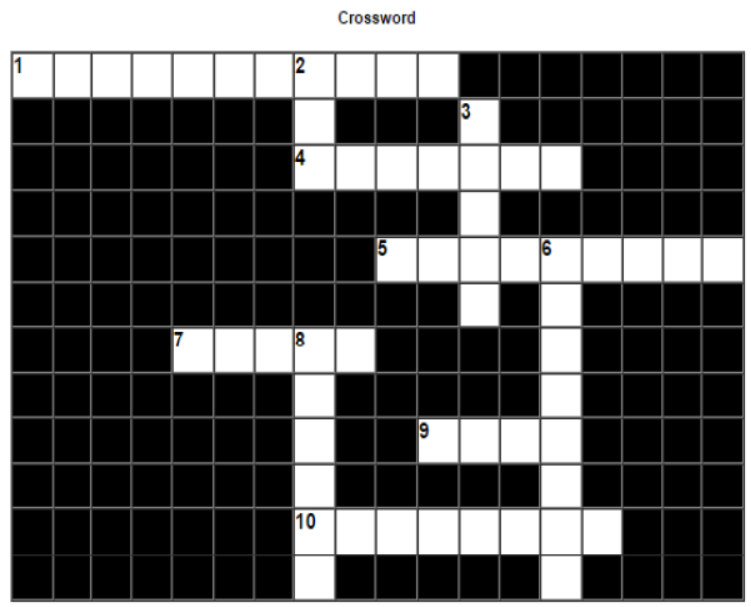
Page 17
Crossword Puzzle Clues and Answers
| Direction | Number | Clue | Answer |
|---|---|---|---|
| Across | 1 | To enforce mutual exclusion. | Button Group |
| Across | 4 | To mimic the click of a button. | DoClick |
| Across | 5 | Class containing SQL string for connectivity. | Statement |
| Across | 7 | Property of a list to set list data. | Model |
| Across | 9 | Java Database Connectivity. | JDBC |
| Across | 10 | A property of jTextArea. | LineWrap |
| Down | 2 | Rapid Application Development. | RAD |
| Down | 3 | Keyword to declare constant. | Final |
| Down | 6 | A property of JPasswordField. | Echochar |
| Down | 8 | Function to compare two strings. | Equals |
Free study material for Informatics Practices
Download Class 12 Informatics Practices Database Connectivity To MySQL Practice Worksheets
Mastering Database Connectivity To MySQL with Printable Worksheets
Access structured practice worksheets for Database Connectivity To MySQL aligned with the 2026 CBSE curriculum. These downloadable exercises for Class 12 Informatics Practices help students build accuracy and reinforce core concepts for upcoming school tests.
Verified Solutions and NCERT Alignment
Each worksheet draws directly from authorized standard textbooks to maintain academic accuracy. Evaluating your finished exercises against expert-verified solutions helps master the formal presentation standards expected in school evaluations.
Additional Study Resources for Class 12 Informatics Practices
Follow up your worksheet practice by attempting the interactive online MCQ tests for Database Connectivity To MySQL to evaluate your execution speed. All printable assignments and revision sheets on our platform are updated for the 2026 session and available free of charge.
FAQs
You can download the latest chapter-wise printable worksheets for Class 12 Informatics Practices Database Connectivity To MySQL for free from StudiesToday.com. These have been made as per the latest CBSE curriculum for this academic year.
Yes, Class 12 Informatics Practices worksheets for Database Connectivity To MySQL focus on activity-based learning and also competency-style questions. This helps students to apply theoretical knowledge to practical scenarios.
Yes, we have provided solved worksheets for Class 12 Informatics Practices Database Connectivity To MySQL to help students verify their answers instantly.
Yes, our Class 12 Informatics Practices test sheets are mobile-friendly PDFs and can be printed by teachers for classroom.
For Database Connectivity To MySQL, regular practice with our worksheets will improve question-handling speed and help students understand all technical terms and diagrams.