

Chapter-wise Worksheets for Class 12 Informatics Practices: It Applications
Access comprehensive chapter-wise worksheets for It Applications using the CBSE Class 12 Informatics Practices It Applications Worksheet. Designed to align with the 2026-27 academic syllabus for Class 12 Informatics Practices, these printable practice sets help students reinforce key concepts and improve their overall exam readiness.
Practice Class 12 Informatics Practices Worksheets: It Applications
Access the complete worksheet PDF for Class 12 Informatics Practices below. Regular practice with these targeted academic tasks builds familiarity with standard question patterns and helps secure higher marks in final school examinations.
CBSE Class 12 Informatics Practices IT Applications. CBSE issues sample papers every year for students for class 12 board exams. Students should solve the CBSE issued sample papers to understand the pattern of the question paper which will come in class 12 board exams this year. The sample papers have been provided with marking scheme. It’s always recommended to practice as many CBSE sample papers as possible before the board examinations. Sample papers should be always practiced in examination condition at home or school and the student should show the answers to teachers for checking or compare with the answers provided. Students can download the sample papers in pdf format free and score better marks in examinations. Refer to other links too for latest sample papers.
UNIT 4
CHAPTER 17: IT APPLICATIONS
Front End: The front end application interacts with the user and collects input from the user. For example: E-mail sign up form or any application where a user enters data.
Back End: The backend is an application or program that is not visible to the user but that processes the user requests as received from the front end. The back end handles all database accesses through one or more servers. For Example: MYSQL, Oracle, MS-Access etc.
Impact of ICT on Society:
ICT stands for (Information and communication Technology). ICT has impacted the society in a
much wider way than any other technologies. The social and economic impacts are as follows:-
Social Impact of ICT on Society:
Social Benefits:
1. Employment Generation
2. Social Networking
3. Education Sector
Economic Benefits:
1. Faster Growth of Economy
2. Global Market
3. Net Banking
4. Ease and Availability
E-Governance: E-governance refers to the application of electronic means in governance with an aim of fulfilling the requirements of common man at affordable costs and in fastest possible time. All government services are accessible to common man in his/her locality and ensure efficiency, transparency and reliability of such services at affordable cost to realize the basic needs of the common man.
IT Applications
Front End: A front-end application functions as the user interface, facilitating direct interaction and gathering data inputs. Examples include registration pages or any interface where users submit information.
Back End: The back-end comprises the underlying software processes and services that run out of the user's view to manage requests received from the front-end. It supervises all database interactions across servers, using systems such as MySQL, Oracle, or MS-Access.
Impact of ICT on Society: Information and Communication Technology (ICT) has profoundly influenced modern communities, far exceeding the reach of most other innovations. Its broader consequences are divided into social and economic dimensions:
Social Benefits:
- Creation of new job opportunities
- Growth of digital social networking
- Advancements in the academic and educational field
Economic Benefits:
- Accelerated financial and economic progress
- Integration into international markets
- Online and electronic banking solutions
- Improved accessibility and convenience of services
E-Governance: E-Governance involves using digital technologies to run administrative and public services, ensuring that citizens get their needs met rapidly and economically. It aims to make public utilities accessible locally, enhancing the reliability, transparency, and productiveness of public administration at minimal cost.
Common E-Governance Web Portals in India:
Social Implications of E-Governance:
- Boosts organizational integrity and transparency across public offices
- Minimizes delays and waiting periods for processing requests
- Helps curb administrative malpractices and corruption to a certain degree
Associated Challenges and Concerns:
- Inequitable access for rural residents due to inadequate digital infrastructure in remote regions
- Deficit in digital literacy and public familiarity with government e-programs
- Incomplete digitization, requiring a fallback to slow manual processes
E-Commerce / E-Business: E-Commerce denotes the commercial transactions - including buying, selling, and exchanging products, services, or information - conducted digitally over internet networks.
Prominent E-Business Platforms in India:
Page 2
Benefits of E-Business for Consumers:
- Lowers the overall retail price of items
- Enables buyers to shop from global markets directly
- Enhances buyer support through around-the-clock (24/7) marketplace availability
Social Consequences of E-Commerce:
- Extends a diverse range of products to customers living in isolated locations
- Fosters a shift toward internet shopping behaviors
- Drives a rise in digital cash-less transactions
Negative Societal Challenges:
- Unreliable internet service and weak telecommunication infrastructure
- Trust deficits arising from deliveries failing to meet customer expectations or missed shipments post-payment
E-Learning: E-Learning represents educational delivery facilitated by electronic technologies, such as the internet, multimedia DVDs, computer programs, and audio-visual setups. This enables educational access virtually anytime and anywhere.
Notable E-Learning Platforms:
Key Advantages:
- Provides flexible studying schedules accessible at any hour from any location
- Lowers the cost barrier associated with learning resources
- Supports self-directed and personally motivated study paths
Societal Impact of E-Learning:
- Serves as an asset for working professionals seeking skill upgrades
- Allows dropouts or those unable to attend school to resume their studies
- Democratizes education by delivering identical courses to millions of concurrent students
Overview of IT Applications:
- E-Governance:
- Objectives / Models: Government to Citizen (G2C), Government to Business (G2B), Government to Government (G2G)
- E-Governance Projects: Highlighting real-world public service platforms
- E-Business:
- Benefits: Cost efficiency, reach, and 24/7 service.
- Examples of Portals: www.irctc.co.in, www.licindia.in
- E-Learning:
- Benefits / Societal Impact: Flexibility, affordability, and democratization of courses.
- Examples of Portals: www.moodle.org, www.w3schools.com
Short Answer Type Question:
Question 1. Give two addresses of most commonly used e-learning sites.
Answer: Two highly popular online learning portals are www.w3schools.com and www.moodle.org.
In simple words: Two websites where you can study and learn new skills online are w3schools and Moodle.
Exam Tip: Be ready to list well-known educational portals such as Khan Academy, Moodle, or W3Schools, as these are frequent answers in exam guides.
Question 2. Write the name of two web portals commonly used for e-Governance.
Answer: Two prominent electronic governance portals utilized in India are www.india.gov.in and www.passport.gov.in.
In simple words: Two official government websites where citizens can access public services are the main India portal and the passport application portal.
Exam Tip: Always write complete, valid domain addresses ending in ".gov.in" to show they are legitimate governmental domains.
Question 3. Give the domain name of two popular e-Commerce sites.
Answer: Two widely recognized online commercial platforms are www.amazon.com and www.flipkart.com.
In simple words: Two famous shopping websites where you can buy products online are Amazon and Flipkart.
Exam Tip: Remember that e-commerce sites typically use ".com" or ".in" extensions, distinguishing them from governmental (.gov) domains.
Page 3
Question 4. Write two advantages of E-Business.
Answer: Two key merits of electronic business include:
1. Lower operational expenses, which leads to reduced prices for consumers.
2. Seamless accessibility to a global market, providing users with 24/7 shopping convenience.
In simple words: E-Business helps lower product costs and lets customers buy things from anywhere in the world at any time of day.
Exam Tip: Mentioning "24/7 availability" and "global reach" are strong keywords that examiners look for when grading advantages of e-commerce.
Question 5. What is Back end? Explain its functions.
Answer: The back-end is the invisible, behind-the-scenes part of a software system. Its main responsibilities are processing transaction queries forwarded by the user interface, securing records, and managing server database retrieval and updates.
In simple words: The back-end is the engine of a website that you cannot see. It stores, organizes, and processes all the data in databases.
Exam Tip: Define the back-end specifically as the database manager (like MySQL or Oracle) that interacts directly with database storage and server-side scripts.
Question 6. What is Front end? Explain its functions.
Answer: The front-end serves as the direct interactive interface between the user and the system. Its core duties include gathering input from the user, verifying form details, and visually presenting data retrieved from the server.
In simple words: The front-end is the actual webpage or screen you see and interact with, like forms where you type in your name and email.
Exam Tip: Highlight that the front-end acts as the first layer of data validation and user interaction, with examples like HTML forms or Java Swing windows.
Question 7. What social impact does e-Governance has on society?
Answer: The implementation of electronic governance affects society positively by increasing administrative accountability, decreasing wait times for public documents, and minimizing bureaucratic corruption.
In simple words: E-Governance makes public service offices more transparent, cuts down lines, and reduces bribery and corruption.
Exam Tip: Point out both benefits (like efficiency and convenience) and challenges (such as the digital divide in rural areas) to provide a balanced response.
Question 8. What benefit does an e-business offers to the customers/common man?
Answer: For the average citizen, electronic business offers better price points due to direct-to-consumer sales, easy accessibility to global merchants, and the convenience of shopping from home at any time.
In simple words: People get to buy items at cheaper prices, shop from global brands, and order everything from their couch.
Exam Tip: Connect your answer directly to consumer-centric points like cost savings, time savings, and direct delivery to make your explanation compelling.
Question 9. How e-Learning has benefitted the society?
Answer: Electronic learning has transformed communities by enabling students to study regardless of location, reducing educational costs, and assisting non-traditional students—such as full-time workers and school dropouts—in completing their studies.
In simple words: E-Learning lets anybody with an internet connection study at their own pace, making school cheaper and helping dropouts get their degree.
Exam Tip: Highlight "democratization of education" and "accessibility for working-class populations" as major social impacts of e-learning.
Question 10. Mr. Kartik is working as a Manager in Flash Telecom. He wants to create the form with the following functions. Choose appropriate controls from Text Field, Label, Radio Button, Check Box, List Box, Combo Box, and Command Button and write in the third column.
Answer:
The matching controls for Flash Telecom's form are listed below:
| S.No | Control Used to | Appropriate Control |
|---|---|---|
| 1 | Enter Name of Customer | Text Field |
| 2 | Enter Mobile No. | Text Field |
| 3 | Select Connection Type | Radio Button (Prepaid/Postpaid) or Combo Box |
| 4 | Display total Amount of Bill | Text Field (non-editable) or Label |
In simple words: Text fields are used for typing names and numbers, radio buttons or combo boxes let you select prepaid/postpaid, and a label or locked text field displays the final bill amount.
Exam Tip: For entering text or numbers, "Text Field" is always the correct choice, while mutually exclusive options like "Connection Type" (Prepaid/Postpaid) are best represented by "Radio Buttons".
Question 11. Bhavna is creating a form for Railway Reservation. Help her to choose most appropriate controls from List Box, Combo Box, Text Field, Text Area, Radio Button, Check box, label and Command button for the following entries from user:
(i) A message "Enter Destination" in front of a Text Field.
(ii) An input to choose Male or female for Gender.
(iii) An input for berth type from drop down list.
(iv) An input for Entering Passenger Name.
Answer:
(i) Label
(ii) Radio Button
(iii) Combo Box
(iv) Text Field
In simple words: Use a static Label to show instructions, Radio Buttons to select one gender, a Combo Box for a drop-down list of berths, and a Text Field to type in the name.
Exam Tip: A drop-down menu always corresponds to a JComboBox (Combo Box), while a descriptive instruction printed on the screen corresponds to a static JLabel (Label).
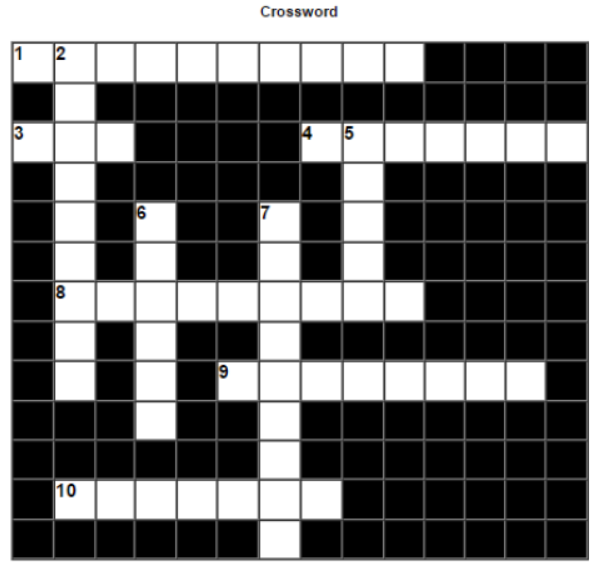
Page 4
Crossword Puzzle Clues and Answers
| Direction | Number | Clue | Answer |
|---|---|---|---|
| Across | 1 | Banking through Internet | Netbanking |
| Across | 3 | Graphical User Interface | GUI |
| Across | 4 | To select multiple options | List box |
| Across | 8 | Process of buying and selling via computer | E-commerce |
| Across | 9 | Interface with which user interacts | Frontend |
| Across | 10 | End that processes user request in an application | Backend |
| Down | 2 | Buying and selling of goods and services within organisation | E-business |
| Down | 5 | Railway Reservation Portal | IRCTC |
| Down | 6 | Website for Virtual Learning | Moodle |
| Down | 7 | Learning done via computer, internet | E-learning |
Free study material for Informatics Practices
CBSE Class 12 Informatics Practices Worksheets for It Applications
Practice Exercises for Class 12 Informatics Practices It Applications
Access structured practice worksheets for It Applications aligned with the 2026 CBSE curriculum. These downloadable exercises for Class 12 Informatics Practices help students build accuracy and reinforce core concepts for upcoming school tests.
Step-by-Step Solutions and Practice Guidelines
Designed around the official curriculum for Class 12 Informatics Practices, these practice sheets guarantee standard compliance. Reviewing step-by-step solutions after completion sharpens your accuracy and clarifies complex sub-topics within It Applications.
Enhance Speed with Online Practice
Follow up your worksheet practice by attempting the interactive online MCQ tests for It Applications to evaluate your execution speed. All printable assignments and revision sheets on our platform are updated for the 2026 session and available free of charge.
FAQs
You can download the latest chapter-wise printable worksheets for Class 12 Informatics Practices It Applications for free from StudiesToday.com. These have been made as per the latest CBSE curriculum for this academic year.
Yes, Class 12 Informatics Practices worksheets for It Applications focus on activity-based learning and also competency-style questions. This helps students to apply theoretical knowledge to practical scenarios.
Yes, we have provided solved worksheets for Class 12 Informatics Practices It Applications to help students verify their answers instantly.
Yes, our Class 12 Informatics Practices test sheets are mobile-friendly PDFs and can be printed by teachers for classroom.
For It Applications, regular practice with our worksheets will improve question-handling speed and help students understand all technical terms and diagrams.