

Official Class 12 Informatics Practices Worksheets: More On Sql Grouping Records And Table Joins
Access comprehensive chapter-wise worksheets for More On Sql Grouping Records And Table Joins using the CBSE Class 12 Informatics Practices More On Sql Grouping Records And Table Joins Worksheet. Designed to align with the 2026-27 academic syllabus for Class 12 Informatics Practices, these printable practice sets help students reinforce key concepts and improve their overall exam readiness.
Solved Practice Worksheets for Informatics Practices
View or download the dedicated CBSE Class 12 Informatics Practices More On Sql Grouping Records And Table Joins Worksheet resource below. Engaging with these practice papers under focused study conditions ensures continuous academic progress and mastery of the 2026-27 curriculum for More On Sql Grouping Records And Table Joins.
CBSE Class 12 Informatics Practices More On Sql-Grouping Records And Table Joins. CBSE issues sample papers every year for students for class 12 board exams. Students should solve the CBSE issued sample papers to understand the pattern of the question paper which will come in class 12 board exams this year. The sample papers have been provided with marking scheme. It’s always recommended to practice as many CBSE sample papers as possible before the board examinations. Sample papers should be always practiced in examination condition at home or school and the student should show the answers to teachers for checking or compare with the answers provided. Students can download the sample papers in pdf format free and score better marks in examinations. Refer to other links too for latest sample papers.
More on SQL - Grouping Records and Table Joins
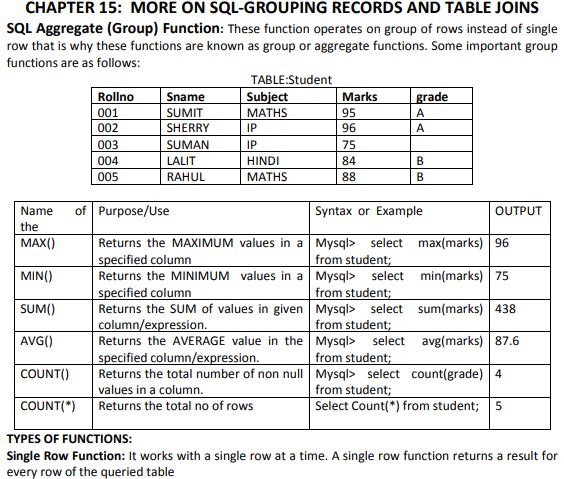
SQL Aggregate (Group) Functions: These functions run calculations on a set of rows rather than a single row. Because they work on multiple rows to return a single value, they are referred to as group or aggregate functions. Below are some of the key group functions:
Table: Student
| Rollno | Sname | Subject | Marks | grade |
|---|---|---|---|---|
| 001 | SUMIT | MATHS | 95 | A |
| 002 | SHERRY | IP | 96 | A |
| 003 | SUMAN | IP | 75 | |
| 004 | LALIT | HINDI | 84 | B |
| 005 | RAHUL | MATHS | 88 | B |
| Name of the function | Purpose/Use | Syntax or Example | OUTPUT |
|---|---|---|---|
| MAX() | Returns the MAXIMUM values in a specified column | Mysql> select max(marks) from student; | 96 |
| MIN() | Returns the MINIMUM values in a specified column | Mysql> select min(marks) from student; | 75 |
| SUM() | Returns the SUM of values in given column/expression. | Mysql> select sum(marks) from student; | 438 |
| AVG() | Returns the AVERAGE value in the specified column/expression. | Mysql> select avg(marks) from student; | 87.6 |
| COUNT() | Returns the total number of non null values in a column. | Mysql> select count(grade) from student; | 4 |
| COUNT(*) | Returns the total no of rows | Select Count(*) from student; | 5 |
Types of Functions:
Single Row Function: This category of functions operates on a single row at a time, producing an individual output value for every single row in the retrieved table.
Multiple Row or Group Function: These functions process data from several rows simultaneously to output a single consolidated aggregate value.
The primary distinction between these two functional types lies in the quantity of rows on which they operate.
Grouping Result by using Group By: The GROUP BY clause is employed within a SELECT query alongside aggregate functions to categorize results according to distinct or duplicate entries in a specific column. Categorization is performed based on the column name, generating a distinct summarized calculation for each individual group. For instance:
Mysql> select count(marks) from student Group By subject;
OUTPUT:
HINDI 1
MATHS 2
IP 2
Mysql> select SUM(marks) from student Group by Subject;
OUTPUT:
HINDI 84
MATHS 183
IP 171
Page 2
Conditions on Group-Having Clause: If needed, we can impose constraints on grouped records. The HAVING clause is utilized to define a filter condition specifically on grouped results.
Mysql> select SUM(marks) from student Group By subject having MAX(marks)>80;
OUTPUT:
HINDI 84
MATHS 183
IP 96
Mysql> Select SUM(marks) from student Group By subject having COUNT(*)>1;
OUTPUT:
MATHS 2
IP 2
Joins: A join operation merges rows from two or more distinct tables. When performing a join query, multiple tables are specified in the FROM clause, separated by a comma (,).
Example: SELECT * FROM EMP1, DEPT;
Cross Join (Cartesian Product): A Cartesian product is formed by combining every single row of the first table with every row of the second table. This result contains all columns from both tables.
Example: mysql> SELECT * FROM Order, product;
Note: In the resulting table, the cardinality (number of rows) is the product of the row counts of both tables, while the degree (number of columns) is the sum of the column counts of both tables.
Table: Order
| SN | Pcode | scode |
|---|---|---|
| 1 | P101 | S002 |
| 2 | P102 | S003 |
Table: Product
| code | Name | qty |
|---|---|---|
| P101 | SOAP | 20 |
| P102 | OIL | 10 |
Output after Cross Join:
| SN | Pcode | scode | code | Name | qty |
|---|---|---|---|---|---|
| 1 | P101 | S002 | P101 | SOAP | 20 |
| 2 | P102 | S003 | P101 | SOAP | 20 |
| 1 | P101 | S002 | P102 | OIL | 10 |
| 2 | P102 | S003 | P102 | OIL | 10 |
This output table contains 4 rows (\( 2 \times 2 = 4 \)) and 6 columns (\( 3 + 3 = 6 \)).
Equi Joins: An Equi-Join is a join operation where columns from different tables are compared using the equality operator. The join column represents the common key present in both tables.
SQL Statement: mysql> SELECT * FROM Order, product where order.pcode=product.pcode;
MySQL evaluates this by first generating a Cartesian product of the tables and then selecting only those records where the pcode column from the Order table matches the code column from the product table.
Output after Equi-Join:
| SN | Pcode | scode | code | Name | qty |
|---|---|---|---|---|---|
| 1 | P101 | S002 | P101 | SOAP | 20 |
| 2 | P102 | S003 | P102 | OIL | 10 |
Page 3
Non-Equi Joins: A Non-Equi join is a query that uses comparison operators other than equality to combine rows. In this type of join, tables are joined using operators like <, >, <>, >=, or <= on the join columns.
Natural Joins: A Natural Join is a join operation where only one copy of any identical/common columns is retained in the output. It behaves similarly to an Equi-Join because rows are linked based on equality, but duplicate join columns are eliminated so that the common column is listed only once.
Output after Natural Join:
| SN | Pcode | scode | Name | qty |
|---|---|---|---|---|
| 1 | P101 | S002 | SOAP | 20 |
| 2 | P102 | S003 | SOAP | 20 |
Joining Tables Using Join Clause in SQL: MySQL provides two main techniques to join multiple tables: utilizing a comma-separated list of tables in the FROM clause, or explicitly using the JOIN keyword within the query.
Table: Student
| RNO | Name | Subject | Fee | Scode |
|---|---|---|---|---|
| 101 | RAM | MATHS | 1000 | S101 |
| 102 | SHAM | ECO | 800 | C102 |
| 103 | RITU | ENG | 500 | H103 |
| 104 | SHERRY | PHY | 1200 | S101 |
Table: Stream
| Scode | Stream |
|---|---|
| S101 | Science |
| C102 | Commerce |
| H103 | Humanities |
Query: Select * from Student, Stream where student.scode = stream.scode;
OUTPUT:
| RNO | Name | Subject | Fee | Scode | Stream |
|---|---|---|---|---|---|
| 101 | RAM | MATHS | 1000 | S101 | Science |
| 102 | SHAM | ECO | 800 | C102 | Commerce |
| 103 | RITU | ENG | 500 | H103 | Humanities |
| 104 | SHERRY | PHY | 1200 | S101 | Science |
Query with JOIN Clause: Select RNO, Name from student join streams on student.scode = streams.scode where stream="Science";
OUTPUT:
| RNO | Name | Stream |
|---|---|---|
| 101 | RAM | Science |
| 104 | SHERRY | Science |
Page 4
Union: The UNION operator combines the outputs of multiple SELECT queries. Every SELECT query in the union must have an identical number of columns, with compatible data types, arranged in the exact same sequence.
Syntax for UNION:SELECT column_name(s) FROM table1
UNION
SELECT column_name(s) FROM table2;
Note: By default, the UNION operator filters out duplicate rows. To include duplicate rows, the UNION ALL keyword combination must be used.
Syntax for UNION ALL:SELECT column_name(s) FROM table1
UNION ALL
SELECT column_name(s) FROM table2;
Note: The column headers of the final merged result-set typically match the column names defined in the first SELECT query. The overall number of columns must remain equal between both queries.
Table: a
| x | y |
|---|---|
| 1 | A |
| 2 | B |
| 3 | C |
| 4 | D |
Table: b
| x | y |
|---|---|
| 1 | A |
| 3 | C |
Page 5
Query: SELECT * FROM a UNION SELECT * FROM b;
| x | y |
|---|---|
| 1 | A |
| 2 | B |
| 3 | C |
| 4 | D |
Query: SELECT * FROM a UNION ALL SELECT * FROM b;
| x | y |
|---|---|
| 1 | A |
| 2 | B |
| 3 | C |
| 4 | D |
| 1 | A |
| 3 | C |
Intersection: An INTERSECT query retrieves rows that are common to multiple datasets. If a row is present across all compared datasets, it appears in the output. Conversely, if a row exists in only one dataset and not the others, it is excluded from the final results.
Venn Diagram of Intersection:
Explanation: The intersect operation extracts only the records within the overlapping region of the diagram. These are the rows shared between both Dataset1 and Dataset2.
Syntax of INTERSECT:SELECT expression1, expression2, ... expression_n
FROM tables
[WHERE conditions]
INTERSECT
SELECT expression1, expression2, ... expression_n
FROM tables
[WHERE conditions];
Page 6
Even though MySQL lacks a native INTERSECT operator, we can replicate this functionality by using the IN or EXISTS clauses, choosing between them depending on how complex the query is.
SQL Functions Classification
1. Single Row Functions (Scalar Functions): These function on a single row to return a single result. They include:
- String Functions:
CHAR(),CONCAT(),LCASE(),UCASE(),SUBSTR(),MID(),INSTR(),LTRIM(),RTRIM(),TRIM(),LENGTH(),LEFT(),RIGHT() - Numeric Functions:
MOD(),POWER(),ROUND(),SIGN(),SQRT(),TRUNCATE() - Date and Time Functions:
CURDATE(),DATE(),MONTH(),YEAR(),DAYNAME(),DAYOFMONTH(),DAYOFWEEK(),DAYOFYEAR(),NOW(),SYSDATE()
2. Multiple Row Functions (Group/Aggregate Functions): These process multiple rows together to produce a single value. They include:
AVG()COUNT()MAX()MIN()SUM()
Very Short Answer Type Question (1 Marks)
Question 1. What is single row and multiple row functions?
Answer: A single-row function operates on one row at a time and yields an output for each row, whereas a multiple-row (or group) function processes a set of rows together to produce a single consolidated result.
In simple words: Single-row functions give an answer for every individual row, while group functions take many rows and combine them into just one answer.
Exam Tip: State clearly that single-row functions work on one row while multiple-row functions aggregate data from many rows, and mention an example of each (like UPPER() vs SUM()) to secure full marks.
Question 2. What is the significance of Group By clause in MYSQL?
Answer: The GROUP BY clause in MySQL organizes rows with matching values in specified columns into distinct categories, allowing us to perform aggregate calculations like sum, count, or average on each group.
In simple words: The GROUP BY clause lets you group matching records together so you can run calculations like sum or average on each set.
Exam Tip: Remember that any non-aggregate column in your SELECT list should generally be included in the GROUP BY clause to avoid unexpected results in SQL.
Question 3. What is Join? How many types of joins are there?
Answer: A join is an SQL operation used to link and retrieve records from two or more tables based on a related column. The major types of joins include Cross Join, Equi Join, Non-Equi Join, and Natural Join.
In simple words: A join is a way to combine information from different tables. Common types include Cross Join, Equi Join, and Natural Join.
Exam Tip: Be ready to name at least four types of joins: Cartesian Product (Cross Join), Equi-Join, Non-Equi Join, and Natural Join, as they are specifically detailed in your curriculum.
Question 4. What are joins? Why are they used?
Answer: Joins are database queries that merge rows from multiple tables together. They are used because relational databases store different entities in separate tables, and joins allow us to retrieve related data as a single cohesive result-set.
In simple words: Joins connect different tables so you can see all your related data in one single table.
Exam Tip: Highlight that joins help maintain relational database design (normalization) by letting us fetch connected information that is stored across multiple tables.
Question 5. How natural join differs from Equi Join?
Answer: An Equi-Join displays the common joining column from both tables in the output, meaning it appears twice. A Natural Join is also based on column equality, but it automatically removes the duplicate column so that the common column is displayed only once.
In simple words: In an Equi-Join, you see the matching column twice in the results, but in a Natural Join, you only see it once.
Exam Tip: Focus on the column count: an Equi-Join keeps all columns of both tables, while a Natural Join eliminates the duplicate key columns.
Question 6. What is the Cartesian product of two tables? Is it same as an Equi-join?
Answer: A Cartesian product (or Cross Join) pairs every row of the first table with every row of the second table, without applying any filters. It is not the same as an Equi-Join, because an Equi-Join filters this complete set to only keep rows that have equal values in the specified joining columns.
In simple words: A Cartesian product matches every row of one table with every row of another. Unlike an Equi-Join, it does not look for matching values.
Exam Tip: Emphasize that a Cartesian product has no joining condition, whereas an Equi-Join requires an equality condition (like table1.id = table2.id) to filter the rows.
Question 7. There is a column C1 in a table T1. The following two statements: SELECT COUNT (*) FROM T1; and SELECT COUNT(C1) from T1; are giving different outputs. What may be the possible reason? What is the significance of NOT NULL constraints?
Answer: The difference arises because the column C1 contains NULL values. The COUNT(*) function counts every row in the table, including those with null entries, whereas COUNT(C1) only counts rows where C1 is not null. A NOT NULL constraint ensures that a column must always hold a value, preventing any empty or NULL entries in that field.
In simple words: COUNT(*) counts all rows, but COUNT(C1) skips rows where C1 is empty. A NOT NULL rule makes sure a column is never left empty.
Exam Tip: Remember that aggregate functions like COUNT(column) ignore NULL values, while COUNT(*) includes all rows regardless of nulls.
Question 8. There are two tables T1 and T2 in a database. Cardinality and degree of T1 are 2 and 4 respectively. Cardinality and degree of T2 are 3 and 2 respectively. What will be the degree and Cardinality of their Cartesian product?
Answer: The Cartesian product of the two tables will have:
Degree = Degree of T1 + Degree of T2 = \( 4 + 2 = 6 \) columns.
Cardinality = Cardinality of T1 \(\times\) Cardinality of T2 = \( 2 \times 3 = 6 \) rows.
In simple words: To find the new degree, add the columns of both tables together. To find the new cardinality, multiply their rows. Both will be 6.
Exam Tip: Remember the formulas: Degree is additive (\( \text{Degree}(A) + \text{Degree}(B) \)) and Cardinality is multiplicative (\( \text{Cardinality}(A) \times \text{Cardinality}(B) \)) for Cartesian products.
Question 9. Do aggregate Functions consider Null values? Does NULL play any role in actual calculations?
Answer: No, SQL aggregate functions (with the exception of COUNT(*)) completely ignore NULL values during their execution. Consequently, NULL does not participate in any mathematical calculations, such as summing or averaging data, since it represents missing or undefined values.
In simple words: SQL functions like SUM and AVG skip empty cells (NULLs) entirely and do not use them in math calculations.
Exam Tip: Be sure to highlight that COUNT(*) is the only aggregate function that counts rows containing nulls; all other functions like SUM(), AVG(), MIN(), MAX(), and COUNT(column) ignore them.
Question 10. Write a query to delete a column pincode from the table employee?
Answer: To remove the pincode column from the employee table, use the following SQL query:ALTER TABLE employee DROP COLUMN pincode;
In simple words: You use the ALTER TABLE command with DROP COLUMN to remove an unwanted column from a table.
Exam Tip: Use the ALTER TABLE statement coupled with the DROP (or DROP COLUMN) clause for modifying the structural schema of an existing table.
Question 11. Write a query to display the highest marks of each subject where Max marks is more than 90 from table student
Answer: To find the highest marks for each subject where the maximum score exceeds 90, run this query:SELECT subject, MAX(marks) FROM student GROUP BY subject HAVING MAX(marks) > 90;
In simple words: This query groups students by subject and finds the highest mark for each, but only shows subjects where that top mark is greater than 90.
Exam Tip: Use the HAVING clause instead of WHERE when applying a filter condition to an aggregate function like MAX(marks).
Question 12. Write a statement to disable the constraints of table.
Answer: In MySQL, you can disable foreign key constraints globally by executing:SET FOREIGN_KEY_CHECKS = 0;
In other SQL databases like Oracle, you can turn off a specific constraint using:ALTER TABLE table_name DISABLE CONSTRAINT constraint_name;
In simple words: You can temporarily turn off table rules in MySQL by setting foreign key checks to 0.
Exam Tip: If the question doesn't specify the SQL dialect, providing either the MySQL command (SET FOREIGN_KEY_CHECKS = 0;) or the generic SQL command (ALTER TABLE... DISABLE CONSTRAINT) is acceptable.
Question 13. Write a query to display the number of employees in each department in table emp.
Answer: To count the number of employees working in each department within the emp table, use this query:SELECT department, COUNT(*) FROM emp GROUP BY department;
In simple words: This command groups employees by their department and counts how many people are in each group.
Exam Tip: Make sure to group by the department column (e.g., GROUP BY department) whenever you need to find counts "for each" department.
Page 7
Short Answer Type Question (2 Marks)
Question 1. Difference between WHERE and HAVING clause in MySQL? Explain with the help of an example.
Answer: The primary differences between the WHERE and HAVING clauses are:
1. The WHERE clause is applied to filter individual rows before they are grouped, and it cannot contain aggregate functions.
2. The HAVING clause is applied to filter groups after the GROUP BY operation has occurred, and it is specifically used to filter based on aggregate conditions.
Example of WHERE:SELECT * FROM student WHERE marks > 80;
This filters individual rows to show only students who scored more than 80 marks.
Example of HAVING:SELECT subject, AVG(marks) FROM student GROUP BY subject HAVING AVG(marks) > 80;
This first groups students by subject, calculates the average mark for each subject, and then displays only those subject groups where the average mark is greater than 80.
In simple words: Use WHERE to filter individual rows before grouping, and use HAVING to filter entire groups after they are made.
Exam Tip: A key test-taking rule is that you can never use aggregate functions (like SUM(), COUNT(), etc.) inside a WHERE clause; they must go in the HAVING clause.
Table: DOCTORS
| DocID | DocName | Department | OPDdays |
|---|---|---|---|
| 101 | K.K.Mathur | ENT | TTS |
| 102 | Ashish Sharma | Paed | MWF |
| 201 | Vivek Khurana | Ortho | MWF |
Table: PATIENT
| PatNo | PatName | Department | DocID |
|---|---|---|---|
| 1 | AKASH | ENT | 101 |
| 2 | NEHA | Ortho | 102 |
| 3 | SUNITA | ENT | 101 |
Question 3. With reference to these two tables, write a SQL query for (i) and (ii) and output for (iii).
(1) Display Patient Name, Patient No and corresponding doctor name for each patient.
(2) Display the list of all patients who’s OPDdays are ‘TTS’.
(3) SELECT OPDdays, count(*) FROM Doctors, Patients WHERE Doctors.Department=Patients.Department GROUP BY OPDdays;
Answer:
(1) SQL Query:SELECT PatName, PatNo, DocName FROM PATIENT, DOCTORS WHERE PATIENT.DocID = DOCTORS.DocID;
(2) SQL Query:SELECT PATIENT.* FROM PATIENT, DOCTORS WHERE PATIENT.DocID = DOCTORS.DocID AND DOCTORS.OPDdays = 'TTS';
(3) Query Output:
| OPDdays | count(*) |
|---|---|
| TTS | 2 |
| MWF | 1 |
In simple words: Part 1 links patients and doctors using their DocID to show names and numbers. Part 2 filters patients whose doctors work on TTS. Part 3 matches departments and groups them by working days, giving counts of 2 for TTS and 1 for MWF.
Exam Tip: In join queries, always use table name prefixes (like PATIENT.DocID = DOCTORS.DocID) when joining on columns that have identical names in both tables to prevent ambiguity errors.
Table: BOOKS
| Book_ID | Book_Name | Author_Name | Publisher | Price | Qty |
|---|---|---|---|---|---|
| L01 | Maths | Raman | ABC | 70 | 20 |
| L02 | Science | Agarkar | DEF | 90 | 15 |
| L03 | Social | Suresh | XYZ | 85 | 30 |
| L04 | Computer | Sumita | ABC | 75 | 7 |
| L05 | Telugu | Nannayya | DEF | 60 | 25 |
| L06 | English | Wordsworth | DEF | 55 | 12 |
Table: ISSUES
| ISSUE_ID | Book_ID | Qty_Issued |
|---|---|---|
| 14 | L02 | 13 |
| 19 | L04 | 5 |
| 3 | L05 | 21 |
Question 4. In a database there are two table BOOKS and ISSUES.
i. How many rows and how many columns will be there in the Cartesian product of these two tables?
ii. Which column in the 'ISSUES' table is the foreign key?
Answer:
i. Cartesian Product Properties:
The number of columns (degree) in the Cartesian product is the sum of the columns of both tables:
Columns = \( 6 \text{ (from BOOKS)} + 3 \text{ (from ISSUES)} = 9 \) columns.
The number of rows (cardinality) in the Cartesian product is the product of the rows of both tables:
Rows = \( 6 \text{ (from BOOKS)} \times 3 \text{ (from ISSUES)} = 18 \) rows.
ii. Foreign Key:
The column Book_ID in the ISSUES table serves as the foreign key because it links to and references the primary key Book_ID in the BOOKS table.
In simple words: The Cartesian product will have 18 rows and 9 columns. The foreign key in the ISSUES table is Book_ID, which connects it to the BOOKS table.
Exam Tip: For Cartesian product questions, write down the formula first: \( \text{Degree} = D1 + D2 \) and \( \text{Cardinality} = C1 \times C2 \), then substitute the values to guarantee maximum marks.
Page 8
Table: staff
| ID | NAME | DEPT | SEX | DATE_OF_J |
|---|---|---|---|---|
| 101 | Siddharth | SALES | M | 2001-01-01 |
| 104 | Raghav | FINANCE | M | 2006-02-14 |
| 107 | Prateek | RESEARCH | M | 2002-07-02 |
| 114 | Dilip | SALES | M | 2003-05-15 |
| 109 | Nupur | FINANCE | F | 2004-11-11 |
| 105 | Binoy | RESEARCH | F | 2002-10-10 |
| 117 | Vaibhav | SALES | M | 2005-08-11 |
| 111 | Rama | FINANCE | F | 2004-02-23 |
Table: Salary
| ID | BASIC | ALLOWANCE | COMM |
|---|---|---|---|
| 101 | 12000 | 1000 | 3 |
| 104 | 23000 | 2300 | 5 |
| 107 | 32000 | 4000 | 5 |
| 114 | 12000 | 5200 | 10 |
| 109 | 42000 | 1700 | 20 |
| 105 | 18900 | 1690 | 3 |
Question 6. With reference to these tables, Write commands in SQL for (i) and (ii) and output for (iii) below:
i. Display NAME, BASIC, ALLOWANCE of all staff who are in “SALES” department
ii. Display the average salary of all the staff working in “FINANCE” department using the table staff and salary. SALARY=BASIC+ALLOWANCE.
iii. SELECT NAME, COMM FROM staff, salary where (staff.ID=salary.ID);
Answer:
i. SQL Query:SELECT NAME, BASIC, ALLOWANCE FROM staff, salary WHERE staff.ID = salary.ID AND DEPT = 'SALES';
ii. SQL Query:SELECT AVG(BASIC + ALLOWANCE) FROM staff, salary WHERE staff.ID = salary.ID AND DEPT = 'FINANCE';
iii. Query Output:
| NAME | COMM |
|---|---|
| Siddharth | 3 |
| Raghav | 5 |
| Prateek | 5 |
| Dilip | 10 |
| Nupur | 20 |
| Binoy | 3 |
In simple words: Part i matches staff and salary tables by ID to select SALES workers' names and pay. Part ii adds BASIC and ALLOWANCE for FINANCE workers and calculates their average. Part iii outputs names and commissions for all matched IDs.
Exam Tip: Always make sure to write parenthesized calculations like BASIC + ALLOWANCE inside aggregate functions like AVG() when displaying averages of computed expressions.
Free study material for Informatics Practices
CBSE Class 12 Informatics Practices Worksheets for More On Sql Grouping Records And Table Joins
Practice Exercises for Class 12 Informatics Practices More On Sql Grouping Records And Table Joins
Access structured practice worksheets for More On Sql Grouping Records And Table Joins aligned with the 2026 CBSE curriculum. These downloadable exercises for Class 12 Informatics Practices help students build accuracy and reinforce core concepts for upcoming school tests.
Step-by-Step Solutions and Practice Guidelines
Designed around the official curriculum for Class 12 Informatics Practices, these practice sheets guarantee standard compliance. Reviewing step-by-step solutions after completion sharpens your accuracy and clarifies complex sub-topics within More On Sql Grouping Records And Table Joins.
Enhance Speed with Online Practice
Wrap up your chapter revision by testing your knowledge against standard objective question formats. Explore our full library of free, up-to-date printable assignments to maximize your academic results in upcoming CBSE evaluations.
FAQs
You can download the latest chapter-wise printable worksheets for Class 12 Informatics Practices More On Sql Grouping Records And Table Joins for free from StudiesToday.com. These have been made as per the latest CBSE curriculum for this academic year.
Yes, Class 12 Informatics Practices worksheets for More On Sql Grouping Records And Table Joins focus on activity-based learning and also competency-style questions. This helps students to apply theoretical knowledge to practical scenarios.
Yes, we have provided solved worksheets for Class 12 Informatics Practices More On Sql Grouping Records And Table Joins to help students verify their answers instantly.
Yes, our Class 12 Informatics Practices test sheets are mobile-friendly PDFs and can be printed by teachers for classroom.
For More On Sql Grouping Records And Table Joins, regular practice with our worksheets will improve question-handling speed and help students understand all technical terms and diagrams.