

School Assignments for Class 12 Computer Science: Programming In C++ Concepts
Review targeted academic assignments with the CBSE Class 12 Computer Science Programming In C++ Concepts. Built according to official CBSE standards for the 2026-27 term, these downloadable Class 12 Computer Science worksheets support effective daily practice for Programming In C++ Concepts.
Practice Class 12 Computer Science Assignments: Programming In C++ Concepts
Access the complete assignment PDF for Class 12 Computer Science below. Regular practice with these targeted academic tasks builds familiarity with standard question patterns and helps secure higher marks in final school evaluations.
Introduction to C++
Which C++ header file(s) will be essentially required to be included to run /execute the following C++ code:void main()
{ char Msg[] = "Sunset Gardens"; for (int I = 5; I < strlen(Msg); I++) puts(Msg);
}
Answer: stdio.h, string.h
In simple words: The header file stdio.h is required for the puts() function, and string.h is required for the strlen() function.
Exam Tip: Always remember standard library functions and their corresponding header files, such as string functions requiring string.h and input/output functions requiring stdio.h or iostream.h.
Name the header files that shall be need for the following code: (CBSE 2012)void main()
{ char text[] = "Something"; cout << "Remaining SMS chars: " << 160 - strlen(text) << endl;
}
Answer: iostream.h / iomanip.h, string.h
In simple words: iostream.h is needed for cout and endl, while string.h is needed for the strlen() function.
Exam Tip: cout and endl belong to iostream.h, and string manipulation functions like strlen() belong to string.h.
1) Rewrite the following program after removing the syntactical error(s) if any. Underline each correction. CBSE 2012#include<iostream.h>
Class Item
{ long IId, Qty;
public: void Purchase { cin>>IId>>Qty;} void Sale() { cout<<setw(5)<<IId<<"Old:"<< Qty<<endl; cout<< "New :"<<Qty<<endl; }};
void main()
{ Item I; Purchase(); I.Sale()
}
Answer:#include<iostream.h>
#include<iomanip.h>
class Item
{ long IId, Qty;
public: void Purchase( ) { cin>>IId>>Qty; } void Sale( ) { cout<<setw(5)<<IId<<"Old:"<< Qty<<endl; cout<<"New :"<<Qty<<endl; }
};
void main()
{ Item I; I.Purchase(); I.Sale();
}
In simple words: Fixed class name capitalization, added missing parentheses and semicolons, prefixed member functions with the object instance, and included iomanip.h for setw.
Exam Tip: Look carefully for missing semicolons, missing parentheses after function names, unreferenced member function calls without objects, and case sensitivity issues (like class instead of Class).
2) Find the output of the following program: CBSE 2012#include<iostream.h>
#include<ctype.h>
typedef char Str80[80];
void main()
{ char *Notes; Str80 str = " vR2GooD"; int L = 6; Notes = str; while(L >= 3) { Str[L] = (isupper(Str[L]) ? tolower(Str[L]) : toupper(Str[L])); cout << Notes << endl; L--; Notes++; }
}
Answer:
vR2Good
R2GoOd
2GOOd
gOOd
In simple words: The program iterates backward from index 6 to 3, toggling the case of characters in the string and printing the string from the current pointer position.
Exam Tip: Trace pointer arithmetic and array index modifications carefully step by step in string manipulation loops.
3) Observe the following program and find out, which output(s) out of (i) to (iv) will not be expected from program? What will be the minimum and maximum value assigned to the variable Chance?#include<iostream.h>
#include<stdlib.h>
void main()
{ randomize(); int Arr[] = {9, 6}, N; int Chance = random(2) + 10; for(int c = 0; c < 2; c++) { N = random(2); cout << Arr[N]; }
}
(i) 9#6#
(ii) 19#17#
(iii) 19#16#
(iv) 20#16#
Answer:
The output not expected from the program are (i), (ii), and (iv).
Minimum value of Chance = 10
Maximum value of Chance = 11
In simple words: random(2) generates 0 or 1. Adding 10 makes Chance range from 10 to 11, so options with 9, 17, or 20 are impossible.
Exam Tip: Evaluate the range of random(num) function, which returns integers from 0 to num-1 inclusive.
4) Find the output of the following program: CBSE 2012#include<iostream.h>
class METRO
{ int Mno, TripNo, PassengerCount;
public: METRO(int Tmno = 1) { Mno = Tmno; TripNo = 1; PassengerCount = 0; } void Trip(int PC = 20) { TripNo++; PassengerCount += PC; } void StatusShow() { cout << Mno << ":" << TripNo << ":" << PassengerCount << endl; }
};
void main()
{ METRO M(5), T; M.Trip(); M.StatusShow(); T.StatusShow(); M.StatusShow();
}
Answer:
5: 2: 20
1: 1: 0
5: 2: 20
In simple words: Objects M and T are created with constructor defaults. Member function calls update and display trip numbers and passenger counts accordingly.
Exam Tip: Track object states and member variables separately for each object instance in class-based programs.
5) Rewrite the following program after removing the syntactical error(s) if any. Underline each correction.#include<iostream.h>
void main()
{ F = 10, S = 20; test(F;S); test(S);
}
void test(int x, int y = 20)
{ x = x + y; count<<x>>y;
}
Answer:#include<iostream.h>
void test(int x, int y = 20);
void main()
{ int F = 10, S = 20; test(F, S); test(S);
}
void test(int x, int y)
{ x = x + y; cout << x << y;
}
Corrections:
1. Declared variables int F, S;
2. Replaced semicolon with comma in function call test(F, S);
3. Corrected output stream operator cout << x << y;
In simple words: Variables must be declared with types, function arguments separated by commas, and output performed using <<.
Exam Tip: Check variable declarations, argument separators, and correct usage of cout stream operators.
6) Rewrite the following program after removing syntactical error(s) if any. Underline each correction.#include "iostream.h"
Class MEMBER
{ int Mno; float Fees;
PUBLIC: void Register () {cin>>Mno>>Fees;} void Display() {cout<<Mno<<" : "<<Fees<<endl;}
};
void main()
{ MEMBER delete; Register(); delete.Display();
}
Answer:#include <iostream.h>
class MEMBER
{ int Mno; float Fees;
public: void Register () { cin>>Mno>>Fees; } void Display() { cout<<Mno<<" : "<<Fees<<endl; }
};
void main()
{ MEMBER m; m.Register(); m.Display();
}
Corrections:
1. Header inclusion format #include <iostream.h>
2. Keyword class in lowercase.
3. Access specifier public: in lowercase.
4. Avoided reserved keyword delete as object name.
5. Invoked member functions using object m.Register(); and m.Display();.
In simple words: Avoid reserved keywords as identifiers and correctly invoke member functions using object dot notation.
Exam Tip: Keywords cannot be used as variable or object names, and standard library headers should be enclosed in angle brackets.
7) Find the output for the following program:#include<iostream.h>
#include<ctype.h>
void Encript ( char T[])
{ for( int i = 0 ; T[i] != '\0' ; i += 2) if( T[i] == 'A' || T[i] == 'E' ) T[i] = '#'; else if (islower (T[i])) T[i] = toupper(T[i]); else T[i] = '@';
}
void main()
{ char text[] = "SaVE EArTh in 2012"; encrypt(text); cout << text << endl;
}
Answer:
S@V@#@R@T#@I#@2@1@2
In simple words: The function processes alternate characters in the string, replacing vowels with #, lowercase letters with uppercase, and other characters with @.
Exam Tip: Pay attention to loop step increments (like i += 2) and conditional character transformations.
8) Find the output of the following program:#include<iostream.h>
void main()
{ int U = 10, V = 20; for(int I = 1; I <= 2; I++) { cout << "[1]" << U++ << "&" << V - 5 << endl; cout << "[2]" << ++V << "&" << U + 2 << endl; }
}
Answer:
[1]10&15
[2]21&13
[1]11&16
[2]22&14
In simple words: Evaluates post-increment and pre-increment operators on variables U and V across two loop iterations.
Exam Tip: Distinguish clearly between post-increment (U++) and pre-increment (++V) when evaluating expressions.
9) Rewrite the following C++ program after removing the syntax error(s) if any. Underline each correction. [CBSE 2010]include<iostream.h>
class FLIGHT
{ Long FlightCode; Char Description[25];
public void addInfo() { cin>>FlightCode; gets(Description); } void showInfo() { cout<<FlightCode<<":"<<Description<<endl; }
};
void main()
{ FLIGHT F; addInfo.F(); showInfo.F;
}
Answer:#include <iostream.h>
#include <stdio.h>
class FLIGHT
{ long FlightCode; char Description[25];
public: void addInfo() { cin>>FlightCode; gets(Description); } void showInfo() { cout<<FlightCode<<":"<<Description<<endl; }
};
void main()
{ FLIGHT F; F.addInfo(); F.showInfo();
}
Corrections:
1. Added # to #include <iostream.h>
2. Corrected data types long and char to lowercase.
3. Added colon to public:.
4. Corrected function calls to F.addInfo(); and F.showInfo();.
In simple words: Preprocessor directives need #, data types must be lowercase, public needs a colon, and member functions are invoked using object.function().
Exam Tip: Verify preprocessor syntax (#include), datatype casing, access specifier colons, and object-oriented function calling syntax.
10) In the following program, find the correct possible output(s) from the options:#include<stdlib.h>
#include<iostream.h>
void main()
{ randomize(); char City[][10] = {"DEL", "CHN", "KOL", "BOM", "BNG"}; int Fly; for(int I = 0; I < 3; I++) { Fly = random(2) + 1; cout << City[Fly] << ":"; }
}
Outputs:
(i) DEL : CHN : KOL:
(ii) CHN : KOL : CHN:
(iii) KOL : BOM : BNG:
(iv) KOL : CHN : KOL:
Answer: (ii) CHN : KOL : CHN:
In simple words: random(2) generates 0 or 1, so random(2) + 1 generates indices 1 or 2, corresponding to CHN and KOL. Thus, only outputs containing CHN and KOL are possible.
Exam Tip: Determine the exact index range produced by random functions to filter out invalid array element selections.
11) In the following C++ program what is the expected value of Myscore from options (i) to (iv) given below. Justify your answer.#include<stdlib.h>
#include<iostream.h>
void main()
{ randomize(); int Score[] = {25, 20, 34, 56, 72, 63}, Myscore; cout << Myscore << endl;
}
i) 25
ii) 34
iii) 20
iv) Garbage Value.
Answer: (iv) Garbage Value.
In simple words: The variable Myscore is declared locally without being initialized or assigned any value before being output, resulting in a garbage value.
Exam Tip: Uninitialized local variables always contain indeterminate garbage values in C++.
♦ C++ programming language developed by AT&T Bell Laboratories in 1979 by Bjarne Stroustrup. C++ is fully based on Object Oriented Technology i.e. C++ is ultimate paradigm for the modeling of information.
♦ C++ is the successor of C language.
♦ It is a case sensitive language.
Character Set- Set of characters which are recognized by c++compiler i.e Digits (0-9), Alphabets (A-Z & a-z) and special characters + - * , . “ ‘ < > = { ( ] ) space etc i.e 256 ASCII characters.
Tokens- Smallest individual unit. Following are the tokens
♦ Keyword- Reserve word having special meaning the language and can’t be used as identifier.
♦ Identifiers- Names given to any variable, function, class, union etc. Naming convention (rule) for writing identifier is as under:
i) First letter of identifier is always alphabet.
ii) Reserve word cannot be taken as identifier name.
iii) No special character in the name of identifier except under score sign ‘_’.
♦ Literals- Value of specific data type assign to a variable or constant. Four type of Literals:
i) Integer Literal i.e int x =10
ii) Floating point Literal i.e float x=123.45
iii) Character Literal i.e char x= ‘a’, enclosed in single quotes and single character only.
iv) String Literal i.e cout<< “Welcome” , anything enclosed in double quotes
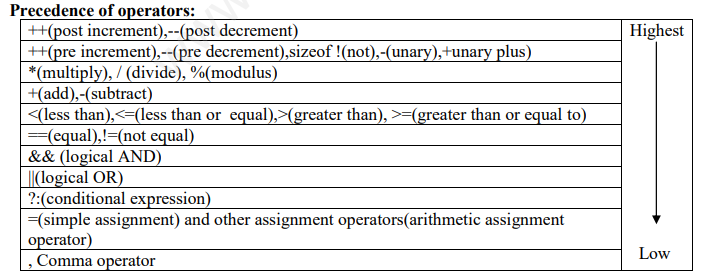
♦ Operator – performs some action on data
o Arithmetic(+,-,*,/,%)
o Assignment operator (=)
o Increment / Decrement (++, --)
o Relational/comparison (<,>,<=,>=,==,!=).
o Logical(AND(&&),OR(||),NOT(!).
Data type- A specifier to create memory block of some specific size and type. C++offers two types of data types:
1) Fundamental type : Which are not composed any other data type i.e. int, char, float and void
2) Derived data type : Which are made up of fundamental data type i.e array, function, class, union etc
Data type conversion- Conversion of one data type into another data type. Two type of conversion i.e
i) Implicit Conversion – It is automatically taken care by complier in the case of lower range to higher range e.g. int x, char c=’A’ then x=c is valid i.e character value in c is automatically converted to integer.
ii) Explicit Conversion- It is user-defined that forces an expression to be of specific type. e.g. double x1,x2 and int res then res=int(x1+x2)
Variable- Memory block of certain size where value can be stored and changed during program execution. e.g. int x, float y, float amount, char c;
Some functions
· isalpha(c)-check whether the argument is alphabetic or not.
· islower(c)- check whether the argument is lowecase or not.
· isupper(c) - check whether the argument is upercase or not.
· isdigit(c)- check whether the argument is digit or not.
· isalnum(c)- check whether the argument is alphanumeric or not.
· tolower()-converts argument in lowercase if its argument is a letter.
· toupper(c)- converts argument in uppercase if its argument is a letter.
· strcat()- concatenates two string.
· strcmp-compare two string.
· pow(x,y)-return x raised to power y.
· sqrt(x)-return square root of x.
· random(num)-return a random number between 0 and (num-1)
· randomize- initializes the random number generator with a random value.
Array- Collection of element of same type that are referred by a common name.
One Dimensional array
· An array is a continuous memory location holding similar type of data in single row or single column. Declaration in c++ is as under:
const int size =20; int a[size] or int a[20]. The elements of array accessed with the help of an index.
For example : for(i=0;i<20;i++) cout<<a[i];
· String (Array of characters) –Defined in c++ as one dimensional array of characters as char s[80]= “Object oriented programming”;
Two dimensional array
· A two diamensional array is a continuous memory location holding similar type of data arranged in row and column format (like a matrix structure).
Declaration – int a[3][4], means ‘a’ is an array of integers are arranged in 3 rows & 4 columns.
Function -Name given to group of statements that does some specific task and may return a value. Function can be invoked(called) any no. of time and anywhere in the program.
Please refer to attached file for CBSE Class 12 Computer Science Programming In C++ Concepts
```html
UNIT 1 : PROGRAMMING IN C++
Introduction to C++
- C++ programming language developed by AT&T Bell Laboratories in 1979 by Bjarne Stroustrup. C++ is fully based on Object Oriented Technology i.e. C++ is ultimate paradigm for the modeling of information.
- C++ is the successor of C language.
- It is a case sensitive language.
Character Set- Set of characters which are recognized by c++compiler i.e Digits (0-9), Alphabets (A-Z & a-z) and special characters + - * , . “ ‘ < > = { ( ] ) space etc i.e 256 ASCII characters.
Tokens- Smallest individual unit. Following are the tokens
- Keyword-Reserve word having special meaning the language and can’t be used as identifier.
- Identifiers-Names given to any variable, function, class, union etc. Naming convention (rule) for writing identifier is as under:
i) First letter of identifier is always alphabet.
ii) Reserve word cannot be taken as identifier name.
iii) No special character in the name of identifier except under score sign ‘_’. - Literals-Value of specific data type assign to a variable or constant. Four type of Literals:
i) Integer Literal i.e int x =10
ii) Floating point Literal i.e float x=123.45
iii) Character Literal i.e char x= ‘a’, enclosed in single quotes and single character only.
iv) String Literal i.e cout<< “Welcome” , anything enclosed in double quotes - Operator – performs some action on data
o Arithmetic(+,-,*,/,%)
o Assignment operator (=)
o Increment / Decrement (++, --)
o Relational/comparison (<,>,<=,>=,==,!=).
o Logical(AND(&&),OR(||),NOT(!).
o Conditional (? :)
Precedence of operators:
| Operator | Precedence |
|---|---|
| ++(post increment),--(post decrement) | Highest |
| ++(pre increment),--(pre decrement),sizeof !(not),-(unary),+unary plus) | |
| *(multiply), / (divide), %(modulus) | |
| +(add),-(subtract) | |
| <(less than),<=(less than or equal),>(greater than), >=(greater than or equal to) | |
| ==(equal),!=(not equal) | |
| && (logical AND) | |
| ||(logical OR) | |
| ?:(conditional expression) | |
| =(simple assignment) and other assignment operators(arithmetic assignment operator) | |
| , Comma operator | Low |
- Punctuation – used as separators in c++ e.g. [ { ( ) } ] , ; # = : etc
Data type- A specifier to create memory block of some specific size and type. C++offers two types of data types:
1) Fundamental type : Which are not composed any other data type i.e. int, char, float and void
2) Derived data type : Which are made up of fundamental data type i.e array, function, class, union etc
Data type conversion- Conversion of one data type into another data type. Two type of conversion i.e
i) Implicit Conversion – It is automatically taken care by complier in the case of lower range to higher range e.g. int x, char c=’A’ then x=c is valid i.e character value in c is automatically converted to integer.
ii) Explicit Conversion- It is user-defined that forces an expression to be of specific type. e.g. double x1,x2 and int res then res=int(x1+x2)
Variable- Memory block of certain size where value can be stored and changed during program execution. e.g. int x, float y, float amount, char c;
Constant- Memory block where value can be stored once but can’t changed later on during program execution.e.g. const int pi =3.14;
cout – It is an object of ostream_withassign class defined in iostream.h header file and used to display value on monitor.
cin – It is an object of istream_withassign class defined in iostream.h header file and used to read value from keyboard for specific variable.
comment- Used for better understanding of program statements and escaped by the compiler to compile . e.g. – single line (//) and multi- line(/*….*/)
Cascading – Repeatedly use of input or output operators( “>>” or “<<”) in one statement with cin or cout.
Control structure:
| Sequence control statement(if) | conditional statement (if else) | Multiple Choice Statement If –else-if | Switch Statement (Alternate for if-else- if) works for only exact match | loop control statement (while ,do… while, for) |
|---|---|---|---|---|
| Syntax if(expression) { statements; } | Syntax If(expression) { statements; } else { statements; } | Syntax If (expression) { statements } else if(expression) { statement } else { statement } | Syntax switch(int / char variable) { case literal1: [statements break;] case literal2: [statements, break;] default:statements; } Break is compulsory statement with every case because if it is not included then the controls executes next case statement until next break encountered or end of swtich reached. Default is optional, it gets executed when no match is found | Syntax while(expression) { statements; } Entry control loop works for true condition. do { statements; } while(expression); Exit Control Loop execute at least once if the condition is false at beginning. for loop for(expression1;expression2;expression3) { statement;} Entry control loop works for true condition and preferred for fixed no.of times. |
Note: any non-zero value of an expression is treated as true and exactly 0 (i.e. all bits contain 0) is treated as false.
Nested loop -loop within loop.
exit()- defined in process.h and used to terminate the program depending upon certain condition.
break- exit from the current loop depending upon certain condition.
continue- to skip the remaining statements of the current loop and passes control to the next loop control statement.
goto- control is unconditionally transferred to the location of local label specified by <identifier>.
For example
A1:
cout<<”test”;
goto A1;
Some Standard C++ libraries
| Header | Nome Purpose |
|---|---|
| iostream.h | Defines stream classes for input/output streams |
| stdio.h | Standard input and output |
| ctype.h | Character tests |
| string.h | String operations |
| math.h | Mathematical functions such as sin() and cos() |
| stdlib.h | Utility functions such as malloc() and rand() |
Some functions
- isalpha(c)-check whether the argument is alphabetic or not.
- islower(c)- check whether the argument is lowecase or not.
- isupper(c) - check whether the argument is upercase or not.
- isdigit(c)- check whether the argument is digit or not.
- isalnum(c)- check whether the argument is alphanumeric or not.
- tolower()-converts argument in lowercase if its argument is a letter.
- toupper(c)- converts argument in uppercase if its argument is a letter.
- strcat()- concatenates two string.
- strcmp-compare two string.
- pow(x,y)-return x raised to power y.
- sqrt(x)-return square root of x.
- random(num)-return a random number between 0 and (num-1)
- randomize- initializes the random number generator with a random value.
Array- Collection of element of same type that are referred by a common name.
One Dimensional array
- An array is a continuous memory location holding similar type of data in single row or single column. Declaration in c++ is as under:
const int size =20;
int a[size] or int a[20]. The elements of array accessed with the help of an index.
For example : for(i=0;i<20;i++) cout<<a[i]; - String (Array of characters) –Defined in c++ as one dimensional array of characters as char s[80]= “Object oriented programming”;
Two dimensional array
- A two diamensional array is a continuous memory location holding similar type of data arranged in row and column format (like a matrix structure).
Declaration – int a[3][4], means ‘a’ is an array of integers are arranged in 3 rows & 4 columns.
Function -Name given to group of statements that does some specific task and may return a value. Function can be invoked(called) any no. of time and anywhere in the program.
Function prototypes-Function declaration that specifies the function name, return type and parameter list of the function.
syntax: return_type function_name(type var1,type var2,….,type varn );
Actual Parameters
Variables associated with function name during function call statement.
Formal Parameters
Variables which contains copy of actual parameters inside the function definition.
Local variables
- Declared inside the function only and its scope and lifetime is function only and hence accessible only inside function.
Global variables
- Declared outside the function and its scope and lifetime is whole program and hence accessible to all function in the program from point declaration.
Example :
#include <iostream.h>
int a=20; // global
void main()
{
int b=10; // local
cout<<a<<b;
}
Passing value to function-
- Passing by value- In this method separate memory created for formal arguments and if any changes done on formal variables , it will not affect the actual variables.So actual variables are preserved in this case
- Passing by address/reference- In this method no separate memory created for formal variables i.e formal variables share the same location of actual variables and hence any change on formal variables automatically reflected back to actual variables.
Example :
void sample( int a, int &b)
{
a=a+100;
b=b+200;
cout<<a<<b;
}
void main()
{
int a=50, b=40;
cout<<a<<b; // output 50 40
sample(a,b) // output 150 240
cout<<a<<b; // output 50 240
}
Function overloading
- Processing of two or more functions having same name but different list of parameters
Function recursion
- Function that call itself either directly or indirectly.
Structure-Collection of logically related different data types (Primitive and Derived) referenced under one name.
e.g. struct employee
{
int empno;
char name[30];
char design[20];
char department[20];
}
Declaration: employee e;
Input /Output : cin>>e.empno; // members are accessed using dot(.) operator.
cout<<e.empno;
Nested structure
- A Structure definition within another structure.
- A structure containing object of another structure.
e.g. struct address
{ int houseno;
char city[20];
char area[20];
long int pincode;}
struct employee
{
int empno;
char name[30];
char design[20];
char department[20];
address ad; // nested structure
}
Declaration: employee e;
Input /Output : cin>>e.ad.houseno; // members are accessed using dot(.) operator.
cout<<e.ad.houseno;
typedef
Used to define new data type name.
e.g. typedef char Str80[80]; Str80 str;
#define Directives
- Use to define a constant number or macro or to replace an instruction.
1 Marks questions
Question. Which C++ header file(s) will be essentially required to be included to run /execute the following C++ code:
void main()
{
char Msg[ ]="Sunset Gardens";
for (int I=5;I<strlen(Msg);I++)
puts(Msg);
}
Answer: stdio.h, string.h
Question. Name the header files that shall be need for the following code: (CBSE 2012)
void main()
{
char text[] =”Something”
cout<<”Remaining SMS chars: ”<<160-strlen(text)<<endl;
}
Answer: iostream.h/iomanip.h , string.h
2 Marks questions:
Question. Rewrite the following program after removing the syntactical error(s) if any. Underline each correction. CBSE 2012
#include<iostream.h>
Class Item
{
long IId, Qty;
public:
void Purchase { cin>>IId>>Qty;}
void Sale()
{
cout<<setw(5)<<IId<<”Old:”<< Qty<<endl;
cout<< “New :”<<Qty<<endl;
}};
void main()
{
Item I;
Purchase();
I.Sale()
}
Answer:
#include<iostream.h>
class Item // C capital
{
long IId, Qty;
public:
void Purchase ( ) { cin>>IId>>Qty;} // ( ) after function name
void Sale( )
{
cout<<setw(5)<<IId<<”Old:”<< Qty<<endl;
cout<< “New :”<<Qty<<endl;
}};
void main()
{
Item I;
I.Purchase(); // object missing
I.Sale(); // ; is missing
}
Either the statement is removed or header file included as #include<iomanip.h>
Question. Find the output of the following program: CBSE 2012
#include<iostream.h>
#include<ctype.h>
typedef char Str80[80];
void main()
{char *Notes;
Str80 str= “ vR2GooD”;
int L=6;
Notes =Str;
while(L>=3)
{
Str[L]=(isupper(Str[L])? tolower(Str[L]) : toupper(Str[L]));
cout<<Notes<<endl;
L--;
Notes++;
}}
Answer:
vR2Good
R2GoOd
2GOOd
gOOd
Question. Observe the following program and find out, which output(s) out id (i) to (iv) will not be expected from program? What will be the minimum and maximum value assigned to the variables Chance? (CBSE 2012)
#include<iostream.h>
#include<stdlib.h>
void main()
{
randomize();
int Arr[] = {9,6};, N;
int Chance = random(2)+10;
for(int c=0;c<2;c++)
{
N= random(2);
cout<<Arr[N];
}}
(a) 9#6#
(b) 19#17#
(c) 19#16#
(d) 20#16#
Answer: The output not expected from program are (i),(ii) and (iv)
Minimum value of Chance =10
Maximum value of Chance = 11
3 Marks questions:
Question. Find the output of the following program: CBSE 2012
#include<iostream.h>
class METRO
{
int Mno, TripNo, PassengerCount;
public:
METRO(int Tmno=1) { Mno =Tmno; PassengerCount=0;}
void Trip(int PC=20) { TripNo++, PassengerCount+=PC};
void StatusShow()
{
cout<<Mno<< “:”<<TripNo<< “ :”<<PassengerCount<<endl;}
};
void main()
{
METRO M(5), T;
M.Trip();
M.StatusShow();
T.StatusShow();
M.StatusShow();
}
Answer:
5: 1: 20
1: 1: 50
5: 2: 50
2& 3 marks practice questions:
Question. Rewrite the following program after removing the syntactical error(s) if any. Underline each correction.
#include<iostream.h>
void main( )
{ F = 10, S = 20;
test(F;S);
test(S);
}
void test(int x, int y = 20)
{ x=x+y;
count<<x>>y;
}
Question. Rewrite the following program after removing syntactical error(s) if any. Underline each correction.
#include “iostream.h”
Class MEMBER
{ int Mno;
float Fees;
PUBLIC:
void Register ( ) {cin>>Mno>>Fees;}
void Display( ) {cout<<Mno<<" : "<<Fees<<endl;}
};
void main()
{ MEMBER delete;
Register();
delete.Display();
}
Question. Find the output for the following program:
#include<iostream.h>
#include<ctype.h>
void Encript ( char T[ ])
{ for( int i=0 ; T[i] != ‘ \0’ ; i += 2)
if( T[i] = = ‘A’ || T[i] = = ‘E’ )
T[i] = ‘#’ ;
else if (islower (T[i] ))
T[i] = toupper(T[i]);
else
T[i] = ‘@’;}
void main()
{ char text [ ] = “SaVE EArTh in 2012”;
encrypt(text);
cout<<text<<endl;
}
Question. Find the output of the following program:
#include<iostream.h>
void main( )
{ int U=10,V=20;
for(int I=1;I<=2;I++)
{ cout<<”[1]”<<U++<<”&”<<V 5 <<endl;
cout<<”[2]”<<++V<<”&”<<U + 2 <<endl; } }
Question. Rewrite the following C++ program after removing the syntax error(s) if any. Underline each correction. [CBSE 2010]
include<iostream.h>
class FLIGHT
{ Long FlightCode;
Char Description[25];
public
void addInfo()
{ cin>>FlightCode; gets(Description);}
void showInfo()
{ cout<<FlightCode<<”:”<<Description<<endl;}
};
void main( )
{ FLIGHT F;
addInfo.F();
showInfo.F;
}
Question. In the following program, find the correct possible output(s)from the options:
#include<stdlib.h>
#include<iostream.h>
void main( )
{ randomize( );
char City[ ][10]={“DEL”, “CHN”, “KOL”, “BOM”, “BNG”};
int Fly;
for(int I=0; I<3;I++)
{Fly=random(2) + 1;
cout<<City[Fly]<< “:”;
}}
Outputs:
(a) DEL : CHN : KOL:
(b) CHN: KOL : CHN:
(c) KOL : BOM : BNG:
(d) KOL : CHN : KOL:
Question. In the following C++ program what is the expected value of Myscore from options (i) to (iv) given below. Justify your answer.
#include<stdlib.h>
#include<iostream.h>
void main( )
{ randomize( );
int Score[ ] = {25,20,34,56,72,63},Myscore;
cout<<Myscore<<endl;
}
(a) 25
(b) 34
(c) 20
(d) Garbage Value.
Function overloading in C++
- A function name having several definitions that are differentiable by the number or types of their arguments is known as function overloading.
Example : A same function print() is being used to print different data types:
#include <iostream.h>
class printData
{
public:
void print(int i) {
cout << "Printing int: " << i << endl;
}
void print(double f) {
cout << "Printing float: " << f << endl;
}
void print(char* c) {
cout << "Printing character: " << c << endl;
}
};
int main(void)
{
printData pd;
// Call print to print integer
pd.print(5);
// Call print to print float
pd.print(500.263);
// Call print to print character
pd.print("Hello C++");
return 0;
}
When the above code is compiled and executed, it produces following result:
Printing int: 5
Printing float: 500.263
Printing character: Hello C++
```
Free study material for Computer Science
CBSE Class 12 Computer Science Assignments for Programming In C++ Concepts
Class 12 Computer Science Programming In C++ Concepts Printable Assignments
Explore reliable practice questions for Programming In C++ Concepts tailored for Class 12 learners. Use these structured worksheets to evaluate preparedness and strengthen core problem-solving skills.
Maximize Exam Scores with Chapter Practice Sets
- Exam Alignment: Questions strictly follow contemporary CBSE sample papers and grading schemes.
- Comprehensive Coverage: Features objective drills, case studies, and structured descriptive problems for Programming In C++ Concepts.
- Pacing & Precision: Regular problem-solving builds critical calculation speed and test-taking accuracy.
How to Approach Computer Science Programming In C++ Concepts Assignments
- Initial Reading: Begin by reading the NCERT book for Class 12 Computer Science to build a baseline understanding.
- Independent Testing: Attempt assignment questions unassisted, then verify work using provided answer keys.
- Supplementary Aids: Leverage revision notes and worksheets whenever you encounter difficult topics.
FAQs
You can download free PDF assignments for Class 12 Computer Science Programming In C++ Concepts from StudiesToday.com. These practice sheets have been updated for the 2026-27 session covering all concepts from latest NCERT textbook.
Yes, our teachers have given solutions for all questions in the Class 12 Computer Science Programming In C++ Concepts assignments. This will help you to understand step-by-step methodology to get full marks in school tests and exams.
Yes. These assignments are designed as per the latest CBSE syllabus for 2026. We have included huge variety of question formats such as MCQs, Case-study based questions and important diagram-based problems found in Programming In C++ Concepts.
Practicing topicw wise assignments will help Class 12 students understand every sub-topic of Programming In C++ Concepts. Daily practice will improve speed, accuracy and answering competency-based questions.
Yes, all printable assignments for Class 12 Computer Science Programming In C++ Concepts are available for free download in mobile-friendly PDF format.