

Download CBSE Class 12 Computer Science Assignments
Review targeted academic assignments with the CBSE Class 12 Computer Science Interface Python with SQL Assignment. Built according to official CBSE standards for the 2026-27 term, these downloadable Class 12 Computer Science worksheets support effective daily practice for Interface Python with SQL.
Access CBSE School Assignments and Answers
Access the complete assignment PDF for Class 12 Computer Science below. Regular practice with these targeted academic tasks builds familiarity with standard question patterns and helps secure higher marks in final school evaluations.
Short Answer Type Questions :
Question. Given below is a table Item in database Inventory.
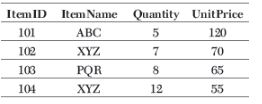
Riya created this table but forget to add column ManufacturingDate. Can she add this column after creation of table? If yes, write the code where user’s name and password are system and test respectively.
Answer: Yes, she can add new column after creation of table.
import mysql.connector
mycon = mysql.connector.connect(
host = “localhost”,
user = “system”,
passwd = “test”,
database = “Inventory”)
cursor = mycon.cursor ( )
cursor.execute (“ALTER TABLE Item ADD
ManufacturingDate Date
NOT NULL”)
mycon.close ( )
Question. Consider the table Faculty whose columns’ name are
F_ID, Fname, Lname, Hire_date, Salary,
Course_name
Write the code to insert the following record into the above table.

Answer: import mysql.connector
mycon = mysql.connector.connect
(host = “localhost”,
user = “root”, passwd = “system”,
database = “Test”)
cursor = con.cursor ( )
sql = “INSERT INTO Faculty (F_ID, Fname,
Lname, Hire_date, Salary,
Course_Name) VALUES
(%s, %s, %s, %s, %s, %s)”
val = [(101, ‘Riya’, ‘Sharma’,
‘12-10-2004’, 35000, ‘Java
Advance’), (102, ‘Kiyaan’,
‘Mishra’, ‘3-12-2010’, 28000,
‘Data Structure’)]
try:
cursor.executemany (sql, val)
mycon.commit ( )
except :
mycon.rollback ( )
mycon.close ( )
Question. Consider the table Persons whose fields are P_ID, LastName, FirstName, Address, City. Write a Python code to add a new row but add data only in the P_Id, LastName and columns as 5, Peterson, Kari respectively.
Answer: import mysql.connector
con = mysql.connector.connect
(host = “localhost”,
user = “admin”,
passwd = “admin@123”,
database = “system”)
cursor = con.cursor ( )
sql= “INSERT INTO Persons (P_ID, LastName,
FirstName) VALUES
(5, ‘Peterson’, ‘Kari’)”
try:
cursor.execute (sql)
con.commit ( )
except:
con.rollback ( )
con.close ( )
Question. Write the code to create a table Product in database Inventory with following fields :
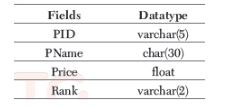
Answer: import mysql.connector
mycon = mysql.connector.connect
(host = “localhost”, user = “system”,
passwd = “hello”,
database = “Inventory”)
cur = mycon.cursor ( )
db = cur.execute (“CREATE TABLE Production
(PID varchar (5) Primary key,
PName char (30),
Price float,
Rank varchar(2)))”
mycon.close( )
Question. Consider the table MobileStock with following fields M_Id, M_Name, M_Qty, M_Supplier
Write the Python code to fetch all records with fields M_Id, M_Name and M_Supplier from database Mobile.
Answer: import mysql.connector as mydb
mycon = mydb.connect (host = “localhost”,
user = “root”, passwd = “system”,
database = “Mobile”)
cursor = mycon.cursor ( )
sql = “SELECT M_Id, M_Name, M_Supplier
FROM MobileStock”
try:
cursor. execute (sql)
display = cursor. fetchall ()
for i in display:
print (i)
except :
mycon.rollback ( )
mycon.close ( )
Question. The table Company of database connect contains the following records
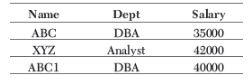
What will be the output of following code?
import mysql.connector
con = mysql.connector.connect
(host = “localhost”,
user = “system”,
passwd = “hello”,
database = “connect”)
cur = con.cursor()
cur.execute (“select Name,
Salary from Company”)
display = cur.fetchone()
print(display)
Answer: (‘ABC’, 35000)
Question. Consider the table Student whose fields are SCODE Name Age strcde Points Grade
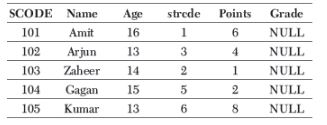
Write the Python code to update grade to ‘A’ for all these students who are getting more than 8 as points.
Answer: import mysql.connector as mydb
con = mydb.connect (host = “localhost”,
user = “Admin”,
passwd = “Admin@123”,
database = “system”)
cursor = con.cursor ( )
sql = “UPDATE Student SET Grade = ‘A’
WHERE Points > 8”
try :
cursor. execute (sql)
con.commit ( )
except :
con.rollback ( )
con.close ( )
Question. Write the code to create the connection in which database’s name is Python, name of host, user and password can taken by user. Also, print that connection.
Answer: import mysql.connector
mycon = mysql.connector.connect(
host = “localhost”,
user = “test”,
passwd = “testData”,
database = “Python”)
print(mycon)
Question. Consider the following table Traders with following fields
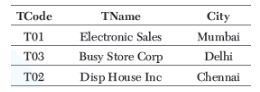
Write Python code to display the names of those traders who are either from Delhi or from Mumbai.
Answer: import mysql. connector
mycon = mysql.connector.connect
(host = “localhost”, user = “root”,
passwd = “system”,
database = “Admin”)
cursor = mycon. cursor ( )
sql = “SELECT * FROM Traders WHERE
City = ‘Mumbai’ OR City = ‘Delhi’”
try:
cursor.execute(sql)
dis = cursor.fetchall ( )
for i in disp:
print (i)
except :
mycon.rollback ( )
mycon.close ( )
Question. Which data will get added in table Company by following code?
import mysql.connector
con = mysql.connector.connect (
host = “localhost”,
user = “system”,
passwd = “hello”,
database = “connect”)
cur = con.cursor ( )
sql = “insert into Company
(Name, Dept, Salary)
values (%s, %s, %s)”
val = (“ABC”, “DBA”, 35000)
cur.execute (sql, val)
con.commit ( )
Answer: “ABC”, “DBA”, 35000
Question. Consider the following table structure
Faculty with fields as
F_ID(P)
Fname
Lname
Hire_date
Salary
Write the Python code to create the above table.
Answer: import mysql.connector
mycon = mysql. connector.connect (
host = “localhost”,
user = “root”,
passwd = “system”,
database = “School”)
cursor = mycon.cursor ( )
db = cursor.execute (“CREATE TABLE
Faculty (
F_ID varchar (3) Primary key,
Fname varchar (30) NOT NULL,
Lname varchar (40),
Hire_date Date,
Salary Float))
mycon.close ( )
Question. Write the code to create the following table Student with the following fields
RollNo
FirstName
LastName
Address
ContactNo
Marks
Course
Rank
In the table, Rank should be Good, Best, Bad, Worst, Average.
Answer: import mysql.connector
mycon = mysql.connector.connect (
host = “localhost”,
user = “root”,
passwd = “system”,
database = “School”)
cursor = mycon.cursor ( )
db = cursor.execute
(“CREATE TABLE Student(
RollNo Int(5) Primary key,
FirstName varchar(30) NOT NULL,
LastName varchar(30),
Address varchar(50),
ContactNo varchar(20),
Marks Float,
Course char(20),
Rank char(10) check (Rank IN(‘Good’, ‘Best’, ‘Bad’, ‘Worst’, ‘Average’))))
mycon.close ( )
Long Answer Type Questions :
Question. Consider the table MobileMaster

Write the Python code for the following
(i) To display details of those mobiles whose price is greater than 8000.
(ii) To increase the price of mobile Samsung by 2000.
Answer: (i) import mysql.connector as mydb
mycon = mydb.connect
(host = “localhost”,
user = “root”,
passwd = “system”,
database = “Admin”)
cursor = mycon.cursor ( )
sql = “SELECT * FROM MobileMaster
WHERE M_Price > 8000”
try:
cursor.execute (sql)
display = cursor. fetchall ( )
for i in display:
print(i)
except:
mycon.rollback ( )
mycon.close ( )
(ii) import mysql.connector as mydb
mycon = mydb.connect
(host = “localhost”,
user = “root”,
passwd = “system”,
database = “Admin”)
cursor = mycon.cursor ( )
sql = “UPDATE MobileMaster SET M_Price
= M_Price + 2000
WHERE M_Company = ‘Samsung’”
try:
cursor.execute (sql)
mycon.commit ( )
except :
mycon.rollback ( )
mycon.close( )
Question. Create following table using Python code where
Database — Test
Table — Watches
User name — Root
Password — System
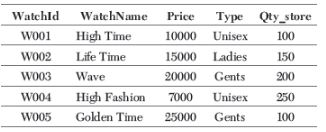
Answer: import mysql.connector
my = mysql.connector.connect
(host = “localhost”,
user = “Root”, passwd = “System”,
database = “Test”)
cursor = my.cursor ( )
db = cursor.execute (“CREATE TABLE Watches
(Watch_Id varchar(5) Primary Key,
WatchName char(20) NOT NULL,
Price float,
Type varchar (20),
Qty_store Int(5) NOT NULL))”
sql = “INSERT INTO Watches
(WatchId, WatchName, Price, Type,
Qty_store) VALUES (%s, %s, %s,
%s, %s)”
val = [(“W001”, “High Time”, 10000,
“Unisex”, 100),
(“W002”, “Life Time”, 15000,
“Ladies”, 150),
(“W003”, “Wave”, 20000,
“Gents”, 200),
(“W004”, “HighFashion”, 7000,
“Unisex”, 250),
(“W005”, “Golden Time“, 25000,
“Gents”, 100)]
try:
cursor. executemany (sql, val)
my.commit ( )
except :
my.rollback ( )
my.close ( )
Question. Write the Python code for (i) and (ii) on the basis of table College.
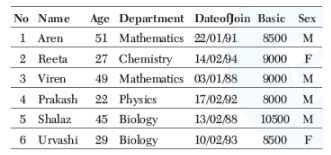
(i) To insert a new row in the table College with the following data
15, “Atin”, 27, “Physics”, “15/05/02”, 8500, “M”
(ii) To delete a row from table in which name is Viren.
Answer: (i) import mysql.connector as mydb
con = mydb.connect (
host = “localhost”,
user = “root”,
passwd = “admin@123”,
database = “Management”)
cursor = con.cursor ( )
sql = “INSERT INTO College (No, Name,
Age, Department, DateofJoin,
Basic, Sex) VALUES
(15, ‘Atin’, 27, ‘Physics’,
‘15/05/02’, 8500, ‘M’)”
cursor.execute (sql)
con.close ( )
(ii) import mysql.connector as mydb
con = mydb.connect
(host = “localhost”,
user = “root”,
passwd = “admin@123”,
database = “Management”)
cursor = con.cursor ( )
try:
cursor.execute (DELETE FROM College
WHERE Name = “Viren” ” )
con.commit ( )
except :
con.rollback ( )
con.close ( )
Question. Here is a table Club
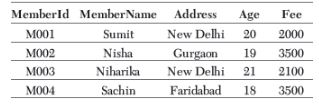
Write the Python code for the following
(i) Update the Address of member whose MemberId is M003 with Noida.
(ii) Delete the record of those member whose name is Sachin.
Answer: (i) import mysql.connector
mycon = mysql.connector.connect
(host = “localhost”,
user = “Admin”, passwd = “Admin@123”, database
= “System”)
cursor = mycon.cursor ( )
try:
cursor.execute (“UPDATE Club SET
Address = “Noida” WHERE MemberId
= “M003”)”)
mycon.commit ( )
except :
mycon.rollback ( )
mycon.close ( )
(ii) import mysql. connector
mycon = mysql. connector.connect
(host = “localhost”,
user = “Admin”,
passwd = “Admin@123”,
database = “System”)
cursor = mycon.cursor ( )
try:
cursor.execute (“DELETE FROM Club
WHERE MemberName = ‘Sachin’)”
cursor.commit ( )
except:
mycon.rollback ( )
mycon.close ( )
Free study material for Computer Science
Download Practice Assignments: Class 12 Computer Science Interface Python with SQL
Download Assignment: Interface Python with SQL (Class 12 Computer Science)
Access structured practice assignments for Interface Python with SQL designed in alignment with the latest CBSE curriculum for Class 12 Computer Science. These printable sets cover objective and descriptive problem types to support thorough revision.
Why Practice Class 12 Computer Science Assignments?
- Syllabus Compliance: Sets reflect current CBSE evaluation criteria and official marking frameworks.
- Multi-Format Practice: Includes varied problem types designed to deepen comprehension across all sub-topics.
- Time Management: Routine practice optimizes pacing to finish school examinations comfortably within schedule.
Steps to Complete Interface Python with SQL Assignments Successfully
- Textbook Review: Always study the core NCERT book for Class 12 Computer Science prior to beginning the assignment.
- Independent Attempt: Solve Interface Python with SQL questions on your own initially before cross-checking with expert solutions.
- Error Tracking: Record challenging concepts in a dedicated notebook and practice online MCQ tests for revision.
FAQs
You can download free PDF assignments for Class 12 Computer Science Interface Python with SQL from StudiesToday.com. These practice sheets have been updated for the 2026-27 session covering all concepts from latest NCERT textbook.
Yes, our teachers have given solutions for all questions in the Class 12 Computer Science Interface Python with SQL assignments. This will help you to understand step-by-step methodology to get full marks in school tests and exams.
Yes. These assignments are designed as per the latest CBSE syllabus for 2026. We have included huge variety of question formats such as MCQs, Case-study based questions and important diagram-based problems found in Interface Python with SQL.
Practicing topicw wise assignments will help Class 12 students understand every sub-topic of Interface Python with SQL. Daily practice will improve speed, accuracy and answering competency-based questions.
Yes, all printable assignments for Class 12 Computer Science Interface Python with SQL are available for free download in mobile-friendly PDF format.