

Official Class 12 Computer Science Revision Material: CBSE Class 12 Computer Science Networking Notes
Review targeted revision notes for Class 12 Computer Science with the CBSE Class 12 Computer Science Networking Notes. Built according to official educational guidelines for the 2026-27 academic year, these downloadable summaries for Networking support daily study and last-minute exam readiness.
Chapter-wise Concept Summaries: Networking
Navigate directly to the revision notes for Networking using the digital viewer below. Each summary is structured to highlight high-weightage sections, allowing students to instantly access critical definitions and focus on core exam topics.
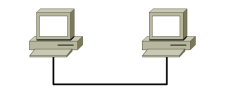
Networking in computers is to enable its users to share resources and to access these resources regardless of their physical locations, which may be a few feet or even thousands of miles apart. Thus we can say that computer network creates a global environment between its users and computers. It also provides communication links for distant places Computer network is defined as a set of interconnected autonomous systems that permits distributed processing of information.
F Need for networking:
• Resource sharing (Processing, Peripherals, Information and software)
• Personal or national or worldwide communication
• Information discovery and retrieval
F A brief history of computer networks: The first computer network was jointly designed by the Advanced Research Projects Agency (ARPA) and Department of Defence (DoD) of United States in 1969 and was called ARPANET. It was an experimental project, which connected a few computers from some of the reputed universities of USA and DoD. ARPANET allowed access to computer resource sharing projects. This ARPANET was handed over to Defence Communication Agency (DCA) for further development. As a result Defence Data Network (DDN) was born in 1983.
F Internet: A Network of computers that share a common communication protocol (Transfer Control Protocol / Internet Protocol – TCP/IP) that allows computers of different types to exchange information. Since each computer often has more than a single user. It has been estimated that more than 45 million people have Internet access. It is an interconnected system of networks that connects computers around the world via the Internet Protocol.
F Interspace: The Interspace is a vision of what the Internet will become, where users cross-correlate information in multiple ways from multiple sources. The Interspace will offer distributed services to transfer concepts across domains, just as Arpanet used distributed services to transfer objects across repositories.
F Network switching techniques: It provides communication between two computers. There are three types of network switching techniques.
1. Circuit switching: This provides end-to-end connected two computers. First, physical connection between two computers is established and then data (message) is transmitted from the source computer to the destination computer.
2. Message switching: The source computer sends data (message) to the switching office, which stores data in a buffer. It then looks for a free link to another switching office and sends data to that office. This process continues until data delivered to the destination computer. This type of switching technique is also known as store and forward switching.
3. Packet switching: A fixed size of packet that can be transmitted across the network is specified. All the packets are stored in the main memory instead of disk. As a result accessing time of packets is reduced.
Data Communication terminologies
F Baud: Baud, also known as Baud rate, is a unit of signaling speed equal to the number of discrete signal elements transmitted per second. Baud is synonymous with bits per seconds (bps), if each signal element represents exactly 1 bit. Baud is often used in the modem speed.
F Data transfer rate: The amount of data transferred in one direction over a link divided by the time taken to transfer it, usually expressed in bits per second (bps), Kilo bps (Kbps), Mega bps (Mbps), Giga bps(Gbps), Tera bps(Tbps). Bytes per second (Bps), Kilo Bps (KBps), Mega Bps (MBps), Giga Bps(GBps), Tera Bps(TBps).
F Bandwidth: The amount of data that can be passed along a communications channel in a given period of time (1 Seconds). The units used for it are Hz, !03 Hz= 1 Kilo Hz (KHz), 103 KHz = 1 Mega Hz (MHz).
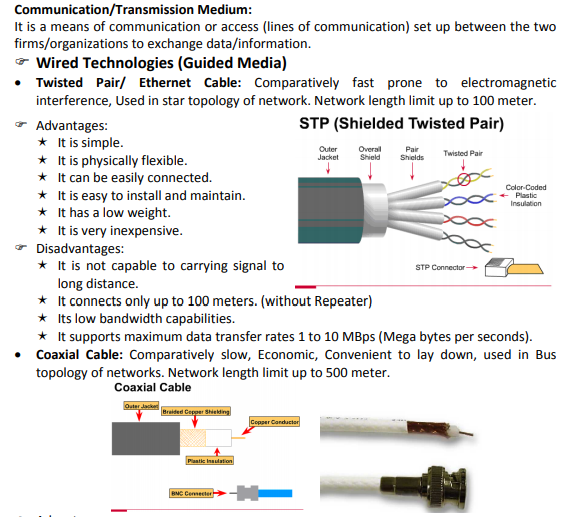
♦ Advantages:
¶ The data transmission rates better than Twist-pair cable.
¶ It is used a shared cable network.
¶ It can be used for broadband transmission. i.e., several channels can be transmitted simultaneously (as with Cable TV).
¶ It supports high bandwidths – up to 400 MBps
♦ Disadvantages:
¶ It connects only up to 500 meters.
¶ It is expensive compared to twisted pair cables.
¶ Optical Fiber: Very fast, expensive, reliable, no interference. Network length limit up to 100 Kilo Meter.
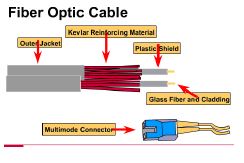
♦ Advantages:
¶ It is immune to electrical and magnetic interference.
¶ It is highly suitable for harsh industrial environments.
¶ It is guarantees secure transmission.
¶ It is very high transmission capacity.
¶ It is used for broadband transmission where several channels.
¶ It connects up to 100 kilo meter.
♦ Disadvantages:
¶ It installation is difficult.
¶ It is most expensive over all the cables.
¶ Connection losses are common problems.
¶ It is difficult to solder.
• Telephone Wire: Most economic, widely available, slow, good for analog signals.
♦ Wireless Technologies (Unguided Media)

• Infrared: Infrared electromagnetic waves have frequencies higher than microwaves but lower than the visible spectrum. Infrared transmission is used for wireless LANs, as well as for point-to-point communications with portable devices. Examples: Mobile phones, Remote controls, etc.
• Radio Wave: It is a form of wireless communications in which the output of the transmitter takes form of dissipating electromagnetic radiation, which spreads outward from the antenna through free space. It is a slow means of communication. It is an insecure communication. It is susceptible to weather effects like rains, thunder storms.
• Microwave: Very expensive, works on line of sight principles, faster than radio communication. The term microwave refers to electromagnetic energy having a frequency higher than 1 gigahertz (billions of cycles per second). They are not reflected or reflected by ionized regions in the upper atmosphere. Microwave beams do not readily diffract around barriers such as hills, mountains, and large human-made structures. It is an insecure communication. It is susceptible to weather effects like rains, thunder storms.
• Laser: The laser transmission requires direct line-of-sight. It is unidirectional like microwave, but has much higher speed than microwaves. The laser transmission is point-to-point transmission.
• Bluetooth: Bluetooth is a telecommunications industries specification that connects mobile phones, computers, and personal digital assistants can be easily interconnected using a short-range wireless connection.
• Satellite link: It is a link using radio frequencies relayed by satellite. IT is very expensive, fast, and wide area coverage. The heavy usage of intercontinental traffic makes the satellite commercial attractive. The high investment cost.
¶ Network Devices
• MODEM (Modulator Demodulator): It is a device used to convert the digital signals into analog signals and vice versa. It is mainly used to connect a telephone to a computer terminal. Modem in two varieties: 1. Internal Modem (Fixed with computer) 2. External Modem (Connect externally to computer).
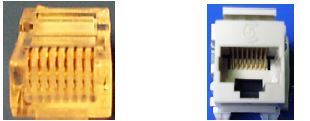
• RJ11 Connector: RJ-11 is the standard connector utilized on 2-pair (4-wire) telephone wiring, and RJ stands for “Registered Jack” – physical connector interface most often used for telephone wire terminals.
• RJ45 Connector: RJ45 is a standard type of connector for network cables and networks. It is an 8-pin connector usually used with Ethernet cables.
• Ethernet Card: Network Interface Card, a card you insert into a computer that enables it to be connected to a network. NICs are designed for a particular type of network and/or protocol. (i.e. Ethernet, ATM, etc)
• Hub: It is an unintelligent network device that sends one signal to all of the stations connected to it. Basically, hubs are multi-slot connectors into which a number of multi-port cards can be plugged to provide additional access as the network group size.
• Switch: It is similar to a hub, in that it provides a central connection between two or more computers on a network, but with some intelligence. A switch is responsible for filtering, transforming data in a specific way and for forwarding packets between LAN segments. Switch support any packet protocols.
• Repeater: It is devices that strengthens the signal intensity and connects two identical networks and used to Repeaters are also used extensively in broadcasting, where they are known as translators or boosters. A repeater is a network device that amplifies and restores signals for long-distance transmission
• Gateway: A Gateway is a network device that connects dissimilar networks. It establishes an intelligent connection between a local networks and external networks with completely different structures. It is a network point that acts as an entrance to another network, such as the server through which people on a company’s local are network access the Internet. Often a gateway conceals the IP address of the specific user sending out information, and outsiders can only see the IP address of the gateway itself. Examples: VSNL, MIT, etc.
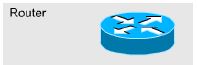
• Router: The router is to make decisions based on groups of network. The purpose of a router is to examine incoming packets, choose the best path for them through the network, and then switch them to the proper outgoing port. Routers are the most important traffic-regulating devices on large networks. Router can handle multiple protocol and works with IP addresses.
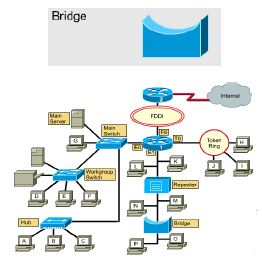
• Bridge: A bridge is a device designed to connect two LAN segments. The purpose of a bridge is to filter traffic on a LAN. It connects two different types of cables (like Optical Fiber, Twist-pair cable). Bridge cannot handles multiple protocol but, It works with MAC addresses.
Please click the link below to download pdf file for CBSE Class 12 Computer Science - Networking.
Free study material for Computer Science
Networking Concepts and Summary for Class 12 Computer Science
Quick Revision Notes: Networking (CBSE)
Review targeted chapter notes for Class 12 Computer Science Networking. Built according to official CBSE guidelines, these summaries highlight high-yield topics frequently tested in school evaluations.
Expert Study Material for Class 12 Computer Science
Cross-reference your comprehension with comprehensive NCERT solutions for Class 12 to ensure absolute clarity across all sub-topics in this chapter.
Complete Your Chapter Revision
Wrap up your chapter revision by testing your knowledge against standard question formats. Everything on our platform is provided free of charge.
FAQs
You can download the teacher prepared revision notes for CBSE Class 12 Computer Science Networking Notes from StudiesToday.com. These notes are designed as per 2026-27 academic session to help Class 12 students get the best study material for Computer Science.
Yes, our CBSE Class 12 Computer Science Networking Notes include 50% competency-based questions with focus on core logic, keyword definitions, and the practical application of Computer Science principles which is important for getting more marks in 2026 CBSE exams.
Yes, our CBSE Class 12 Computer Science Networking Notes provide a detailed, topic wise breakdown of the chapter. Fundamental definitions, complex numerical formulas and all topics of CBSE syllabus in Class 12 is covered.
These notes for Computer Science are organized into bullet points and easy-to-read charts. By using CBSE Class 12 Computer Science Networking Notes, Class 12 students fast revise formulas, key definitions before the exams.
No, all study resources on StudiesToday, including CBSE Class 12 Computer Science Networking Notes, are available for immediate free download. Class 12 Computer Science study material is available in PDF and can be downloaded on mobile.