

Computer Science Concept Notes for Class 12: Database And SQL
Review targeted revision notes for Class 12 Computer Science with the CBSE Class 12 Computer Science Database And SQL Notes Set 01. Built according to official educational guidelines for the 2026-27 academic year, these downloadable summaries for Database And SQL support daily study and last-minute exam readiness.
Download Database And SQL Revision Notes PDF
Navigate directly to the revision notes for Database And SQL using the digital viewer below. Each summary is structured to highlight high-weightage sections, allowing students to instantly access critical definitions and focus on core exam topics.


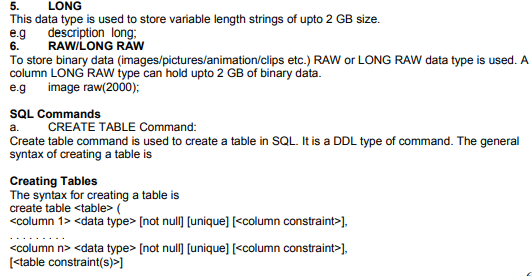
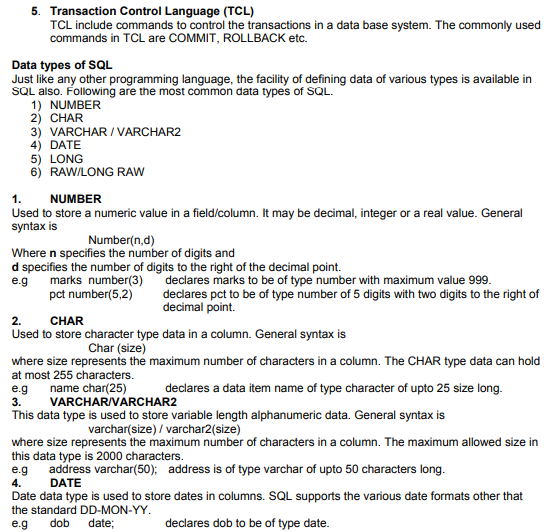
5. LONG
This data type is used to store variable length strings of upto 2 GB size.
e.g description long;
6. RAW/LONG RAW
To store binary data (images/pictures/animation/clips etc.) RAW or LONG RAW data type is used. A
column LONG RAW type can hold upto 2 GB of binary data.
e.g image raw(2000);
SQL Commands
a. CREATE TABLE Command:
Create table command is used to create a table in SQL. It is a DDL type of command. The general syntax of creating a table is
Creating Tables
The syntax for creating a table is
create table <table> (
<column 1> <data type> [not null] [unique] [<column constraint>],
. . . . . . . . .
<column n> <data type> [not null] [unique] [<column constraint>],
[<table constraint(s)>]
); For each column, a name and a data type must be specified and the column name must be unique within the table definition. Column definitions are separated by comma. Uppercase and lowercase letters makes no difference in column names, the only place where upper and lower case letters matter are strings comparisons. A not null Constraint means that the column cannot have null value, that is a value needs to be supplied for that column. The keyword unique specifies that no two tuples can have the same attribute value for this column.
Operators in SQL:
The following are the commonly used operators in SQL
1. Arithmetic Operators +, -, *, /
2. Relational Operators =, <, >, <=, >=, <>
3. Logical Operators OR, AND, NOT
Arithmetic operators are used to perform simple arithmetic operations.
Relational Operators are used when two values are to be compared and Logical operators are used to connect search conditions in the WHERE Clause in SQL.
Constraints:
Constraints are the conditions that can be enforced on the attributes of a relation. The constraints come in play when ever we try to insert, delete or update a record in a relation.
1. NOT NULL
2. UNIQUE
3. PRIMARY KEY
4. FOREIGN KEY
5. CHECK
6. DEFAULT
Not null ensures that we cannot leave a column as null. That is a value has to be supplied for that column.
e.g name varchar(25) not null;
Unique constraint means that the values under that column are always unique.
e.g Roll_no number(3) unique;
Primary key constraint means that a column can not have duplicate values and not even a null value.
e.g. Roll_no number(3) primary key;
The main difference between unique and primary key constraint is that a column specified as unique may have null value but primary key constraint does not allow null values in the column.
Foreign key is used to enforce referential integrity and is declared as a primary key in some other table.
e.g cust_id varchar(5) references master(cust_id);
it declares cust_id column as a foreign key that refers to cust_id field of table master. That means we
cannot insert that value in cust_id filed whose corresponding value is not present in cust_id field of master table.
Check constraint limits the values that can be inserted into a column of a table.
e.g marks number(3) check(marks>=0);
The above statement declares marks to be of type number and while inserting or updating the value in marks it is ensured that its value is always greater than or equal to zero.
Default constraint is used to specify a default value to a column of a table automatically. This default value will be used when user does not enter any value for that column.
e.g balance number(5) default = 0;
CREATE TABLE student (
Roll_ no number(3) primary key,
Name varchar(25) not null,
Class varchar(10),
Marks number(3) check(marks>0),
City varchar(25) );
Data Modifications in SQL
After a table has been created using the create table command, tuples can be inserted into the table,
or tuples can be deleted or modified.
INSERT Statement
The simplest way to insert a tuple into a table is to use the insert statement
insert into <table> [(<column i, . . . , column j>)] values (<value i, . . . , value j>);
INSERT INTO student VALUES(101,'Rohan','XI',400,'Jammu');
While inserting the record it should be checked that the values passed are of same data types as the one which is specified for that particular column.
For inserting a row interactively (from keyboard) & operator can be used.
e.g INSERT INTO student VALUES(&Roll_no’,’&Name’,’&Class’,’&Marks’,’&City’);
In the above command the values for all the columns are read from keyboard and inserted into the table student.
NOTE:- In SQL we can repeat or re-execute the last command typed at SQL prompt by typing “/” key and pressing enter.
Queries:
To retrieve information from a database we can query the databases. SQL SELECT statement is used to select rows and columns from a database/relation.
SELECT Command
This command can perform selection as well as projection.
Selection: This capability of SQL can return you the tuples form a relation with all the attributes.
Projection: This is the capability of SQL to return only specific attributes in the relation.
* SELECT * FROM student; command will display all the tuples in the relation student
* SELECT * FROM student WHERE Roll_no <=102;
The above command display only those records whose Roll_no less than or equal to 102.
Select command can also display specific attributes from a relation.
* SELECT name, class FROM student;
The above command displays only name and class attributes from student table.
* SELECT count(*) AS “Total Number of Records” FROM student;
Display the total number of records with title as “Total Number of Records” i.e an alias We can also use arithmetic operators in select statement, like
* SELECT Roll_no, name, marks+20 FROM student;
* SELECT name, (marks/500)*100 FROM student WHERE Roll_no > 103;
Eliminating Duplicate/Redundant data
DISTINCT keyword is used to restrict the duplicate rows from the results of a SELECT statement.
e.g. SELECT DISTINCT name FROM student;
The above command returns
Name
Rohan
Aneeta Chopra
Pawan Kuma
Conditions based on a range
SQL provides a BETWEEN operator that defines a range of values that the column value must fall for the condition to become true.
e.g. SELECT Roll_no, name FROM student WHERE Roll_no BETWENN 100 AND 103;
The above command displays Roll_no and name of those students whose Roll_no lies in the range 100 to 103 (both 100 and 103 are included in the range).
Conditions based on a list
To specify a list of values, IN operator is used. This operator select values that match any value in the given list.
e.g. SELECT * FROM student WHERE city IN (‘Jammu’,’Amritsar’,’Gurdaspur’);
The above command displays all those records whose city is either Jammu or Amritsar or Gurdaspur.
Conditions based on Pattern
SQL provides two wild card characters that are used while comparing the strings with LIKE operator.
a. percent(%) Matches any string
b. Underscore(_) Matches any one character
e.g SELECT Roll_no, name, city FROM student WHERE Roll_no LIKE “%3”;
displays those records where last digit of Roll_no is 3 and may have any number of characters in front.
e.g SELECT Roll_no, name, city FROM student WHERE Roll_no LIKE “1_3”;
displays those records whose Roll_no starts with 1 and second letter may be any letter but ends with digit 3.
ORDER BY Clause
ORDER BY clause is used to display the result of a query in a specific order(sorted order).
The sorting can be done in ascending or in descending order. It should be kept in mind that the actual data in the database is not sorted but only the results of the query are displayed in sorted order.
e.g. SELECT name, city FROM student ORDER BY name;
The above query returns name and city columns of table student sorted by name in increasing/ascending order.
e.g. SELECT * FROM student ORDER BY city DESC;
It displays all the records of table student ordered by city in descending order.
Note:- If order is not specifies that by default the sorting will be performed in ascending order.
GROUP BY Clause
The GROUP BY clause can be used in a SELECT statement to collect data across multiple records and group the results by one or more columns.
The syntax for the GROUP BY clause is:
SELECT column1, column2, ... column_n, aggregate_function (expression)
FROM tables
WHERE conditions
GROUP BY column1, column2, ... column_n;
aggregate_function can be a function such as SUM, COUNT, MAX, MIN, AVG etc.
e.g SELECT name, COUNT(*) as "Number of employees"
FROM student
WHERE marks>350
GROUP BY city;
HAVING Clause
The HAVING clause is used in combination with the GROUP BY clause. It can be used in a SELECT statement to filter the records that a GROUP BY returns.
The syntax for the HAVING clause is:
SELECT column1, column2, ... column_n, aggregate_function (expression)
FROM tables
WHERE predicates
GROUP BY column1, column2, ... column_n
HAVING condition1 ... condition_n;
e.g SELECT SUM(marks) as "Total marks"
FROM student
GROUP BY department
HAVING SUM(sales) > 1000;
Please click the link below to download pdf file for CBSE Class 12 Computer Science - Database And Sql.
Free study material for Computer Science
Download CBSE Revision Notes: Class 12 Computer Science Database And SQL
Quick Revision Notes: Database And SQL (CBSE)
Explore reliable chapter overviews for Database And SQL tailored for Class 12 learners. Use these structured points to grasp difficult themes and ensure solid preparation for upcoming assessments.
Expert Study Material for Class 12 Computer Science
Built using the official NCERT book for Class 12 Computer Science, these notes provide reliable academic guidance. Pair your summary review with our recommended NCERT solutions to master optimal problem-solving approaches.
Complete Your Chapter Revision
Wrap up your chapter revision by testing your knowledge against standard question formats. Everything on our platform is provided free of charge.
FAQs
You can download the teacher prepared revision notes for CBSE Class 12 Computer Science Database And SQL Notes Set 01 from StudiesToday.com. These notes are designed as per 2026-27 academic session to help Class 12 students get the best study material for Computer Science.
Yes, our CBSE Class 12 Computer Science Database And SQL Notes Set 01 include 50% competency-based questions with focus on core logic, keyword definitions, and the practical application of Computer Science principles which is important for getting more marks in 2026 CBSE exams.
Yes, our CBSE Class 12 Computer Science Database And SQL Notes Set 01 provide a detailed, topic wise breakdown of the chapter. Fundamental definitions, complex numerical formulas and all topics of CBSE syllabus in Class 12 is covered.
These notes for Computer Science are organized into bullet points and easy-to-read charts. By using CBSE Class 12 Computer Science Database And SQL Notes Set 01, Class 12 students fast revise formulas, key definitions before the exams.
No, all study resources on StudiesToday, including CBSE Class 12 Computer Science Database And SQL Notes Set 01, are available for immediate free download. Class 12 Computer Science study material is available in PDF and can be downloaded on mobile.