

Computer Science Concept Notes for Class 12: Communication And Network
Review targeted revision notes for Class 12 Computer Science with the CBSE Class 12 Computer Science Communication And Network Notes Set 02. Built according to official educational guidelines for the 2026-27 academic year, these downloadable summaries for Communication And Network support daily study and last-minute exam readiness.
Download Communication And Network Revision Notes PDF
View or download the dedicated Communication And Network revision resource below. Engaging with these structured concept notes daily ensures continuous academic progress and mastery of the 2026-27 curriculum for Computer Science.
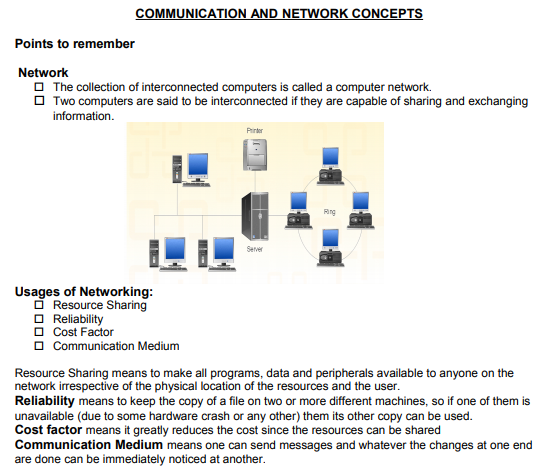
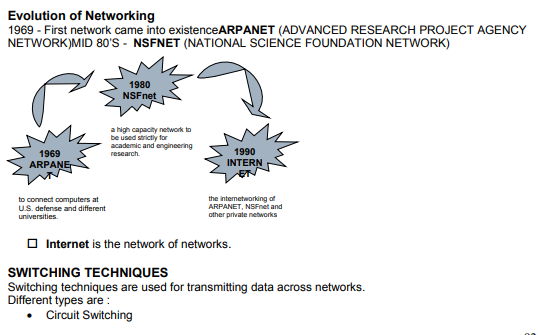
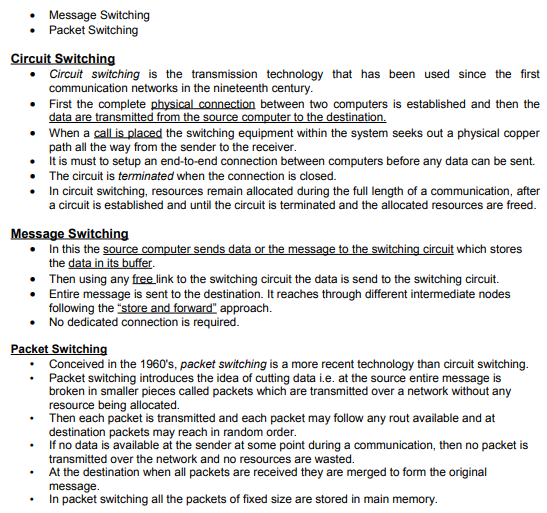

Basic communications media types
· Copper
o unshielded twisted pair (utp)
o shielded twisted pair (stp)
o coaxial cable (thinnet, thicknet)
· Fiber optic
o single-mode
o multi-mode
· Infrared
· Radio & microwave
Twisted Pair Cable
· These cables consist of two insulated copper wires twisted around each other in a double helix.
· Twisting of wires reduces crosstalk which is bleeding of a signal from one wire to another.
Types:
· Unshielded Twisted Pair (UTP)
· Shielded Twisted Pair (STP
STP offers greater protection from interference and crosstalk due to shielding.
But it is heavier and costlier than UTP.
USE 1. In local telephone communication
2. For digital data transmission over short distances upto 1 km
Advantages:
· Easy to install and maintain
· Simple
· Inexpensive
· Low weight
· Suitable for small (Local) Networks
Disadvantages:
· Not suitable for long distance due to high attenuation.
· Low bandwidth support.
· Low Speed
Coaxial cable
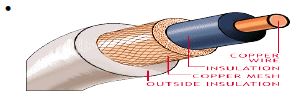
· Coaxial cable consists of a solid copper wire core surrounded by a plastic cladding shielded in a wire mesh.
· Shield prevents the noise by redirecting it to ground.
Types:
Coaxial cable comes in two sizes which are called thinnet and thicknet.
· Thicknet : segment length upto 500 m
· Thinnet : segment length upto 185 m
USE:
In TV channel communication
Advantages:
· Better than twisted wire cable.
· Popular for TV networks
· Offers higher bandwidth & Speed
· Disadvantages:
· Expensive than twisted wires.
· Not compatible with twisted wire cable.
Optical Fibres
· Thin strands of glass or glass like material designed to carry light from one source to another.
· Source converts (Modulates) the data signal into light using LED (Light Emitting Diodes) or LASER diodes and send it over the Optical fiber.
It consists of three parts:
1. The core: glass or plastic through which the light travels.
2. The cladding : covers the core and reflects light back to the core
3. Protective coating : protects the fiber
Advantages
· Not affected by any kind of noise.
· High transmission capacity
· Speed of Light
· Suitable for broadband communication
Disadvantages
· Installation requires care.
· Connecting two Optical fibers is difficult.
· Optical fibers are more difficult to solder
· Most expensive
Microwaves
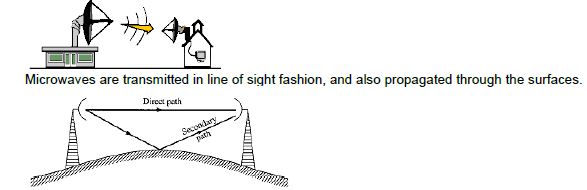
Microwaves are transmitted from the transmitters placed at very high towers to the receivers at a long distance.
Advantages
• Maintenance easy than cables.
• Suitable when cable can not be used.
Disadvantages
• Repeaters are required for long distance communication.
• Less Bandwidth available
Satellite
Geostationary satellites are placed around 36000 KM away from the earth’s surface. In satellite communication transmitting station transmits the signals to the satellite. (It is called up-linking). After receiving the signals (microwaves) it amplifies them and transmit back to earth in whole visibility area.
Receiving stations at different places can receive these signals. (It is called down-linking).

Advantage
• Area coverage is too large
Disadvantage
• High investment
Network devices
Modem
· A modem is a computer peripheral that allows you to connect and communicate with other computers via telephone lines.
· Modem means Modulation/ Demodulation.
· Modulation: A modem changes the digital data from your computer into analog data, a format that can be carried by telephone lines.
· Demodulation: The modem receiving the call then changes the analog signal back into digital data that the computer can digest.
· The shift of digital data into analog data and back again, allows two computers to speak with one another.
RJ- 45 Connector
RJ-45 is short for Registered Jack-45. It is an eight wire connector which is commonly used to connect computers on the local area networks i.e., LAN.
Network Interface Cards (Ethernet Card)
· A network card, network adapter or NIC (network interface card) is a piece of computer hardware designed to allow computers to communicate over a computer network. It provides physical access to a networking medium and often provides a low-level addressing system through the use of MAC addresses. It allows users to connect to each other either by using cables or wirelessly.

A repeater is an electronic device that receives a signal and retransmits it at a higher level or higher power, or onto the other side of an obstruction, so that the signal can cover longer distances without degradation. In most twisted pair Ethernet configurations, repeaters are required for cable runs longer than 100 meters.
Please click the link below to download pdf file for CBSE Class 12 Computer Science - Communication And Network Concepts.
Free study material for Computer Science
Study Material and Revision Notes for Class 12 Computer Science Communication And Network
Key Concepts and Summary for Class 12 Computer Science Communication And Network
Review targeted chapter notes for Class 12 Computer Science Communication And Network. Built according to official CBSE guidelines, these summaries highlight high-yield topics frequently tested in school evaluations.
NCERT-Aligned Chapter Summary and Notes
Built using the official NCERT book for Class 12 Computer Science, these notes provide reliable academic guidance. Pair your summary review with our recommended NCERT solutions to master optimal problem-solving approaches.
Next Steps in Your Exam Preparation
Follow up your revision by attempting the interactive online Computer Science MCQ test and practice worksheets for this chapter to verify your mastery. All platform resources are free to access.
FAQs
You can download the teacher prepared revision notes for CBSE Class 12 Computer Science Communication And Network Notes Set 02 from StudiesToday.com. These notes are designed as per 2026-27 academic session to help Class 12 students get the best study material for Computer Science.
Yes, our CBSE Class 12 Computer Science Communication And Network Notes Set 02 include 50% competency-based questions with focus on core logic, keyword definitions, and the practical application of Computer Science principles which is important for getting more marks in 2026 CBSE exams.
Yes, our CBSE Class 12 Computer Science Communication And Network Notes Set 02 provide a detailed, topic wise breakdown of the chapter. Fundamental definitions, complex numerical formulas and all topics of CBSE syllabus in Class 12 is covered.
These notes for Computer Science are organized into bullet points and easy-to-read charts. By using CBSE Class 12 Computer Science Communication And Network Notes Set 02, Class 12 students fast revise formulas, key definitions before the exams.
No, all study resources on StudiesToday, including CBSE Class 12 Computer Science Communication And Network Notes Set 02, are available for immediate free download. Class 12 Computer Science study material is available in PDF and can be downloaded on mobile.