

Download CBSE Class 12 Computer Science Useful Resources
Explore structured advanced study materials through the Class 12 Data File Handling In C++ Revision Notes. Tailored for Class 12 learners, utilizing these Computer Science resources ensures thorough preparation and strengthens foundational knowledge before final CBSE evaluations.
Access CBSE Study Guides and Summaries
Navigate directly to the advanced Computer Science study materials using the digital viewer below. Each resource pack includes detailed conceptual summaries and solved practice questions, allowing students to instantly reinforce their learning.
This Class 12 Computer Science revision notes page on Data File Handling in C++ covers files and streams, text and binary files, the ofstream, ifstream and fstream classes, opening and closing files, the put, get, read and write functions, file pointers and seekg, seekp, tellg and tellp, followed by solved short answer and very short answer questions on text and binary files with corrected answers.
UNIT-I: OBJECT ORIENTED PROGRAMMING IN C++
CHAPTER 5: DATA FILE HANDLING IN C++
BASIC TERMS
File: The information or data stored under a specific name on a storage device is called a file.
Stream: A stream refers to a sequence of bytes.
Text file: A file that stores information in ASCII characters. In text files, each line of text is terminated with a special character known as EOL (End of Line) character or delimiter character. When this EOL character is read or written, certain internal translations take place.
Binary file: A file that contains information in the same format as it is held in memory. In binary files, no delimiters are used for a line and no translations occur here.
CLASSES USED FOR FILE OPERATIONS
ofstream: Object of ofstream class used to write data to the files.
ifstream: Object of ifstream class used to read from files.
fstream: Object of fstream class used to both read and write from or to files.
OPENING A FILE
Opening a file using a constructor:
ofstream outFile("sample.txt"); //output only
ifstream inFile("sample.txt"); //input only
Opening a file using open():
StreamObject.open("filename", [mode]);
ofstream outFile;
outFile.open("sample.txt");
ifstream inFile;
inFile.open("sample.txt");
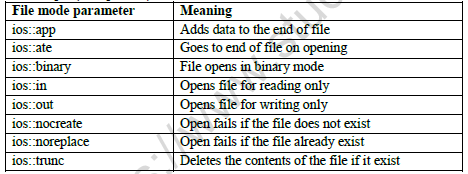
File mode parameters and their meanings:
| File mode parameter | Meaning |
|---|---|
| ios::app | Adds data to the end of file |
| ios::ate | Goes to end of file on opening |
| ios::binary | File opens in binary mode |
| ios::in | Opens file for reading only |
| ios::out | Opens file for writing only |
| ios::nocreate | Open fails if the file does not exist |
| ios::noreplace | Open fails if the file already exists |
| ios::trunc | Deletes the contents of the file if it exists |
All these flags can be combined using the bitwise operator OR (|). For example, to open the file example.dat in binary mode to add data, the following call to the member function open() is made:
fstream file;
file.open("example.dat", ios::out | ios::app | ios::binary);
Closing a file:
outFile.close();
inFile.close();
INPUT AND OUTPUT OPERATIONS
put() and get() functions: The function put() writes a single character to the associated stream. Similarly, the function get() reads a single character from the associated stream.
Example:
file.get(ch);
file.put(ch);
write() and read() functions: The write() and read() functions write and read blocks of binary data.
Example:
file.read((char *)&obj, sizeof(obj));
file.write((char *)&obj, sizeof(obj));
Determining the end of file: The function eof() returns true (non zero) if the end of file is encountered while reading; otherwise it returns false (zero).
FILE POINTERS AND THEIR MANIPULATION
All I/O stream objects have, at least, one internal stream pointer. ifstream has a pointer known as the get pointer that points to the element to be read in the next input operation. ofstream has a pointer known as the put pointer that points to the location where the next element has to be written. fstream inherits both the get and the put pointers.
These internal stream pointers, which point to the reading or writing locations within a stream, can be manipulated using the following member functions:
seekg() moves the get pointer (input) to a specified location.
seekp() moves the put pointer (output) to a specified location.
tellg() gives the current position of the get pointer.
tellp() gives the current position of the put pointer.
The other prototype for these functions is:
seekg(offset, refposition);
seekp(offset, refposition);
The parameter offset represents the number of bytes (any negative or positive integer value for backward or forward movement) the file pointer is to be moved from the location specified by the parameter refposition. The refposition takes one of the following three constants defined in the ios class:
ios::beg: start of the file
ios::cur: current position of the pointer
ios::end: end of the file
SOLVED PROGRAM EXAMPLES
Program to count the number of words in a text file "input.txt":
#include <fstream.h>
void main()
{
ifstream fin;
fin.open("input.txt");
char words[50]; int count=0;
while(!fin.eof())
{
fin>>words;
count++;
}
cout<<"Number of words in file is "<<count;
fin.close();
}
Program to count the number of vowels in a text file "input.txt":
#include <fstream.h>
void main()
{
ifstream fin;
fin.open("input.txt");
char ch; int count=0;
while(!fin.eof())
{
fin.get(ch);
if(ch=='a'||ch=='e'||ch=='i'||ch=='o'||ch=='u')
count++;
}
cout<<"Number of vowels in file are "<<count;
fin.close();
}
Binary file: input, output and modify a record:
#include <fstream.h>
#include <string.h>
#include <stdio.h>
class employee
{
int empno;
char ename[20];
public:
void getdata()
{
cout<<"\nEnter The Employee no. ";
cin>>empno;
cout<<"\n\nEnter The Name of The Employee ";
gets(ename);
}
void showdata()
{
cout<<"\nEmployee no. : "<<empno;
cout<<"\nEmployee Name : ";
cout<<ename;
}
int returnempno()
{
return empno;
}
};
void write_data()
{
employee obj;
ofstream fout;
fout.open("employee.dat", ios::binary|ios::app);
obj.getdata();
fout.write((char*)&obj, sizeof(obj));
fout.close();
}
void display()
{
employee obj;
ifstream fin;
fin.open("employee.dat", ios::binary);
while(fin.read((char*)&obj, sizeof(obj)))
{
obj.showdata();
}
fin.close();
}
void modifyrecord(int n)
{
fstream finout;
employee obj;
int found=0;
finout.open("employee.dat", ios::in|ios::out);
while(finout.read((char*)&obj, sizeof(obj)) && found==0)
{
if(obj.returnempno()==n)
{
obj.showdata();
cout<<"\nEnter The New data of employee";
obj.getdata();
int pos=-1*sizeof(obj);
finout.seekp(pos, ios::cur);
finout.write((char*)&obj, sizeof(obj));
found=1;
}
}
finout.close();
}
SHORT ANSWER TYPE QUESTIONS (2 MARKS BASED ON TEXT FILES)
1. Write a function in a C++ to count the number of lowercase alphabets present in a text file "BOOK.txt". [2 Marks]
Answer:
1. The function opens BOOK.txt for reading with an ifstream object.
2. Each character is read with get() and tested with islower().
3. The counter is increased for every lowercase letter, and the file is closed before returning the count.
int countalpha()
{
ifstream Fin("BOOK.txt");
char ch;
int count=0;
while(Fin.get(ch))
{
if (islower(ch))
count++;
}
Fin.close();
return count;
}
Teacher's Note:
a) The printed key used while(!Fin.eof()) with get(). When the last read fails, ch still holds the previous character, so a final lowercase letter is counted twice. The loop is corrected to while(Fin.get(ch)), which stops exactly at end of file.
b) islower() comes from ctype.h, so that header must be included in the program.
2. Write a function in C++ to count the number of line started with alphabet 'a' or 'A' in a text file "LINES.TXT". [2 Marks]
Answer:
1. Declare a character array Aline of size 80 to hold one line, and an int Count set to 0.
2. Open LINES.TXT with the ifstream object Fin.
3. Read each line with getline() and check its first character Aline[0].
4. Increase Count when the first character is 'A' or 'a', then print Count and close the file.
void counter()
{
char Aline[80];
int Count=0;
ifstream Fin("LINES.TXT");
while(Fin.getline(Aline,80,'\n'))
{
if (Aline[0]=='A'||Aline[0]=='a')
Count++;
}
cout<<Count<<endl;
Fin.close();
}
Teacher's Note:
a) The printed key tested fin.eof() in lowercase, but the stream object is named Fin, so the name must match. It also had an extra closing bracket in the getline() call.
b) Putting getline() directly in the while condition reads one line per pass and stops automatically at end of file.
3. Given a binary file PHONE.DAT, containing records of the following structure type.
class phonlist
{ char Name[20] ;
char Address[30] ;
char AreaCode[5] ;
char PhoneNo[15] ;
public ;
void Register( ) ;
void Show( ) ;
int CheckCode(char AC[ ])
{ return strcmp(AreaCode, AC) ;
}
};
Write a function TRANSFER( ) in C++, that would copy all those records which are having AreaCode as "DEL" from PHONE.DAT to PHONBACK.DAT. [2 Marks]
Answer:
1. Open PHONE.DAT for binary reading and PHONBACK.DAT for binary writing.
2. Read one phonlist record at a time from PHONE.DAT.
3. Call CheckCode("DEL") on each record. It returns 0 when the AreaCode matches "DEL".
4. Write every matching record to PHONBACK.DAT, then close both files.
void TRANSFER( )
{
ifstream Fin;
ofstream Fout;
phonlist ph;
Fin.open("PHONE.DAT", ios::in|ios::binary);
Fout.open("PHONBACK.DAT", ios::out|ios::binary);
while(Fin.read((char*)&ph, sizeof(ph)))
{
if(ph.CheckCode("DEL")==0)
Fout.write((char*)&ph, sizeof(ph));
}
Fin.close();
Fout.close();
}
Teacher's Note:
a) The printed key called ph.check("DEL"), but the member function in the class is named CheckCode(), so the call must use that name.
b) The printed key wrote the class as Phonlist and the question as phonlist; the object must be declared with the class name exactly as it is written in the class definition.
4. Given a binary file STUDENT.DAT, containing records of the following class Student type
class Student
{
char S_Admno[lO]; //Admission number of student
char S_Name[30]; //Name of student
int Percentage; //Marks Percentage of student
public:
void EnterData()
{
gets(S_Admno);gets(S_Name);cin>>Percentage;
}
void DisplayData()
{
cout<<setw(12)<<S_Admno;
cout<<setw(32)<<S_Name;
cout<<setw(3)<<Percentage<<endl;
}
int ReturnPercentage(){return Percentage;}
};
Write a function in C++, that would read contents of file STUDENT.DAT and display the details of those Students whose Percentage is above 75 [2 Marks]
Answer:
1. Open STUDENT.DAT in binary input mode.
2. Read one Student record at a time into the object S.
3. If ReturnPercentage() is greater than 75, call DisplayData() for that record.
4. Close the file.
void Distinction()
{
Student S;
fstream Fin;
Fin.open("STUDENT.DAT", ios::binary|ios::in);
while(Fin.read((char*)&S, sizeof(Student)))
{
if (S.ReturnPercentage()>75)
S.DisplayData();
}
Fin.close();
}
Teacher's Note:
a) The printed key left out the closing bracket of the while condition, so the line is corrected to while(Fin.read(...)).
b) Only students with Percentage strictly greater than 75 are displayed, so 75 itself is not included.
5. Given a binary file STUINFO.DAT, containing records of the following structure type.
class STUDENT
{
int rollno;
char Name[20] ;
char Address[30] ;
char PhoneNo[15] ;
public ;
void enter( )
{
cin>>rollno;
cin.getline(name,20);
cin.getline(address,30);
cin,getline(phoneno,15);
}
void display( )
{
cout<<"information of student is";
cout<<rollno<<name<<address<<phoneno;
}
};
Write a function stu_write( ) in C++, that would write information of students in STUINFO.DAT [2 Marks]
Answer:
1. Declare an object S of class STUDENT and an ofstream object Fout that opens STUINFO.DAT in binary append mode.
2. Call S.enter() to read the details of one student from the keyboard.
3. Write the object S to the file with write(), using sizeof(S).
4. Repeat while the user chooses to add another student, then close the file.
void stu_write( )
{
STUDENT S;
ofstream Fout;
Fout.open("STUINFO.DAT", ios::binary|ios::app);
char ch;
do
{
S.enter();
Fout.write((char*)&S, sizeof(S));
cout<<"Add another student (Y/N)? ";
cin>>ch;
} while(ch=='Y'||ch=='y');
Fout.close();
}
Teacher's Note:
a) The question gives no answer, so this function is written from the class as printed. The class needs a fix before it works: after cin>>rollno, add cin.ignore(); so that the newline left in the buffer is not read as an empty name.
b) In the class, the variables are declared as Name, Address and PhoneNo, but enter() uses name, address and phoneno. The names must match exactly, and cin,getline should be cin.getline.
VERY SHORT QUESTIONS (1 MARK BASED ON FILE POINTER)
1. Observe the program segment given below carefully and fill the blanks marked as Line 1 and Line 2 using fstream functions for performing the required task. [1 Mark]
#include <fstream.h>
class Library
{
long Ano; //Ano - Accession Number of the Book
char Title[20]; //Title - Title of the Book
int Qty; //Qty - Number of Books in Library
public:
void Enter(int); //Function to enter the content
void Display(); //Function of display the content
void Buy(int Tqty)
{
Qty+=Tqty;
} //Function to increment in Qty
long GetAno() {return Ano;}
};
void BuyBook (long BANo, int BQty)
//BANo - Ano of the book purchased
//BQty - Number of books purchased
{
fstream File;
File.open("STOCK.DAT", ios::binary|ios::in|ios::out);
int Position=-1;
Liberary L;
while (Position==-1 && File.read((char*)&L, sizeof(L)))
if (L.GetAno()==BANo)
{
L.Buy(BQty); //To update the number of Books
Position=File.tellg()-sizeof(L);
//Line 1: To place the file pointer to the required position.
__________________;
//Line 2: To write the object L on to the binary file
__________________;
}
if (Position==-1)
cout<<"No updation done as required Ano not found...";
File.Close();
}
Answer:
1. Line 1 is File.seekp(Position, ios::beg); which moves the put pointer to the start of the matching record.
2. Line 2 is File.write((char*)&L, sizeof(L)); which writes the updated object L to the file.
Teacher's Note:
a) Line 1 places the put pointer at the start of the matching record, using the byte position that tellg() gave minus the size of one record.
Free study material for Computer Science
Useful Resources and Notes for Class 12 Computer Science Data File Handling In C++
Essential Notes for Class 12 Computer Science
Review targeted study resources for Data File Handling In C++ tailored for Class 12 learners. Utilizing these structured notes and quick-revision tools ensures complete alignment with current CBSE evaluation standards.
Verified Solutions for Class 12 Computer Science
Designed around the official curriculum, these study guides guarantee standard compliance. Reviewing step-by-step solutions clarifies complex sub-topics within Data File Handling In C++ and demystifies standard marking schemes for Computer Science evaluations.
Enhance Accuracy with Online Tests
Wrap up your chapter revision by testing your knowledge against standard objective question formats. Explore our full library of free, up-to-date sample papers and online assessments to secure top grades in your CBSE examinations.
FAQs
Our advanced study package for Data File Handling In C++ includes detailed concepts, diagrams, Mind Maps, and explanation of complex topics to ensure Class 12 students learn as per syllabus for 2026 exams.
The Mind Maps provided for Data File Handling In C++ act as visual anchors which will help faster recall during high-pressure exams.
Yes, teachers use our Class 12 Computer Science resources for lesson planning as they are in simple language and have lot of solved examples.
Yes, You can download the complete, mobile-friendly PDF of the Computer Science Data File Handling In C++ advanced resources for free.
Yes, our subject matter experts have updated the Data File Handling In C++ material to align with the rationalized NCERT textbooks and have removed deleted topics and added new competency-based questions.