

Advanced Study Material for Class 12 Computer Science: Network and Communication Technology
Access comprehensive study materials and useful resources for Network and Communication Technology using the Class 12 Network and Communication Technology Revision Notes. Designed to align with the 2026-27 CBSE academic guidelines, these advanced resources help Class 12 Computer Science students reinforce core concepts beyond standard textbooks.
Practice Class 12 Computer Science Resources: Network and Communication Technology
Navigate directly to the advanced Computer Science study materials using the digital viewer below. Each resource pack includes detailed conceptual summaries and solved practice questions, allowing students to instantly reinforce their learning.
Network and Communication Technology is Unit V (Chapter 9) of the Class 12 Computer Science syllabus. These revision notes cover networks and their types, network topologies, protocols, data communication terms, wired and wireless transmission media, networking devices such as modem, hub, switch, repeater, bridge, router and gateway, important networking abbreviations, cyber security terms, and open source software, followed by two long answer questions on cabling and server placement with answers.
NETWORK AND COMMUNICATION TECHNOLOGY
A Network is a collection of interconnected autonomous computers. A Computer which is a part of a network is known as Node or Workstation. The benefits of a network are Resource Sharing, Increased Reliability, Cost Reduction and Effective Communication.
Types of Network:
The following types of network exist:
1. LAN (Local Area Network)
2. MAN (Metropolitan Area Network)
3. WAN (Wide Area Network)
4. PAN (Personal Area Network)
Topology:
It is termed as the physical arrangement of computers in a network viz Bus, Ring, Star, Mesh.
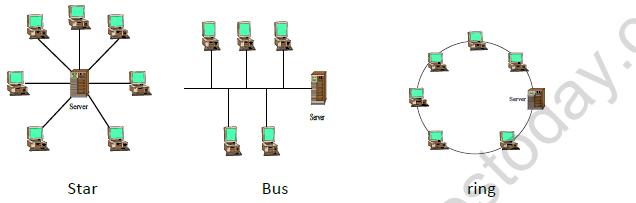
[Figure: Star topology - a server in the centre connected directly to six computers around it]
[Figure: Bus topology - computers and a server attached along a single straight backbone cable]
[Figure: Ring topology - a server and computers connected one after another in a closed circle]
Protocol:
Set of rules to govern communication between two computers in a network viz TCP/IP, PPP etc.
DATA COMMUNICATION TERMINOLOGIES
| Term | Meaning |
|---|---|
| Data channel | The information / data carry from one end to another in the network by channel. |
| Baud & bits per second (bps) | It is used to measure the information carried by a communication channel. Measurement Units are Kbps (kilobits Per Second), KBPS (Kilo Byte Per Second), and Mbps (Mega bits Per Second). |
| Bandwidth | It is the amount of information transmitted or received per unit time. |
TRANSMISSION MEDIA
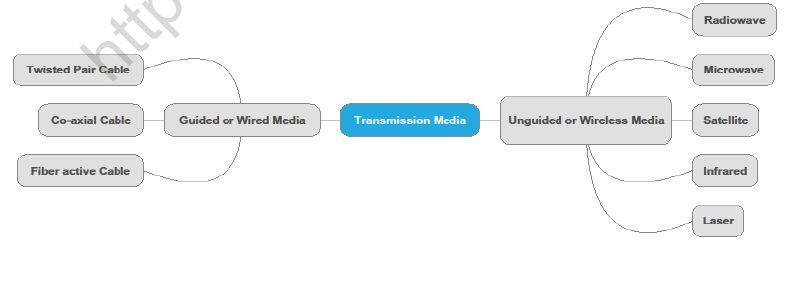
Transmission Media is of two kinds:
1. Guided or Wired Media: Twisted Pair Cable, Co-axial Cable, Fibre optic Cable
2. Unguided or Wireless Media: Radiowave, Microwave, Satellite, Infrared, Laser
[Figure: Mind map with Transmission Media at the centre, branching to Guided or Wired Media (Twisted Pair Cable, Co-axial Cable, Fibre optic Cable) and Unguided or Wireless Media (Radiowave, Microwave, Satellite, Infrared, Laser)]
[Figure: Twisted Pair Cable - photograph of twisted pairs of coloured wires]
[Figure: Co Axial Cable - cut-away view with the labels Copper Wire, Insulation, Copper Mesh, Outside Insulation]
[Figure: Microwaves - two microwave towers with a direct path between them over the curved surface of the earth]
[Figure: Satellite communication - microwave towers on the earth sending signals to a Geostationary Satellite]
NETWORKING DEVICES
Modem
A modem is a computer peripheral that allows you to connect and communicate with other computers via telephone lines. Modem means Modulation/Demodulation. Modem can be Internal and External.
RJ-45 Connector
RJ-45 is short for Registered Jack-45. It is an eight wire connector which is commonly used to connect computers on the local area networks i.e., LAN.
Network Interface Cards (Ethernet Card)
A network card, network adapter or NIC (network interface card) or NIU is a piece of computer hardware designed to allow computers to communicate over a computer network.
Repeaters
A repeater is an electronic device that receives a signal and retransmits it at a higher level or higher power, or onto the other side of an obstruction, so that the signal can cover longer distances without degradation.
[Figure: Repeater - a repeater placed between a base station and mobile stations to carry the signal over a longer distance]
Hub
A hub contains multiple ports. When a packet arrives at one port, it is copied to all the ports of the hub.
[Figure: Hub connecting several computers and a server in a network]
Switch
Switch is a device that performs switching. It forwards chunks of data communication between ports (connected cables) based on the Mac-Addresses in the packets. This is distinct from a hub in that it only forwards the data to the ports involved in the communications rather than all ports connected. The network can be connected directly to a switch, or another switch that is in turn connected to a switch.
[Figure: Photograph of a network switch with several ports]
DIFFERENCE BETWEEN BRIDGES, ROUTERS AND GATEWAY
All these network devices are used to connect two or more networks or network segments with the following conditions:
| Bridge | Router | Gateway |
|---|---|---|
| Similar Topology and similar protocol | Similar Topology and Different protocol | Different Topology and Different protocol |
COMMON NETWORKING TERMS AND THEIR EXPANSION
| Term | Expansion |
|---|---|
| TCP/IP | Transmission Control Protocol/Internet Protocol |
| FTP | File Transfer Protocol |
| SLIP | Serial Line Internet Protocol |
| POP | Post Office Protocol |
| PPP | Point to Point Protocol |
| SMTP | Simple Mail Transfer Protocol |
| VoIP | Voice over Internet Protocol |
| HTTP | Hyper Text Transfer Protocol |
| URL | Uniform Resource Locator |
| HTML | Hyper Text Markup Language |
| DHTML | Dynamic Hyper Text Markup Language |
| WLL | Wireless in Local loop |
| GSM | Global System for Mobile Communication |
| CDMA | Code Division Multiple Access |
| TDMA | Time Division Multiple Access |
| SIM | Subscriber's Identity Module |
| SMS | Short Messaging Service |
| MMS | Multimedia Messaging Service |
| EDGE | Enhanced Data rates for Global Evolution |
| IMAP | Internet Message Access Protocol |
| Wi-Fi | Wireless Fidelity |
| IPR | Intellectual Property Rights |
| WWW | World Wide Web |
| XML | eXtensible Markup Language |
| PHP | Hyper Text Preprocessor |
| ASP | Active Server Pages |
| JSP | Java Server Pages |
| FLOSS | Free Libre and Open Source Software |
| GNU | GNU's Not Unix |
| OSI | Open Source Initiative |
| FSF | Free Software Foundation |
| W3C | World Wide Web Consortium |
SOME DEFINITIONS
Hacker: A Hacker is a programmer who intrudes in a secure network just for gaining knowledge or playful pranks.
Cracker: A cracker is a malicious programmer who breaks into a secure system with a malafide intention.
Cookies: Cookies are messages sent by web server to keep track of user's activity.
Web Server: A web server is a computer system that processes requests of the client via HTTP.
Web Browser: A web browser (commonly referred to as a browser) is a software application for retrieving, presenting, and traversing information resources on the World Wide Web. e.g. Internet Explorer, Mozilla Firefox, Google Chrome etc.
Firewall: A firewall is a network security system designed to prevent unauthorized access to or from a private network. Firewalls can be implemented in both hardware and software, or a combination of both.
Cyber Crime: Criminal activities carried out by means of computer or Internet. All such crime are dealt with Indian IT Act 2000.
Cyber Law: Cyberlaw is a generic term used to refer rules for preventing crime on Internet.
Cloud computing: Cloud Computing is a kind of Internet-based computing that provides shared processing resources and data to computers and other devices on demand. The cloud aims to cut costs, and helps the users focus on their core business instead of being impeded by IT obstacles.
Spam: Irrelevant or unsolicited messages sent over the Internet, typically to large numbers of users, for the purposes of advertising, phishing, spreading malware, etc.
Virus: A computer virus is a program that, when executed, replicates itself or infects other programs by modifying them. Infected computer programs can include data files, or the boot sector of the hard drive.
Antivirus: Antivirus or anti-virus software, is computer software used to prevent, detect and remove malicious software. Some common examples of Antivirus Software are Norton, Quickheal, Kaspersky etc.
OPEN SOURCE TERMINOLOGIES
TERMINOLOGY & DEFINITIONS:
Free Software: They are freely accessible and can be freely used, changed, improved, copied and distributed by all and payments are not needed for free Software.
Open Source Software: Software whose source code is available to the user and it can be modified and redistributed without any limitation. OSS may come free of cost but nominal charges have to be paid for support of Software and development of Software.
Proprietary Software: Proprietary Software is neither open nor freely available, normally the source code of the Proprietary Software is not available but further distribution and modification is possible by special permission by the developer.
Freeware: Freeware are the software freely available, which permit redistribution but not modification (their source code is not available). Freeware is distributed in Binary Form (ready to run) without any licensing fees.
Shareware: Software for which license fee is payable after some time limit, its source code is not available and modification to the software are not allowed.
OPEN SOURCE / FREE SOFTWARE
Linux: Linux is a famous computer operating system. Popular Linux server set of program - LAMP (Linux, Apache, MySQL, PHP)
Mozilla: Mozilla is a free internet software that includes
a web browser
an email client
an HTML editor
IRC client
Apache server: Apache web server is an open source web server available for many platforms such as BSD, Linux, and Microsoft Windows etc.
Apache Web server is maintained by open community of developers of Apache software foundation.
MYSQL: MYSQL is one of the most popular open source database system.
OpenOffice: OpenOffice is an office applications suite. It is intended to be compatible and directly compete with Microsoft office.
It includes:
Writer (word processor)
Calc (spreadsheet)
Draw (graphics program)
Python: Python is an interactive programming language originally as scripting language for Amoeba OS capable of making system calls.
Long Answer Questions
Q1. Knowledge Supplement Organization has set up its new center at Mangalore for its office and web based activities. It has 4 blocks of buildings as shown in the diagram below:
[Figure: Four blocks drawn as buildings - Block A on the left, Block C at the top centre, Block D on the right and Block B at the bottom centre]
Centre to centre distances between various blocks
| Block A to Block B | 50 m |
| Block B to Block C | 150 m |
| Block C to Block D | 25 m |
| Block A to Block D | 170 m |
| Block B to Block D | 125 m |
| Block A to Block C | 90 m |
Number of Computers
| Block A | 25 |
| Block B | 50 |
| Block C | 125 |
| Block D | 10 |
(a) Suggest a cable layout of connections between the blocks.
Answer:
1. To use the least cable, connect the blocks by the three shortest links that join all four blocks: Block C - Block D (25 m), Block A - Block B (50 m) and Block A - Block C (90 m).
2. The layout is therefore B - A - C - D, a bus-like chain with a total cable length of 25 + 50 + 90 = 165 m.
3. The costly links B - C (150 m), B - D (125 m) and A - D (170 m) are not laid.
Teacher's Note:
a) Choose the shortest links that still connect every block, like a minimum spanning tree.
b) A fully connected layout of all six links needs far more cable and is not needed.
(b) Suggest the most suitable place (i.e. block) to house the server of this organisation with a suitable reason.
Answer: The server should be placed in Block C, because it has the maximum number of computers (125), so most of the network traffic stays inside the block and the least cable is used for data transfer.
Teacher's Note:
a) The block with the most computers is chosen so that most traffic stays local.
b) Always quote the number of computers as the reason.
(c) Suggest the placement of the following devices with justification
(i) Repeater
(ii) Hub/Switch
Answer:
1. (i) Repeater: place a repeater on the longest cable, between Block A and Block C (90 m), because the signal weakens over a long cable and the distance is close to the 100 m limit of a LAN cable. No repeater is needed on the shorter links.
2. (ii) Hub/Switch: place a hub or switch in every block, because each block has its own computers that must be connected together and then joined to the other blocks.
Teacher's Note:
a) A repeater is needed where the cable run is long enough for the signal to fade.
b) A switch is preferred to a hub because it sends data only to the intended port.
(d) The organization is planning to link its front office situated in the city in a hilly region where cable connection is not feasible, suggest an economic way to connect it with reasonably high speed?
Answer: The most economical way is a wireless link using microwave or radio waves between the front office and the main centre, because cables cannot be laid in the hilly region and this link gives reasonably high speed.
Teacher's Note:
a) Wireless media such as microwave and radio waves work where cables are not practical.
b) A satellite link would also work but is more costly.
Q2. Ravya Industries has set up its new center at Kaka Nagar for its office and web based activities. The company compound has 4 buildings as shown in the diagram below:
[Figure: Four buildings drawn inside the company compound - Raj Building and Fazz Building at the top, Harsh Building at the bottom left and Jazz Building at the bottom right]
Centre to centre distances between various buildings
| Harsh Building to Raj Building | 50 m |
| Raj Building to Fazz Building | 60 m |
| Fazz Building to Jazz Building | 25 m |
| Jazz Building to Harsh Building | 170 m |
| Harsh Building to Fazz Building | 125 m |
| Raj Building to Jazz Building | 90 m |
Number of Computers
| Harsh Building | 15 |
| Raj Building | 150 |
| Fazz Building | 15 |
| Jazz Building | 25 |
(a) Suggest a cable layout of connections between the buildings.
Answer:
1. Connect the buildings by the three shortest links that join all four: Fazz Building - Jazz Building (25 m), Harsh Building - Raj Building (50 m) and Raj Building - Fazz Building (60 m).
2. The layout is Harsh - Raj - Fazz - Jazz, with a total cable length of 25 + 50 + 60 = 135 m.
3. The long links Jazz - Harsh (170 m), Harsh - Fazz (125 m) and Raj - Jazz (90 m) are not laid.
Teacher's Note:
a) Pick the shortest links that connect all buildings, with no closed loop.
b) The Raj - Jazz link (90 m) is skipped because Jazz Building is already reachable through Fazz Building.
(b) Suggest the most suitable place (i.e. building) to house the server of this organisation with a suitable reason.
Answer: The server should be placed in Raj Building, because it has the maximum number of computers (150), which keeps most of the traffic within the building.
Teacher's Note:
a) Place the server where the largest number of users are.
b) Raj Building also lies in the middle of the chain, which keeps the cables to it short.
(c) Suggest the placement of the following devices with justification:
(i) Internet Connecting Device/Modem
(ii) Switch
Answer:
1. (i) Internet Connecting Device/Modem: place it in Raj Building, along with the server, because most users are there and all other buildings can reach the Internet through it.
2. (ii) Switch: place a switch in every building, to connect the computers inside the building and to link the building to the others.
Teacher's Note:
a) A modem connects the network to the Internet service provider.
b) A switch sends data only to the port that needs it, so it is better than a hub.
(d) The organization is planning to link its sale counter situated in various parts of the same city, which type of network out of LAN, MAN or WAN will be formed? Justify your answer.
Answer: A MAN (Metropolitan Area Network) will be formed, because the sale counters are spread over different parts of the same city, which is larger than a LAN (one building or campus) but smaller than a WAN (across cities and countries).
Teacher's Note:
a) Network type depends on the area covered: LAN is within a building, MAN within a city, WAN across countries.
b) Always add the justification, as marks are given for it.

Free study material for Computer Science
Computer Science Class 12 Exam Resources: Network and Communication Technology
Essential Notes for Class 12 Computer Science
Explore essential learning tools for Class 12 Computer Science Network and Communication Technology. This curated collection features in-depth notes and targeted practice questions built around the active 2026 curriculum to streamline your daily revision.
Verified Solutions for Class 12 Computer Science
Built using official NCERT guidelines for Class 12 Computer Science, these materials provide reliable academic support. Integrating past examination questions and step-by-step solutions helps students understand official CBSE grading criteria.
Enhance Accuracy with Online Tests
Maximize your grade potential by utilizing Class 12 Computer Science practice papers in tandem with these structured notes. All printable assignments and interactive mock tests on our platform are updated for the 2026 session and available free of charge.
FAQs
Our advanced study package for Network and Communication Technology includes detailed concepts, diagrams, Mind Maps, and explanation of complex topics to ensure Class 12 students learn as per syllabus for 2026 exams.
The Mind Maps provided for Network and Communication Technology act as visual anchors which will help faster recall during high-pressure exams.
Yes, teachers use our Class 12 Computer Science resources for lesson planning as they are in simple language and have lot of solved examples.
Yes, You can download the complete, mobile-friendly PDF of the Computer Science Network and Communication Technology advanced resources for free.
Yes, our subject matter experts have updated the Network and Communication Technology material to align with the rationalized NCERT textbooks and have removed deleted topics and added new competency-based questions.