

Chapter-wise Worksheets for Class 12 Computer Science: SQL
Access comprehensive chapter-wise worksheets for SQL using the CBSE Class 12 Computer Science SQL Worksheet Set 01. Designed to align with the 2026-27 academic syllabus for Class 12 Computer Science, these printable practice sets help students reinforce key concepts and improve their overall exam readiness.
Practice Class 12 Computer Science Worksheets: SQL
Access the complete worksheet PDF for Class 12 Computer Science below. Regular practice with these targeted academic tasks builds familiarity with standard question patterns and helps secure higher marks in final school examinations.
DATABASE CONCEPTS
Question. What is RDBMS?
Answer : RDBMS stands for relational data base management system. It is a software package that managed a database.
Question. What is the function of a database management system?
Answer : It provides the users that much information that is required by them.
Question. What is data redundancy?
Answer : It is duplication of data in a database. It leads to the problems like wastage of space and data inconsistency.
Question. What are different levels of data abstraction?
Answer : External level, conceptual level, physical level.
Question. What do you mean by relational database?
Answer : In relational database, the data is organized in form of tables(rows and columns).
Question. What is relational algebra?
Answer : Relational algebra is used to perform specific operation on existing relation to provide desired result. Relationl algebra is procedural language.
Question. What does union operator do?
Answer : It produces third relation that contains tuples from both the operand relation.
Question. What is normalization?
Answer : It is concerned with the transformation of the conceptual schema (logical data structures) into a computer represent able form.
Question. What is meant by functional dependency?
Answer : It is a relationalship that exist between any two fields of tables.
Question. What do you understand by domain?
Answer : A domain is a pool of values from which the actual vales appearing in a given column are drawn.
(Two Marks Questions)
Question. What is data model?
Answer : A data model is a collection of conceptual tools for describing data, relationship, data semantic etc. There are generally three data models available: relational, network and hierarchical model.
(a) Relational Model: The relational model represent data and relationships among data by a collection of tables known as relations, each of which has a number of columns with a unique names.
(b) Network Model: The Network model represent data by collections of records and relational ship among the data are represented by links which can be viewed as pointers. The record in the database are organized as collection of arbitrary graph.
(c) Hierarchical Model : This model is similar to network model in the sense that data are relational ships among the data are represented by records and links respectively. In this model records are represented by tree.
Question. What is relation?
Answer : A relation is a table i.e. data is arranged in rows and columns. A relational has the following properties.
(a) In any column of table, all items are of same kind where as items in different columns may not be of same kind.
(b) For a row, each columns must have an atomic values. .
(c) All rows of a relation are distinct.
Question. Define the terms : Primary Key, Alternate Key, Candidate Key
Answer : (a) Primary Key:- A Primary Key is a set of one or more attribute that can uniquely identify tuples with in the relation.
(b) Alternate Key:- A Candidate key which is not the primary key is known as alternate key.
(c) Candidate Key:- All attribute combinations inside a relation that can serve as primary key are candidate keys as they are candidate
Question. What is data independence? How logical data independence is different from physical data independence?
Answer : The ability to modify a scheme definition in one level without affecting a scheme definition in the next higher level is called data independence.
Logical data independence is different from physical as in logical the conceptual scheme can be modified without causing any changes in the scheme followed at view levels where as in physical level could be modified without affecting the scheme followed at conceptual level.
Question. What are views? How they are useful?
Answer : A view is a virtual table that does not really exist in its own right but is instead derived form one or more underlying base tables. The view is a kind of table whose contents are taken upon other tables depending upon given query condition.
The usefulness of a views lies in the fact that they provide an excellent way to give people access to some but not all of the information in a table.
Question. Define First, second and third normal forms?
Answer : A relation R is in first normal form( 1NF) if and only if all underlying domains of the relation contains atomic vales only.
A relation is said to be in second normal form (2NF) if and only if it is in 1NF and every non key attribute is fully dependent of the primary key.
A relation R is said to be in third normal form (3NF) if and only if it is in 2NF and every non key attribute non transitively dependent upon the primary key.
Question. How many type of user works in database ?
Answer : Three type of user can work with data base.
1. End User -> This user is not a computer trained person but it uses the data base to retrieve information.
2. Application System Analyst.:-This user is concerned about all of the data base at logical level i.e. what all data constitute the database.
3. Physical storage system analyst-> This user is concerned with the physical implementation details of the database such as which storage device? Which storage technique should be used.
Question. What is foreign Key? What is its purpose?
Answer : A non key attribute, whose value are derived from the primary key of some other table, is known as foreign key in the current table. The table in which this non-key attribute i.e. foreign key attribute exists, is called a foreign table.
Question. Define the terms Tuple and Attribute
Answer : Tuples: The rows of tables (relations) are generally referred to as tuples.
Attribute: The columns of tables are generally referred to as attribute.
Question. What do you understand by the terms Cardinality and Degree of the table?
Answer : Degree: The number of attributes in a relation determines the degree of a relation. A relation having 3 attributes is said to be a relation of degree 3.
Cardinality: The number of rows in a relation is known as Cardinality.
STRUCTURED QUERY LANGUAGE
(Two Marks Questions)
Question. What are DDL and DML?
Answer : The DDL provides statements for the creation and deletion of tables and indexes.
The DML provides statements to enter, update , delete data and perform complex queries on these tables.
Question. What is the difference between Where and Having Clause ?
Answer : The having clause places the condition on group but where clause places the condition on individual rows
Question. What are the different Data types available in SQL.
Answer : Data Type Description
VARCHAR2(w) Variable length character having Max width is 2000 character
CHAR(w) Fixed length character Min Length 1 Ma Length 255
NUMBER(w.p) Number with precision w and scale p.
DATE Date value from Jan. 1, 4712 BC to DEC. 31,4712 AD.
Question. What do you understand by constraints?
Answer : Constraints are used to enforce rules at table level when ever row is inserted. , updated or deleted from table.
Constraints can be defined to one of the Two level.
Column Level. Reference to a single column. can be defined any type of integrity.
Table Level. References one or more columns and is defined separately from definition of the columns in the table.
Question. Write some features of SQL?
Answer : Recovery ad Concurrency:- Concurrency is concerned with the manner in which multiple user operate upon the Database.
Security: The Security can be maintained by view mechanism.
Integrity Constraints-> Integrity constraints are enforced by the system.
Question. Write the rules to name an objects?
Answer : • The maximum length must be 30 characters long.
• The Object name should not contain quotation mark.
• The name must start with letter.
• The use of $ and # is discouraged in the object name.
• A name must not be a reserved name.
Question. What are group Functions
Answer : The aggregate functions are group functions. They return result based on groups of rows. The group functions are AVG(), COUNT(), MAX(), MI N(), SUM()
Question. What are column alias?
Answer : In many cases heading table may not be descriptive and hence it difficult to understand. In such case we use columns alias It will change column heading with column alias.
(Six Marks Questions)
Question. Table : SchoolBus
| Rtno | Area_covered | Capacity | Noofstudents | Distance | Transporter | Charges |
| 1 | Vasant kunj | 100 | 120 | 10 | Shivamtravels | 100000 |
| 2 | Hauz Khas | 80 | 80 | 10 | Anand travels | 85000 |
| 3 | Pitampura | 60 | 55 | 30 | Anand travels | 60000 |
| 4 | Rohini | 100 | 90 | 35 | Anand travels | 100000 |
| 5 | Yamuna Vihar | 50 | 60 | 20 | Bhalla Co. | 55000 |
| 6 | Krishna Nagar | 70 | 80 | 30 | Yadav Co. | 80000 |
| 7 | Vasundhara | 100 | 110 | 20 | Yadav Co. | 100000 |
| 8 | Paschim Vihar | 40 | 40 | 20 | Speed travels | 55000 |
| 9 | Saket | 120 | 120 | 10 | Speed travels | 100000 |
| 10 | Janak Puri | 100 | 100 | 20 | Kisan Tours | 95000 |
(a) To show all information of students where capacity is more than the no of student in order of rtno.
(b) To show area_covered for buses covering more than 20 km., but charges less then 80000.
(c) To show transporter wise total no. of students traveling.
(d) To show rtno, area_covered and average cost per student for all routes where average cost per student is - charges/noofstudents.
(e) Add a new record with following data:
(11, “ Moti bagh”,35,32,10,” kisan tours “, 35000)
(f) Give the output considering the original relation as given:
(i) select sum(distance) from schoolbus where transporter= “ Yadav Co.”;
(ii) select min(noofstudents) from schoolbus;
(iii) select avg(charges) from schoolbus where transporter= “ Anand travels”;
(iv) select distinct transporter from schoolbus;
Answer :
(a) select * from schoolbus where capacity>noofstudents order by rtno;
(b) select area_covered from schoolbus where distance>20 and charges < 80000;
(c) select transporter, sum(noofstudents) from schoolbus group by transporter;
(d) select rtno, area_covered, charges/noofstudents avgcost from schoolbus;
(e) insert into schoolbus values(11,'Moti Bagh', 35, 32, 10, 'Kisan Tours', 35000);
(f) Output of given following commands will be :
(i) select sum(distance) from schoolbus where transporter='Yadav Co.';
SUM(DISTANCE)
50
(ii) select min(noofstudents) from schoolbus;
MIN(NOOFSTUDENTS)
32
(iii) select avg(charges) from schoolbus where transporter='Anand travels';
AVG(CHARGES)
81666.6667
(iv) select distinct transporter from schoolbus;
TRANSPORTER
Anand travels
Bhalla Co.
Kisan Tours
Speed travels
Yadav Co.
shivamtravels
6 rows selected.
Question. Write SQL command for (i) to (vii) on the basis of the table SPORTS
Table: SPORTS
| Student NO | Class | Name | Game1 | Grade | Game2 | Grade2 |
| 10 | 7 | Sammer | Cricket | B | Swimming | A |
| 11 | 8 | Sujit | Tennis | A | Skating | C |
| 12 | 7 | Kamal | Swimming | B | Football | B |
| 13 | 7 | Venna | Tennis | C | Tennis | A |
| 14 | 9 | Archana | Basketball | A | Cricket | A |
| 15 | 10 | Arpit | Cricket | A | Atheletics | C |
(b) Display the number of students getting grade ‘A’ in Cricket.
(c.) Display the names of the students who have same game for both Game1 and Game2.
(d) Display the games taken up by the students, whose name starts with ‘A’.
(e) Assign a value 200 for Marks for all those who are getting grade ‘B’ or grade ‘A’ in both Game1 and Game2.
(f) Add a new column named ‘Marks’.
Answer :(a) select name from sports where grade='C' or grade2='C';
(b) select count(name) from sports where (grade='A' and Game1='Cricket') or (grade2='A' and Game2='Cricket');
(c) select name from sports where game1=game2;
(d) select game1, game2 from sports where name like 'A%';
(e) update sports set marks = 200 where grade in ('A','B') and grade2 in ('A','B');
(f) Alter table sports add marks int;
Q 1 Print all records from salespeople
Q 2 Print customer no. and name from customers
Q 3 Print salesman’s number & amt from orders
Q 4 How many salesman have got orders?
Q 5 Print all records with rating>300.
Q6 Print all records where city = London.
Q 7 Print all records with city = London and rating not equal to 200
Q 8 Select all records whose either city is not London or rating is not greater than 200.
Q 9 Where either city = London and rating>200 or city = rome and rating <100.
Q 10 Where city is either London or rome.
Q 11 Where Snum is 1001 or 1007, 1004.
Q 12 Where Cnum is between .10 and .12
Q 13 Where Q12 but exclusive .1 & .12
Q 14 Where Cname starts from P and end with G and lengthof 6 characters
Q 15 Where amount < 2000
Q 16 Count all records in costumer.
Q 17 Print maximum of amt + bal
Q 18 Find max amt of each salesperson in orders table.
Q 19 Find salesnumber and max amount of each salesnumber
Q 20 Find Snum, max (amt) of all Snum having max (amt) >3000
Q 21 Find sum & max amt of all Snum where date = 10/03/90
Q 22 Find Snum, max amt from orders for all Snum having Snum in (1002, 1007)
Q 23 Find total orders for each Snum
Q 24 Find all orders in descending order of date
Q 25 Find Snum, max amt of all Snum order by Snum
Q 26 List each order no followed by name of customers
Q 27 Give names of both the salesperson and customer for each order after the order no
Q 28 List all customer salesname, comm. Serviced by salespeople with comm. > 12%
Q 29 Calculate amount of salesperson comm. on each order by a customer with rating greater than 100
Q 30 Delete all records with orders 1/1/99
Q 31 Create view that contains Cnum,snum and sname
Q 32 Change the city Rome to Italy.
Q33 Drop all tables.
Q34 Print total order of a customer with cnum=’255’
Q35 Print all orders that are more than 5000/-
Table EMP
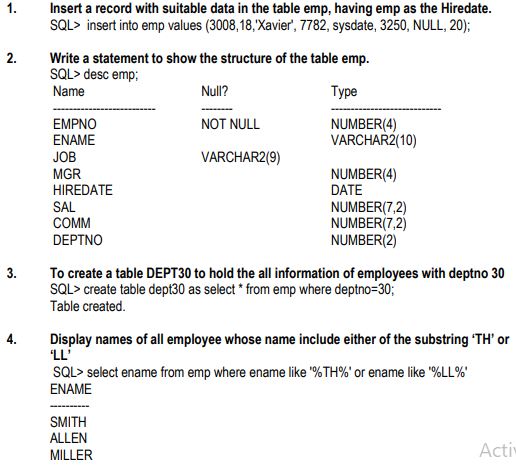
Question 1. Insert a record with suitable data in the table emp, having sysdate as the Hiredate.
Answer:
SQL> insert into emp values (3008,18,'Xavier', 7782, sysdate, 3250, NULL, 20);
In simple words: This query inserts a new row of employee details into the emp table, using the sysdate function to record the current date as their hiring date.
Exam Tip: When using INSERT INTO table_name VALUES (...), ensure the values list matches the table's exact column order and data types.
Question 2. Write a statement to show the structure of the table emp.
Answer:
SQL> desc emp;
| Name | Null? | Type |
|---|---|---|
| EMPNO | NOT NULL | NUMBER(4) |
| ENAME | VARCHAR2(10) | |
| JOB | VARCHAR2(9) | |
| MGR | NUMBER(4) | |
| HIREDATE | DATE | |
| SAL | NUMBER(7,2) | |
| COMM | NUMBER(7,2) | |
| DEPTNO | NUMBER(2) |
In simple words: The DESC command is used to display the blueprint of a table, showing each column's name, whether it can be empty, and its data type.
Exam Tip: Use DESCRIBE or DESC to quickly check column data types and constraints before writing insert or update queries.
Question 3. To create a table DEPT30 to hold the all information of employees with deptno 30
Answer:
SQL> create table dept30 as select * from emp where deptno=30;
Table created.
In simple words: This command creates a brand new table called dept30 and automatically populates it with all columns and records of employees belonging to department 30.
Exam Tip: The CREATE TABLE ... AS SELECT (CTAS) statement is a powerful way to copy both structure and filtered data from an existing table.
Question 4. Display names of all employee whose name include either of the substring 'TH' or 'LL'
Answer:
SQL> select ename from emp where ename like '%TH%' or ename like '%LL%'
| ENAME |
|---|
| SMITH |
| ALLEN |
| MILLER |
In simple words: This query retrieves the names of employees containing the characters "TH" or "LL" anywhere inside their names by using the wildcard symbol %.
Exam Tip: Remember that the LIKE operator is case-sensitive in some database systems; use OR to combine multiple pattern-matching conditions.
Question 5. Display data for all CLERKS who earn between 1000 and 2000;
Answer:
SQL> select * from emp where job='CLERK' AND SAL BETWEEN 1000 AND 2000;
| EMPNO | ENAME | JOB | MGR | HIREDATE | SAL | COMM | DEPTNO |
|---|---|---|---|---|---|---|---|
| 7876 | ADAMS | CLERK | 7788 | 23-MAY-87 | 1100 | 20 | |
| 7934 | MILLER | CLERK | 7782 | 23-JAN-82 | 1300 | 10 |
In simple words: This search finds all clerks who earn a salary from 1000 up to 2000, including both of those exact boundary figures.
Exam Tip: The BETWEEN operator is inclusive of both endpoints, meaning salaries of exactly 1000 and 2000 will be included in the output.
Question 6. Find the employees who have no manager.
Answer:
SQL> select ename from emp where mgr is NULL;
| ENAME |
|---|
| KING |
In simple words: This query lists the names of employees who do not have a manager assigned to them by checking for empty values in the manager column.
Exam Tip: Always use IS NULL to check for empty/missing data in SQL; comparing a column using = NULL will not return any results.
Question 7. Display the name of the employee who earns the maximum salary.
Answer:
SQL> select ename from emp where sal=(select max(sal) from emp);
| ENAME |
|---|
| KING |
In simple words: This query uses a subquery to first find the highest salary in the table and then retrieves the name of the employee earning that specific amount.
Exam Tip: Subqueries must be enclosed in parentheses. When looking for a single maximum value, use a subquery with the MAX() aggregate function.
Question 8. Write a SQL statement to list empno, empname, deptno for all the employees. The information should be sorted on empname;
Answer:
SQL> Select empno, ename, deptno from emp order by ename;
| EMPNO | ENAME | DEPTNO |
|---|---|---|
| 3008 | 18 | 20 |
| 7876 | ADAMS | 20 |
| 7499 | ALLEN | 30 |
| 7698 | BLAKE | 30 |
| 7782 | CLARK | 10 |
| 7902 | FORD | 20 |
| 7900 | JAMES | 30 |
| 7566 | JONES | 20 |
| 7839 | KING | 10 |
| 7654 | MARTIN | 30 |
| 7934 | MILLER | 10 |
| 7788 | SCOTT | 20 |
| 7369 | SMITH | 20 |
| 7844 | TURNER | 30 |
| 7521 | WARD | 30 |
15 rows selected.
In simple words: This query displays the employee number, name, and department code for all staff members, sorting them alphabetically by name.
Exam Tip: By default, the ORDER BY clause sorts data in ascending order. You can append DESC if you want the results sorted from Z to A.
Question 9. List the minimum and maximum salary for each employee.
Answer:
SQL> select job, min(sal), max(sal) from emp group by job;
| JOB | MIN(SAL) | MAX(SAL) |
|---|---|---|
| ANALYST | 3000 | 3000 |
| CLERK | 800 | 1300 |
| MANAGER | 2450 | 2975 |
| PRESIDENT | 5000 | 5000 |
| SALESMAN | 1250 | 1600 |
| Xavier | 3250 | 3250 |
6 rows selected.
In simple words: This query groups the employees by their designation and displays the lowest and highest salaries found within each job role.
Exam Tip: Any non-aggregate column (like job) in the SELECT list must also be included in the GROUP BY clause.
Question 10. Display the name of the employee who earns the maximum salary.
Answer:
SQL> select ename from emp where sal=(select min(sal) from emp);
| ENAME |
|---|
| SMITH |
In simple words: This query finds the person with the lowest salary by using a subquery that calculates the minimum wage first.
Exam Tip: Be careful with question descriptions vs. actual SQL code in exam sheets; always write the code that matches the logical query required.
Question 11. To display deptno, job, empname in reverse order of salary from emp.
Answer:
SQL> select deptno, job, ename from emp order by sal;
| DEPTNO | JOB | ENAME |
|---|---|---|
| 20 | CLERK | SMITH |
| 30 | CLERK | JAMES |
| 20 | CLERK | ADAMS |
| 30 | SALESMAN | WARD |
| 30 | SALESMAN | MARTIN |
| 10 | CLERK | MILLER |
| 30 | SALESMAN | TURNER |
| 30 | SALESMAN | ALLEN |
| 10 | MANAGER | CLARK |
| 30 | MANAGER | BLAKE |
| 20 | MANAGER | JONES |
| 20 | ANALYST | SCOTT |
| 20 | ANALYST | FORD |
| 20 | Xavier | 18 |
| 10 | PRESIDENT | KING |
15 rows selected.
In simple words: This query lists the department number, job, and name of employees, sorting them from the lowest salary to the highest.
Exam Tip: Sorting in SQL is done with ORDER BY. Make sure to pay attention to ascending versus descending sorting requirements in exams.
Question 12. Show the average salary for all departments with more than 3 people for a job.
Answer:
SQL> select deptno, avg(sal) from emp group by deptno having count(*) > 3;
| DEPTNO | AVG(SAL) |
|---|---|
| 20 | 2354.1667 |
| 30 | 1566.6667 |
In simple words: This query groups employees by department, counts how many work in each, and outputs the average salary only for departments with more than 3 staff members.
Exam Tip: Use WHERE to filter individual rows before grouping, and use HAVING to filter groups after the GROUP BY clause is applied.
Question 13. Create a view deptno20 with empname and salary of employees for dept 20
Answer:
SQL> create view deptno20 as select ename, sal from emp where deptno=20;
View created.
In simple words: This statement creates a virtual table called deptno20 that displays the name and salary of only those employees working in department 20.
Exam Tip: Views do not store physical data; they are saved queries that dynamically retrieve live data from the base tables whenever accessed.
Question 14. Write a SQL statement to find out the total number of employees from emp table.
Answer:
SQL> select count(*) from emp;
| COUNT(*) |
|---|
| 15 |
In simple words: This query counts the total number of rows present in the employee table, giving the total staff count.
Exam Tip: The COUNT(*) function counts all rows, including those that contain NULL values in some of their columns.
Question 15. Write a suitable sql statement to display employees name, salary and location of all the employees working in new york in the following format
Answer:
SQL> select ename "EmpName", sal "Salary", dept.loc "Location" from emp, dept where EMP.DEPTNO=DEPT.DEPTNO AND DEPT.LOC='NEW YORK';
| EmpName | Salary | Location |
|---|---|---|
| CLARK | 2450 | NEW YORK |
| KING | 5000 | NEW YORK |
| MILLER | 1300 | NEW YORK |
In simple words: This query joins the employee and department tables to find and display the names, salaries, and locations of everyone based in New York.
Exam Tip: When joining tables, always specify the join condition (like matching DEPTNO) to prevent creating an unwanted Cartesian product.
Question 16. Display name and annual salary for all employee.
Answer:
SQL> select ename, sal*12 "Annual Salary" from emp;
| ENAME | Annual Salary |
|---|---|
| SMITH | 9600 |
| ALLEN | 19200 |
| WARD | 15000 |
| JONES | 35700 |
| MARTIN | 15000 |
| BLAKE | 34200 |
| CLARK | 29400 |
| SCOTT | 36000 |
| KING | 60000 |
| TURNER | 18000 |
| ADAMS | 13200 |
| JAMES | 11400 |
| FORD | 36000 |
| MILLER | 15600 |
| 18 | 39000 |
15 rows selected.
In simple words: This query displays each employee's name alongside their calculated annual salary, which is obtained by multiplying their monthly salary by 12.
Exam Tip: You can perform arithmetic operations directly in SQL SELECT statements and rename the output column using double quotes as an alias.
Question 17. Count no of employee working in each department.
Answer:
SQL> select deptno, count(*) from emp group by deptno;
| DEPTNO | COUNT(*) |
|---|---|
| 10 | 3 |
| 20 | 6 |
| 30 | 6 |
In simple words: This query counts the number of employees associated with each department number by grouping the rows together.
Exam Tip: GROUP BY is essential when you want to compute aggregate metrics (like count, sum, or average) for separate categories.
Question 18. Display names of all employee whose name is at least 4 characters long;
Answer:
SQL> select ename from emp where length(ename)>=4;
| ENAME |
|---|
| SMITH |
| ALLEN |
| WARD |
| JONES |
| MARTIN |
| BLAKE |
| CLARK |
| SCOTT |
| KING |
| TURNER |
| ADAMS |
| JAMES |
| FORD |
| MILLER |
14 rows selected.
In simple words: This query lists only those employees whose names are made up of 4 or more characters.
Exam Tip: The built-in LENGTH() function returns the total number of characters in a string value, making it easy to filter by length.
Question 19. Display the current system date.
Answer:
SQL> select sysdate from dual;
| SYSDATE |
|---|
| 19-JAN-05 |
In simple words: This query checks the database system and returns the current date using the built-in system date function.
Exam Tip: DUAL is a special one-row, one-column dummy table in Oracle databases used to evaluate expressions or functions that do not require actual tables.
Question 20. display the current system time;
Answer:
SQL> select to_char(sysdate,'hh:mm:ss') from dual
| TO_CHAR( |
|---|
| 12:01:01 |
In simple words: This query displays the current time formatted as hours, minutes, and seconds from the database system.
Exam Tip: The TO_CHAR function is used to convert date and time values into customized readable string formats.
Question 21. Write a SQL query to increase the salary of each employee by 200.
Answer:
SQL> update emp set sal = sal + 200 ;
15 rows updated.
In simple words: This command updates the entire employee database, raising the salary of every single worker by 200.
Exam Tip: Be extremely cautious with UPDATE statements; omitting a WHERE clause will apply the change to every single row in the table.
Question 22. Display the total salary of all employees
Answer:
SQL> select sum(sal) from emp;
| SUM(SAL) |
|---|
| 35275 |
In simple words: This query adds up the salaries of all employees combined and displays the grand total.
Exam Tip: The SUM() aggregate function ignores NULL values automatically when computing the total of a column.
Question 23. display the different job from emp table;
Answer:
SQL> select distinct job from emp
| JOB |
|---|
| ANALYST |
| CLERK |
| MANAGER |
| PRESIDENT |
| SALESMAN |
| Xavier |
6 rows selected.
In simple words: This query lists all the unique job roles available in the table, hiding any duplicate entries.
Exam Tip: Use DISTINCT right after the SELECT keyword to filter out duplicate rows from your query results.
Question 24. Display the names and no of characters in each name
Answer:
SQL> select ename, length(ename) from emp
| ENAME | LENGTH(ENAME) |
|---|---|
| SMITH | 5 |
| ALLEN | 5 |
| WARD | 4 |
| JONES | 5 |
| MARTIN | 6 |
| BLAKE | 5 |
| CLARK | 5 |
| SCOTT | 5 |
| KING | 4 |
| TURNER | 6 |
| ADAMS | 5 |
| JAMES | 5 |
| FORD | 4 |
| MILLER | 6 |
| 18 | 2 |
In simple words: This query displays the name of each employee side-by-side with the exact count of letters in their name.
Exam Tip: You can select a physical column and a function-derived value (like LENGTH(ename)) together in the same query.
Question 25. Display ename in lower case and job in upper case
Answer:
SQL> select lower(ename), upper(job) from emp;
| LOWER(ENAM | UPPER(JOB |
|---|---|
| smith | CLERK |
| allen | SALESMAN |
| ward | SALESMAN |
| jones | MANAGER |
| martin | SALESMAN |
| blake | MANAGER |
| clark | MANAGER |
| scott | ANALYST |
| king | PRESIDENT |
| turner | SALESMAN |
| adams | CLERK |
| james | CLERK |
| ford | ANALYST |
| miller | CLERK |
| 18 | XAVIER |
15 rows selected.
In simple words: This query displays the names of employees in lowercase letters and their job roles in uppercase letters.
Exam Tip: Case conversion functions like LOWER() and UPPER() are extremely useful for normalizing data outputs or performing case-insensitive searches.
Free study material for Computer Science
SQL Printable Worksheets and Exercises for Class 12 Computer Science
Download Chapter Worksheets: Class 12 Computer Science
Explore reliable practice questions for SQL tailored for Class 12 Computer Science learners. Use these structured worksheets to evaluate exam preparedness and strengthen problem-solving skills throughout the 2026 academic session.
Concept Clarification for SQL
Each worksheet draws directly from authorized standard textbooks to maintain academic accuracy. Evaluating your finished exercises against expert-verified solutions helps master the formal presentation standards expected in school evaluations.
Effective Revision Strategies for School Exams
Consistent engagement with these exercises builds familiarity with recurring exam themes. If specific areas within SQL cause trouble, utilize our dedicated NCERT solutions for Class 12 Computer Science to clear up doubts immediately.
FAQs
You can download the latest chapter-wise printable worksheets for Class 12 Computer Science SQL for free from StudiesToday.com. These have been made as per the latest CBSE curriculum for this academic year.
Yes, Class 12 Computer Science worksheets for SQL focus on activity-based learning and also competency-style questions. This helps students to apply theoretical knowledge to practical scenarios.
Yes, we have provided solved worksheets for Class 12 Computer Science SQL to help students verify their answers instantly.
Yes, our Class 12 Computer Science test sheets are mobile-friendly PDFs and can be printed by teachers for classroom.
For SQL, regular practice with our worksheets will improve question-handling speed and help students understand all technical terms and diagrams.