

Class 12 Computer Science Practice Sheet: CBSE Class 12 Computer Science Object Oriented Programming In C++ Worksheet
Review targeted academic worksheets with the CBSE Class 12 Computer Science Object Oriented Programming In C++ Worksheet. Built according to official educational standards for the 2026-27 term, these downloadable Class 12 Computer Science resources support effective daily practice and detailed self-evaluation for Object Oriented Programming In C++.
Download Object Oriented Programming In C++ Worksheet PDF with Answers
Access the complete worksheet PDF for Class 12 Computer Science below. Regular practice with these targeted academic tasks builds familiarity with standard question patterns and helps secure higher marks in final school examinations.

Unit-I: Object Oriented Programming in C++
Revision Tour of Class XI (Chapter: 01)
Keywords: Reserved words with a special meaning to the compiler, such as for, if, else, this, do. They cannot be used as identifiers.
Identifiers: Programmer defined names for variables, functions, arrays, objects and classes. They may contain letters, digits and underscore, must begin with a letter or underscore, are case sensitive and cannot be keywords. Valid examples: Pen, time580, s2e2r3, _dos, _HJI3_JK.
Data types in C++: Fundamental (built-in) types are int, char, float and double. Derived and user defined types are Array, Function, Reference, Constant, Pointer, Class, Enum, Union and Structure.
Data type modifiers: signed, unsigned, long, short.
Variables: A named memory location whose contents can change during program execution. Syntax: datatype variable_name1, variable_name2; Initialisation: datatype variable_name = value; Dynamic initialisation: float avg = sum/count;
Constant: A named memory location whose contents cannot change during program execution. Syntax: const datatype constant_name = value; e.g. const float pi = 3.14f;
Conditional operator (? :): A ternary operator: expression1 ? expression2 : expression3; e.g. min = a<b ? a : b;
Type conversion: Implicit conversion is done by the compiler (type promotion). Explicit conversion is done by the programmer. Type casting syntax: (data_type) expression, e.g. (float)(x+y/2).
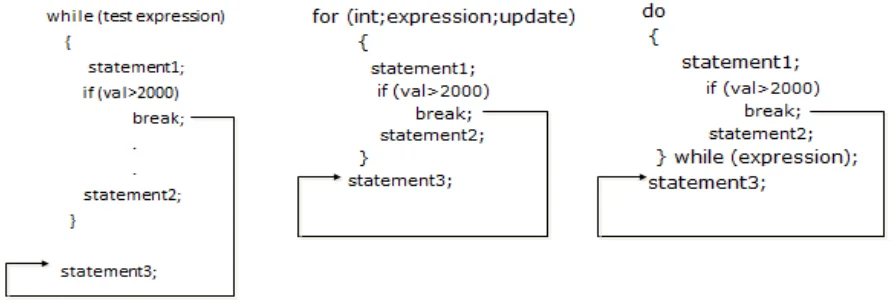
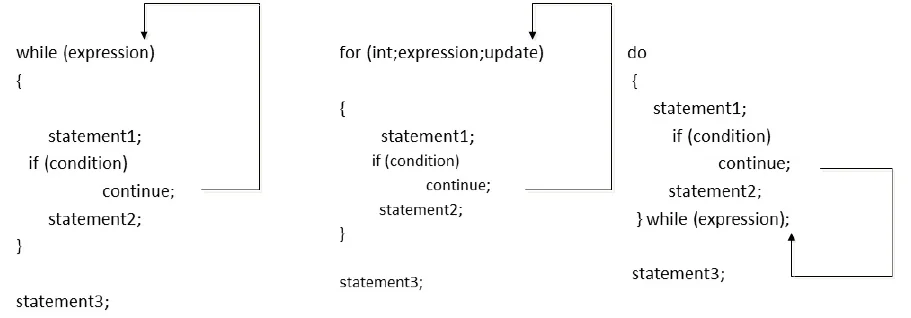
Important syntax: if, if-else, if-else-if ladder, switch, for, while and do-while. The break statement terminates the smallest enclosing while, do-while, for or switch. The continue statement forces the next iteration of the loop. In syntax, <> is a placeholder and [ ] marks an optional part.
Functions: A named group of statements that performs a specific task and returns a value. Built-in (library) functions such as sqrt(), toupper(), isdigit() come from header files: stdio.h (gets, puts), ctype.h (isalnum, isalpha, isdigit, islower, isupper, tolower, toupper), string.h (strcpy, strcat, strlen, strcmp, strcmpi, strrev, strupr, strlwr), math.h (fabs, pow, sqrt, sin, cos, abs), stdlib.h (randomize, random).
Random numbers: randomize() provides the seed value. random(x) generates a value from 0 to x-1. To get numbers between L and U use random(U-L+1)+L, e.g. random(100-10+1)+10 gives 10 to 100.
User-defined functions: Declared as Return_type function_name(List of formal parameters) { Body of the function }. Called as function_name(list of actual parameters); The actual parameters must match the formal parameters in number, type and order.
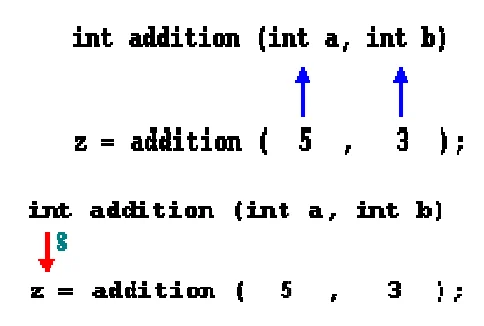
Call by value: The value of each actual parameter is copied into the formal parameter, so changes inside the function do not affect the actual parameter.
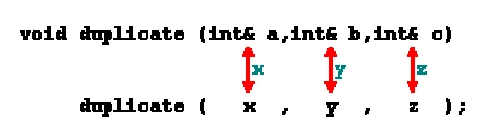
Call by reference: A reference to the original variable is passed (using &), so the function works on the original data and changes are reflected in the caller.
Constant arguments: The const keyword stops a function from modifying an argument, e.g. int myFunction(const int x, const int b);
Default arguments: Default values are given in the function definition from the right most parameter to the left, e.g. float interest(float principal, int time, float rate = 0.70f); the call interest(5600,4) uses rate = 0.7.
Formal and actual parameters: Parameters in the function definition are formal parameters. Parameters in the function call are actual parameters.
void functions and return: void indicates that a function returns no value. The return statement exits the function and returns control (and optionally a value) to the calling function.
Scope of identifiers: Local scope (declared in a block { }), function scope (declared in the outermost block of a function or its argument list), file or global scope (declared outside all blocks), and class scope (class members). Lifetime is the time for which an identifier or data value stays in memory.
Arrays: One-dimensional declaration: Data_type Array_name[size]; Two-dimensional declaration: Data_type Array_name[R][C]; Elements are read and printed with for loops, using nested loops for 2-D arrays.
Structures: struct Name { datatype member1; datatype member2; ... }; Structure variables are declared as Name var1, var2; and members are accessed with the dot operator: Structure_Variable_Name.element_name
Pointers: A pointer holds the memory address of a variable of the same type. Declaration: Datatype *variable_name; e.g. int *p; The & operator gives the address of an operand and * is used to access the value at that address. Adding 1 to a pointer moves it by the size of its base type, e.g. from 1000 to 1002 for an int pointer. The base address of an array is the address of its first element. The name of an array acts as a constant pointer to its first element.
Dynamic allocation: The operators new and delete allocate and free memory from the heap at run time.
typedef: Creates an alias for an existing data type, syntax: typedef existing_data_type new_name; e.g. typedef int num;
#define preprocessor directive: Creates symbolic constants or macros, e.g. #define PI 3.14. A macro with arguments: #define max(a, b) a>b ? a : b. Then A = max(x, y); becomes A = x>y ? x : y;
Function overloading: Functions with the same name but different argument lists and/or return types, e.g. int Add(int,int); double Add(double,double); float Add(int,float);
Short Answer Type Questions (2 Marks)
Question 1. Define Macro with suitable example.
Answer: A macro is a preprocessor directive created using #define that works as a symbolic constant or a parameterised replacement, e.g. #define PI 3.14 replaces PI with 3.14 everywhere in the program.
In simple words: A macro is a find and replace done by the preprocessor before compiling.
Exam Tip: Mention that macros are replaced by the preprocessor, not by the compiler.
Question 2. Explain in brief the purpose of function prototype with the help of a suitable example.
Answer: A function prototype declares the function's return type, name and parameter types before it is used, so the compiler can check calls to it, e.g. int add(int, int); declares add before main() calls z = add(5,3).
In simple words: A prototype is a promise about a function that tells the compiler what it looks like before the function is used.
Exam Tip: A prototype ends with a semicolon and has no body.
Question 3. What is the role of typedef? Can it be used to create new data type?
Answer: typedef creates an alias (another name) for an existing data type, e.g. typedef int num; No, it cannot create a new data type; it only gives a new name to an existing type.
In simple words: typedef gives a nickname to a type, but the type itself stays the same.
Exam Tip: Remember: alias only, no new type.
Question 4. What is the difference between Object Oriented Programming and Procedural Programming?
Answer: OOP organises a program around objects that combine data and the functions that operate on it (classes), while procedural programming organises a program as a sequence of functions acting on separate data.
In simple words: OOP groups data and actions together in objects; procedural programming keeps data and functions apart.
Exam Tip: Use the words objects, classes and data hiding in your answer.
Question 5. What is the difference between Global Variable and Local Variable? Also, give a suitable C++ code to illustrate both.
Answer: A global variable is declared outside all blocks and can be used in all functions. A local variable is declared inside a block or function and can be used only there.
#include <iostream.h>
int g = 10; // global
void main()
{ int l = 5; // local
cout<<g<<l; }
In simple words: Global variables are known everywhere; local variables are known only inside their own block.
Exam Tip: Show the declaration position in the code.
Question 6. Differentiate between ordinary function and member functions in C++. Explain with an example.
Answer: An ordinary function is defined outside any class and is called directly. A member function is declared inside a class, is called through an object of that class, and can access the class's data members, e.g. obj.show();
In simple words: A member function belongs to a class and works on that class's objects.
Exam Tip: Use the dot operator with objects to show a member function call.
Question 7. What is the difference between call by reference and call by value with respect to memory allocation? Give a suitable example to illustrate using C++ code.
Answer: In call by value the formal parameter is a new copy stored in separate memory, so the original is not changed. In call by reference the formal parameter is only another name for the original variable, so no new memory is created for the data and the original changes, e.g. void f(int& a) { a*=2; }
In simple words: Call by value makes a photocopy; call by reference shares the original.
Exam Tip: Mention the & symbol for call by reference.
Question 8. What is the difference between actual and formal parameter? Give a suitable example to illustrate using a C++ code.
Answer: Formal parameters appear in the function definition; actual parameters appear in the function call, e.g. void show(int x) {...} and in main() show(5); where x is formal and 5 is actual.
In simple words: Formal is the name in the definition; actual is the value sent in the call.
Exam Tip: Match the parameters by number, type and order.
Question 9. Differentiate between a Logical Error and Syntax Error. Also give suitable examples of each in C++.
Answer: A syntax error breaks the rules of the language and is found by the compiler, e.g. missing semicolon in int a = 5. A logical error lets the program compile and run but gives wrong results, e.g. average = sum + count instead of sum / count.
In simple words: Syntax errors stop the program from running; logical errors make it run the wrong way.
Exam Tip: Compiler messages reveal syntax errors; only testing reveals logical errors.
Question 10. Find the correct identifiers out of the following, which can be used for naming variable, constants or functions in a C++ program: While, for, Float, new, 2ndName, A%B, Amount2, _Counter
Answer: While, Float, Amount2, _Counter
In simple words: Identifiers cannot be keywords, cannot start with a digit and cannot contain symbols like %.
Exam Tip: Keywords are case sensitive, so While is allowed but while is not.
Question 11. Out of the following, find those identifiers, which cannot be used for naming Variable, Constants or Functions in a C++ program: _Cost, Price*Qty, float, Switch, Address One, Delete, Number12, do
Answer: Price*Qty, float, Address One, do
In simple words: These have a symbol, a space or are keywords.
Exam Tip: Check for spaces and operators first.
Question 12. Find the correct identifiers out of the following, which can be used for naming Variable, Constants or Functions in a C++ program: For, while, INT, NeW, delete, 1stName, Add+Subtract, name1
Answer: For, INT, NeW, name1
In simple words: while and delete are keywords; 1stName starts with a digit; Add+Subtract has a plus sign.
Exam Tip: C++ is case sensitive, so For and INT are valid.
Very Short Answer Type Questions (1 Mark Based on Header Files)
Question 13. Which C++ header file(s) will be included to run/execute the following C++ code? void main() { int Last =26.5698742658; cout<<setw(5)<<setprecision(9)<<Last; }
Answer: iostream.h, iomanip.h
In simple words: cout needs iostream.h and setw/setprecision need iomanip.h.
Exam Tip: setw and setprecision always come from iomanip.h.
Question 14. Name the header files that shall be needed for successful compilation of the following C++ code: void main() { char str[20],str1[20]; gets(str); strcpy(str1,str); strrev(str); puts(str); puts(str1); }
Answer: stdio.h (for gets and puts), string.h (for strcpy and strrev)
In simple words: Input/output functions come from stdio.h and string functions from string.h.
Exam Tip: Look at each function name and recall its header.
Question 15. Write the names of the header files to which the following belong: (i) strcmp() (ii) fabs()
Answer: (i) string.h (ii) math.h
In simple words: strcmp compares strings; fabs is a maths function.
Exam Tip: Learn one function per header.
Question 16. Write the names of the header files to which the following belong: (i) frexp() (ii) isalnum()
Answer: (i) math.h (ii) ctype.h
In simple words: frexp is a maths function; isalnum checks characters.
Exam Tip: Character checks belong to ctype.h.
Short Answer Type Questions (2 Marks Error Finding)
Question 17. Rewrite the following program after removing any syntactical errors. Underline each correction made. #include<iostream.h> void main( ) int A[10]; A=[3,2,5,4,7,9,10]; for( p = 0; p<=6; p++) { if(A[p]%2=0) int S = S+A[p]; } cout<<S; }
Answer: #include<iostream.h>
void main( )
{ int A[10] = {3,2,5,4,7,9,10};
int S = 0, p;
for(p = 0; p<=6; p++)
{ if(A[p]%2==0)
S = S+A[p]; }
cout<<S; }
In simple words: Arrays are filled with braces, comparison needs ==, and S must be declared before use.
Exam Tip: Use == for comparison and = for assignment.
Question 18. Deepa has written a C++ function to find the smallest number in a one-dimensional array but it does not give the desired result. Rewrite the correct code underlining the corrections done. Do not add any additional statements in the corrected code. int find(int a[],int n) { int s=a[0]; for(int x=1;x<n;x++) if(a[x]>s) a[x]=s; return(s); }
Answer: int find(int a[],int n)
{ int s=a[0];
for(int x=1;x<n;x++)
if(a[x]<s)
s=a[x];
return(s); }
In simple words: To find the smallest value, keep the smaller number in s, not the bigger one.
Exam Tip: Compare with < for smallest and update s, not the array.
Question 19. Rewrite the following program after removing the syntactical errors (if any). Underline each correction. #include [iostream.h] class PAYITNOW { int Charge; PUBLIC: void Raise(){cin>>Charge;} void Show{cout<<Charge;} }; void main() { PAYITNOW P; P.Raise(); Show(); }
Answer: #include<iostream.h>
class PAYITNOW
{ int Charge;
public:
void Raise(){cin>>Charge;}
void Show(){cout<<Charge;} };
void main()
{ PAYITNOW P;
P.Raise();
P.Show(); }
In simple words: Use angle brackets, public (lowercase), round brackets for functions and call Show through the object P.
Exam Tip: Member functions are called with the object name and a dot.
Question 20. Rewrite the following program after removing the syntactical errors (if any). Underline each correction. #include <iostream.h> struct Pixels { int Color,Style;} void ShowPoint(Pixels P) { cout<<P.Color,P.Style<<endl;} void main() { Pixels Point1=(5,3); ShowPoint(Point1); Pixels Point2=Point1; Color.Point1+=2; ShowPoint(Point2); }
Answer: #include <iostream.h>
struct Pixels
{ int Color,Style; };
void ShowPoint(Pixels P)
{ cout<<P.Color<<P.Style<<endl; }
void main()
{ Pixels Point1={5,3};
ShowPoint(Point1);
Pixels Point2=Point1;
Point1.Color+=2;
ShowPoint(Point2); }
In simple words: Use semicolons after structs, braces for initial values, dot after the variable name and separate output with <<.
Exam Tip: Struct members are accessed as Variable.member.
Short Answer Type Questions (2 Marks Finding Output)
Question 21. Find the output of the following C++ program: void repch(char s[]) { for (int i=0;s[i]!='\0';i++) { if((i%2)!=0) &&(s[i]!=s[i+1])) { s[i]='@'; } else if (s[i]==s[i+1]) { s[i+1]='!'; } } } void main() { char str[]="SUCCESS"; cout<<"Original String"<<str; repch(str); cout<<"Changed String"<<str; }
Answer: Original String SUCCESS
Changed String S@C@ES!
In simple words: Odd positions that differ from the next letter become @, and a repeated letter after it becomes !.
Exam Tip: Trace the string index by index, carefully noting i%2.
Question 22. Find output of the following program segment: #include<iostream.h> #include<ctype.h> void Mycode(char Msg[],char CH) { for(int cnt=0;Msg[cnt]!='\0';cnt++) { if(Msg[cnt]>='B'&& Msg[cnt]<='G') Msg[cnt]=tolower(Msg[cnt]); else if(Msg[cnt]=='N'||Msg[cnt]=='n'||Msg[cnt]==' ') Msg[cnt]=CH; else if(cnt%2==0) Msg[cnt]=toupper(Msg[cnt]); else Msg[cnt]=Msg[cnt-1]; } } void main() { char MyText[]="Input Raw"; Mycode(MyText,'@'); cout<<"NEW TEXT:"<<MyText<<endl; }
Answer: NEW TEXT:I@PPT@RRW
In simple words: Even positions become capitals, odd positions copy the letter before them, and spaces and n become @.
Exam Tip: Update the array from left to right, because later steps use the changed letters.
Question 23. Find the output of the following program: #include <iostream.h> #include <ctype.h> void Encrypt(char T[]) { for (int i=0;T[i]!='\0';i+=2) if (T[i]=='A' || T[i]=='E') T[i]='#'; else if (islower(T[i])) T[i]=toupper(T[i]); else T[i]='@'; } void main() { char Text[]="SaVE EArtH"; Encrypt(Text); cout<<Text<<endl; }
Answer: @a@E@E#rTH
In simple words: Only even positions are changed: capital A or E becomes #, lowercase becomes capital, and other letters become @.
Exam Tip: The loop jumps by 2, so odd positions stay the same.
Question 24. Find the output of the following program: #include <iostream.h> struct Game { char Magic[20]; int Score; }; void main() { Game M={"Tiger",500}; char *Choice; Choice=M.Magic; Choice[4]='P'; Choice[2]='L'; M.Score+=50; cout<<M.Magic<<M.Score<<endl; Game N=M; N.Magic[0]='A'; N.Magic[3]='J'; N.Score-=120; cout<<N.Magic<<N.Score<<endl; }
Answer: TiLeP550
AiLJP430
In simple words: Choice points to the same letters as M.Magic, so changes show up in M. N is a copy, so changing N does not change M.
Exam Tip: A pointer to an array changes the array itself.
Application Based Questions (3 Marks Finding Output)
Question 25. Find the output of the following: #include <iostream.h> void switchover(int A[ ],int N, int split) { for(int K = 0; K<N; K++) if(K<split) A[K] += K; else A[K]*= K; } void display(int A[ ] ,int N) { for(int K = 0; K<N; K++) (K%2== 0) ?cout<<A[K]<<"%" : cout<<A[K]<<endl; } void main( ) { int H[ ] = {30,40,50,20,10,5}; switchover(H,6,3); display(H,6); }
Answer: 30%41
52%60
40%25
In simple words: The first three numbers get K added, the rest get multiplied by K, then values at even positions are followed by %.
Exam Tip: Write the new array values first: 30, 41, 52, 60, 40, 25.
Question 26. Find the output of the following program: #include<iostream.h> void in(int x,int y, int &z) { x+=y; y- -; z*=(x-y); } void out(int z,int y, int &x) { x*=y; y++; z/=(x+y); } void main() { int a=20, b=30, c=10; out(a,c,b); cout<<a<<"#"<<b<<"#"<<c<<"#"<<endl; in(b,c,a); cout<<a<<"@"<<b<<"@"<<c<<"@"<<endl; out(a,b,c); cout<<a<<"$"<<b<<"$"<<c<<"$"<<endl; }
Answer: 20#300#10#
6020@300@10@
6020$300$3000$
In simple words: Only parameters passed by reference (&) change the variables in main; the others are copies.
Exam Tip: Track each variable separately for every call.
Question 27. Find the output of the following program: #include <iostream.h> struct PLAY { int Score, Bonus;}; void Calculate(PLAY &P, int N=10) { P.Score++; P.Bonus+=N; } void main() { PLAY PL={10,15}; Calculate(PL,5); cout<<PL.Score<<":"<<PL.Bonus<<endl; Calculate(PL); cout<<PL.Score<<":"<<PL.Bonus<<endl; Calculate(PL,15); cout<<PL.Score<<":"<<PL.Bonus<<endl; }
Answer: 11:20
12:30
13:45
In simple words: Score goes up by 1 each call, and Bonus goes up by N (10 when N is not given).
Exam Tip: Default values are used when the second argument is missing.
Question 28. Find the output of the following program: #include <iostream.h> void Changethecontent(int Arr[], int Count) { for (int C=1;C<Count;C++) Arr[C-1]+=Arr[C]; } void main() { int A[]={3,4,5},B[]={10,20,30,40},C[]={900,1200}; Changethecontent(A,3); Changethecontent(B,4); Changethecontent(C,2); for (int L=0;L<3;L++) cout<<A[L]<<'#'; cout<<endl; for (L=0;L<4;L++) cout<<B[L] <<'#'; cout<<endl; for (L=0;L<2;L++) cout<<C[L] <<'#'; }
Answer: 7#9#5#
30#50#70#40#
2100#1200#
In simple words: Each element adds the element after it, moving from left to right, so the later values are already changed.
Exam Tip: Update A first, then B, then C, and check each step.
Question 29. Find the output of the following program: #include <iostream.h> struct GAME { int Score, Bonus;}; void Play(GAME &g, int N=10) { g.Score++; g.Bonus+=N; } void main() { GAME G={110,50}; Play(G,10); cout<<G.Score<<":"<<G.Bonus<<endl; Play(G); cout<<G.Score<<":"<<G.Bonus<<endl; Play(G,15); cout<<G.Score<<":"<<G.Bonus<<endl; }
Answer: 111:60
112:70
113:85
In simple words: Each call adds 1 to Score and adds N to Bonus.
Exam Tip: Remember the structure is passed by reference, so the changes stay.
Application Based Questions (2 Marks Based on random function)
Question 30. Observe the following C++ code and find out which out of the given options (i) to (iv) are the expected correct output. Also assign the maximum and minimum value that can be assigned to the variable 'Go'. void main() { int X [4] ={100,75,10,125}; int Go = random(2)+2; for (int i = Go; i< 4; i++) cout<<X[i]<<"$$"; } (i) 100$$75 (ii) 75$$10$$125$$ (iii) 75$$10$$ (iv) 10$$125$
Answer: (iv) is the correct option. Minimum value of Go = 2. Maximum value of Go = 3.
In simple words: random(2) gives 0 or 1, so Go is 2 or 3 and the loop starts at index 2 or 3.
Exam Tip: random(n) gives 0 to n-1, so add the offset to both ends.
Question 31. In the following program, if the value of N given by the user is 15, what maximum and minimum values the program could possibly display? void main() { int N,Guessme; randomize(); cin>>N; Guessme=random(N)+10; cout<<Guessme<<endl; }
Answer: Maximum = 24, Minimum = 10
In simple words: random(15) gives 0 to 14, and adding 10 gives 10 to 24.
Exam Tip: Add the offset after finding the range.
Question 32. In the following program, if the value of N given by the user is 20, what maximum and minimum values the program could possibly display? void main() { int N,Guessnum; randomize(); cin>>N; Guessnum=random(N-10)+10; cout<<Guessnum<<endl; }
Answer: Maximum = 19, Minimum = 10
In simple words: random(10) gives 0 to 9, and adding 10 gives 10 to 19.
Exam Tip: Compute N-10 first.
Question 33. Read the following C++ code carefully and find out which out of the given options (i) to (iv) are the expected correct output(s) of it. Also, write the maximum and minimum value that can be assigned to the variable Taker used in the code: void main() { int GuessMe[4]={100,50,200,20}; int Taker=random(2)+2; for (int Chance=0;Chance<Taker;Chance++) cout<<GuessMe[Chance]<<"#"; } (i) 100# (ii) 50#200# (iii) 100#50#200# (iv) 100#50
Answer: (iii) 100#50#200# is correct when Taker = 3. Option (iv) 100#50 is correct when Taker = 2 (the trailing # is ignored). Maximum value of Taker = 3, Minimum value of Taker = 2.
In simple words: Taker is 2 or 3, so the loop prints either the first two or the first three values.
Exam Tip: Count how many times the loop runs for each value of Taker.
Free study material for Computer Science
Free CBSE Practice Worksheets: Class 12 Computer Science Object Oriented Programming In C++
Practice Exercises for Class 12 Computer Science Object Oriented Programming In C++
Explore reliable practice questions for Object Oriented Programming In C++ tailored for Class 12 Computer Science learners. Use these structured worksheets to evaluate exam preparedness and strengthen problem-solving skills throughout the 2026 academic session.
Step-by-Step Solutions and Practice Guidelines
Built using official NCERT guidelines for Class 12 Computer Science, these practice sheets provide reliable academic support. Cross-reference your completed work with our detailed solutions to learn standard answer-writing formats for CBSE exams.
Enhance Speed with Online Practice
Follow up your worksheet practice by attempting the interactive online MCQ tests for Object Oriented Programming In C++ to evaluate your execution speed. All printable assignments and revision sheets on our platform are updated for the 2026 session and available free of charge.
FAQs
You can download the latest chapter-wise printable worksheets for Class 12 Computer Science Object Oriented Programming In C++ for free from StudiesToday.com. These have been made as per the latest CBSE curriculum for this academic year.
Yes, Class 12 Computer Science worksheets for Object Oriented Programming In C++ focus on activity-based learning and also competency-style questions. This helps students to apply theoretical knowledge to practical scenarios.
Yes, we have provided solved worksheets for Class 12 Computer Science Object Oriented Programming In C++ to help students verify their answers instantly.
Yes, our Class 12 Computer Science test sheets are mobile-friendly PDFs and can be printed by teachers for classroom.
For Object Oriented Programming In C++, regular practice with our worksheets will improve question-handling speed and help students understand all technical terms and diagrams.