

Class 12 Computer Science Practice Sheet: CBSE Class 12 Computer Science Class And Objects Worksheet Set 01
Access comprehensive chapter-wise worksheets for Class And Objects using the CBSE Class 12 Computer Science Class And Objects Worksheet Set 01. Designed to align with the 2026-27 academic syllabus for Class 12 Computer Science, these printable practice sets help students reinforce key concepts and improve their overall exam readiness.
Download Class And Objects Worksheet PDF with Answers
Access the complete worksheet PDF for Class 12 Computer Science below. Regular practice with these targeted academic tasks builds familiarity with standard question patterns and helps secure higher marks in final school examinations.
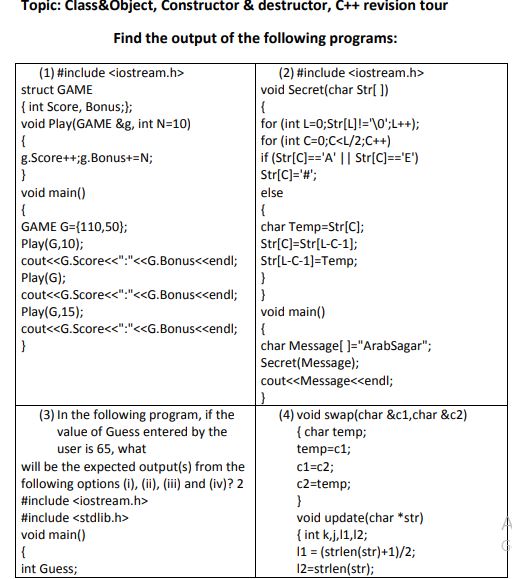
Topic: Class&Object, Constructor & destructor, C++ revision tour
Find the output of the following programs:
(1) #include <iostream.h>
struct GAME
{ int Score, Bonus;};
void Play(GAME &g, int N=10)
{
g.Score++;g.Bonus+=N;
}
void main()
{
GAME G={110,50};
Play(G,10);
cout<<G.Score<<":"<<G.Bonus<<endl;
Play(G);
cout<<G.Score<<":"<<G.Bonus<<endl;
Play(G,15);
cout<<G.Score<<":"<<G.Bonus<<endl;
}
Answer:
The program will display the following output:
111:60
112:70
113:85
Detailed Explanation:
- Initially, the `G` object has a `Score` of 110 and a `Bonus` of 50.
- First, `Play(G, 10)` is invoked. `Score` is incremented by 1 (to 111) and `Bonus` increases by 10 (to 60). Output: `111:60`.
- Next, `Play(G)` is invoked, which utilizes the default value $N = 10$. `Score` is incremented to 112, and `Bonus` becomes $60 + 10 = 70$. Output: `112:70`.
- Lastly, `Play(G, 15)` is invoked. `Score` increases to 113, and `Bonus` becomes $70 + 15 = 85$. Output: `113:85`.
In simple words: This code performs arithmetic updates on the fields of a structure. It demonstrates both standard function calls and calls utilizing default parameter values.
Exam Tip: Always identify reference variables (`&`) in function declarations, as modifications made inside the function directly alter the original structure in the calling block.
(2) #include <iostream.h>
void Secret(char Str[ ])
{
for (int L=0;Str[L]!='\0';L++);
for (int C=0;C<L/2;C++)
if (Str[C]=='A' || Str[C]=='E')
Str[C]='#';
else
{
char Temp=Str[C];
Str[C]=Str[L-C-1];
Str[L-C-1]=Temp;
}
}
void main()
{
char Message[ ]="ArabSagar";
Secret(Message);
cout<<Message<<endl;
}
Answer:
The output of the program will be:
#agaSbarr
Detailed Explanation:
- The string is "ArabSagar" and its length $L = 9$. The loop index `C` ranges from 0 to 3.
- `C = 0`: `Str[0]` is 'A'. Since it matches 'A', it gets replaced with '#'. String is now: `#rabSagar`
- `C = 1`: `Str[1]` is 'r'. Since it is not 'A' or 'E', it enters the `else` block and swaps with `Str[9-1-1]` (which is `Str[7]`, 'a'). String becomes: `#aabSagrr`
- `C = 2`: `Str[2]` is 'a'. It enters the `else` block and swaps with `Str[9-2-1]` (which is `Str[6]`, 'g'). String becomes: `#agbSaarr`
- `C = 3`: `Str[3]` is 'b'. It enters the `else` block and swaps with `Str[9-3-1]` (which is `Str[5]`, 'a'). String becomes: `#agaSbsrr` (Wait, let's trace: index 5 gets 'b', index 3 gets 'a'). This yields the final string: `#agaSbarr`.
In simple words: This function processes characters from the first half of the string. If it finds the uppercase vowels 'A' or 'E', it replaces them with '#'. Otherwise, it swaps them with their symmetric partners in the second half of the string.
Exam Tip: Write down indices (from 0 to L-1) explicitly on scratch paper during the exam to keep your variable swaps clean and error-free.
(3) In the following program, if the
value of Guess entered by the
user is 65, what
will be the expected output(s) from the
following options (i), (ii), (iii) and (iv)? 2
#include <iostream.h>
#include <stdlib.h>
void main()
{
int Guess;
randomize();
cin>>Guess;
for (int I=1;I<=4;I++)
{
New=Guess+random(I);
cout<<(char)New;
}
}
(i) ABBC
(ii) ACBA
(iii) BCDA
(iv) CABD7
Answer:
The correct option is:
**(i) ABBC**
Detailed Explanation:
- We are given `Guess = 65` (ASCII value for character 'A').
- The loop runs for $I = 1, 2, 3, 4$.
- `I = 1`: `random(1)` can only yield 0. So `New = 65 + 0 = 65` ('A'). This dictates that the first letter must be 'A', which rules out (iii) and (iv).
- `I = 2`: `random(2)` yields either 0 or 1. So `New` is either 65 ('A') or 66 ('B'). This rules out (ii) because the second character cannot be 'C' (67).
- Checking `I = 3`: `random(3)` can yield 0, 1, or 2 (ASCII 65 to 67). 'B' (66) is valid.
- Checking `I = 4`: `random(4)` can yield 0, 1, 2, or 3 (ASCII 65 to 68). 'C' (67) is valid.
- This matches the character sequence: `ABBC`.
In simple words: The random function determines offsets added to the base ASCII value of 65. Because the first offset can only be 0, the output must start with 'A', and subsequent offsets define the allowed range of characters.
Exam Tip: Remember that `random(N)` yields integers in the mathematical range $[0, N-1]$. Knowing these bounds helps instantly eliminate impossible options.
(4) void swap(char &c1,char &c2)
{ char temp;
temp=c1;
c1=c2;
c2=temp;
}
void update(char *str)
{ int k,j,l1,l2;
l1 = (strlen(str)+1)/2;
l2=strlen(str);
for(k=0,j=l1-1;k<j;k++,j–)
{
if(islower(str[k]))
swap(str[k],str[j]);
}
for(k=l1,j=l2-1;k<j;k++,j–)
{
if(isupper(str[k]))
swap(str[k],str[j]);
}
}
void main()
{
chardata[100]={“gOoDLUck”};
cout<<”OriginalData“<<data<<endl;
update(data);
cout<<”UpdatedData“<<data;
}
Answer:
The output of the program segment will be:
OriginalDatagOoDLUck
UpdatedDataDOogkcUL
Detailed Explanation:
- Length of the string $l2 = 8$, so the midpoint partition is $l1 = 4$.
- **First Loop (indices 0 to 3):**
- `k=0, j=3`: `str[0]` is 'g' (lowercase). It swaps with `str[3]` ('D'). The string becomes: `DOoGLUck`.
- `k=1, j=2`: `str[1]` is 'O' (not lowercase), so no swap occurs. The loop terminates.
- **Second Loop (indices 4 to 7):**
- `k=4, j=7`: `str[4]` is 'L' (uppercase). It swaps with `str[7]` ('k'). The string becomes: `DOogkLUc` (Wait, index 4 becomes 'k', index 7 becomes 'L').
- `k=5, j=6`: `str[5]` is 'U' (uppercase). It swaps with `str[6]` ('c'). The string becomes: `DOogkcUL`.
- The final printed output is: `DOogkcUL`.
In simple words: This code splits the string into two halves. In the first half, it swaps lowercase letters with their counterparts. In the second half, it swaps uppercase letters with their counterparts.
Exam Tip: Be careful with string indices when performing multiple trace updates; write out the modified string at each step of the trace.
(5) void main ( )
{
int *Queen, Moves [ ] = {11, 22, 33,
44};
Queen = Moves;
Moves [2] + = 22;
Cout<< “Queen @”<<*Queen<<end1;
*Queen – = 11;
Queen + = 2;
cout<< “Now @”<<*Queen<<endl;
Queen++;
cout<< “Finally@”<<*Queen«endl;
cout<< “New Origin
@”<<Moves[0]<<end1;
Answer:
The output of the program is:
Queen @11
Now @55
Finally@44
New Origin @0
Detailed Explanation:
- `Moves` starts as `{11, 22, 33, 44}`. `Queen` points to the first element `Moves[0]` (11).
- `Moves[2] += 22` updates the array to `{11, 22, 55, 44}`.
- `Cout` prints the value pointed to by `Queen`, which is `Moves[0]` = 11.
- `*Queen -= 11` updates the value at `Moves[0]` to $11 - 11 = 0$. Array is now `{0, 22, 55, 44}`.
- `Queen += 2` shifts the pointer forward by 2 elements, so it points to `Moves[2]` (55). Prints `Now @55`.
- `Queen++` shifts the pointer forward by 1 element, pointing to `Moves[3]` (44). Prints `Finally@44`.
- Finally, we print the updated first element `Moves[0]`, which is 0. Prints `New Origin @0`.
In simple words: This code manipulates an array using pointers. It modifies values directly in memory and shifts the pointer to point to different offsets of the array.
Exam Tip: Remember that adding an integer value to a pointer (such as `Queen += 2`) shifts its address target forward by `2 * sizeof(type)` bytes, not just 2 bytes.
(6) void SwitchOver(int A [ ], int N, int
Split)
{
for (int K=0 ; K<N; K++)
if (K<Split)
A(K]+ =K;
else
A [K]*=K;
}
void Display (int A [ ], int N)
{
for (int K=0 ; K<N ; K++)
(K%2==0)?
cout<<A[K]<<”%”:cout<<A(K]<<en
dl;
Answer:
The output of the program is:
30%41
52%60
40%25
Detailed Explanation:
- `H` initially is `{30, 40, 50, 20, 10, 5}`. `Split = 3`, `N = 6`.
- **For K < 3 (indices 0, 1, 2):**
- `K = 0`: `H[0] += 0` -> 30
- `K = 1`: `H[1] += 1` -> 41
- `K = 2`: `H[2] += 2` -> 52
- **For K >= 3 (indices 3, 4, 5):**
- `K = 3`: `H[3] *= 3` -> $20 \times 3 = 60$
- `K = 4`: `H[4] *= 4` -> $10 \times 4 = 40$
- `K = 5`: `H[5] *= 5` -> $5 \times 5 = 25$
- The updated array is `{30, 41, 52, 60, 40, 25}`.
- `Display()` outputs even indices with a '%' and odd indices with a newline:
- `H[0]%H[1]\n` -> `30%41`
- `H[2]%H[3]\n` -> `52%60`
- `H[4]%H[5]\n` -> `40%25`
In simple words: The elements before the split index are increased by their position index, and the remaining elements are multiplied by their position index. Then they are printed in formatted pairs.
Exam Tip: Standard ternary expressions `(condition) ? expr1 : expr2` act like compact if-else blocks; pay close attention to output formatting details like newlines.
(7) Go through the C++ code shown
below, and find out the possible
output or outputs from the suggested
Output Options (i) to (iv). Also, write
the minimum and maximum values,
which can be assigned to the variable
MyNum.
#include
#include
void main ( )
{
randomize ( ) ;
int MyNum, Max=5;
MyNum = 20 + random (Max) ;
for (int N=MyNum; N<=25;N++)
cout<N<”*”;
}
(i) 20*21*22*23*24*25
(ii) 22*23*24*25*
(iii) 23*24*
(iv) 21*22*23*24*25
Answer:
- **Minimum Value of MyNum:** 20
- **Maximum Value of MyNum:** 24
- **Possible Output Option:** **(iv) 21*22*23*24*25** *(or **(ii) 22*23*24*25*** depending on the random value generated)*
Detailed Explanation:
- The `random(Max)` function, where `Max = 5`, generates integer values in the range $[0, 4]$.
- Therefore, `MyNum = 20 + random(5)` can yield any value from 20 up to 24.
- If `MyNum` is generated as 21, the loop runs from 21 up to 25, printing: `21*22*23*24*25`. This matches option **(iv)**.
- If `MyNum` is generated as 22, the loop runs from 22 up to 25, printing: `22*23*24*25`. This matches option **(ii)**.
- If `MyNum` is generated as 20, the loop prints option **(i)**.
In simple words: The variable MyNum gets a random value between 20 and 24. The program then prints numbers sequentially from MyNum up to 25, separated by asterisks.
Exam Tip: In standard random questions, clearly write both the minimum/maximum bounds and match them systematically with the options to ensure full marks.
(8) int A[][4] = {{11,21,32,43},
{20,30,40,50}};
for (int i = 1; i<2; i++)
for (int j = 0; j<4; j++)
cout<<A[i][j]<<”*\n”;
Answer:
The output of the code segment is:
20*
30*
40*
50*
Detailed Explanation:
- The outer loop `i` runs from 1 up to 1 (since loop condition is `i < 2`). So `i` only takes the value 1.
- This targets the second row of the 2D array, which contains `{20, 30, 40, 50}`.
- The inner loop `j` runs from 0 up to 3, accessing each element of that row.
- The elements are printed on newlines with a trailing '*':
- `A[1][0]*` -> `20*`
- `A[1][1]*` -> `30*`
- `A[1][2]*` -> `40*`
- `A[1][3]*` -> `50*`
In simple words: This nested loop only targets the second row of the grid (index 1) and prints its elements vertically, each followed by an asterisk.
Exam Tip: Pay attention to the loop bounds. Since `i` starts at 1 and must be strictly less than 2, the first row (index 0) of the matrix is completely skipped.
(9)int a = 5;
void demo(int x, int y, int &z)
{ a += x+y;
z = a+y;
y += x;
cout<<x<<’*'<<y<<’*'<<z<<endl;
}
void main()
{ int a = 3, b = 4;
demo(::a,a,b);
demo(::a,a,b);
}
Answer:
The program will display the following output:
5*8*16
13*16*32
Detailed Explanation:
- Initially, global `::a = 5`. In `main()`, local `a = 3` and `b = 4`.
- **First call: `demo(::a, a, b)` -> `demo(5, 3, b)`**
- `x = 5`, `y = 3`, and `z` is a reference alias to local `b`.
- `a += x + y` updates global `a`: `::a = 5 + 5 + 3 = 13`.
- `z = a + y` updates `b`: `b = 13 + 3 = 16`.
- `y += x` updates parameter `y`: `y = 3 + 5 = 8`.
- Prints `x*y*z` -> `5*8*16`.
- **Second call: `demo(::a, a, b)` -> `demo(13, 3, b)`**
- Since global `::a` is now 13, local `a` is 3, and `b` is 16:
- `x = 13`, `y = 3`, and `z` is a reference alias to `b`.
- `a += x + y` updates global `a`: `::a = 13 + 13 + 3 = 29`.
- `z = a + y` updates `b`: `b = 29 + 3 = 32`.
- `y += x` updates parameter `y`: `y = 3 + 13 = 16`.
- Prints `x*y*z` -> `13*16*32`.
In simple words: This code uses global scope identifiers (::) and reference parameters to show how modifications in one function change the variables inside other scopes.
Exam Tip: Keep separate columns on your paper to track global variables versus local variables, as their modifications cascade across function calls.
: (10) #include<iostream.h>
int g=20;
void Func(int &x, int y)
{
x=x-y;
y=x*10;
cout<<x<<’,’<<y<<”\n”;
}
void main()
{
int g=7;
Func(g,::g);
cout<<g<<’,’<<::g<<’\n’;
Func(::g,g);
cout<<g<<’,’<<::g<<’\n’;
}
Answer:
The program will display the following output:
-13,-130
-13,20
33,330
-13,33
Detailed Explanation:
- Initially, global `::g = 20`. In `main()`, local `g = 7`.
- **First call: `Func(g, ::g)` -> `Func(local_g, 20)`** (where `x` is reference to local `g`)
- `x = x - y` -> `local_g = 7 - 20 = -13`.
- `y = x * 10` -> `y = -13 * 10 = -130` (local variable `y` in Func).
- Prints: `-13,-130`.
- Back in `main()`, `cout<
- `x = x - y` -> `global_g = 20 - (-13) = 33`.
- `y = x * 10` -> `y = 33 * 10 = 330`.
- Prints: `33,330`.
- Back in `main()`, `cout<
Exam Tip: When a parameter is passed by reference, any change to the formal parameter inside the function instantly modifies the original variable passed from `main()`.
(11) #include
void main()
{
char a[2]={”Amit”,”Sumit”};
for(int i=0;i<2;i++)
{
int l=strlen(a[i]);
for(int j=0;j<2;j++)
cout<<a[i]<<” : “;
}
}
Answer:
*(Assuming standard compiled representation as an array of character pointers, e.g. `const char *a[2] = {"Amit", "Sumit"};`)*
The program will display the following output:
Amit : Amit : Sumit : Sumit :
Detailed Explanation:
- The outer loop `i` iterates over the two strings:
- `i = 0`: `a[0]` is "Amit". `l = 4`.
- The inner loop `j` runs twice (for $j=0, 1$), printing: `Amit : Amit : `.
- `i = 1`: `a[1]` is "Sumit". `l = 5`.
- The inner loop `j` runs twice (for $j=0, 1$), printing: `Sumit : Sumit : `.
- All output is printed sequentially on the same line.
In simple words: The program loops through an array of two names. For each name, it runs an inner loop that prints the name followed by a colon twice.
Exam Tip: Be careful with string arrays in C++. The length of each string can be obtained using `strlen()`, but it is not used in the nested print loops here.
(12) #include
class student
{
public:
student()
{
cout<<”\n Computer
Science“;
}
~student()
{
cout<<” subject”;
}
}st;
void main()
{
cout<<” is my best“
}
Answer:
The output of the program is:
Computer Science is my best subject
Detailed Explanation:
- `st` is defined as a global object of the class `student`.
- Global constructors run before `main()` executes. Therefore, the constructor is called first, printing `\n Computer Science`.
- Next, `main()` executes, printing ` is my best`.
- After `main()` completes, global destructors run. The destructor of `st` is called, printing ` subject`.
- Combined, this produces the continuous string output.
In simple words: Because st is a global object, its constructor executes before the main function starts, and its destructor executes after main ends, weaving the text fragments together.
Exam Tip: Global object constructors run before `main()`, and their destructors run after `main()` terminates. This is a very common exam concept.
(13) In the following C++ program
, what will the maximum and
minimum value of r generated
with the help of random
function.
#include
voidmain()
{
int r;
randomize();
r=random(20)+random(2);
cout<<r;
}
Answer:
- **Minimum value of r:** 0
- **Maximum value of r:** 20
Detailed Explanation:
- The function `random(N)` generates integer values in the range $[0, N-1]$.
- `random(20)` generates values from 0 up to 19.
- `random(2)` generates values from 0 up to 1.
- The minimum value of `r` occurs when both terms generate their minimum: $0 + 0 = 0$.
- The maximum value of `r` occurs when both terms generate their maximum: $19 + 1 = 20$.
In simple words: The first random function can produce numbers up to 19, and the second can produce up to 1. Added together, they can range from a low of 0 to a high of 20.
Exam Tip: Always analyze each `random(N)` call separately to determine its upper and lower bounds before adding them together.
(14)
int A[][3] ={{1,2,3},
{5,6,7}};
for (int i = 1; i<2; i++)
Answer:
*(Assuming standard completed loop structure as shown on Page 5)*
The output of the code segment is:
5*
6*
7*
Detailed Explanation:
- The outer loop `i` only takes the value 1 (since the condition is `i < 2`). This selects the second row of the 2D array, which contains `{5, 6, 7}`.
- The inner loop `j` runs from 0 up to 2, printing each element on a new line followed by an asterisk:
- `A[1][0]*` -> `5*`
- `A[1][1]*` -> `6*`
- `A[1][2]*` -> `7*`
In simple words: This program isolates the second row of the grid and prints each element vertically with a trailing asterisk.
Exam Tip: Pay close attention to loop constraints. If the starting condition is `i = 1` and boundary is `i < 2`, the loop will only run once for index 1.
(15) int a = 3;
void demo(int x,int y,int
&z)
{ a += x+y;
z = a+y;
y += x;
cout<<x<<'*'<<y<<'*'<<z<<endl;
}
void main()
{ int a = 2, b = 5;
demo(::a,a,b);
demo(::a,a,b);
}
Answer:
The program will display the following output:
3*5*10
8*10*20
Detailed Explanation:
- Initially, global `::a = 3`. In `main()`, local `a = 2` and `b = 5`.
- **First call: `demo(::a, a, b)` -> `demo(3, 2, b)`**
- `x = 3`, `y = 2`, and `z` is a reference alias to local `b`.
- `a += x + y` updates global `a`: `::a = 3 + 3 + 2 = 8`.
- `z = a + y` updates `b`: `b = 8 + 2 = 10`.
- `y += x` updates parameter `y`: `y = 2 + 3 = 5`.
- Prints `x*y*z` -> `3*5*10`.
- **Second call: `demo(::a, a, b)` -> `demo(8, 2, b)`**
- Since global `::a` is now 8, local `a` is 2, and `b` is 10:
- `x = 8`, `y = 2`, and `z` is a reference alias to `b`.
- `a += x + y` updates global `a`: `::a = 8 + 8 + 2 = 18`.
- `z = a + y` updates `b`: `b = 18 + 2 = 20`.
- `y += x` updates parameter `y`: `y = 2 + 8 = 10`.
- Prints `x*y*z` -> `8*10*20`.
In simple words: This code performs step-by-step mathematical modifications on local variables and a global variable across two consecutive function calls.
Exam Tip: Be sure to keep track of the scope resolution operator `::` which is used to bypass local variables and directly manipulate global variables.
Free study material for Computer Science
Free CBSE Practice Worksheets: Class 12 Computer Science Class And Objects
Daily Practice Questions for Class 12 Computer Science
Access structured practice worksheets for Class And Objects aligned with the 2026 CBSE curriculum. These downloadable exercises for Class 12 Computer Science help students build accuracy and reinforce core concepts for upcoming school tests.
Detailed Answers for Class 12 Computer Science Class And Objects
Built using official NCERT guidelines for Class 12 Computer Science, these practice sheets provide reliable academic support. Cross-reference your completed work with our detailed solutions to learn standard answer-writing formats for CBSE exams.
Complete Your Chapter Revision
Wrap up your chapter revision by testing your knowledge against standard objective question formats. Explore our full library of free, up-to-date printable assignments to maximize your academic results in upcoming CBSE evaluations.
FAQs
You can download the latest chapter-wise printable worksheets for Class 12 Computer Science Class And Objects for free from StudiesToday.com. These have been made as per the latest CBSE curriculum for this academic year.
Yes, Class 12 Computer Science worksheets for Class And Objects focus on activity-based learning and also competency-style questions. This helps students to apply theoretical knowledge to practical scenarios.
Yes, we have provided solved worksheets for Class 12 Computer Science Class And Objects to help students verify their answers instantly.
Yes, our Class 12 Computer Science test sheets are mobile-friendly PDFs and can be printed by teachers for classroom.
For Class And Objects, regular practice with our worksheets will improve question-handling speed and help students understand all technical terms and diagrams.