

Download Class 4 Computers Concept Summaries: CBSE Class 4 Computer Science Word Processor Notes
Review targeted revision notes for Class 4 Computers with the CBSE Class 4 Computer Science Word Processor Notes. Built according to official educational guidelines for the 2026-27 academic year, these downloadable summaries for Word Processor support daily study and last-minute exam readiness.
Access Word Processor Notes and Study Material
Access the complete concept summary PDF for Word Processor below. Regular review of these targeted notes builds familiarity with complex Class 4 Computers themes and helps secure higher marks in final school evaluations.
CBSE Class 4 Word Processor. Learning the important concepts is very important for every student to get better marks in examinations. The concepts should be clear which will help in faster learning. The attached concepts will help the student to understand the chapter and score better marks in the examinations.
UNIT-2
WORD PROCESSOR
MS Word is a word processing software. It falls under the category of application software. It is used to create and edit personal and business documents such as letters, reports etc. The default file extension of MS Word 2007 is .docx. Given below is the basic Window that appears when we open the MS Word.
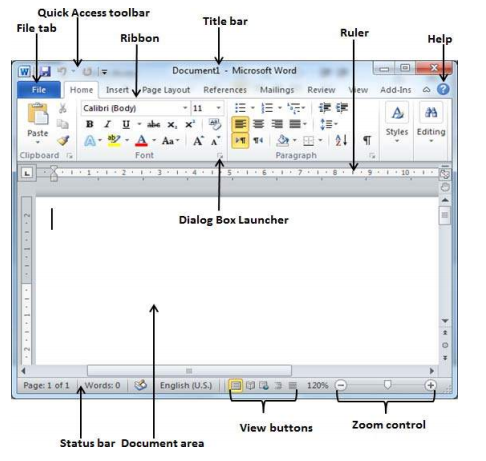
2.1 File Menu : File menu contains all the options related to an open file
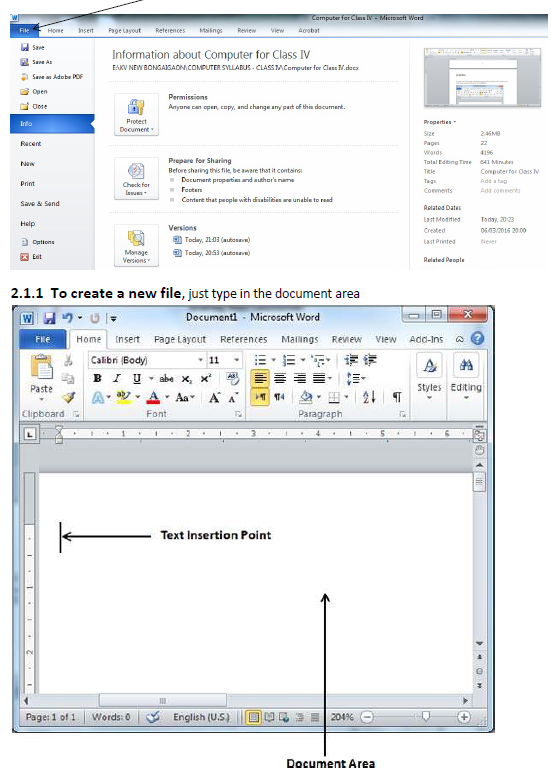
The text insertion point is the place where the cursor stands and the document area is the place where we can type our text. While typing texts, it is advisable to use the TAB key instead of SPACE bar for inserting more than one space between words as it will provide uniform spacing.
2.1.2 To Open an existing file : Click on File menu and select Open or just press CTRL + O , awindow will pop up , locate your file in the computer and click Open button
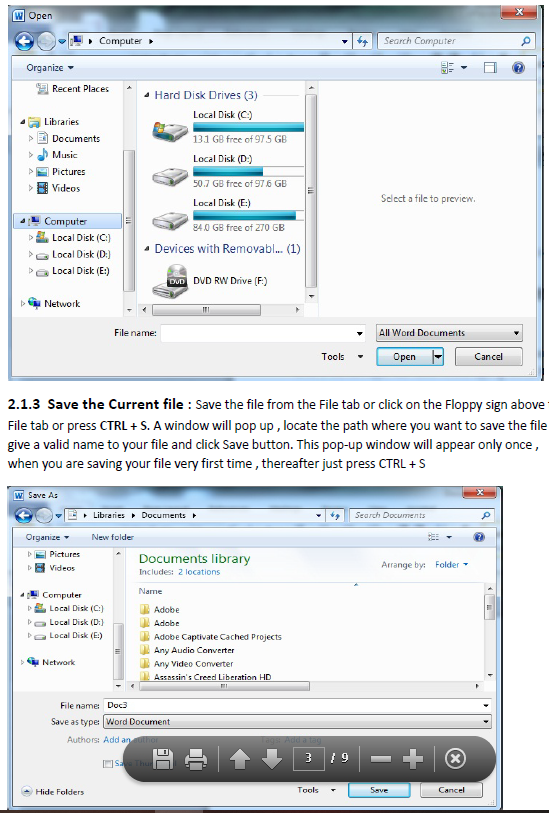
2.1.4 Save As :The ‘Save As’ option under File menu provides us to save our file in different formats or to save our existing file with different name. We can choose our desired format and then save the file.
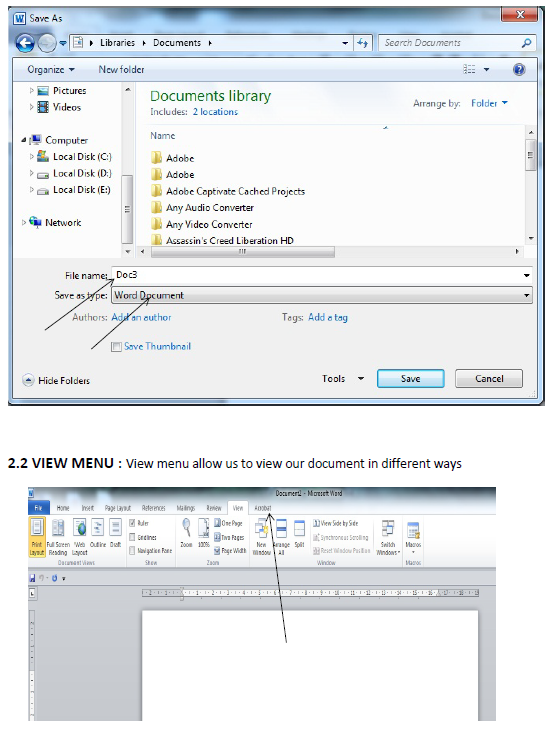
2.2.1 Print Layout : To go to the Print Layout, we need to click on the file tab and then the Print option.. The various print menus as displayed below:
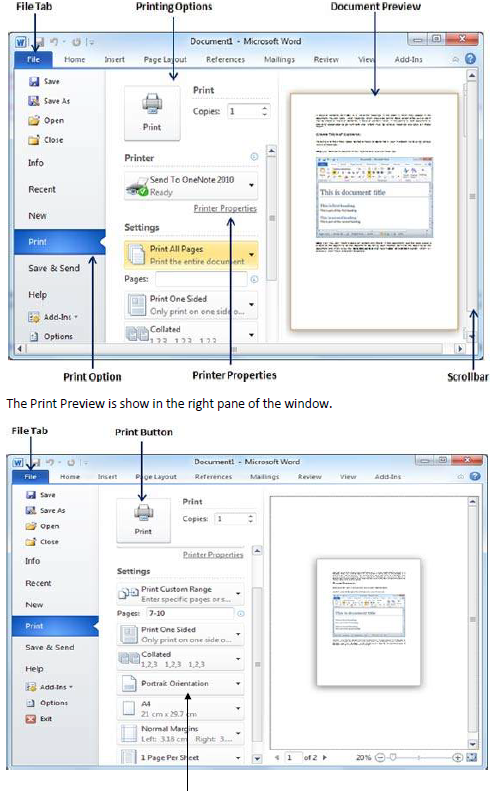
Here, we can select the type of Orientation we need our document to be printed on. Two orientations are available –
→ Portrait
→ Landscape
2.2.2 Full Screen :To view a document in full screen mode, we need to follow the given below steps:
→ Click on the View tab
→ Click on the “Full screen reading” button
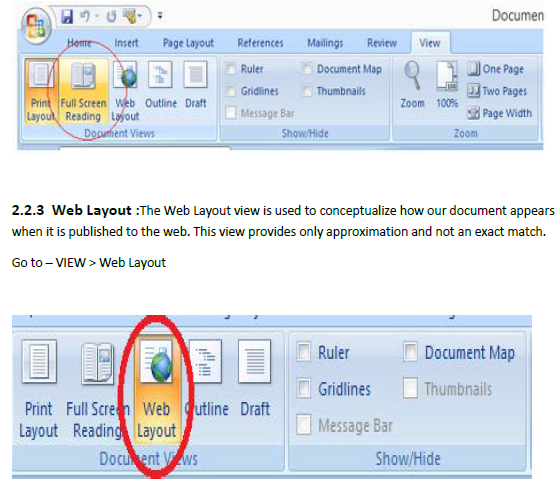
The Web Layout view is encircled in red.
2.2.4 Zooming : Zooming i.e. Zoom-in and Zoom-out enlarges and reduces respectively the size of the texts.
Go to- View > Zoom
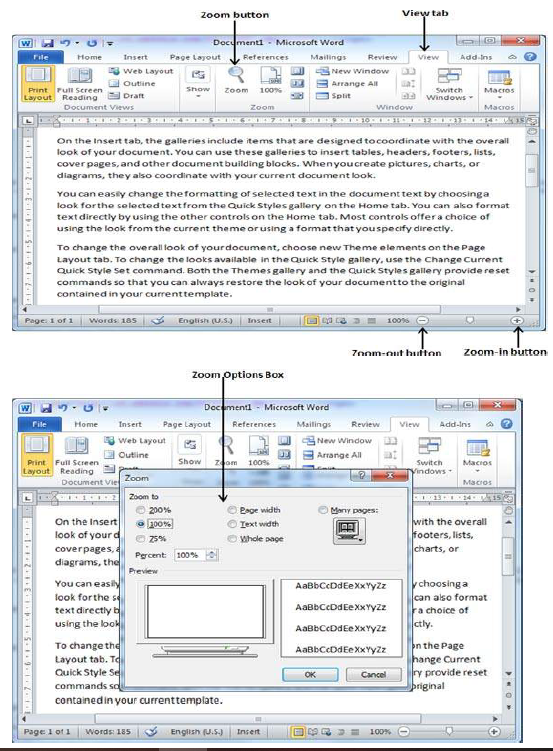
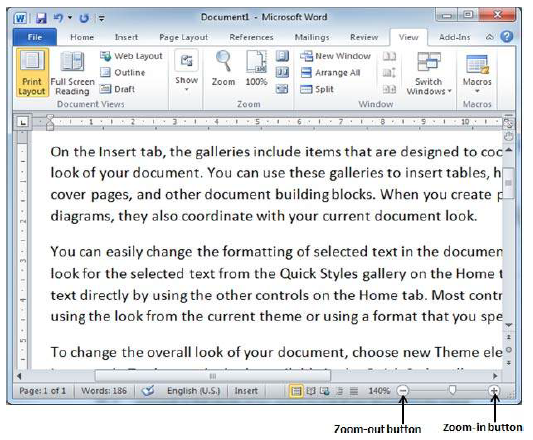
In the above given image, dragging the control at the bottom right, to the left reduces the text size and dragging to the right increases the text size.
2.2.5 Ruler :We can use the horizontal or the vertical rulers in Word to align text, graphics, and other elements in our document.
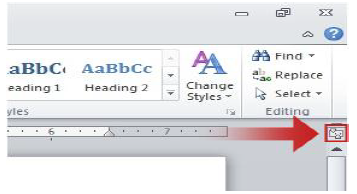
The ruler appears only when it is turned on. To turn on this option follow the given below steps
→ Click on the File tab
→ Click on Words Options ( for MS Word 2007)
→ Click on Advanced
→ Click on Display and then check the ‘Set Vertical ruler in Print Layout Page’
Some of the important shortcuts are given below:
→ Open a file – CTRL + O
→ Create a new document – CTRL + N
→ Close a document – CTRL + W
→ Save a file – CTRL + S
→ Display the ‘Save as’ dialog box – F12
→ Copy – CTRL + C
→ Paste –CTRL + V
→ Cut – CTRL + X
→ Undo – CTRL + Z
→ Redo or repeat an action – CTRL + Y
→ Cancel an action – ESC
EXERCISE
Q 1. What is a word processor? Write at least two uses of it.
Q 2. What is the default file extension of MS Word 2007/2010/2013?
Q 3. What is the shortcut to open the Print Dialog Box?
Q 4. How many types of Page orientation are there in MS Word? Name them.
Q 5. ............................ is the shortcut key to paste in MS Word.
Q 6. CTRL + A selects all the texts and graphics in the working document. (True/False)
Q 7. The Web Layout view is used to preview our document before printing. (True/False)
Q 8. It is possible only to Zoom-in but not Zoom-out in MS Word. (True/False)
Q 9. ............................... positions the texts according to margin.
Q 10. MS Word falls under which category of software?
LAB WORK
1. Open MS Word and write Five sentences about yourself and save the file with your name on the Desktop.
2. Open the file that you have just created write two more sentence about your parents and save the file with the name My Family in D: drive.
3. Open the file that you have just created and set the page, margin and orientation of the document for printing on a normal A4 size paper.
4. Open the file that you have just created and increase the font size to 16 , font style Calibri and save the file with the name MyFile in a folder.
5. Create a new file say Ruler and write Five points ( 1 to 5 )about your country. Now adjust the space between the text and the point number using the Ruler handles
Please click the link below to download CBSE Class 4 Word Processor.
Study Material and Revision Notes for Class 4 Computers Word Processor
Key Concepts and Summary for Class 4 Computers Word Processor
Access structured revision notes for Word Processor designed in alignment with the latest CBSE curriculum for Class 4 Computers. These summaries help clarify core themes and support effective daily study.
NCERT-Aligned Chapter Summary and Notes
Cross-reference your comprehension with comprehensive NCERT solutions for Class 4 to ensure absolute clarity across all sub-topics in this chapter.
Next Steps in Your Exam Preparation
Wrap up your chapter revision by testing your knowledge against standard question formats. Everything on our platform is provided free of charge.
FAQs
You can download the teacher prepared revision notes for CBSE Class 4 Computer Science Word Processor Notes from StudiesToday.com. These notes are designed as per 2026-27 academic session to help Class 4 students get the best study material for Computers.
Yes, our CBSE Class 4 Computer Science Word Processor Notes include 50% competency-based questions with focus on core logic, keyword definitions, and the practical application of Computers principles which is important for getting more marks in 2026 CBSE exams.
Yes, our CBSE Class 4 Computer Science Word Processor Notes provide a detailed, topic wise breakdown of the chapter. Fundamental definitions, complex numerical formulas and all topics of CBSE syllabus in Class 4 is covered.
These notes for Computers are organized into bullet points and easy-to-read charts. By using CBSE Class 4 Computer Science Word Processor Notes, Class 4 students fast revise formulas, key definitions before the exams.
No, all study resources on StudiesToday, including CBSE Class 4 Computer Science Word Processor Notes, are available for immediate free download. Class 4 Computers study material is available in PDF and can be downloaded on mobile.