

Download Class 4 Computers Concept Summaries: CBSE Class 4 Computer Science Internet and its uses Notes
Review targeted revision notes for Class 4 Computers with the CBSE Class 4 Computer Science Internet and its uses Notes. Built according to official educational guidelines for the 2026-27 academic year, these downloadable summaries for Internet and its uses support daily study and last-minute exam readiness.
Access Internet and its uses Notes and Study Material
View or download the dedicated Internet and its uses revision resource below. Engaging with these structured concept notes daily ensures continuous academic progress and mastery of the 2026-27 curriculum for Computers.
Internet
• Internet is the shortened form of ‘INTER and NET-work’.
• It is a well-connected network which joins computers from all across the world.
• This interconnection of networks all across the world is known as Internet or Net. It is very well organized and is a storehouse of information.
• To use the internet, you must be connected to the computer.
• The computers may be present at different places or very away in some other part of the world.
History of Internet
• The history of the Internet begins with the development of electronic computers in the 1950s.
• Initial concepts of wide area networking originated in several computer science laboratories in the United States, United Kingdom, and France.
• Later in 1969, Department of Defense of USA founded the internet. They set up a network of computers called ARPANET (Advanced Research Projects Agency Network). The main purpose of creating this network was to ensure connectivity even during nuclear attack.
• Later, however, ARPANET was used in educational fields by scholars of different universities to share information on latest technologies.
• ARPANET was then open to include sites of business, government and universities etc. and finally became a network of millions of interconnected computers which we use today.
Uses of Internet
Internet is a very useful invention. Nowadays, it is widely used in all aspects of life. From elder people to young children, everyone is using internet for varied uses.
• Internet is very vast and has information on almost everything. We can use internet to access all this information.
• Internet helps us to communicate with a person sitting miles away. Using internet, we can send e-mails (electronic mails), pictures, messages, videos and audios etc. very quickly.
• Internet is a great platform to buy or sell different things on the internet.
• We can avail online services like ticket booking, paying bills and hotel bookings etc.
• Internet is used to download data. We can download movies, songs, videos, games, pictures and files from the internet.
• Internet helps us to connect to our friends and family through various social media websites like Facebook.com and Twitter.com etc. It can be accessed over the mobile phones to use instant messaging services like Whats-App, etc.
• We can search for jobs on the internet.
• There are several chatting portals on the internet. We can do live chat virtually with strangers, friends and family. Chatting can be done individually or with a group of people in virtual Chat rooms.
• We can upload and download a lot of information, movies, music, videos, images and audios from the internet.
Uploading: Transmission of a file from one computer system to another computer or to a server so that others can see and retrieve it is called uploading.
Downloading : Downloading is opposite of uploading. It is the transmission of file to your computer from the internet
Basic requirements for An Internet connection
The various requirements for connecting to a internet are:
• A Computer: A processing device like PC, Laptop, Smartphone or a Tablet is required to access the internet facilities.
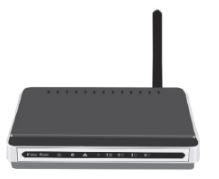
• Modem: Modem stands for Modulator Demodulator. It is a device which connects one computer to another with the help of telephone lines. It is through modem that a computer sends and receives all the data. A modem can be present inside fitted into the computer (internal modem) or attached from outside (External modem).
A modem is a small box shaped device which may or may not be connected to a telephone line. The modem is provided to the user by Internet Service Provider.
Internet connection
Internet connection is provided by the Internet Service Providers (ISPs). Many companies provide internet connections. For example: Reliance Communications, Airtel, MTNL and BSNL etc.
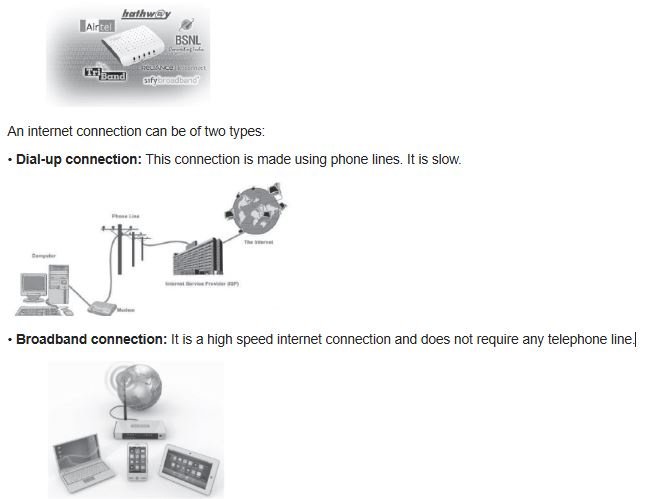
• Nowadays, internet connections are also available in portable devices called data cards. These cards are inserted into the ports of the computer to access the internet.
• Web Browser :The computer must have a web browser installed for easy access to the internet.
Internet Application Software
MS-Windows comes loaded with a Internet Application Software for both dial-up and broadband networking. It is essential to set up and control the connections from the computer to the internet.
The two important components of Internet Application software are:
1. Dialler Software: It tells the modem to dial a telephone/connection number so as to get recognised by ISP.
2. TCP/IP Network: It stands for Transmission Control Protocol/Internet Protocol. It enables the computer to communicate with one another.
Connecting to the Internet
To connect to the internet
1. Switch on the modem.
2. If it’s a dial-up internet connection, then double click on the Dial-up connection icon on the desktop.
3. A dialog box appears. Input the username and password and then click on Dial button. [This information is not required in case of broadband connections]
4. The dialler starts dialling the Internet Service Provider which connects you to the Internet.
5. As the internet connection gets established, you can see an ‘Internet Connected’ icon on the right hand side of the taskbar on the desktop.
Browsing Internet
After your computer is connected to the Internet, you can start browsing.
1. Click on the Start button→All Programs→Internet Explorer (you can also choose any other web browser) OR Double click on the Internet Explorer icon on the desktop.
2. The web browser will get open up.
3. In the address bar, type the website address which is to be opened. Press Enter Key.
4. The home page of the website will appear on the web browser window.
While browsing net, it is very important to be more responsible and follow netiquettes for safe browsing on the internet.
Search Engine

The Search Engine is software that is used to search information on the Internet. Some popular search engines are www.google.com, www.yahoo.com, www.bing.com, www.sify.com and www.ask.com etc. Google search is the most widely used search engine. It gives the user options of Advance Search also. The results are presented immediately in the form of text and images.
Search engines are used by millions of users across the globe to find important information. While searching for the information using Search engines, the user has to use the appropriate keywords. Using these appropriate words, you can search and find any information.
Email
Email is short form of ‘electronic mail’. Similar to a letter, it is sent via the internet to a recipient. An email address is required to receive email, and that address is unique to the user. Some people use internet-based applications and some use programs on their computer to access and store emails.
Key Benefits and Features of Email
• It’s quick – your recipients receives your email as soon as they go online and collect their mails.
• It’s secure.
• It’s low cost.
• Photos, documents and other files can be attached to an email, so that more information can be shared.
• One email can be sent to more than one recipient at a time.
Parts of an Email
• Recipient’s address : The first thing you need to enter when composing an email is the recipient’s address. This is entered before you compose the body of the email. This field is usually found in one of the spaces above the message.
• Cc and Bcc : Another option when sending a message to multiple recipients is to use the Cc, or carbon copy, and Bcc, blind carbon copy fields.
• Subject line : The subject line is the first part of your email that the recipient will see. When entering the subject line, be sure to include important information such as what the email is about.
• Body : The body is where you actually write the message that you want to send. Your message can be anything from a professional memo to a note to friend or family member.
Web Browser
Web browser is computer software which enables the user to interact with text, images, videos, music and other information present on the internet. The various web browsers are-
Internet Explorer, Google Chrome, Mozilla Firefox, Safari and Opera etc.
Important terminologies related to Internet network
• Webpage
In books, we have pages over which the information is written upon. Similarly, internet also has different pages over which it stores all the information. These pages are called web pages. These pages are in digital form and created in HTML (Hyper Text Mark-up Language). The information stored can be in the form of text, videos, images and audio etc.
• Website
A website is a collection of related web pages. Each and every website has a unique address called its URL (Uniform Resource Locator).
• World Wide Web [www]

World Wide Web or www is a collection of related websites. The websites are connected in a manner similar to a web and all the information is accessible to anyone around the world. Tim Berners-Lee invented the World Wide Web.
• Address Bar
The term address bar refers to the text field in a web browser that identifies the user, s location on the web and allows them to access different websites. The address bar is known as a location bar.
• URL
URL is the abbreviation of Uniform Resource Locator and is defined as the global address of documents and other resources on the World Wide Web. The URL is an address that sends users to a specific resource online, such as a webpage, video or other document or resource.
• Home Page
Home page is the first page of any website which appears when we open that website.
• Hyper Link
A web page consists of many links to a topic which may be present on the same page or some other page. These links are called hyperlinks. Hyperlinks can be a word, image or an icon which moves the user from one web page to another.
• Net surfing
The process of exploring the information by moving from one web page to another page is called internet surfing.
Social networking services
Internet allows us to communicate with the people sitting at remote locations. There are various apps available on the web that use Internet as a medium for communication. One can find various social networking sites such as:

It is the top social network on the web. This is the biggest social media network on the Internet, both in terms of total number of users and name recognition.

It is known as the real-time, public micro-blogging network.

It is a social network for professionals. Users can promote themselves and their businesses by making connections with other professionals, interact in group discussions, posting job ads, apply to jobs and publish articles on LinkedIn.
It has grown to be one of the most popular social networks for photo sharing.
It is an instant messaging app for smart-phones, PCs and tablets. The app relies on the Internet to send images, texts, documents, audio and video messages to other users that have the app installed on their devices.
Internet and its uses Concepts and Summary for Class 4 Computers
Key Concepts and Summary for Class 4 Computers Internet and its uses
Access structured revision notes for Internet and its uses designed in alignment with the latest CBSE curriculum for Class 4 Computers. These summaries help clarify core themes and support effective daily study.
NCERT-Aligned Chapter Summary and Notes
Cross-reference your comprehension with comprehensive NCERT solutions for Class 4 to ensure absolute clarity across all sub-topics in this chapter.
Next Steps in Your Exam Preparation
Follow up your revision by attempting the interactive online Computers MCQ test and practice worksheets for this chapter to verify your mastery. All platform resources are free to access.
FAQs
You can download the teacher prepared revision notes for CBSE Class 4 Computer Science Internet and its uses Notes from StudiesToday.com. These notes are designed as per 2026-27 academic session to help Class 4 students get the best study material for Computers.
Yes, our CBSE Class 4 Computer Science Internet and its uses Notes include 50% competency-based questions with focus on core logic, keyword definitions, and the practical application of Computers principles which is important for getting more marks in 2026 CBSE exams.
Yes, our CBSE Class 4 Computer Science Internet and its uses Notes provide a detailed, topic wise breakdown of the chapter. Fundamental definitions, complex numerical formulas and all topics of CBSE syllabus in Class 4 is covered.
These notes for Computers are organized into bullet points and easy-to-read charts. By using CBSE Class 4 Computer Science Internet and its uses Notes, Class 4 students fast revise formulas, key definitions before the exams.
No, all study resources on StudiesToday, including CBSE Class 4 Computer Science Internet and its uses Notes, are available for immediate free download. Class 4 Computers study material is available in PDF and can be downloaded on mobile.