

Download Class 7 Computer Science Practice Worksheets
Explore structured practice materials through the CBSE Class 7 Computer Science Typing Tutor Worksheet. Tailored for Class 7 learners, utilizing these Computer Science worksheets ensures thorough preparation and strengthens problem-solving accuracy before final school evaluations.
Access Chapter 01 Typing Tutor Practice Papers and Solutions
View or download the dedicated CBSE Class 7 Computer Science Typing Tutor Worksheet resource below. Engaging with these practice papers under focused study conditions ensures continuous academic progress and mastery of the 2026-27 curriculum for Chapter 01 Typing Tutor.
Fill in the blanks
Question. In home row, _______ key is pressed with little finger of left hand.
a) A
b) S
c) D
d) F
Answer : A
Question. In Second row, _______ key is pressed with ring finger of left hand.
a) Q
b) W
c) E
d) R
Answer : B
Question. In home row, _______ key is pressed with Middle finger of right hand.
a) J
b) K
c) L
d) ;
Answer : B
Question. To use number pad, _________ should be kept ON
a) Num Lock
b) Caps Lock
c) Scroll Lock
d) None of These
Answer : A
Question. In third row, _______ key is pressed with index finger of right hand.
a) B
b) N
c) M
d) M, N
Answer : D
Very Short Answer type Questions:
Question. Write the name of the technique for typing with all fingers without looking at keyboard.
Answer : Touch Typing
Question. Which key is used to go to new line during typing?
Answer : Enter Key
Question. Write the name of any one Font.
Answer : Arial
Question. For typing purpose, a keyboard can be divided in how many parts?
Answer : In two parts (left side and right side)
Question. Which finger is used to press spacebar during typing?
Answer : Thumb
Short Answer type Questions:
Question. What is Touch Typing?
Answer : Touch typing is a technique by which we can learn typing with all fingers, step by step, without having to look down at the keyboard. If all the time we keep on looking for right keys on keyboard, it slows our typing speed a lot.
Question. While typing numbers from numeric key pad, which hand we should use? Explain the position of your fingers on numeric key pad.
Answer : Numeric Key Pad is present on right side of the keyboard. We have to use only one hand (Right Hand) to work with its keys. For using these keys, fingers should be used as below:
• Index Finger is used for 1, 4 and 7 keys
• Middle Finger is used for 2, 5 and 8 keys
• Ring Finger is used for 3, 6 and 9 keys
• Little Finger is used for Enter, "+" and "-" keys
• Thumb is used for 0 key
Question. Describe the position of our fingers on Home Row Key?
Answer : Following figure shows the position of fingers on Home Row Key: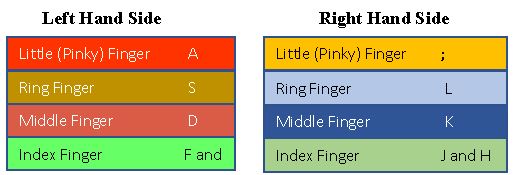
Question. What are the tips to improve typing speed?
Answer : Following are the tips to improve the typing speed:
1. Our hand/finger position should always be in home position. We must start from and return to this position.
2. We should focus on accuracy not speed.
3. Don’t look at the keyboard.
4. Be steady, even pace and strive for accuracy.
5. As we tap each key, we should say its letter to ourselves
Long Answer type Questions:
Question. Explain the Proper Posture while typing?
Answer : Following points should be taken care for proper posture whike typing:
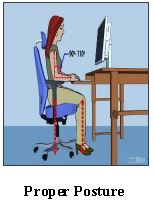
1. We should sit up straight, directly in front of keyboard.
2. Our feet must be flat on floor.
3. Monitor should be at our eye level.
4. Our eyes should be on copy or monitor.
5. Our fingers must be curved and upright over home keys.
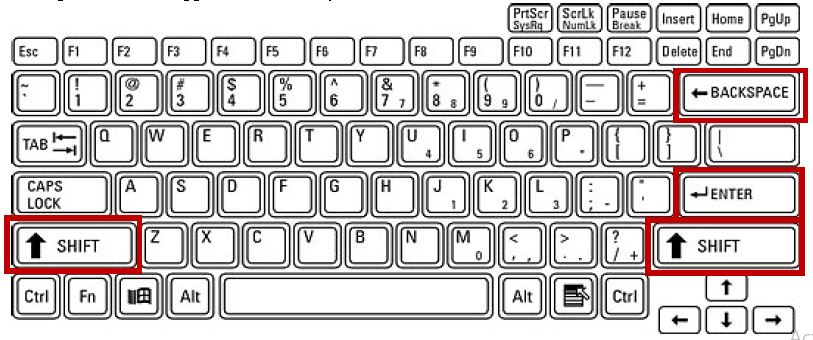
Question. Explain following keys:
Answer : a. Enter key: It is used to move down the cursor to a new line. Use our right little finger for the Enter key.
b. Backspace key: It deletes one character to the left of the blinking cursor. Use our right little finger for the Backspace key.
c. Shift key: It is present on both the sides of keyboard. It is used to write capital letters or to write the letter printed on the upper side of the key.
CBSE Class 7 Computer Science Worksheets for Chapter 01 Typing Tutor
Daily Practice Questions for Class 7 Computer Science
Review targeted practice exercises for Class 7 Computer Science Chapter 01 Typing Tutor. Curated to match official CBSE guidelines, these printable problem sets support daily revision and improve overall test readiness.
Detailed Answers for Class 7 Computer Science Chapter 01 Typing Tutor
Each worksheet draws directly from authorized standard textbooks to maintain academic accuracy. Evaluating your finished exercises against expert-verified solutions helps master the formal presentation standards expected in school evaluations.
Complete Your Chapter Revision
Follow up your worksheet practice by attempting the interactive online MCQ tests for Chapter 01 Typing Tutor to evaluate your execution speed. All printable assignments and revision sheets on our platform are updated for the 2026 session and available free of charge.
FAQs
You can download the latest chapter-wise printable worksheets for Class 7 Computer Science Chapter 01 Typing Tutor for free from StudiesToday.com. These have been made as per the latest CBSE curriculum for this academic year.
Yes, Class 7 Computer Science worksheets for Chapter 01 Typing Tutor focus on activity-based learning and also competency-style questions. This helps students to apply theoretical knowledge to practical scenarios.
Yes, we have provided solved worksheets for Class 7 Computer Science Chapter 01 Typing Tutor to help students verify their answers instantly.
Yes, our Class 7 Computer Science test sheets are mobile-friendly PDFs and can be printed by teachers for classroom.
For Chapter 01 Typing Tutor, regular practice with our worksheets will improve question-handling speed and help students understand all technical terms and diagrams.