

Chapter-wise Worksheets for Class 7 Computer Science: Chapter 02 Windows Explorer
Explore structured practice materials through the CBSE Class 7 Computer Science Windows Explorer Worksheet Set 01. Tailored for Class 7 learners, utilizing these Computer Science worksheets ensures thorough preparation and strengthens problem-solving accuracy before final school evaluations.
Practice Class 7 Computer Science Worksheets: Chapter 02 Windows Explorer
Access the complete worksheet PDF for Class 7 Computer Science below. Regular practice with these targeted academic tasks builds familiarity with standard question patterns and helps secure higher marks in final school examinations.
Choose the suitable option and fill in the Blanks:
Question.. ________ view tells about size, type and date of modified of a file.
a) Details
b) Tiles
c) List
d) Content
Answer : B
Question.. A __________ is a combination of pictures, colors, and sounds on our computer
a) Background
b) Desktop
c) Screensaver
d) Theme
Answer : A
Question.. __________command is used to move an item from its place.
a) Copy
b) Paste
c) Cut
d) Delete
Answer : C
Question.. Windows Explorer has two panes. These are______ and _____
a) First, Second
b) Left, Right
c) Top, Bottom
d) File, folder
Answer : D
Question. A ______________ is a software program that becomes activated after the computer is not in use for a specified duration of time.
a) Background
b) Desktop
c) Screensaver
d) Theme
Answer : C
Very Short Answer Type Questions
Question. What do we call a folder inside another folder?
Answer : Subfolder
Question. Which option is used to make a duplicate of an item?
Answer : Copy and Paste
Question. What is a method of opening windows explorer?
Answer : Window Key+ E
Question. Which window application is used for management of files?
Answer : Windows Explorer
Question. Write the name of any default library of window.
Answer : Documents Folder
Short Answer Type Questions:
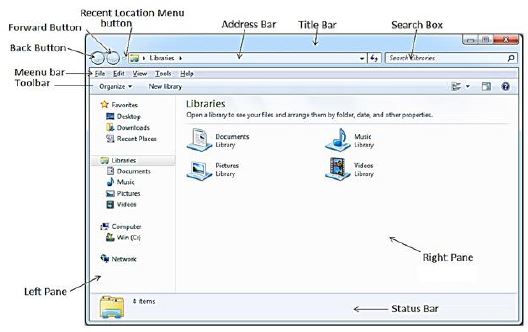
Question. Write the name of different parts of Window Explorer?
Answer : Following are the names of different parts of Windows Explorer:
1. Title Bar
2. Back and Forward Button
3. Address Bar
4. Search Box
5. Menu Bar
6. Toolbar
7. Status Bar
Question. Define File and Folder?
Answer : A file is the smallest unit to store data. To manage and organize files in the computer system, we use folders. Folders are also called Directories. A folder may contain other folders and files.

Question. How many panes are available in Window Explorer? Write their names?
Answer : There are two panes in Window Explorer which are mentioned below:
• Left Pane or Navigation Pane
• Right Pane
Long Answer Type Questions:
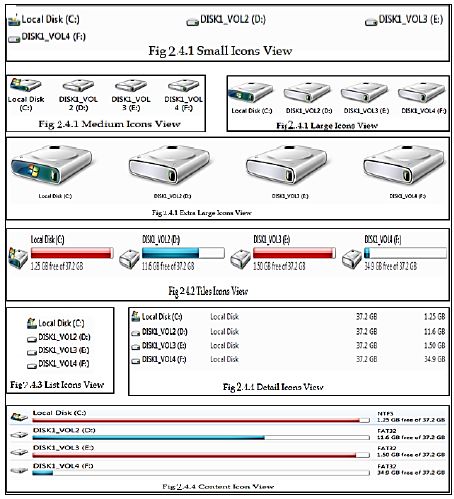
Question. Explain different views of Windows Explorer.
Answer : Windows Explorer provides different view to have a look on the items available in it. Following is the list of views available in Windows Explorer:
• Small, Medium, Large and Extra Larger Icons View
• Tiles Icons View
• List Icons View
• Detail Icons View
• Content Icons View
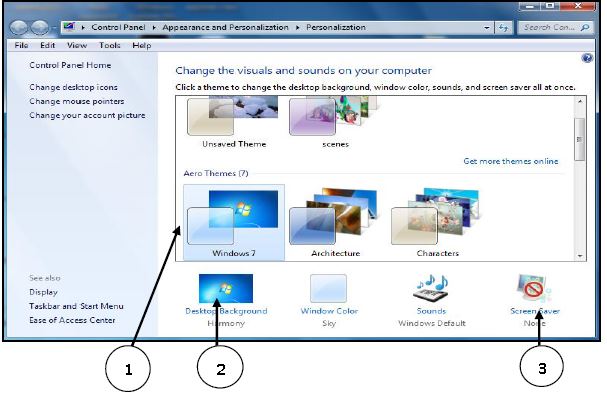
Question. What are the options to customize the Desktop in Windows Environment?
Answer : With the help of Personalization dialog box in Windows Environment, we can customize the Desktop. It provides the following options to change the appearance of Desktop:
1. Themes: It provides a combination of pictures, colours, and sounds on our computer
2. Desktop Background: Desktop background primarily consists of wallpaper. A wallpaper can be a Background pattern or a picture which can be changed using this option.
3. Screen Saver: A screensaver basically consists of animated images. Screensavers were originally designed to help prevent phosphorus coating of older monitors from being burned.
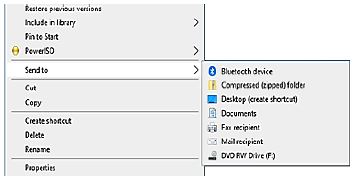
Question. How can we Copy items using ‘send to’ option?
Answer : “Send to” option is an easy way to send/copy one or more items to some new location. To use this option, perform the following steps:
1. Select the item that we want to copy
2. Right click on the item, it will show a shortcut/properties menu.
3. Click on the “Send to” option from this menu. Now a submenu will appear showing the different location for sending the selected items, click on the desired location.
Question. What is Windows Explorer? Give different ways to open windows explorer.
Answer : Windows Explorer is also known as File Explorer. It is used to access or to work with files and folders that are available in our computer system. Following are some common methods to open window explorer:
• Press Windows + E keys together
• Window Key → All Programs → Accessories → Windows Explorer
• Press Window Key → Type Explorer in the search box
Question. Write about Screen Saver.
Answer : A Screen Saver is a software program. It gets activated when computer system is not used for a specified duration of time. A screensaver basically consists of animated images. Screensavers were originally designed to help prevent phosphorus coating of older monitors from being burned
Chapter 02 Windows Explorer Printable Worksheets and Exercises for Class 7 Computer Science
Mastering Chapter 02 Windows Explorer with Printable Worksheets
Access structured practice worksheets for Chapter 02 Windows Explorer aligned with the 2026 CBSE curriculum. These downloadable exercises for Class 7 Computer Science help students build accuracy and reinforce core concepts for upcoming school tests.
Verified Solutions and NCERT Alignment
Each worksheet draws directly from authorized standard textbooks to maintain academic accuracy. Evaluating your finished exercises against expert-verified solutions helps master the formal presentation standards expected in school evaluations.
Additional Study Resources for Class 7 Computer Science
Consistent engagement with these exercises builds familiarity with recurring exam themes. If specific areas within Chapter 02 Windows Explorer cause trouble, utilize our dedicated NCERT solutions for Class 7 Computer Science to clear up doubts immediately.
FAQs
You can download the latest chapter-wise printable worksheets for Class 7 Computer Science Chapter 02 Windows Explorer for free from StudiesToday.com. These have been made as per the latest CBSE curriculum for this academic year.
Yes, Class 7 Computer Science worksheets for Chapter 02 Windows Explorer focus on activity-based learning and also competency-style questions. This helps students to apply theoretical knowledge to practical scenarios.
Yes, we have provided solved worksheets for Class 7 Computer Science Chapter 02 Windows Explorer to help students verify their answers instantly.
Yes, our Class 7 Computer Science test sheets are mobile-friendly PDFs and can be printed by teachers for classroom.
For Chapter 02 Windows Explorer, regular practice with our worksheets will improve question-handling speed and help students understand all technical terms and diagrams.