

Download Class 7 Computer Science Practice Worksheets
Explore structured practice materials through the CBSE Class 7 Computer Science Introduction to Multimedia Worksheet Set 01. Tailored for Class 7 learners, utilizing these Computer Science worksheets ensures thorough preparation and strengthens problem-solving accuracy before final school evaluations.
Access Chapter 07 Introduction to Multimedia Practice Papers and Solutions
Access the complete worksheet PDF for Class 7 Computer Science below. Regular practice with these targeted academic tasks builds familiarity with standard question patterns and helps secure higher marks in final school examinations.
Que: 1 Fill in the blanks by choosing the right option:
Question. Animation is of two types, these are _________ and _________
(a) Analog, digital
(b) Static, Hyper
(c) Raster, Bitmap
(d) Path, Frame
Answer : D
Question. In Multimedia Text is of _________ and _________ type.
(a) Analog, digital
(b) Raster, Bitmap
(c) Static, Hyper
(d) Path, Frame
Answer : C
Question. Requirements for Multimedia are _________ and _________
(a) Images, Sound
(b) Analog, Digital
(c) Hardware, Software
(d) Multimedia
Answer : C
Question. Multimedia is a combination of two words _________ and _________
(a) Images, Sound
(b) Audio, Video
(c) Multi, Media
(d) Hardware, Software
Answer : C
Question. Input Devices consists of _________ and _________
(a) Monitor, Printer
(b) RAM, Hard Disk
(c) Keyboard, Mouse
(d) Hardware, Software
Answer : C
Very short Answer type a Question:
Question. In how many types a video can be classified?
Answer : Two types – Analog and Digital videos
Question. There are how many types of text?
Answer : Two types – Static and Hyper text
Question. Write the name of any one type of animation.
Answer : Path Animation
Question. Write any one application of Multimedia
Answer : Education and Entertainment field
Short Answer type Questions:
Question. What is Video?
Answer : Video is an important component of multimedia In multimedia, video is used to represent information in a much better way. The video can be played with motion pictures as well as sound There are usually two types of videos: analogue and digital videos.
Question. What is Multimedia Conferencing?
Answer : Multimedia conferencing is also called video conferencing. This is an important application area of multimedia Using it, we can have face-to-face conversations with people living at distant places.
Question. What is an Animation?
Answer : Animation is an important component of Multimedia It shows motion effects on static images or text. There are two main types of animation - path animation and frame animation. PowerPoint and Flash are examples of commonly used animation software.
Long Answer Type Questions:
Question. What is Multimedia? Explain the Components of Multimedia
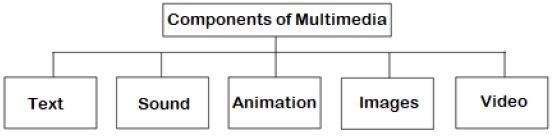
Answer : The word multimedia is a combination of the two words - Multi and Media Multi means two or more and media means medium. Thus, multimedia is a technology in which information is distributed using a variety of mediums. The following are major components of multimedia:
• Text: Written information is called text.
• Sound: Sound helps us to explain an idea clearly.
• Animation: It is the motion effect on static images or text.
• Images: Images are an essential part of multimedia
• Video: Video contains motion pictures as well as sound
Question. What are the requirements for Multimedia?
Answer : The basic requirements for multimedia are hardware and software. These are as follows:
Hardware Requirements:
1. Input device
2. Output device
3. Storage devices
Software Requirements:
These are used to modify and manage the elements of Multimedia For example: Adobe Director, Media Blender, Multimedia Builder, etc
Question. What is a Multimedia Presentation? What should we keep in mind before preparing Multimedia Presentation?
Answer : A topic can be presented effectively using multimedia presentation. Text, sound, video, animation, and pictures are the important components of a multimedia presentation. Following are some of the points that we should keep in mind before preparing a multimedia presentation:
1. Text should be kept minimum.
2. Sound quality should be good
3. The user should be able to use the keyboard and mouse.
4. It should be small in size.
Question. Write down Applications of Multimedia
Answer : Multimedia is used in many fields. Some of the important application areas of multimedia are given below:
1. Multimedia is used in the field of education.
2. Multimedia is used to represent the model of human body in medical science.
3. Multimedia is used in the field of entertainment.
4. It is used to inform customers at railway stations, banks etc
5. It is used for face to face communication with people living far away.
CBSE Class 7 Computer Science Worksheets for Chapter 07 Introduction to Multimedia
Mastering Chapter 07 Introduction to Multimedia with Printable Worksheets
Explore reliable practice questions for Chapter 07 Introduction to Multimedia tailored for Class 7 Computer Science learners. Use these structured worksheets to evaluate exam preparedness and strengthen problem-solving skills throughout the 2026 academic session.
Verified Solutions and NCERT Alignment
Designed around the official curriculum for Class 7 Computer Science, these practice sheets guarantee standard compliance. Reviewing step-by-step solutions after completion sharpens your accuracy and clarifies complex sub-topics within Chapter 07 Introduction to Multimedia.
Additional Study Resources for Class 7 Computer Science
Wrap up your chapter revision by testing your knowledge against standard objective question formats. Explore our full library of free, up-to-date printable assignments to maximize your academic results in upcoming CBSE evaluations.
FAQs
You can download the latest chapter-wise printable worksheets for Class 7 Computer Science Chapter 07 Introduction to Multimedia for free from StudiesToday.com. These have been made as per the latest CBSE curriculum for this academic year.
Yes, Class 7 Computer Science worksheets for Chapter 07 Introduction to Multimedia focus on activity-based learning and also competency-style questions. This helps students to apply theoretical knowledge to practical scenarios.
Yes, we have provided solved worksheets for Class 7 Computer Science Chapter 07 Introduction to Multimedia to help students verify their answers instantly.
Yes, our Class 7 Computer Science test sheets are mobile-friendly PDFs and can be printed by teachers for classroom.
For Chapter 07 Introduction to Multimedia, regular practice with our worksheets will improve question-handling speed and help students understand all technical terms and diagrams.