

Class 7 Computer Science Practice Sheet: CBSE Class 7 Computer Science Microsoft Word Part 2 Worksheet Set 02
Explore structured practice materials through the CBSE Class 7 Computer Science Microsoft Word Part 2 Worksheet Set 02. Tailored for Class 7 learners, utilizing these Computer Science worksheets ensures thorough preparation and strengthens problem-solving accuracy before final school evaluations.
Download Chapter 04 Microsoft Word Worksheet PDF with Answers
View or download the dedicated CBSE Class 7 Computer Science Microsoft Word Part 2 Worksheet Set 02 resource below. Engaging with these practice papers under focused study conditions ensures continuous academic progress and mastery of the 2026-27 curriculum for Chapter 04 Microsoft Word.
Fill in the Blanks:
Question: After selecting a picture _ tab appears.
(a) format
(b) page layout
(c) insert
(d) view
Answer: Format
Question: To do wrap text, we can use _____________option.
(a) Square
(b) tight
(c) behind text
(d) All of these
Answer: All of these
Question: To remove any unwanted parts of picture, __ option is used.
(a) crop
(b) rotate
(c) group
(d) compress
Answer: Crop
Question: We can apply different colors, texture or picture to our document with the help of ________ option.
(a) Page design
(b) page background
(c) page color
(d) page style
Answer: Page Background
Question: We can find the number of words in the __ bar at the bottom of the window.
(a) Task bar
(b) status bar
(c) title bar
(d) scroll bar
Answer: Status Bar
True/False
Question: Columns option splits the text into two or more columns.
Answer: True
Question: Landscape format means the page is oriented horizontally.
Answer: True
Question: Group option is used to group two or more images together so that they can be treated as a single object.
Answer: True
Question: 3D rotation is not a type of Picture Effects.
Answer: True
Question: Removing the background from an image can give our images a cleaner appearance.
Answer: True
Short Answer Type Questions
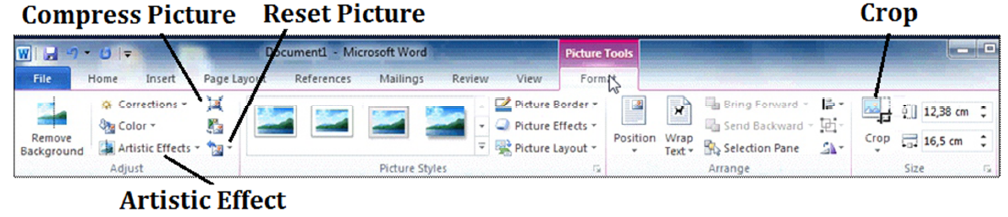
Question: What are the three categories in color option?
Answer: Following are the three categories in color option:
1. Color Saturation 2. Color Tone 3. Re-Color
Question: What do you mean by compress picture?
Answer: Compress picture option is used to reduce the size of the document file. This option reduces the file size by lowering the resolution of picture and by removing the cropped area of the picture. This option is available in the Format Tab which appear automatically when we select the picture.
Question: Write about Reset picture?
Answer: This option is used to remove the changes that has been applied on the picture using various formatting options. This option is available in the Adjust Group of the Format tab.
Question: What is crop option?
Answer: This option is used to remove the unrequired part of the picture. This option is available in the Size group of the Format tab.
Question: What do you mean by orientation?
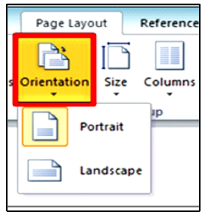
Answer: Orienatage decides the vertical or horizontal direction of the page. Page orientation can be set to either Portrait or Landscape. Portrait orientation means the vertical direction of the page while the landscape orientation means the horizontal direction of the page.
Chapter 04 Microsoft Word Printable Worksheets and Exercises for Class 7 Computer Science
Mastering Chapter 04 Microsoft Word with Printable Worksheets
Access structured practice worksheets for Chapter 04 Microsoft Word aligned with the 2026 CBSE curriculum. These downloadable exercises for Class 7 Computer Science help students build accuracy and reinforce core concepts for upcoming school tests.
Verified Solutions and NCERT Alignment
Built using official NCERT guidelines for Class 7 Computer Science, these practice sheets provide reliable academic support. Cross-reference your completed work with our detailed solutions to learn standard answer-writing formats for CBSE exams.
Additional Study Resources for Class 7 Computer Science
Consistent engagement with these exercises builds familiarity with recurring exam themes. If specific areas within Chapter 04 Microsoft Word cause trouble, utilize our dedicated NCERT solutions for Class 7 Computer Science to clear up doubts immediately.
FAQs
You can download the latest chapter-wise printable worksheets for Class 7 Computer Science Chapter 04 Microsoft Word for free from StudiesToday.com. These have been made as per the latest CBSE curriculum for this academic year.
Yes, Class 7 Computer Science worksheets for Chapter 04 Microsoft Word focus on activity-based learning and also competency-style questions. This helps students to apply theoretical knowledge to practical scenarios.
Yes, we have provided solved worksheets for Class 7 Computer Science Chapter 04 Microsoft Word to help students verify their answers instantly.
Yes, our Class 7 Computer Science test sheets are mobile-friendly PDFs and can be printed by teachers for classroom.
For Chapter 04 Microsoft Word, regular practice with our worksheets will improve question-handling speed and help students understand all technical terms and diagrams.