

Chapter-wise Worksheets for Class 7 Computer Science: Chapter 05 Microsoft Word
Explore structured practice materials through the CBSE Class 7 Computer Science Microsoft Word Part 3 Worksheet. Tailored for Class 7 learners, utilizing these Computer Science worksheets ensures thorough preparation and strengthens problem-solving accuracy before final school evaluations.
Practice Class 7 Computer Science Worksheets: Chapter 05 Microsoft Word
Access the complete worksheet PDF for Class 7 Computer Science below. Regular practice with these targeted academic tasks builds familiarity with standard question patterns and helps secure higher marks in final school examinations.
Fill in the blanks:
Question. For text wrapping, we can use _____________option.
a) Square
b) Tight
c) Behind Text
d) All of these
Answer : C
Question. We can find the number of words in the __________ bar at the bottom of the window
a) Task Bar
b) Status Bar
c) Title Bar
d) Scroll Bar
Answer : A
Question. To remove any unwanted parts of picture, ______________ option is used.
a) Crop
b) Rotate
c) Group
d) Compress
Answer : C
Question. After selecting a picture ___________ tab appears.
a) Format
b) Page Layout
c) Insert
d) View
Answer : C
Question. Which of the following option is not available in the Adjust group of Format tab?
a) Corrections
b) Artistic Effects
c) Remove Background
d) Picture Styles
Answer : B
Very Short Answer Type Questions
Question. Which option is used to group two or more images together so that they can be treated as a single object?
Answer : Format → Group
Question. Which option splits the text into two or more columns?
Answer : Page Layout → Columns
Question. Which option can be used to change the color of a picture in MS Word?
Answer : Format → Color
Question. Which page orientation sets the page in horizontal direction?
Answer : Landscape
Question. Which option is used to count words in MS Word?
Answer : Word Count

Short Answer type Questions:
Question. What is Crop option?
Answer : Unnecessary part of the selected image can be removed using the Crop option in MS Word. This option is available in the Picture Tools - Format tab. After clicking this option, crop handles are made on the edges of the selected image which can be easily used to crop the image.
Question. What do you mean by Compress picture?
Answer : Compressed Picture is used to reduce the size of images in our document. It may reduce the overall size of our document. MS Word reduces the resolution (quality) of images to compress them and erases the cropped area of the images. The option to compress images is available in the Picture Tools - Format tab.

Question. Write about Reset picture?
Answer : If we make any changes or do formatting in a picture in MSWord and later we want to remove the changes or formatting made on these pictures then we can do this with the help of reset picture option. The reset picture option is available in the Picture Tools - Format tab.
Question. What are Margins?
Answer : Page margins are the spaces left around the edges of a page. We can insert headers, footers and page numbers in the margin. To set the margins of the document, we can use the Margins option in the Page layout tab. Margins can be set at all the 4 sides of the document- Top, Bottom, Left and Right.
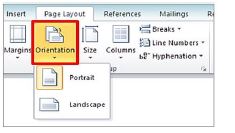
Question. Give the name of two page-orientations in MS Word?
Answer : The Orientation option sets the vertical or horizontal direction of the page of our document. Following are the name of two page-orientations in MS Word:
• Portrait orientation: It means setting the page in vertical direction
• Landscape orientation: It means setting the page in horizontal direction.
Question. Write the name of various options available in the adjust group of Picture tools format tab.
Answer : The first group in the Format tab is the Adjust group. It has the following main options:
• Corrections
• Color
• Artistic Effects
• Compress Picture
• Change Picture
• Reset Picture
• Remove Background
Long Answer type Questions:
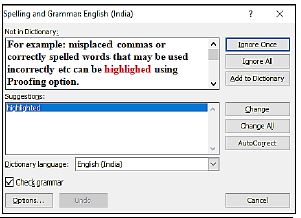
Question. Write the steps to run a Spelling and Grammar check?
Answer : Spelling and grammar check feature is an important feature of MS Word. Using this option, we can make our document error-free. In MS Word, Spelling errors are indicated by a red wavy underline while grammatical errors are represented by a green wavy underline. MS Word also provides the ability to correct these errors. “Spelling & Grammar” option in the “Review” tab can be used for this purpose. Errors can also be corrected by opening the “Spelling & Grammar” dialog box using the shortcut key F7.
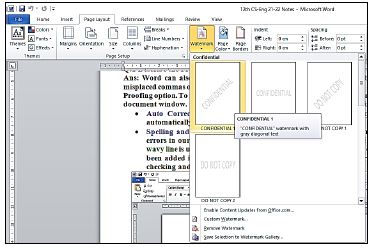
Question. What is Water Mark? Write the Steps to add a watermark in a word document?
Answer : A watermark is a text or image that appears at the background of the document text. It is usually used to mark the status of a document - Draft or Confidential. Here are the steps for inserting a watermark in MS Word:
1. Click on the Page Layout tab.
2. Click on the Watermark option in the Page Background group.
3. Select the watermark according to your requirement.
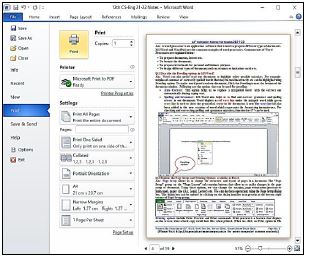
Question. Explain the steps to Print a Document.
Answer : When our document is complete, we can print it using a printer. Here are the steps to print the document:
1. Click on the File menu/tab.
2. Click on the Print option, a print pane will appear.
3. Select the options for printing as required, such as - range of pages, number of copies to be printed etc.
4. Click on the Print button.
Chapter 05 Microsoft Word Printable Worksheets and Exercises for Class 7 Computer Science
Daily Practice Questions for Class 7 Computer Science
Access structured practice worksheets for Chapter 05 Microsoft Word aligned with the 2026 CBSE curriculum. These downloadable exercises for Class 7 Computer Science help students build accuracy and reinforce core concepts for upcoming school tests.
Detailed Answers for Class 7 Computer Science Chapter 05 Microsoft Word
Each worksheet draws directly from authorized standard textbooks to maintain academic accuracy. Evaluating your finished exercises against expert-verified solutions helps master the formal presentation standards expected in school evaluations.
Complete Your Chapter Revision
Follow up your worksheet practice by attempting the interactive online MCQ tests for Chapter 05 Microsoft Word to evaluate your execution speed. All printable assignments and revision sheets on our platform are updated for the 2026 session and available free of charge.
FAQs
You can download the latest chapter-wise printable worksheets for Class 7 Computer Science Chapter 05 Microsoft Word for free from StudiesToday.com. These have been made as per the latest CBSE curriculum for this academic year.
Yes, Class 7 Computer Science worksheets for Chapter 05 Microsoft Word focus on activity-based learning and also competency-style questions. This helps students to apply theoretical knowledge to practical scenarios.
Yes, we have provided solved worksheets for Class 7 Computer Science Chapter 05 Microsoft Word to help students verify their answers instantly.
Yes, our Class 7 Computer Science test sheets are mobile-friendly PDFs and can be printed by teachers for classroom.
For Chapter 05 Microsoft Word, regular practice with our worksheets will improve question-handling speed and help students understand all technical terms and diagrams.