

Chapter-wise Worksheets for Class 7 Computer Science: Chapter 08 Storage Devices
Access comprehensive chapter-wise worksheets for Chapter 08 Storage Devices using the CBSE Class 7 Computer Science Storage Devices Worksheet Set 01. Designed to align with the 2026-27 academic syllabus for Class 7 Computer Science, these printable practice sets help students reinforce key concepts and improve their overall exam readiness.
Practice Class 7 Computer Science Worksheets: Chapter 08 Storage Devices
View or download the dedicated CBSE Class 7 Computer Science Storage Devices Worksheet Set 01 resource below. Engaging with these practice papers under focused study conditions ensures continuous academic progress and mastery of the 2026-27 curriculum for Chapter 08 Storage Devices.
Fill in the blanks:
Question. Primary memory is also called ___________.
a) Internal memory
b) External memory
c) Physical memory
d) Auxiliary memory
Answer : A
Question. The memory is divided into number of small parts called ________________
a) Cells
b) Area
c) Inter-section
d) None of these
Answer : A
Question. ________________ memory is not a Read Only Memory.
a) ROM
b) PROM
c) EPROM
d) RAM
Answer : D
Question. USB means __________________
a) Uniform Service Book
b) Universal Serial Bus
c) Universal Straight Bus
d) Uniform Serial Bus
Answer : B
Question. _____________ is not a portable storage device.
a) External Hard Disk
b) Pen Drive
c) Hard disk Drive
d) Memory Card
Answer : C
Very Short Answer Type Questions:
Question. What is the Capacity of Floppy disk?
Answer : 1.44 MB
Question. Which is having greater storage capacity out of CD or DVD?
Answer : DVD
Question. What is the Capacity of Compact Disk (CD)?
Answer : 700 MB
Question. Which computer port is used to attach Pen drive?
Answer : USB
Question. Which memory unit is usually used to measure the Storage capacity of hard disks?
Answer : Gigabyte (GB)
Short Answer type Questions:
Question. What is Memory Card?
Answer : Memory card is a portable secondary memory. It is also called a flash memory card. These cards are commonly used in mobiles, digital cameras, MP3 players, etc. Memory cards are usually used to store pictures, movies, songs, and other data.

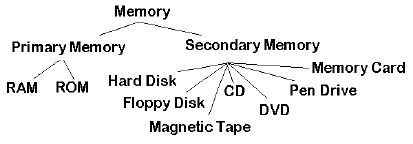
Question. What is memory? Write down two main categories of memories?
Answer : Any medium that has the capacity to store data is called memory. Memory is divided into many smaller parts, called cells. Memory is used to store data and instructions. The two main categories of memory are:
1. Primary memory
2. Secondary memory
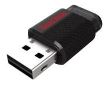
Question. Write a short note on pen drive.
Answer : The pen drive is a portable secondary memory. It is a USB based memory device. It is used to transfer data from one computer to another. It is very small in size and its speed is faster. They also have higher storage capacity.
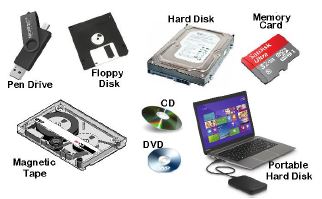
Question. Write the name of any four Secondary Memory devices?
Answer : The names of the secondary memories are as follows:
1. Hard disk
2. External hard disk
3. Floppy disk
4. Magnetic tape
5. Compact Disc (CD)
6. Digital Video Disc (DVD)
7. Pen drive
8. Memory card
Long Answer type Questions:
Question. Write a note on Primary Memory?
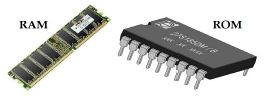
Answer : Primary memory is also called Main Memory or Internal Memory. The CPU has direct access to this memory. Micro-conductors, which are very fast and special types of electronic circuits, are used to make this memory. These memories are also called Semiconductor memories. These memories have low storage capacity. There are two types of primary memory:
1. RAM: RAM stands for Random Access Memory. This memory only stores those data and instructions that the computer is working on.
2. ROM: ROM stands for Read Only Memory. This memory stores the instructions to start the computer.
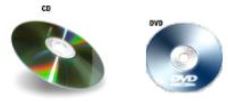
Question. Write precautions that we must follow while using a CD/DVD.
Answer : The following precautions should be taken when using CD / DVD:
1. The CD / DVD should be kept in the cover.
2. The bright side of the CD / DVD should not be touched.
3. The bright side of the CD / DVD should not be written with pen or pencil.
4. Do not bend CD / DVD.
5. A soft cloth should be used to clean the CD / DVD.
Question. What is Secondary Memory? Explain any one secondary memory device?
Answer : Secondary memory is also called external memory or physical memory or auxiliary memory. The stored data remains in this memory even after the computer is turned off. Hard disk drives, optical storage disks, floppy disks, etc. are examples of secondary memory devices.
Hard Disk Drive (HDD): A hard disk consists of one or more metal plates, called platters. These plates are coated with a layer of metal-oxide to store data. These plates rotate at a speed of 5400 to 7200 RPM (rotation per minute). Hard disks have a high capacity to store data. Its storage capacity is usually measured in gigabytes (GB).
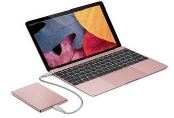
Question. What is External Hard Disk drive? Write its advantages?
Answer : External hard disk is a secondary memory. It is a portable type of secondary memory, which can be easily moved from one place to another. This is a USB based memory device. It has a very high storage capacity. It is commonly used to back up data. Once the data is backed up, it can be removed from the computer and stored in a safe place.
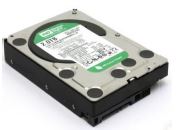
Question. What is HDD? Explain?
Answer : HDD stands for Hard Disk Drive. This is the most commonly used secondary memory. The stored data remains in this memory even after the computer is turned off. Its speed is slower than primary memory. A hard disk consists of one or more metal plates, called Platters. These plates are coated with a layer of metal-oxide to store data. These plates rotate at a speed of 5400 to 7200 RPM (rotation per minute). Hard disks have a high capacity to store data. Its storage capacity is usually measured in gigabytes (GB).
Download Class 7 Computer Science Chapter 08 Storage Devices Practice Worksheets
Mastering Chapter 08 Storage Devices with Printable Worksheets
Explore reliable practice questions for Chapter 08 Storage Devices tailored for Class 7 Computer Science learners. Use these structured worksheets to evaluate exam preparedness and strengthen problem-solving skills throughout the 2026 academic session.
Verified Solutions and NCERT Alignment
Built using official NCERT guidelines for Class 7 Computer Science, these practice sheets provide reliable academic support. Cross-reference your completed work with our detailed solutions to learn standard answer-writing formats for CBSE exams.
Additional Study Resources for Class 7 Computer Science
Wrap up your chapter revision by testing your knowledge against standard objective question formats. Explore our full library of free, up-to-date printable assignments to maximize your academic results in upcoming CBSE evaluations.
FAQs
You can download the latest chapter-wise printable worksheets for Class 7 Computer Science Chapter 08 Storage Devices for free from StudiesToday.com. These have been made as per the latest CBSE curriculum for this academic year.
Yes, Class 7 Computer Science worksheets for Chapter 08 Storage Devices focus on activity-based learning and also competency-style questions. This helps students to apply theoretical knowledge to practical scenarios.
Yes, we have provided solved worksheets for Class 7 Computer Science Chapter 08 Storage Devices to help students verify their answers instantly.
Yes, our Class 7 Computer Science test sheets are mobile-friendly PDFs and can be printed by teachers for classroom.
For Chapter 08 Storage Devices, regular practice with our worksheets will improve question-handling speed and help students understand all technical terms and diagrams.