

Official Class 7 Computer Science Worksheets: Chapter 03 Microsoft Word
Explore structured practice materials through the CBSE Class 7 Computer Science Microsoft Word Part 1 Worksheet Set 01. Tailored for Class 7 learners, utilizing these Computer Science worksheets ensures thorough preparation and strengthens problem-solving accuracy before final school evaluations.
Solved Practice Worksheets for Computer Science
Access the complete worksheet PDF for Class 7 Computer Science below. Regular practice with these targeted academic tasks builds familiarity with standard question patterns and helps secure higher marks in final school examinations.
Multiple Choice Questions:
Question. Below the ruler the large area is called the _________.
(a) Text Area
(b) Open Area
(c) Close Area
(d) All of these
Answer : A
Question. The _________ view shows the document as it will look when it is printed.
(a) Print Layout
(b) Draft
(c) Outline
(d) Full size
Answer : A
Question. There are two scroll bars in a word document ____________ and ____________.
(a) Horizontal, Vertical
(b) Left, Right
(c) Upper bar, Lower bar
(d) None of these
Answer : A
Question. Ctrl + S is used to __________.
(a) Save
(b) Open
(c) New
(d) Close
Answer : A
Question. To open a new document Press __________ keys on the keyboard
(a) Ctrl + O
(b) Ctrl + N
(c) Ctrl + S
(d) Ctrl + V
Answer : B
Very Short Answer Type Questions:
Question. Which view of MS Word displays the document in the same way as we get it after printing?
Answer : Print Layout
Question. Write the name of option that is present at the bottom-right corner of every group?
Answer : Dialog Box Launcher
Question. Which Layout view shows the Outline of a Document?
Answer : Outline View
Question. Write the name of top most bar of Word window?
Answer : Title Bar
Question. Write the shortcut to create a New document.
Answer : Ctrl + N

Short Answer type Questions:
Question. Write the name of some Word Processing Software.
Answer : Following are some of the important word-processing software:
1. MS Word 2. Word Perfect 3. WordPad 4. WordStar
Question. Define the Text Area.
Answer : Text area is an important component of MS Word. The large area that appears below the ruler is called the text area. We use this area to create our documents. The blinking line in it is called Cursor.
Question. How to start the MS Word?
Answer : MS Word can be started using the following steps:
1. Open the Start menu.
2. Type WORD in the search box.
3. Press the Enter key.

Question. What is a Word Processor?
Answer : Word processors are application software. We can create a variety of documents and letters using these softwares. WordPad, MS Word etc. are the examples of some commonly used word-processor software.
Question. Write the name of different Parts of MS Word Window.
Answer : Following are the main components of the MS Word window:
1. Title bar 2. Ribbons and tabs 3. Text area
4. Status bar 5. Scroll bar 6. Ruler
Long Answer type Questions:
Question. Explain Document Views in MS Word
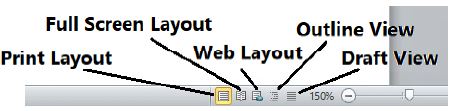
Answer : Following are the different views for viewing documents in MS Word:
1. Print Layout View: This view will show the document exactly as it appears after it is printed.
2. Full Screen Layout View: This view displays the document in full screen so that the document can be read easily.
3. Web Layout View: This view will show the document exactly as it would appear in a web browser in the form of a web page.
4. Outline View: This view shows the outline of the document.
5. Draft View: Word document can be edited quickly with the help of this view.
Question. Explain the Special Features of MS Word
Answer : Following are some key features of MS Word:
1. We can enter text anywhere in Word document.
2. We can set the margin of pages as per our requirement in the Word document.
3. We can easily find any word/text in MS Word document.
4. We can change the font and style of text as required in the Word document.
5. We can easily set the header and footer of pages in the Word document.
6. We can check and correct spelling and grammar related errors in the Word document.
Question. How to Create and Save a New Document in MS Word?
Answer : Following are the steps to create and save a new file in Word:
Steps for Creating New File:
1. Press the shortcut key Ctrl + N to create a new file.
Steps to Save the New File:
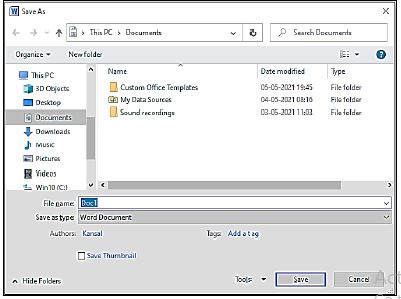
1. Press Ctrl + S shortcut key to save the file.
2. Save As… dialog box will open.
3. Type the name of the file in this dialog box.
4. Click on Save button.
Download Class 7 Computer Science Chapter 03 Microsoft Word Practice Worksheets
Mastering Chapter 03 Microsoft Word with Printable Worksheets
Review targeted practice exercises for Class 7 Computer Science Chapter 03 Microsoft Word. Curated to match official CBSE guidelines, these printable problem sets support daily revision and improve overall test readiness.
Verified Solutions and NCERT Alignment
Designed around the official curriculum for Class 7 Computer Science, these practice sheets guarantee standard compliance. Reviewing step-by-step solutions after completion sharpens your accuracy and clarifies complex sub-topics within Chapter 03 Microsoft Word.
Additional Study Resources for Class 7 Computer Science
Wrap up your chapter revision by testing your knowledge against standard objective question formats. Explore our full library of free, up-to-date printable assignments to maximize your academic results in upcoming CBSE evaluations.
FAQs
You can download the latest chapter-wise printable worksheets for Class 7 Computer Science Chapter 03 Microsoft Word for free from StudiesToday.com. These have been made as per the latest CBSE curriculum for this academic year.
Yes, Class 7 Computer Science worksheets for Chapter 03 Microsoft Word focus on activity-based learning and also competency-style questions. This helps students to apply theoretical knowledge to practical scenarios.
Yes, we have provided solved worksheets for Class 7 Computer Science Chapter 03 Microsoft Word to help students verify their answers instantly.
Yes, our Class 7 Computer Science test sheets are mobile-friendly PDFs and can be printed by teachers for classroom.
For Chapter 03 Microsoft Word, regular practice with our worksheets will improve question-handling speed and help students understand all technical terms and diagrams.