

Download Class 12 Computer Science Worksheets for Data File Handling
Access printable practice worksheets for Data File Handling designed to align with the 2026-27 academic syllabus for Class 12 Computer Science. These structured exercises help students evaluate their conceptual understanding and improve exam readiness.
Access Data File Handling Questions and Exercises
Navigate directly to the printable exercises for Data File Handling using the digital viewer below. Each practice set allows students to isolate specific topics for thorough review and uninterrupted practice alongside standard textbooks.
Question. The ____________ method returns a list containing each line of the file as a list item.
a) read()
b) readline()
c) readlines()
d) readone()
Answer : C
Question. We can use readline( ) function which can read one line at a time from the file.
a) read()
b) readline()
c) readlines()
d) readone()
Answer : B
Question. The ________ method in Python file handling clears the internal buffer of the file..
a) close()
b) flush()
c) clear()
d) open()
Answer : B
Question. Which of the following options can be used to read the first line of a text file Myfile.txt?
a) myfile = open(‘Myfile.txt’); myfile.read()
b) myfile = open(‘Myfile.txt’,’r’); myfile.read(n)
c) myfile = open(‘Myfile.txt’); myfile.readline()
d) myfile = open(‘Myfile.txt’); myfile.readlines()
Answer : C
Question. Suppose content of ‘Myfile.txt’ is Culture is the widening of the mind and of the spirit. What will be the output of the following code?
myfile = open(“Myfile.txt”)
x = myfile.read()
y = x.count(‘the’)
print(y)
myfile.close()
a) 2
b) 3
c) 4
d) 5
Answer : B
Question. If we want to write a sequence of strings,list, tuple into the file then we use _________ function.
a) write()
b) writelines()
c) writerow()
d) append()
Answer : B
Question. Python automatically flushes the file buffers before closing a file with close() function.
a) True
b) False
Answer : A
9. To create a new file or to write on an existing file after truncating / overwriting its old content , file has to be opened in _______ access mode
a) “w+”
b) “a+”
c) “r+”
d) “wb”
Answer : A
Question. To open a file for reading any of the following statement can be used :
a) f = open(“demofile.txt”)
b) f = open(“demofile.txt”, “rt”)
c) f = open(“demofile.txt”, “r”)
d) All of the above
Answer : D
Question. read() and readline() functions can be used for reading no of characters from file if size is mentioned.
a) read() and readline()
b) readlines() and readline()
c) read() and readlines()
d) None of the above
Answer : A
Question. Suppose content of ‘Myfile.txt’ is
Humpty Dumpty sat on a wall
Humpty Dumpty had a great fall
All the king’s horses and all the king’s men
Couldn’t put Humpty together again
What will be the output of the following code?
myfile = open(“Myfile.txt”)
record = myfile.read().split()
print(len(record))
myfile.close()
a) 24
b) 25
c) 26
d) 27
Answer : C
Question. Suppose content of ‘Myfile.txt’ is: Twinkle twinkle little star How I wonder what you are Up above the world so high Like a diamond in the sky What will be the output of the following code?
myfile = open(“Myfile.txt”)
data = myfile.readlines()
print(len(data))
myfile.close()
a) 3
b) 4
c) 5
d) 6
Answer : B
Question. To read twelve characters from a file object fin we use ________
a) fin.read(12)
b) fin.read()
c) fin.readline()
d) read(12)
Answer : A
Question. Which of the following options can be used to read the whole content of a text file Myfile.txt?
a) myfile = open(‘Myfile.txt’); myfile.read()
b) myfile = open(‘Myfile.txt’,’r’); myfile.read(n)
c) myfile = open(‘Myfile.txt’); myfile.readline()
d) myfile = open(‘Myfile.txt’); myfile.readlines()
Answer : A
CASE STUDY QUESTIONS
Rahul is trying to perform write the data to a text file. He is not sure of the commands to be used. Hence partially he could write the program . Help him to complete the program.
file1 = open(“myfile.txt”, ____)#line 1
L = [“This is Delhi \n”, “This is Paris \n”, “This is London”]
file1._________(L) #line 2
file1.close()
file1 = open(“myfile.txt”, _____)#line 3 opening file to add new data to existing file.
# writing newline character
file1.write(“\n”)
file1._________(“Today”)#line 4
Question. Which access mode to be used in line 1 to open the file for writing on to file.
a) w
b) w+
c) wr+
d) a
Answer : A
Question. Which access mode to be used in line3 to open the file for writing new content on existing file without any data loss.
a) w
b) w+
c) wr+
d) a
Answer : D
Question. Which function to be used in line 2 for writing a list to file.
a) write()
b) writelines()
c) writerow()
d) writeline()
Answer : B
Question. Which function to be used in line4 for writing a list to file.
a) write()
b) writelines()
c) writerow()
d) writeline()
Answer : A
Teacher has developed a program to count how many lines start with “T” in a text file “story.txt”. To choose correct option for executing program successfully.
def countlines():
file= _______ (“story.txt”) #line1
data = __________ #line2
__________# line 3
for I in data :
if _______ : # line4
c+=1
print(“Number of lines start with T “, _____) #line5
Question. Which function is used to read the content from the file
a) file.read()
b) readline()
c) file.readlines()
d) file.readline()
Answer : C
Question. choose correct condition for line3
a) i==’T’
b) i[0]==’T’
c) “i”==T
d) i[0]==T
Answer : B
Question. Which function to be used to complete line 1
a) Read()
b) open()
c) read()
d) Open()
Answer : B
Question. complete the line4
a) c
b) count
c) I
d) data
Answer : A
Question. Line3- initialize the variable for count
a) c=0
b) c=c+1
c) both
d) none
Answer : A
Atif has been asked by his senior to complete the following code. The code uses a text file namely message.txt.
def count_words(filename):
Bigwords=0
F=open(filename,‟r‟)
Data=F.___________ # line 1
words = _____________ # line 2
For w in words :
__________ # line 3
___________# line 4
return bigwords, len(words)
_______ # line 5
print(“total number of words : “,count)
print(“No. of big words :”,big)
Question. Which function is used to read all the content of the file for line1 and store in Data variable in string format.
a) readline()
b) read(file)
c) read()
d) readlines()
Answer : C
Question. Which option is correct for completing line 3 and line 4 so that the count of words having length more than 8 characters.
a) If w>8 :
bigwords+=1
b) if len(w) >8:
bigwords+=1
c) if len(w) >=8:
bigwords+=1
d) if len(w) >8:
bigwords+=1
Answer : B
Question. Which option is correct for completing line 2
a) Data.split()
b) Data.Split()
c) f.split()
d) None of the above
Answer : A
Question. Which option is correct for completing line 5 so that function count_words() is called.
a) big ,count= count_words(filename)
b) big ,count= count_words(“message.txt”)
c) big _count=count_words(“message.txt”)
d) big=count_words(“message.txt”) count=count_words(“message.txt”)
Answer : B
Anisha wants to develop a program to count the number of “Me” or “My” words present in a text file “STORY.TXT” .But she is not sure about the code . Help her to complete it.
def displayMeMY(): n=0 f=open(“story.txt” , „____‟) #line 1
N = __read() #line 2
M = N.________ #line 3
for x in M :
if ____________________: #line 4
n=n+1 f.________ #line 5 Closing the file.
print(“Count of Me /My words : “, ____) #line 6
Question. Fill the line 2 by suitable option
a) F.
b) f.
c) n.
d) N.
Answer : B
Question. select the correct option to complete the line 4
a) x==me or x== my
b) x==”me” or “my”
c) x==”Me” or x==”My”
d) x==[“Me”,”My”]
Answer : C
Question. Which method to be used to complete the line 3
a) readline()
b) split()
c) write()
d) writelines()
Answer : B
Question. Which function is used to complete line 5.
a) Exit()
b) close()
c) end()
d) Close()
Answer : B
Question. Which access mode to be used in line 1 to open the file .
a) w
b) r
c) rb
d) a
Answer : B

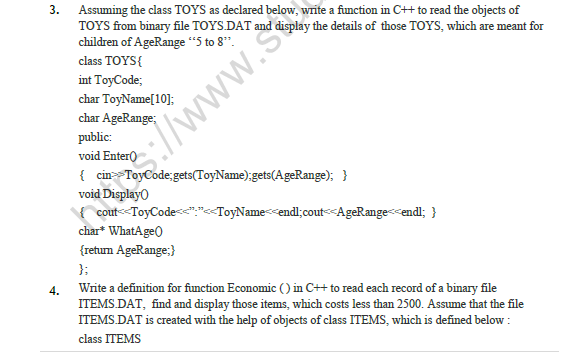
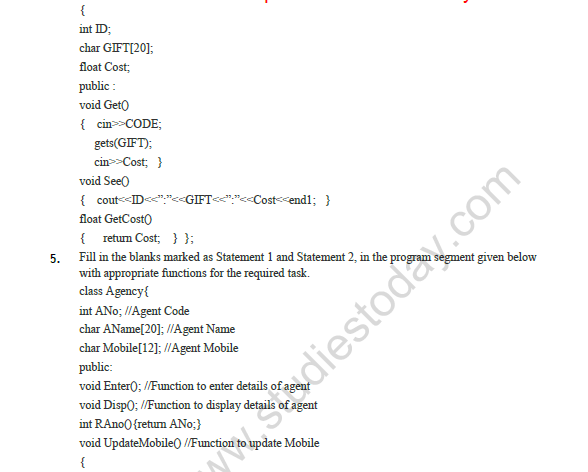
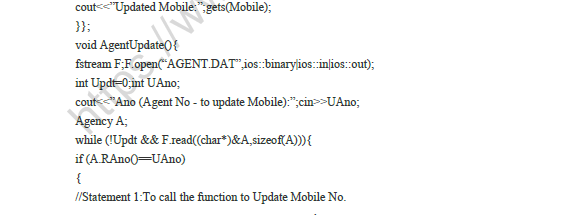
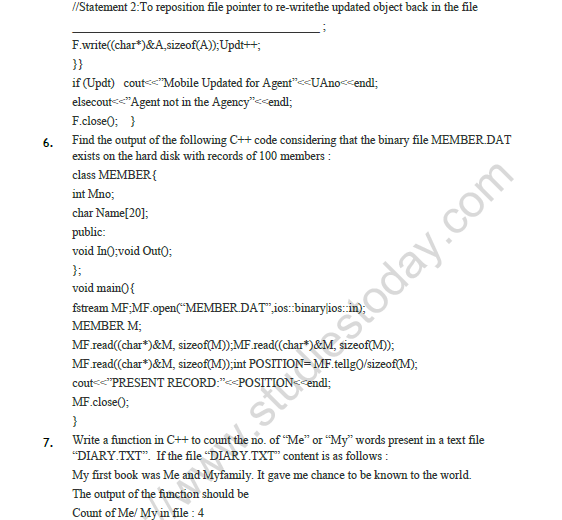
Please click on below link to download CBSE Class 12 Computer Science Data File Handling Worksheet
Free study material for Computer Science
Download CBSE Practice Material: Class 12 Computer Science Data File Handling
CBSE Practice Material: Class 12 Computer Science Data File Handling
Access structured practice worksheets for Data File Handling designed in alignment with the latest CBSE curriculum for Class 12 Computer Science. These printable problem sets help students build accuracy and prepare effectively for school tests.
NCERT-Aligned Questions and Solutions
Cross-reference your completed exercises with comprehensive NCERT solutions for Class 12 Computer Science to ensure absolute clarity across all sub-topics in this chapter.
Next Steps in Your Exam Preparation
Follow up your worksheet practice by attempting the interactive online Computer Science MCQ test for this chapter to evaluate your execution speed. All platform resources are free to access.
FAQs
You can download the teacher-verified PDF for CBSE Class 12 Computer Science Data File Handling Worksheet from StudiesToday.com. These practice sheets for Class 12 Computer Science are designed as per the latest CBSE academic session.
Yes, our CBSE Class 12 Computer Science Data File Handling Worksheet includes a variety of questions like Case-based studies, Assertion-Reasoning, and MCQs as per the 50% competency-based weightage in the latest curriculum for Class 12.
Yes, we have provided detailed solutions for CBSE Class 12 Computer Science Data File Handling Worksheet to help Class 12 and follow the official CBSE marking scheme.
Daily practice with these Computer Science worksheets helps in identifying understanding gaps. It also improves question solving speed and ensures that Class 12 students get more marks in CBSE exams.
All our Class 12 Computer Science practice test papers and worksheets are available for free download in mobile-friendly PDF format. You can access CBSE Class 12 Computer Science Data File Handling Worksheet without any registration.