

Class 11 Informatics Practices Practice Set: My Sql
Explore reliable practice materials for My Sql tailored for Class 11 learners. Utilizing these Informatics Practices worksheets ensures thorough preparation and strengthens problem-solving speed for upcoming school assessments.
Download My Sql Worksheet PDF
View or download the dedicated My Sql practice resource below. Engaging with these objective and subjective questions daily ensures continuous academic progress and mastery of the 2026-27 curriculum.
Topic : MySQL
Lab Work Sheet
Type and execute SQL commands to do the following :
1. Create a table STUDENT with the following fields :
Rollno (int), Name (varchar(20)), Gender (char(1)) and Marks (Decimal(4,1))
2. Add the following rows to the table
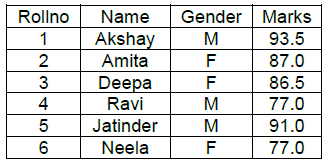
3. Display the structure of the table
4. Display all tables in the database
5. Display the result of the expression 7+8/3
6. Display details of the male students who have secured less than 90.
7. Display all the details in descending order of marks and in ascending order of Name.
8. Add a new column Grade (char(1)) to the table.
9. Set the Grade as ‘A’ for those students whose mark is above 90.
10. Display the names of the students who do not have a grade.
11. Delete the students whose mark is below 80.
12. Change name to “Anitha” and marks to 89.0 of the student whose roll number is 2.
13. Modify the data type of column Name to varchar(30)
14. Delete the column Grade.
15. Display roll number, name and marks of the students whose roll number is 2 and 4
16. Display name and marks-3 for all students.
17. Display the student details in the following format Deepa ‘has secured’ 86.5
18. Display names of the students having five letters and ending with ‘a’
19. Add a new row with Rollno =10 , name=’Shakthi’ and Gender=’M’
20. Display names of the students whose marks are entered in the table.
21. Create a table BOYS which will have name and marks of all the boys from STUDENT table.
22. Display the contents of BOYS table.
23. Add a PRIMARY KEY data constraint on the column Name.
24. Change Name column in BOYS table to B_NAME.
Please click on below link to download CBSE Class 11 Informatics Practices My Sql Worksheet Set D
Free study material for Informatics Practices
Practice Worksheet and Study Resources for Class 11 Informatics Practices My Sql
Download Practice Sheet: My Sql (Class 11 Informatics Practices)
Explore reliable practice questions for My Sql tailored for Class 11 Informatics Practices learners. Use these structured worksheets to evaluate preparedness and strengthen problem-solving skills.
Concept Clarification for My Sql
Each worksheet is structured around standard CBSE textbooks, allowing students to check their working steps and correct mistakes early in their revision.
Additional Study Resources for Class 11 Informatics Practices
Explore our broader library of printable assignments, chapter notes, and mock tests designed to support continuous revision and secure higher marks in CBSE assessments.
FAQs
You can download the teacher-verified PDF for CBSE Class 11 Informatics Practices My Sql Worksheet Set 04 from StudiesToday.com. These practice sheets for Class 11 Informatics Practices are designed as per the latest CBSE academic session.
Yes, our CBSE Class 11 Informatics Practices My Sql Worksheet Set 04 includes a variety of questions like Case-based studies, Assertion-Reasoning, and MCQs as per the 50% competency-based weightage in the latest curriculum for Class 11.
Yes, we have provided detailed solutions for CBSE Class 11 Informatics Practices My Sql Worksheet Set 04 to help Class 11 and follow the official CBSE marking scheme.
Daily practice with these Informatics Practices worksheets helps in identifying understanding gaps. It also improves question solving speed and ensures that Class 11 students get more marks in CBSE exams.
All our Class 11 Informatics Practices practice test papers and worksheets are available for free download in mobile-friendly PDF format. You can access CBSE Class 11 Informatics Practices My Sql Worksheet Set 04 without any registration.