

Practice Worksheets for Class 11 Informatics Practices: Java Programming Variables
Access printable practice worksheets for Java Programming Variables designed to align with the 2026-27 academic syllabus for Class 11 Informatics Practices. These structured exercises help students evaluate their conceptual understanding and improve exam readiness.
Practice Java Programming Variables Worksheets for Class 11 Informatics Practices
View or download the dedicated Java Programming Variables practice resource below. Engaging with these objective and subjective questions daily ensures continuous academic progress and mastery of the 2026-27 curriculum.
Topic : JAVA PROGRAMMING - Variables
Lab Work Sheet :
Q1. Create a Java application using NetBeans the following form
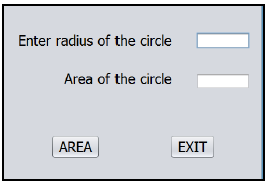
Write Java code to accept radius of the circle and display the area on clicking the AREA buttonand to stop the application on clicking EXIT button.
Q2. Create a Java application using NetBeans the following form
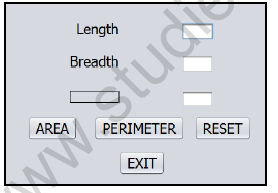
Write Java code to accept length and breadth of the rectangle and display the area of the rectangle on clicking the AREA button, perimeter of the rectangle on clicking PERIMETER button and to stop the application on clicking EXIT button. Also include code to clear the text fields on clicking RESET button. Display the result on jTextField3 and set jLabel3 as AREA if AREA button is clicked and PERIMETER if PERIMETER button is clicked.
Q3. Create a Java application using NetBeans the following form

Write Java code to convert the temperature to Fahrenheit or Celsius according to the clicking of F to C or C to F button respectively and display in the respective text field. The application should terminate on clicking EXIT button. Clear the text fields on clicking RESET button.
Q4. Create a Java application using NetBeans the following form
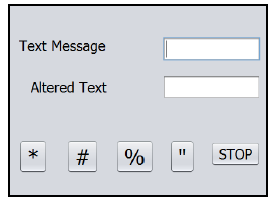
Write Java code to prefix and suffix the given text with the special character according to the button chosen. Also include code to terminate the application on clicking STOP button.
For Example, if given Text Message is Welcome, on clicking % button, the altered text should be %Welcome%
Q5. Create a Java application using NetBeans the following form

Set the properties of the various controls in Properties window as given below
(i) uncheck the check box(ii) disable the option button(iii) enable option button(iv) make the text field uneditable(v) select the check box
Q6. Create a Java application using NetBeans the following form
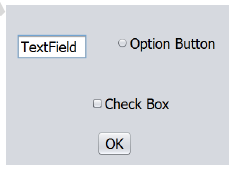
Write Java code to perform the following tasks on clicking OK button
(i) uncheck/unselect the check box(ii) disable the option button
(iii) make the text field visible(iv) enable option button
(v) make the text field uneditable(vi) select the check box
Please click on below link to download CBSE Class 11 Informatics Practices Java Programming Variables Worksheet
Free study material for Informatics Practices
Exam Preparation Worksheet for Class 11 Informatics Practices Java Programming Variables
Chapter Practice Questions for Class 11 Informatics Practices
Explore reliable practice questions for Java Programming Variables tailored for Class 11 Informatics Practices learners. Use these structured worksheets to evaluate preparedness and strengthen problem-solving skills.
Expert Practice Material for Class 11 Informatics Practices
Built using the official NCERT book for Class 11 Informatics Practices, these practice materials provide reliable academic guidance. Pair your practice with our recommended NCERT solutions to master optimal problem-solving approaches.
Complete Your Chapter Revision
Explore our broader library of printable assignments, chapter notes, and mock tests designed to support continuous revision and secure higher marks in CBSE assessments.
FAQs
You can download the teacher-verified PDF for CBSE Class 11 Informatics Practices Java Programming Variables Worksheet from StudiesToday.com. These practice sheets for Class 11 Informatics Practices are designed as per the latest CBSE academic session.
Yes, our CBSE Class 11 Informatics Practices Java Programming Variables Worksheet includes a variety of questions like Case-based studies, Assertion-Reasoning, and MCQs as per the 50% competency-based weightage in the latest curriculum for Class 11.
Yes, we have provided detailed solutions for CBSE Class 11 Informatics Practices Java Programming Variables Worksheet to help Class 11 and follow the official CBSE marking scheme.
Daily practice with these Informatics Practices worksheets helps in identifying understanding gaps. It also improves question solving speed and ensures that Class 11 students get more marks in CBSE exams.
All our Class 11 Informatics Practices practice test papers and worksheets are available for free download in mobile-friendly PDF format. You can access CBSE Class 11 Informatics Practices Java Programming Variables Worksheet without any registration.