

Class 11 Informatics Practices Practice Set: Office Automation Tools
Review targeted practice sets for Class 11 Informatics Practices Office Automation Tools. Built according to official educational guidelines for the 2026-27 academic year, these downloadable worksheets support daily revision and core concept reinforcement.
Download Office Automation Tools Worksheet PDF
View or download the dedicated Office Automation Tools practice resource below. Engaging with these objective and subjective questions daily ensures continuous academic progress and mastery of the 2026-27 curriculum.
Topic : OFFICE AUTOMATION TOOLS
OPEN OFFICE CALC
LAB- WORKSHEET
Write the steps to do the following in spreadsheet:
ABC Sports
Yearly Sales Report
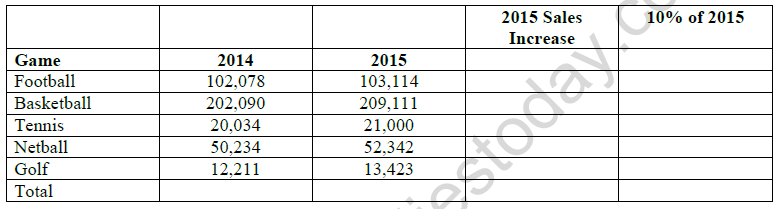
1) Enter a formula in B8 that will calculate the amount of the sales for 2014.
2) Find the increase of sales in 2015 and 10% of 2015 with appropriate formula.
3) Find the average sales for the year 2015 in C9.
4) Sort the table on name of the game.
5) In B14 type SQUARE ROOT OF 144 and in C14 type =SQRT(144)
6) In B15 type power of 5^3 is and in C15 type = POWER(5;3)
7) In B16 type quotient of 5/2 is and in C16 type = QUOTIENT(5;2)
8) In B17 type 4567.89578 and in C17 type = ROUND(4567.89758;3)
9) In B18 type positive value of -25 is and in C18 type = ABS(-25)
10) In B19 type 4* 5 and in C19 type = PRODUCT(4;5)
11) In B20 type sine of 30 and in C20 type = SIN(30)
12) In B21 type cosine 30 and in C21 type = COS(30)
13) In B22 type Tangent 30 and in C22 type = TAN(30)
Please click on below link to download CBSE Class 11 Informatics Technology Office Automation Tools Worksheet Set C
Free study material for Informatics Practices
Office Automation Tools Practice Sheet and Solutions for Class 11 Informatics Practices
CBSE Practice Material: Class 11 Informatics Practices Office Automation Tools
Access structured practice worksheets for Office Automation Tools designed in alignment with the latest CBSE curriculum for Class 11 Informatics Practices. These printable problem sets help students build accuracy and prepare effectively for school tests.
NCERT-Aligned Questions and Solutions
Each worksheet is structured around standard CBSE textbooks, allowing students to check their working steps and correct mistakes early in their revision.
Next Steps in Your Exam Preparation
Follow up your worksheet practice by attempting the interactive online Informatics Practices MCQ test for this chapter to evaluate your execution speed. All platform resources are free to access.
FAQs
You can download the teacher-verified PDF for CBSE Class 11 Informatics Technology Office Automation Tools Worksheet Set 03 from StudiesToday.com. These practice sheets for Class 11 Informatics Practices are designed as per the latest CBSE academic session.
Yes, our CBSE Class 11 Informatics Technology Office Automation Tools Worksheet Set 03 includes a variety of questions like Case-based studies, Assertion-Reasoning, and MCQs as per the 50% competency-based weightage in the latest curriculum for Class 11.
Yes, we have provided detailed solutions for CBSE Class 11 Informatics Technology Office Automation Tools Worksheet Set 03 to help Class 11 and follow the official CBSE marking scheme.
Daily practice with these Informatics Practices worksheets helps in identifying understanding gaps. It also improves question solving speed and ensures that Class 11 students get more marks in CBSE exams.
All our Class 11 Informatics Practices practice test papers and worksheets are available for free download in mobile-friendly PDF format. You can access CBSE Class 11 Informatics Technology Office Automation Tools Worksheet Set 03 without any registration.