

Practice Worksheets for Class 11 Informatics Practices: Office Automation Tools
Review targeted practice sets for Class 11 Informatics Practices Office Automation Tools. Built according to official educational guidelines for the 2026-27 academic year, these downloadable worksheets support daily revision and core concept reinforcement.
Practice Office Automation Tools Worksheets for Class 11 Informatics Practices
View or download the dedicated Office Automation Tools practice resource below. Engaging with these objective and subjective questions daily ensures continuous academic progress and mastery of the 2026-27 curriculum.
Topic : OFFICE AUTOMATION TOOLS
OPEN OFFICE CALC
LAB- WORKSHEET
Write the steps to do the following:
1. Open a new spreadsheet in Open Office Calc and save it as InternetHours
The following table records the number of hours each student uses Internet in a week:
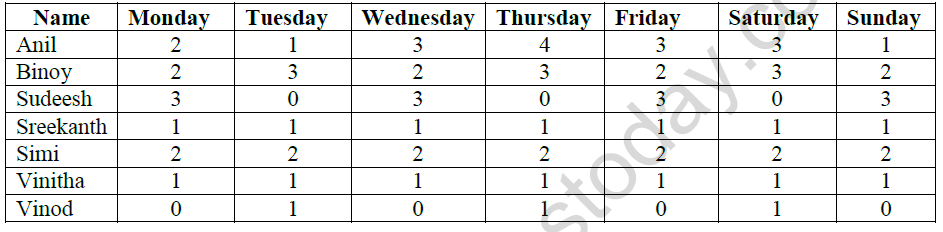
a) Type data into your spreadsheet.
b) Add another column titled “SlNo:”to the left of name column. Fill the number in SlNo column using auto fill feature.
c) Add another column titled “Total hours per user”. Using an appropriate formula, calculate the total hours each student used in the week.
d) Add another column titled “ Average hours used in a week”. Using an appropriate formula,calculate the average hours each student used in a week. The hours should be rounded to 1 decimal place.
e) Below the last student, add a row titled “Total hours per day”. Using an appropriate formula, calculate the total hours used each day of the week.
f) Add another row titled “Minimum hours used”. Using an appropriate formula, find the minimum number of hours used for each of the days.
g) Add another row titled “Maximum hours used”. Using an appropriate formula, find the maximum number of hours used for each of the days.
h) Select the cell wherever 0 is typed and put red colour for that cell
i) Count the number of students using the count() function.
j) Add a title “INTERNET USAGE” to your spreadsheet.
k) Save the spreadsheet with appropriate name.
Please click on below link to download CBSE Class 11 Informatics Technology Office Automation Tools Worksheet Set B
Free study material for Informatics Practices
Office Automation Tools Practice Sheet and Solutions for Class 11 Informatics Practices
Download Practice Sheet: Office Automation Tools (Class 11 Informatics Practices)
Explore reliable practice questions for Office Automation Tools tailored for Class 11 Informatics Practices learners. Use these structured worksheets to evaluate preparedness and strengthen problem-solving skills.
Concept Clarification for Office Automation Tools
Built using the official NCERT book for Class 11 Informatics Practices, these practice materials provide reliable academic guidance. Pair your practice with our recommended NCERT solutions to master optimal problem-solving approaches.
Additional Study Resources for Class 11 Informatics Practices
Explore our broader library of printable assignments, chapter notes, and mock tests designed to support continuous revision and secure higher marks in CBSE assessments.
FAQs
You can download the teacher-verified PDF for CBSE Class 11 Informatics Technology Office Automation Tools Worksheet Set 02 from StudiesToday.com. These practice sheets for Class 11 Informatics Practices are designed as per the latest CBSE academic session.
Yes, our CBSE Class 11 Informatics Technology Office Automation Tools Worksheet Set 02 includes a variety of questions like Case-based studies, Assertion-Reasoning, and MCQs as per the 50% competency-based weightage in the latest curriculum for Class 11.
Yes, we have provided detailed solutions for CBSE Class 11 Informatics Technology Office Automation Tools Worksheet Set 02 to help Class 11 and follow the official CBSE marking scheme.
Daily practice with these Informatics Practices worksheets helps in identifying understanding gaps. It also improves question solving speed and ensures that Class 11 students get more marks in CBSE exams.
All our Class 11 Informatics Practices practice test papers and worksheets are available for free download in mobile-friendly PDF format. You can access CBSE Class 11 Informatics Technology Office Automation Tools Worksheet Set 02 without any registration.