

Official Class 4 Computers Worksheets: Editing Text In Ms Word
Explore structured practice materials through the CBSE Class 4 Computers Editing Text In Ms Word Worksheet. Tailored for Class 4 learners, utilizing these Computers worksheets ensures thorough preparation and strengthens problem-solving accuracy before final school evaluations.
Solved Practice Worksheets for Computers
Navigate directly to the solved Computers worksheets using the digital viewer below. Each practice set includes detailed step-by-step solutions, allowing students to instantly cross-check their work and identify areas requiring further revision.
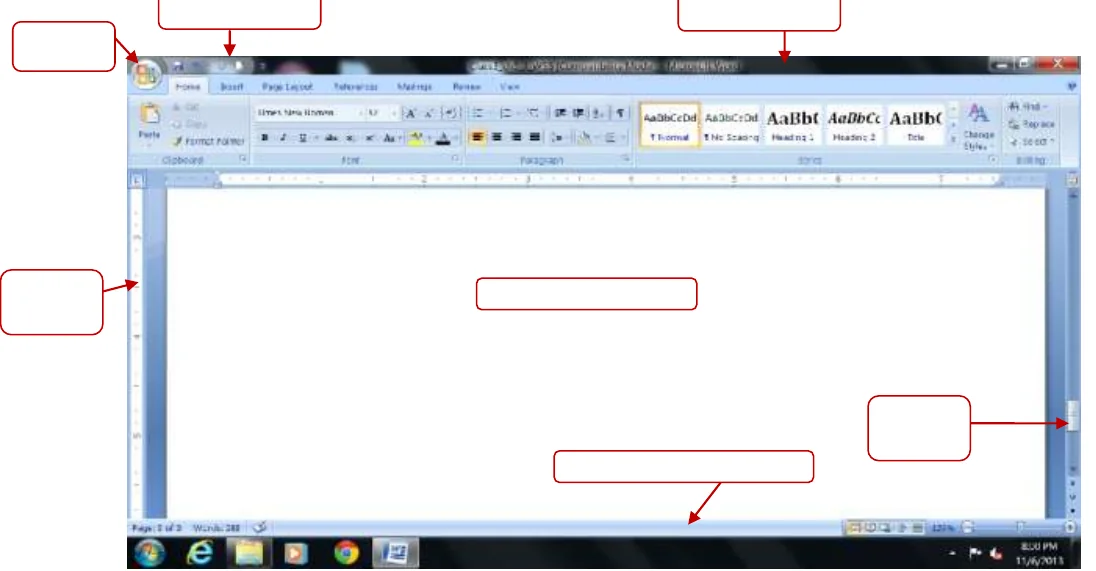
Q1. Identify the parts of the MS Word 2007 window given below:
Answer:
1. Office button
2. Quick Access toolbar
3. Title bar
4. Ruler
5. Document area
6. Vertical Scroll
7. Status bar
In simple words: These are the main structural parts of the MS Word 2007 program window.
Exam Tip: Learn the exact locations and functions of the Quick Access Toolbar, Title bar, and Office button.
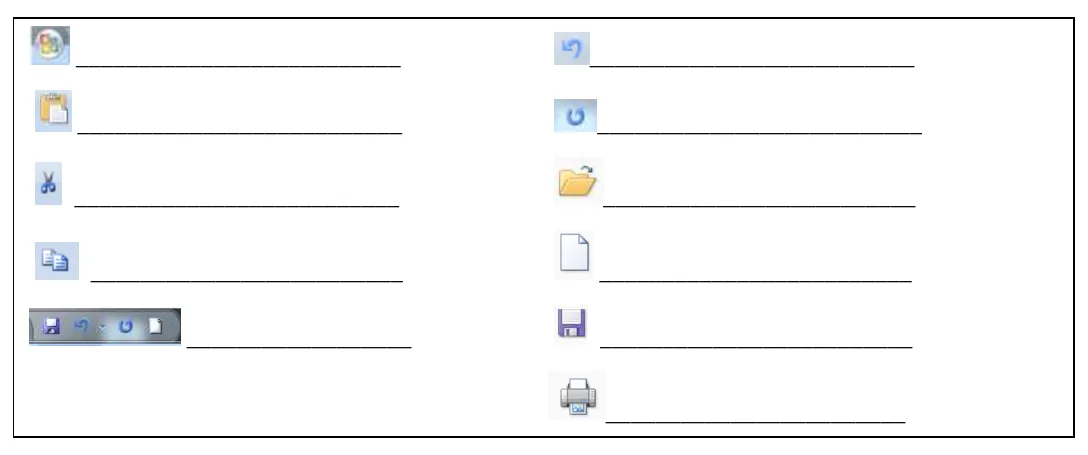
Q2. Identify and name the following components of MS word window:
Answer:
- Office button
- Paste option
- Cut option
- Copy option
- Quick Access toolbar
- Undo
- Redo
- Open
- New
- Save
- Print
In simple words: These icons represent common commands used inside MS Word.
Exam Tip: Memorize the graphical icons for Cut, Copy, Paste, Save, Undo, and Redo.
Q3. Fill in the blanks:
Answer:
1. The title bar displays the name of the current document and application.
2. Document 1 is the default name for a blank document.
3. The small blinking line that you see on the screen is known as Cursor.
4. The document area is the area in the MS Word window where you type text.
5. Clipboard is a temporary storage area in Windows.
6. To close a document click on Office button > Close option.
7. To exit MS Word application click on Office button > Exit Word option.
In simple words: Fill in each blank with the correct terminology used in MS Word.
Exam Tip: Remember that 'Document 1' is the default filename assigned by Word when a new document is opened.
Q4. Write the keyboard shortcuts for the following:
Answer:
1. To create new document -> Ctrl + N
2. To save a document -> Ctrl + S
3. To close a document -> Ctrl + W
4. To open an existing document -> Ctrl + O
5. To print a document -> Ctrl + P
6. To exit MS Word -> Alt + F4
7. Cut -> Ctrl + X
8. Copy -> Ctrl + C
9. Paste -> Ctrl + V
10. Select the entire document -> Ctrl + A
11. Undo -> Ctrl + Z
12. Redo -> Ctrl + Y
13. Check Spelling and Grammar -> F7
14. Open Thesaurus -> Shift + F7
15. Cut and Paste -> Ctrl + X and Ctrl + V
16. Copy and Paste -> Ctrl + C and Ctrl + V
17. Selects text from the current position to the beginning of a line -> Shift + Home
18. Selects text from the current position to the end of a line -> Shift + End
In simple words: Keyboard shortcuts help perform commands quickly without using the mouse.
Exam Tip: Practice these shortcuts regularly; they frequently appear in practical and theory tests.
Q5. Write the selection methods for each of the following:
Answer:
1. To select a word: Double-click on the word.
2. To select a sentence: Hold down the Ctrl key and click anywhere in the sentence.
3. To select a paragraph: Triple-click anywhere in the paragraph.
4. To select a large block of text (two or more paragraphs): Click at the beginning of the text, hold down the Shift key, and click at the end of the text.
5. To select the entire document: Press Ctrl + A or triple-click in the selection area.
In simple words: Different parts of a document require different mouse or keyboard actions to get selected.
Exam Tip: Distinguish carefully between double-clicking a word and triple-clicking a paragraph.
Q6. Answer the following:
1. What kind of software is MS-Word?
Answer: MS Word is an application software used for word processing.
2. Give any two examples of word processing software?
Answer: MS Word, Wordpad.
3. What do you understand by 'Editing the text'?
Answer: Making changes to the text in the document after typing is called Editing.
4. Which button has the commands to open, save, close, print a document?
Answer: Office button.
5. On which toolbar appears Save, Undo and Redo buttons?
Answer: Quick Access toolbar.
6. Which toolbar is located next to the Office button and contains the commonly used commands?
Answer: Quick Access toolbar.
7. Define cursor, editing, selection and clipboard.
Answer:
- Cursor: A cursor is the small blinking line that we see on the screen.
- Editing: Making changes to the text in the document after typing is called Editing.
- Selection: We can select the text in a variety of ways. The selected text is displayed on the screen in a highlighted bar.
- Clipboard: Clipboard is a temporary storage area in Windows which can hold a piece of information at a time for further use in a program.
8. What do the green wavy lines under the text show?
Answer: Grammatical errors are indicated with a green wavy line.
9. Write the steps to move the text?
Answer:
Step 1: Select the text that you want to move.
Step 2: Press Ctrl + X.
Step 3: Move the cursor to the new location and press Ctrl + V.
10. Write the steps to copy the text?
Answer:
Step 1: Select the text that you want to copy.
Step 2: Press Ctrl + C.
Step 3: Move the cursor to the new location and press Ctrl + V.
In simple words: Moving removes text from its original place, while copying keeps it in both places.
Exam Tip: Remember that moving uses Cut (\(\text{Ctrl} + \text{X}\)) and Copy uses (\(\text{Ctrl} + \text{C}\)), while both use Paste (\(\text{Ctrl} + \text{V}\)).
Question. A word processor would most likely be used to do which of the following ?
a) keep an account to money spent
b) maintain an inventory
c) type a biography
d) None of these
Answer : C
Question. Changing an existing document is called ________ the document ?
a) creating
b) editing
c) modifying
d) adjusting
Answer : B
Question. Why are headers and footers used in document ?
a) To enhance the overall appearance of the document
b) To mark the starting and ending of a page
c) To make large document more readable
d) To allow page headers and footers to appear on document when it is printed
Answer : D
Question. In order to save an existing document with a different name you need to ?
a) retype the document and give it a different name
b) use the Save as command
c) copy and paste the original document to a new document and then save
d) use Windows Explorer to copy the document to a different location and then rename it
Answer : B
Question. Text and graphics that have been cut or copied are stored in an area called the ?
a) Pasteboard
b) Copyboard
c) Clipboard
d) Cuttingboard
Answer : C
Question. The name a user assigns to a document is called a(n) — ?
a) File name
b) Program
c) Record
d) Data
Answer : A
Question. Graphics for word processor ?
a) Peripheral
b) Clip art
c) Highlight
d) Execute
Answer : B
Question. Which of the following displays the buttons for changing text style, alignment and size ?
a) Standard toolbar
b) Status bar
c) Drawing toolbar
d) Formatting toolbar
Answer : D
Question. What is the minimum number of rows and columns that a word table can have ?
a) Zero
b) 2 rows and 1 column
c) 2 rows and 2 column
d) 1 row and 1 column
Answer : D
Question. Which groupings do you work with when formatting text in Word ?
a) Tables, paragraphs and indexes
b) Paragraphs. indexes and sections
c) Characters, sections and paragraphs
d) Indexes, characters and tables
Answer : A
Question. A saved document is referred to as a __________ ?
a) file
b) word
c) folder
d) project
Answer : A
Question. What menu is selected to print ?
a) Edit
b) Special
c) File
d) Tools
Answer : C
Question. A program which helps to create written document and lets you go back and make corrections as necessary ?
a) Home row keys
b) Tool bar
c) Folder
d) Word processor
Answer : D
Question. When creating a word processed document, this step involves the user changing how words on the page appear, both on the screen and in printed form ?
a) Editing text
b) Inserting tables and indexes
c) Formatting text
d) Print Preview
Answer : D
Question. Editing a document consists of reading through the document you've created, then ?
a) Correcting your errors
b) Printing it
c) Saving it
d) deleting it
Answer : A
Question. Which of the following are valid Min. & Max. zoom sizes in MS Office ?
a) 10, 100
b) 20, 250
c) 10, 500
d) 10, 1000
Answer : C
Editing Text In Ms Word Printable Worksheets and Exercises for Class 4 Computers
Daily Practice Questions for Class 4 Computers
Access structured practice worksheets for Editing Text In Ms Word aligned with the 2026 CBSE curriculum. These downloadable exercises for Class 4 Computers help students build accuracy and reinforce core concepts for upcoming school tests.
Detailed Answers for Class 4 Computers Editing Text In Ms Word
Each worksheet draws directly from authorized standard textbooks to maintain academic accuracy. Evaluating your finished exercises against expert-verified solutions helps master the formal presentation standards expected in school evaluations.
Complete Your Chapter Revision
Wrap up your chapter revision by testing your knowledge against standard objective question formats. Explore our full library of free, up-to-date printable assignments to maximize your academic results in upcoming CBSE evaluations.
FAQs
You can download the latest chapter-wise printable worksheets for Class 4 Computers Editing Text In Ms Word for free from StudiesToday.com. These have been made as per the latest CBSE curriculum for this academic year.
Yes, Class 4 Computers worksheets for Editing Text In Ms Word focus on activity-based learning and also competency-style questions. This helps students to apply theoretical knowledge to practical scenarios.
Yes, we have provided solved worksheets for Class 4 Computers Editing Text In Ms Word to help students verify their answers instantly.
Yes, our Class 4 Computers test sheets are mobile-friendly PDFs and can be printed by teachers for classroom.
For Editing Text In Ms Word, regular practice with our worksheets will improve question-handling speed and help students understand all technical terms and diagrams.