Class 9 Computer Science Database Concepts RDBMS Notes

Read the Class 9 Computer Science Database Concepts RDBMS Notes right here in PDF format. Our Class 9 Computer Science revision notes follow the updated 2026-27 syllabus rules and are written by experienced teachers. They simplify tricky chapters and emphasize essential definitions, making them ideal for Class 9 test revision.

Concept Summary for Class 9 Computer Science Database Concepts RDBMS

Use these Class 9 Computer Science Database Concepts RDBMS notes for rapid revision before your exams. Designed specifically for school tests and final evaluations, these summaries break down complex sections so you can understand everything clearly.

Database Concepts RDBMS Summary & Notes for Class 9 Computer Science

DATABASE CONCEPTS- RDBMS
 
Basics of RDBMS
 
Database Management System or DBMS in short, refers to the technology of storing and retrieving user’s data with utmost efficiency along with safety and security features. DBMS allows
its users to create their own databases, which are relevant with the nature of work they want. These databases are highly configurable and offers bunch of options.
 
Database is collection of data, which is related by some aspect. Data is collection of facts and figures which can be processed to produce information. Name of a student, age, class
and her subjects can be counted as data for recording purposes.
 
Mostly data represents recordable facts. Data aids in producing information, which is based on facts. For example, if we have data about marks obtained by all students, we can then conclude about toppers and average marks etc.
A database management system stores data, in such a way, which is easier to retrieve, manipulate and helps to produce information.
 
Users

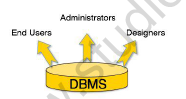
DBMS is used by various users for various purposes. Some may involve in retrieving data and some may involve in backing it up. Some of them are described as follows:
 
Class 9 Computer Science Database Concepts RDBMS Notes
 
 
Administrators: A bunch of users maintain the DBMS and are responsible for administrating the database. They are responsible to look after its usage and by whom it should be used.
 
Designer: This is the group of people who actually works on designing part of database. The actual database is started with requirement analysis followed by a good designing process.
 
End Users: This group contains the persons who actually take advantage of database system. End users can be just viewers who pay attention to the logs or market rates or end users can be as sophisticated as business analysts who take the most of it.
 
Purpose of RDBMS:
 
A relational database will allow you to store data organized such that you can store your information in tables, organized by rows (records) and columns (fields) which you can then store and access as required.
The features of a relational database is storage minimization - you, as a DB designer try and use the least storage that you can and still be able to access the data efficiently.
If you then need to retrieve any data, you would 'query' the database (ask it) if record exists in the database or not. This interaction is done via SQL - Structured Query Language - to get the records (rows) that you need.
By utilizing a well-structured database, you can store a lot of information and retrieve it quickly.
 
Data Models
 
Data model tells how the logical structure of a database is modeled. Data Models are fundamental entities to introduce abstraction in DBMS. Data models define how data is connected to each other and how it will be processed and stored inside the system.
 
The very first data model could be flat data-models where all the data used to be kept in same plane.Because earlier data models were not so scientific, they were prone to introduce lots of duplication and update anomalies.
 
1. Hierarchical Model: The hierarchical data model organizes data in a tree structure.
2. Network Model: Some data were more naturally modeled with more than one parent per child.Therefore, the network model permitted the modeling of many-to-many relationships in data.
3. Object-Oriented Model: Object DBMSs add database functionality to object programming languages.
 
Relational Model
 
The most popular data model in DBMS is Relational Model. It is more scientific model then others. This model is based on first-order predicate logic and defines table as an n-any relation.
Class-9-Computer-Science-Database-Concepts-RDBMS-Notes-unlocked 1
 
Concepts
 
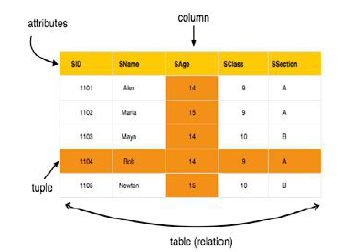
Tables: In relation data model, relations are saved in the format of Tables. This format stores the relation among entities. A table has rows and columns, where rows represent records and columns represents the attributes
 
Tuple: A single row of a table, which contains a single record for that relation, is called a tuple.Relation instance: A finite set of tuples in the relational database system represents relation instance. Relation instances do not have duplicate tuples.
 
Relation schema: This describes the relation name (table name), attributes and their names.
Relation key: Each row has one or more attributes, which can identify the row in the relation (table) uniquely, is called the relation key.
 
Attribute domain: Every attribute has some pre-defined value scope, known as attribute domain.
 
The main highlights of this model are:
 
• Data is stored in tables called relations.
 
• Relations can be normalized.
 
• In normalized relations, values saved are atomic values.
 
• Each row in relation contains unique value
 
• Each column in relation contains values from a same domain.
 
Data Definition Language
 
Data Definition Language (DDL) statements are used to define the database structure. Some examples:
 
• CREATE - to create objects in the database
 
• ALTER - alters the structure of the database
 
• DROP - delete objects from the database
 
• TRUNCATE - remove all records from a table, including all spaces allocated for the records are removed
 
• COMMENT - add comments to the data dictionary
 
• RENAME - rename an object
 
Create database: The CREATE DATABASE statement is used to create a database.
Syntax: CREATE DATABASE your_name;
Create Table: The CREATE TABLE statement is used to create a table in a database.
 
Tables are organized into rows and columns and each table must have a name.
 
CREATE TABLE Student
(
RollNo int,
LastName varchar(255),
FirstName varchar(255),
Address varchar(255),
City varchar(255)
);

Revision Notes & Key Concepts for Class 9 Computer Science Database Concepts RDBMS

CBSE Class 9 Computer Science Database Concepts RDBMS Notes

Review these Revision Notes for Database Concepts RDBMS to grasp essential chapter ideas efficiently. Aligned with current CBSE standards for Class 9, this material helps clarify difficult themes. Consistent reading of these targeted notes ensures solid preparation for upcoming school assessments.

NCERT Based Database Concepts RDBMS Summary

Compiled directly from the official NCERT book for Class 9 Computer Science, these notes offer reliable academic support. Following your chapter summary review, our educators recommend checking our detailed NCERT solutions for Class 9 to compare your understanding, helping build a strong foundation in Computer Science.

Database Concepts RDBMS Complete Revision and Practice

Enhance your academic standing by completing the MCQ questions and practice worksheets offered alongside. These solved checks confirm your command of Database Concepts RDBMS ideas. All website learning assets are free of charge, structured around latest Computer Science patterns. Reading these revision notes daily cultivates deep test assurance.

FAQs

Where can I download the latest PDF for Class 9 Computer Science Database Concepts RDBMS Notes?

You can download the teacher prepared revision notes for Class 9 Computer Science Database Concepts RDBMS Notes from StudiesToday.com. These notes are designed as per 2026-27 academic session to help Class 9 students get the best study material for Computer Science.

Are these Computer Science notes for Class 9 based on the 2026 board exam pattern?

Yes, our Class 9 Computer Science Database Concepts RDBMS Notes include 50% competency-based questions with focus on core logic, keyword definitions, and the practical application of Computer Science principles which is important for getting more marks in 2026 CBSE exams.

Do these Class 9 notes cover all topic-wise concepts for Computer Science?

Yes, our Class 9 Computer Science Database Concepts RDBMS Notes provide a detailed, topic wise breakdown of the chapter. Fundamental definitions, complex numerical formulas and all topics of CBSE syllabus in Class 9 is covered.

How can I use Class 9 Computer Science Database Concepts RDBMS Notes for quick last-minute revision?

These notes for Computer Science are organized into bullet points and easy-to-read charts. By using Class 9 Computer Science Database Concepts RDBMS Notes, Class 9 students fast revise formulas, key definitions before the exams.

Is there any registration required to download Class 9 Computer Science notes?

No, all study resources on StudiesToday, including Class 9 Computer Science Database Concepts RDBMS Notes, are available for immediate free download. Class 9 Computer Science study material is available in PDF and can be downloaded on mobile.