

Computer Science Concept Notes for Class 11: Introduction To C++
Access comprehensive revision notes for Introduction To C++ using the CBSE Class 11 Computer Science Introduction To C++ Notes. Designed to align with the 2026-27 academic syllabus for Class 11 Computer Science, these concept summaries help students streamline their exam preparation and review complex topics efficiently.
Download Introduction To C++ Revision Notes PDF
View or download the dedicated Introduction To C++ revision resource below. Engaging with these structured concept notes daily ensures continuous academic progress and mastery of the 2026-27 curriculum for Computer Science.
Introduction to C++
C++ CHARACTER SET
Character set is asset of valid characters that a language can recognize . A character can represents any letter, digit, or any other sign . Following are some of the C++
character set.
LETTERS A to Z and a to z
DIGITS 0 -9
SPECIAL SYMBOLS + -* ^ \ [] {} = != < > . ‗ ‗ ; : & #
WHITE SPACE Blankl space , horizontal tab ( - > ), carriage return , Newline, Form feed.
OTHER CHARACTERS 256 ASCII characters as data or as literals.
TOKENS:
The smallest lexical unit in a program is known as token. A token can be any keyword,Identifier,Literals, Puncutators, Operators.
KEYWORDS :
These are the reserved words used by the compiler. Following are some of the Keywords.
auto continue float new signed volatile
short long class struct else inline
delete friend private typedef void template
catch friend sizeof union register goto
IDENTIFIERS:
An arbitrary name consisting of letters and digits to identify a particular word.C++ iscase sensitive as nit treats upper and lower case letters differently. The first character must be a letter . the underscore counts as a letter
Pen time580 s2e2r3 _dos _HJI3_JK
LITERALS:
The data items which never change their value throughout the program run. There are several kind of literals:
• Integer constant
• Character constant
• Floating constant
• String constant.
Integer constant :
Integer constant are whole numbers without any fractional part. An integer constant must have at least one digit and must not contain any decimal point. It may contain either + or _. A number with no sign is assumed as positive. e.g 15, 1300, -58795.
Character Constant:
A character constant is single character which is enclosed within single quotation marks. e.g ‗ A‘
Floating constant:
Numbers which are having the fractional part are referred as floating numbers or real constants. it may be a positive or negative number. A number with no sign is assumed to be a positive number. e.g 2.0, 17.5, -0.00256
String Literals:
It is a sequence of letters surrounded by double quotes. E.g ―abc‖.
PUNCTUATORS:
The following characters are used as punctuators which are also know as separators in C++
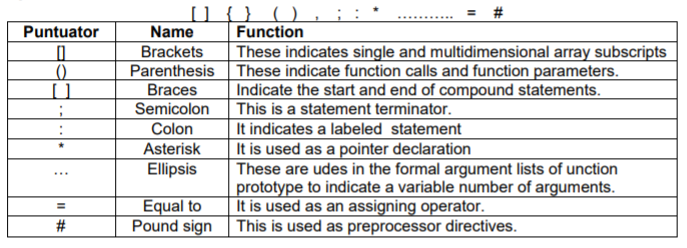
OPERATORS:
These are those lexical units that trigger some computation when applied to variables and other objects in an expression. Following are some operators used in C++ Unary operators: Those which require only one operand to trigger. e.g. & , + , ++ , -- ! . Binary operators: these require two operands to operate upon. Following are some of the Binary operators.
Arithmatic operators :
+ Addition
_ ubstraction
A* Multiplication
/ Division
% Remainder.
Logical Operators :
&& - logical AND || - Logical OR
Relational Operator:
< less than
a> Greater than
<= Less than equal to.
>= greater than equal to.
== equal to.
!= not equal to.
Conditional operator: ? (question ) : ( colon )
Assignment Operator:
= assignment operator
*= Assign Product.
/= Assign quotient
%= assign Remainder
&= Assign bitwise AND
^= Assign bitwise XOR.
|=Assign bitwise OR
Conditional operator ( ? )
The conditional operator evaluates an expression returning a value if that expression is true and a different one if the expression is evaluated as false. Its format is:
condition ? result1 : result2
e.g 7==5 ? 4 : 3 // returns 3, since 7 is not equal to 5.
Comma operator ( , )
The comma operator (,) is used to separate two or more expressions that are included where only one expression is expected. When the set of expressions has to be evaluated for a value, only the rightmost expression is considered.
For example, the following code:
a = (b =3 , b +2 );
Would first assign the value 3 to b, and then assign b+2 to variable a. So, at the end, variable a would contain the value 5 while variable b would contain value 3.
Explicit type casting operator
Type casting operators allow you to convert a datum of a given type to another. There are several ways to do this in C++. The simplest one, which has been inherited from the C language, is to precede the expression to be converted by the new type enclosed between parentheses ( ) :
int i;
float f =3014;
i = ( int ) f;
The previous code converts the float number 3.14 to an integer value (3), the remainder is lost. Here,the typecasting operator was (int). Another way to do the same thing in C++ is using the functional notation: preceding the expression to be converted by the type and enclosing the expression between parentheses:
i = int (f );
Both ways of type casting are valid in C++.
sizeof()
This operator accepts one parameter, which can be either a type or a variable itself and returns the size in bytes of that type or object:
a= sizeof (char);
This will assign the value 1 to a because char is a one-byte long type.
The value returned by sizeof is a constant, so it is always determined before program execution.
Input Output (I/O) In C++
The cout Object:
The cout object sends to the standard output device. cout sends all out put to the screen i.e monitor.
The syntax of cout is as follows:
cout<< data;.
e.g
cout<< a ; ( here a can be any variable)
The cin operator :
The cin operator is used to get input from the keyboard. When a program reaches the line with cin, the user at the keyboard can enter values directly into variables.
The syntax of cin is as follows:
cin>> variablename
e.g
cin>> ch; ( here ch can be any variable)
• Basic structure of a C++ program:
Following is the structure of a C++ program tht prints a string on the screen:
#include<iostream.h>
void main ()
{
cout<<‖ Study material for Class XI‖;
}
Please click the link below to download pdf file for CBSE Class XI Computer Science Introduction to C++ Concepts.
Introduction To C++ Concepts and Summary for Class 11 Computer Science
Quick Revision Notes: Introduction To C++ (CBSE)
Review targeted chapter notes for Class 11 Computer Science Introduction To C++. Built according to official CBSE guidelines, these summaries highlight high-yield topics frequently tested in school evaluations.
Expert Study Material for Class 11 Computer Science
Cross-reference your comprehension with comprehensive NCERT solutions for Class 11 to ensure absolute clarity across all sub-topics in this chapter.
Complete Your Chapter Revision
Follow up your revision by attempting the interactive online Computer Science MCQ test and practice worksheets for this chapter to verify your mastery. All platform resources are free to access.
FAQs
You can download the teacher prepared revision notes for CBSE Class 11 Computer Science Introduction To C++ Notes from StudiesToday.com. These notes are designed as per 2026-27 academic session to help Class 11 students get the best study material for Computer Science.
Yes, our CBSE Class 11 Computer Science Introduction To C++ Notes include 50% competency-based questions with focus on core logic, keyword definitions, and the practical application of Computer Science principles which is important for getting more marks in 2026 CBSE exams.
Yes, our CBSE Class 11 Computer Science Introduction To C++ Notes provide a detailed, topic wise breakdown of the chapter. Fundamental definitions, complex numerical formulas and all topics of CBSE syllabus in Class 11 is covered.
These notes for Computer Science are organized into bullet points and easy-to-read charts. By using CBSE Class 11 Computer Science Introduction To C++ Notes, Class 11 students fast revise formulas, key definitions before the exams.
No, all study resources on StudiesToday, including CBSE Class 11 Computer Science Introduction To C++ Notes, are available for immediate free download. Class 11 Computer Science study material is available in PDF and can be downloaded on mobile.