

Official Class 11 Computer Science Revision Material: CBSE Class 11 Computer Science Computer Fundamentals Notes
Explore reliable concept summaries and revision materials through the CBSE Class 11 Computer Science Computer Fundamentals Notes. Tailored for Class 11 learners, utilizing these notes for Computer Science Computer Fundamentals ensures thorough preparation and strengthens core academic definitions before final evaluations.
Chapter-wise Concept Summaries: Computer Fundamentals
View or download the dedicated Computer Fundamentals revision resource below. Engaging with these structured concept notes daily ensures continuous academic progress and mastery of the 2026-27 curriculum for Computer Science.
Computer Fundamentals
Objective:
• To impart in-depth knowledge of computer related basic terminologies.
• To inculcate the skills of implementation of basic theory in troubleshooting the software & hardware problems.
What is Computer?
Computer is an advanced electronic device that takes raw data as input from the user and processes these data under the control of set of instructions (called program) and gives the result (output) and saves output for the future use. It can process both numerical and non-numerical (arithmetic and logical) calculations.
A computer has four functions:
a. accepts data Input
b. processes data Processing
c. produces output Output
d. stores results Storage
Input (Data):
Input is the raw information entered into a computer from the input devices. It is the collection of letters, numbers, images etc.
Process:
Process is the operation of data as per given instruction. It is totally internal process of the computer system.
Output:
Output is the processed data given by computer after data processing. Output is also called as Result. We can save these results in the storage devices for the future use.
Computer System
All of the components of a computer system can be summarized with the simple equations.
COMPUTER SYSTEM = HARDWARE + SOFTWARE+ USER
• Hardware = Internal Devices + Peripheral Devices
All physical parts of the computer (or everything that we can touch) are known as Hardware.
• Software = Programs
Software gives "intelligence" to the computer.
• USER = Person, who operates computer.
Generation of computer:
First Generation (1940-56):
The first generation computers used vaccum tubes & machine language was used for giving the instructions. These computer were large in size & their programming was difficult task. The electricity consumption was very high. Some computers of this generation are ENIAC, EDVAC, EDSAC & UNIVAC-1.
Second Generation(1956-63):
In 2nd generation computers, vaccum tubes were replaced by transistors. They required only 1/10 of power required by tubes. This generation computers generated less heat & were reliable. The first operating system developed in this generation.
The Third Generation(1964-71):
The 3rd generation computers replaced transistors with Integrated circuit known as chip. From Small scale integrated circuits which had 10 transistors per chip, technology developed to MSI circuits with 100 transistors per chip. These computers were smaller, faster & more reliable. High level languages invented in this generation.
The fourth Generation(1972- present):
LSI & VLSI were used in this generation. As a result microprocessors came into existence. The computers using this technology known to be Micro Computers. High capacity hard disk were invented. There is great development in data communication.
The Fifth Generation (Present & Beyond):
Fifth generation computing devices, based on artificial intelligence, are still in development, though there are some applications, such as voice recognition, that are being used today. The use of parallel processing and superconductors is helping to make artificial intelligence a reality. Quantum computation and molecular and nanotechnology will radically change the face of computers in years to come.
ARCHITECTURE OF COMPUTER
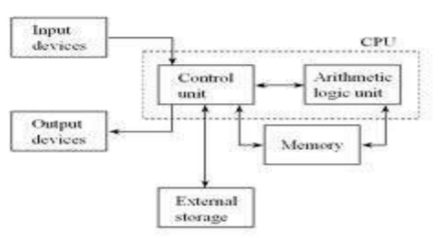
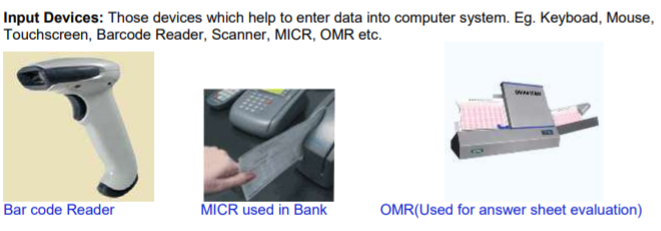
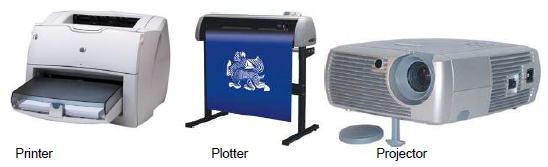
Output Devices: Those devices which help to display the processed information. Eg. Monitor, Printer, Plotter, Projector
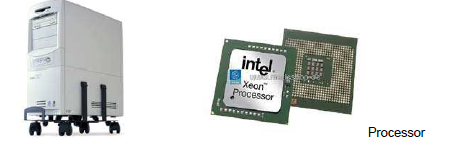
CENTRAL PROCESSING UNIT (CPU)
The main component to make a computer operate is the computer chip or microprocessor. This is referred to as the Central Processing Unit (CPU) and is housed in the computer case. Together, they are also called the CPU. It performs arithmetic and logic operations. The CPU (Central Processing Unit) is the device that interprets and executes instructions.
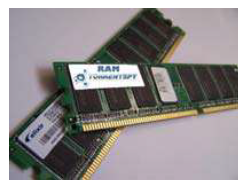
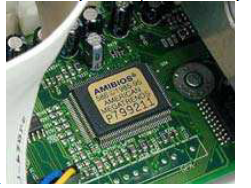
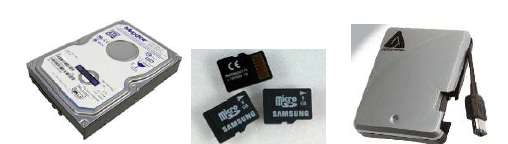
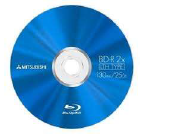
Memory: It facilitates the remembrance power to computer system. It refers to the physical devices used to store programs (sequences of instructions) or data (e.g. program state information) on a temporary or permanent basis for use in a computer or other digital electronic device. The term primary memory is used for the information in physical systems which are fast (i.e. RAM), as a distinction from secondary memory, which are physical devices for program and data storage which are slow to access but offer higher memory capacity. Primary memory stored on secondary memory is called virtual memory. Primary Memory can be categorized as Volatile Memory & Non-Volatile Memory.
Volatile memory(RAM)
Volatile memory is computer memory that requires power to maintain the stored information. Most modern semiconductor volatile memory is either Static RAM or dynamic RAM.
SRAM retains its contents as long as the power is connected and is easy to interface to but uses six transistors per bit.
Please click the link below to download pdf file for CBSE Class XI Computer Science Computer Fundamentals Concepts.
Study Material and Revision Notes for Class 11 Computer Science Computer Fundamentals
About Computer Fundamentals Revision Notes
Explore reliable chapter overviews for Computer Fundamentals tailored for Class 11 learners. Use these structured points to grasp difficult themes and ensure solid preparation for upcoming assessments.
How to Use These Revision Notes
Cross-reference your comprehension with comprehensive NCERT solutions for Class 11 to ensure absolute clarity across all sub-topics in this chapter.
Enhance Practice with MCQs and Worksheets
Explore our broader library of printable assignments, chapter notes, and mock tests designed to support continuous revision and secure higher marks in CBSE assessments.
FAQs
You can download the teacher prepared revision notes for CBSE Class 11 Computer Science Computer Fundamentals Notes from StudiesToday.com. These notes are designed as per 2026-27 academic session to help Class 11 students get the best study material for Computer Science.
Yes, our CBSE Class 11 Computer Science Computer Fundamentals Notes include 50% competency-based questions with focus on core logic, keyword definitions, and the practical application of Computer Science principles which is important for getting more marks in 2026 CBSE exams.
Yes, our CBSE Class 11 Computer Science Computer Fundamentals Notes provide a detailed, topic wise breakdown of the chapter. Fundamental definitions, complex numerical formulas and all topics of CBSE syllabus in Class 11 is covered.
These notes for Computer Science are organized into bullet points and easy-to-read charts. By using CBSE Class 11 Computer Science Computer Fundamentals Notes, Class 11 students fast revise formulas, key definitions before the exams.
No, all study resources on StudiesToday, including CBSE Class 11 Computer Science Computer Fundamentals Notes, are available for immediate free download. Class 11 Computer Science study material is available in PDF and can be downloaded on mobile.