

Revision Notes for Class 11 Computer Science: Computer Fundamentals
Explore reliable concept summaries and revision materials through the CBSE Class 11 Computer Science Online Access And Computer Security Notes. Tailored for Class 11 learners, utilizing these notes for Computer Science Computer Fundamentals ensures thorough preparation and strengthens core academic definitions before final evaluations.
Review Computer Fundamentals for Class 11 Computer Science
Navigate directly to the revision notes for Computer Fundamentals using the digital viewer below. Each summary is structured to highlight high-weightage sections, allowing students to instantly access critical definitions and focus on core exam topics.
Short Answer Type Questions
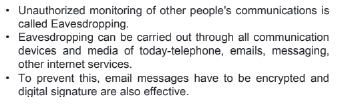
Question: What is Eavesdropping? What security measures can you take up to prevent it?
Answer:
Question: What is a virus? What is anti-virus software?
Answer: A computer virus is a malicious program that self-replicates by copying itself to another program. In other words, the computer virus spreads by itself into other executable code or documents. The purpose of creating a computer virus is to infect vulnerable systems, gain admin control and steal user sensitive data. Hackers design computer viruses with malicious intent and prey on online users by tricking them.
Antivirus software is a program or set of programs that are designed to prevent, search for,detect, and remove software viruses, and other malicious software like worms, trojans, adware,and more
Question: What is Computer virus? How can it affect your computer?
Answer: A computer virus is a malicious program that self-replicates by copying itself to another program. In other words, the computer virus spreads by itself into other executable code or documents. The purpose of creating a computer virus is to infect vulnerable systems, gain admin control and steal user sensitive data. Hackers design computer viruses with malicious intent and prey on online users by tricking them.
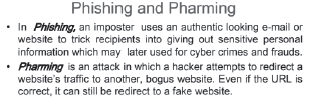
Question: How is pharming similar to and different from phishing?
Answer:
Question: How is backup utility useful? Is it necessary to take backup of data?
Answer: Backup is a very helpful utility. You can backup your data with that and whenever your data is corrupted by any virus or Trojans your data will remain safe.
It is not necessary to backup your until or unless you have something really important stuff in your machine.The backup depends on your wish if you want to make backup, go on for it and if you don’t leave it. But if you have something very useful for you in future then its better to take backup.
Question: What type damages can be caused by viruses to your computer?
Answer: Damages caused by Viruses:
– Damage or Delete files.
– Slow down your computer.
– Invade your email programs.
Question: What are different types of threats to computer security?
Answer: A Threat is a potential violation of security. When a threat is actually executed, it becomes attack. Those who execute such actions, or cause them to be executed are called attackers.
Some common threats the average computer user faces everyday are 1. Viruses
2. Worms
3. Trojans
4. Spyware
5. Adware
6. Spamming
7. PC Intrusion:
8. Denial of Service
9. Sweeping
10. Password Guessing
11. Phishing
Question: What are malware? What type damages can they cause to your computer?
Answer: “Malware” is short for malicious software and used as a single term to refer to virus, spy ware,worm etc. Malware is designed to cause damage to a stand-alone computer or a networked pc.So wherever a malware term is used it means a program which is designed to damage your computer it may be a virus, worm or Trojan.
Question: What do you understand by PC intrusion?
Answer: Intrusion – Computer Definition. To compromise a computer system by breaking the security of such a system or causing it to enter into an insecure state. The act of intruding—or gaining unauthorized access to a system—typically leaves traces that can be discovered by intrusion detection systems.
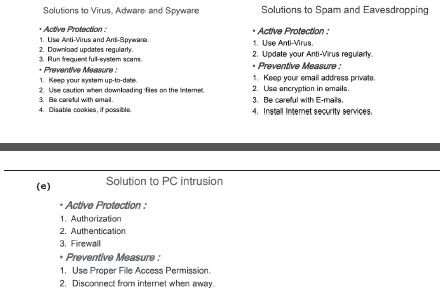
Question: What measures would you take to avoid –
(a)Virus attack (b) Spyware (c) Adware (d) Spam (e) PC Intrusion
Answer: (a), (b)& (c) (d)
Question: What is a spam? Why has it become a big Internet issue?
Answer: Spam email is a form of commercial advertising which is economically viable because email is a very cost-effective medium for the sender. If just a fraction of the recipients of a spam message purchase the advertised product, the spammers are making money and the spam problem is perpetuated.
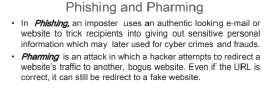
Question: What is Phishing?
Answer:
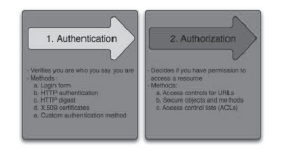
Question: What is Authentication and Authorization? Why are these two used together?
Answer: Difference between Authentication and Authorization. Both the terms are often used in conjunction with each other in terms of security, especially when it comes to gaining access to the system. Authentication means confirming your own identity, while authorization means granting access to the system.
Question: What are denial-of-service or Sweeper attack?
Answer: A denial-of-service attack is a security event that occurs when an attacker prevents legitimate users from accessing specific computer systems, devices, services or other IT resources.
Question:What is the need for secure passwords?
Answer: A password that is difficult to detect by both humans and computer programs, effectively protecting data from unauthorized access. A strong password consists of at least six characters (and the more characters, the stronger the password) that are a combination of letters, numbers and symbols (@, #, $, %, etc.) if allowed. Passwords are typically casesensitive, so a strong password contains letters in both uppercase and lowercase. Strong passwords also do not contain words that can be found in a dictionary
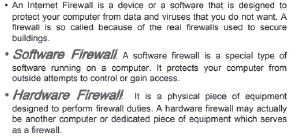
Question: What is the significance of Firewall in a computer‟s security scheme?
Answer:
Download CBSE Revision Notes: Class 11 Computer Science Computer Fundamentals
Key Concepts and Summary for Class 11 Computer Science Computer Fundamentals
Explore reliable chapter overviews for Computer Fundamentals tailored for Class 11 learners. Use these structured points to grasp difficult themes and ensure solid preparation for upcoming assessments.
NCERT-Aligned Chapter Summary and Notes
Built using the official NCERT book for Class 11 Computer Science, these notes provide reliable academic guidance. Pair your summary review with our recommended NCERT solutions to master optimal problem-solving approaches.
Next Steps in Your Exam Preparation
Follow up your revision by attempting the interactive online Computer Science MCQ test and practice worksheets for this chapter to verify your mastery. All platform resources are free to access.
FAQs
You can download the teacher prepared revision notes for CBSE Class 11 Computer Science Online Access And Computer Security Notes from StudiesToday.com. These notes are designed as per 2026-27 academic session to help Class 11 students get the best study material for Computer Science.
Yes, our CBSE Class 11 Computer Science Online Access And Computer Security Notes include 50% competency-based questions with focus on core logic, keyword definitions, and the practical application of Computer Science principles which is important for getting more marks in 2026 CBSE exams.
Yes, our CBSE Class 11 Computer Science Online Access And Computer Security Notes provide a detailed, topic wise breakdown of the chapter. Fundamental definitions, complex numerical formulas and all topics of CBSE syllabus in Class 11 is covered.
These notes for Computer Science are organized into bullet points and easy-to-read charts. By using CBSE Class 11 Computer Science Online Access And Computer Security Notes, Class 11 students fast revise formulas, key definitions before the exams.
No, all study resources on StudiesToday, including CBSE Class 11 Computer Science Online Access And Computer Security Notes, are available for immediate free download. Class 11 Computer Science study material is available in PDF and can be downloaded on mobile.