

Chapter-wise Worksheets for Class 6 Computer Science: Ms PowerPoint
Review targeted academic worksheets with the CBSE Class 6 Computer Ms PowerPoint Worksheet. Built according to official educational standards for the 2026-27 term, these downloadable Class 6 Computer Science resources support effective daily practice and detailed self-evaluation for Ms PowerPoint.
Practice Class 6 Computer Science Worksheets: Ms PowerPoint
View or download the dedicated CBSE Class 6 Computer Ms PowerPoint Worksheet resource below. Engaging with these practice papers under focused study conditions ensures continuous academic progress and mastery of the 2026-27 curriculum for Ms PowerPoint.
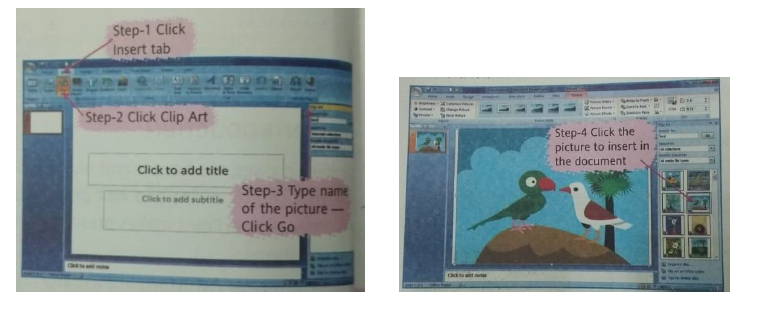
Question. Write down the steps to insert picture from Clip Art in a Power Point Presentation.
Answer. To insert a Clip Art in a slide, we follow these steps -
Step-1 Click on the Insert tab .
Step-2 Click on Clip Art from illustrations group . The Clip Art task pane appears .
Step-3 In the Search box, type the category of the picture required, eg- birds , and click on Go button . Various picture of the birds are displayed now.
Step-4 Click on the desired picture to insert it in the Power Point document.
Question. Write down the steps to insert tables in a PowerPoint Presentation.
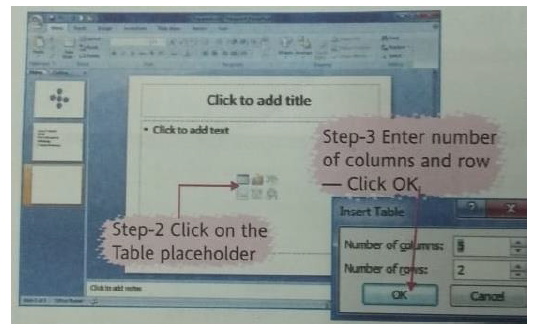
Answer. To Insert a Table, we follow these steps -
Step-1 Select a slide layout including a Table Placeholder, eg – title slide .
Step-2 Click on the Table Placeholder, the Insert Table dialog box is displayed .
Step-3 Enter the required number of rows and columns. Click on ok button .
Step- 4 Fill the required data in the empty table that appears .
We can also insert a table directly by clicking on Table from Insert tab on the Ribbon .
Question. Write the steps to add Bullets and Numbering in a PowerPoint Presentation.
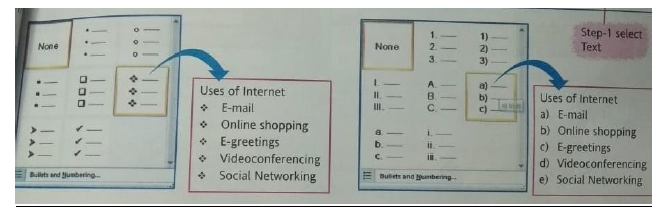
Answer. We use the following steps to add bullets and numbers -
Step-1 Select the required text to be bulleted or numbered.
Step-2 Click on Home tab .
Step-3 Click the Bullets from Paragraph group or Numbering and choose an option from the gallery.
Question. What do you know about Theme ? Write the steps to apply a Theme in a PowerPoint presentation .
Answer. THEME – A Theme contains a set of colors , fonts and many special effects. Theme is used to make a slide attractive .
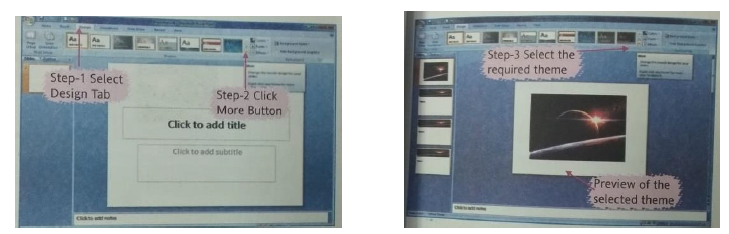
To apply a Theme to various slides in a presentation-
Step-1 Click on Design tab .
Step-2 Click on More button in the Themes group .
Step-3 Select any theme and note the preview effects on the slide in background. Click to apply the required theme to all slides .
Question. Draw and label the diagram of PowerPoint Window.
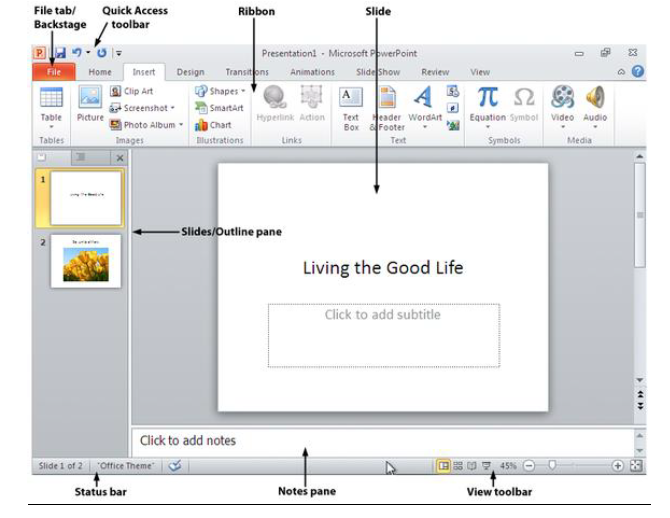
More Question..
1) Write the menu and submenu for the following:
a) Inserting a new slide
b) Apply new designs to slide
c) Changing the Background color of a slide
d) Changing the text and font style.
e) Inserting a page number
f) Creating a copy of a slide.
2) Match the columns:
COLUMN A COLUMN B
1) An electronic presentation which can 1) Outlines
be run on a computer screen
2) An electronic page in a slide show 2) Speaker’s notes
3) A summarized version of your slides. 3) PPT
4) A set of notes is required to aid the 4) CLIP ART
presenter.
5) A set of pre-designed formats or text 5) Slide show
applicable to a presentation
6) The application software that can create 6) Template
professional looking visual aids.
7) PowerPoint presentation are given 7) Slide
extension
8) MS –OFFICE comes with its 8) Presentation graphics software
own set of pictures in.
3) What do you understand by auto content wizard?
4) Name some software’s that can be used to create graphic presentation.
5) How can you view all the slides of your presentation simultaneously?
6) Name the layout that you can be used for the following type of slide?
a) A date sheet for the half yearly exam.
b) Heading as “THANKING YOU”
c) Slide discussing the concept of solar system.
d) Difference between Living and non Living
7) What is the need of Place holder in a slide?
8) What is the difference between text tool and place holder?
9) How can we create the following image in a slide?
FILL IN THE BLANKS :
Question. Clip Art option appears in the _____ group .
Answer : illustrations
Question. To change the category of Smart Art ,we choose from the _____ groups .
Answer : layout
Question. Tables consist of _____ present in rows and columns .
Answer : data
Question. _____ tab is used to insert a theme .
Answer : Design
Question. We click on _____ from Media Clips group to insert music in a PowerPoint Presentation.
Answer : sound
Question. To apply the slide transition , we click on the _____ tab.
Answer : animations
Question. We can insert pictures in MS PowerPoint using _____ .
Answer : Clip Art
Question. To resize a picture, we click ,select and drag a blank _____ .
Answer : circle
DEFINE THE FOLLOWING :
Question. CUSTOM ANIMATION
Answer : This is an option of MS PowerPoint to enhance presentations using special animations , graphics and sound effects .
Question. SMART ART
Answer : This is a feature in PowerPoint to make text attractive by use of graphics .
Question. TABLES
Answer : It is a presentation of data using rows and columns .
Question. SLIDE TRANSITION
Answer : It is the visual effect that occurs when we move from one slide to the next during a presentation .
Very Short Answer Type Questions :
Question. Name one format used to create a PowerPoint Presentation .
Answer : Blank and Recent .
Question. Name any two programs in MS Windows where the Bullets and Numbering option can be used .
Answer : MS- Word , MS PowerPoint.
Question. Name two screen elements of the Power Point screen .
Answer : Menu bar, Ribbon .
Question. Name the option we insert pictures in a Power Point Presentation .
Answer : Clip Art or from a file.
Short Answer Type Questions :
Question. What is Power Point ?
Answer : PowerPoint is a presentation software used to create, edit and show presentations for slide shows, meetings and web pages etc .
Question. List any one use of animations in MS PowerPoint .
Answer : We can use animation for special effect and sound in PowerPoint during the transition of slides .
Question. What are the different ways to create a New Presentation in MS PowerPoint ?
Answer : There are three ways to create a presentation –
(a) Blank and Recent – To create a blank presentation .
(b) Installed Templates – To create a presentation by asking questions on the topic of the presentation .
(c) Installed Themes – Contains ready made slides , colour patterns and graphics .
Question. What are clips in MS PowerPoint ?
Answer : Clips are files in MS PowerPoint that consists of various drawings , photos, sounds, videos and various other things .
Download Class 6 Computer Science Ms PowerPoint Practice Worksheets
Daily Practice Questions for Class 6 Computer Science
Explore reliable practice questions for Ms PowerPoint tailored for Class 6 Computer Science learners. Use these structured worksheets to evaluate exam preparedness and strengthen problem-solving skills throughout the 2026 academic session.
Detailed Answers for Class 6 Computer Science Ms PowerPoint
Designed around the official curriculum for Class 6 Computer Science, these practice sheets guarantee standard compliance. Reviewing step-by-step solutions after completion sharpens your accuracy and clarifies complex sub-topics within Ms PowerPoint.
Complete Your Chapter Revision
Consistent engagement with these exercises builds familiarity with recurring exam themes. If specific areas within Ms PowerPoint cause trouble, utilize our dedicated NCERT solutions for Class 6 Computer Science to clear up doubts immediately.
FAQs
You can download the latest chapter-wise printable worksheets for Class 6 Computer Science Ms PowerPoint for free from StudiesToday.com. These have been made as per the latest CBSE curriculum for this academic year.
Yes, Class 6 Computer Science worksheets for Ms PowerPoint focus on activity-based learning and also competency-style questions. This helps students to apply theoretical knowledge to practical scenarios.
Yes, we have provided solved worksheets for Class 6 Computer Science Ms PowerPoint to help students verify their answers instantly.
Yes, our Class 6 Computer Science test sheets are mobile-friendly PDFs and can be printed by teachers for classroom.
For Ms PowerPoint, regular practice with our worksheets will improve question-handling speed and help students understand all technical terms and diagrams.