

Official Class 6 Computer Science Worksheets: Hardware and Software
Access comprehensive chapter-wise worksheets for Hardware and Software using the CBSE Class 6 Computer Hardware and Software Worksheet. Designed to align with the 2026-27 academic syllabus for Class 6 Computer Science, these printable practice sets help students reinforce key concepts and improve their overall exam readiness.
Solved Practice Worksheets for Computer Science
Navigate directly to the solved Computer Science worksheets using the digital viewer below. Each practice set includes detailed step-by-step solutions, allowing students to instantly cross-check their work and identify areas requiring further revision.
Very short answer type Questions:
Question: Which part of CPU connects the other parts like Processor, Hard Disk, Ram etc
Answer: Motherboard
Question: What we call a set of instructions given to a computer?
Answer: Program
Question: Which part of computer cannot be touched but felt?
Answer: Software
Question: What are two types of Software?
Answer: System software and Application software
Question: Which type of softwares are expensive?
Answer: System Software
Short answer type Questions:
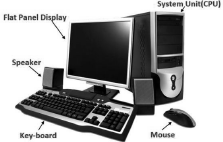
Question: Give four examples of Hardware.
Answer: Examples of hardware are:
- Keyboard
- Mouse
- Monitor
- Speaker
- System Unit
- Printer etc.
Question: What are the qualities or features of Software?
Answer: The qualities of the software are as follows:
1. Software has no weight.
2. We cannot touch it.
3. A software makes a hardware working.
Question: What is Hardware?
Answer: The physical components/parts of a computer are called hardware, For Example: keyboard, mouse, monitor, printer, etc. We can touch these parts. A complete computer system is made up by the interconnection of these physical components.
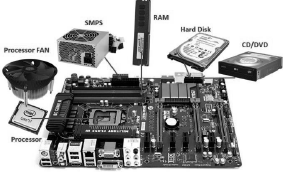
Question: Write the name of devices which are connected with motherboard?
Answer: The main devices which are connected with the motherboard are:
- Processor
- Processor Fan
- RAM
- Hard Disk
- Power Supply- SMPS
- CD/DVD
Question: Explain the important points for taking care of hardware.
Answer: Here are some key points to keep in mind about hardware:
1. Keep computer parts clean.
2. Do not clean computer parts while the computer is turned on.
3. Do not press the keyboard keys too hard.
4. Cover it after use.
5. Don’t eat anything near the computer.
Question: What is Software?
Answer: A set of programs is called software. We can do any work in the computer using these softwares. These are the parts of the computer that we cannot touch. For example: paint, notepad, windows etc.
Long answer type Questions:
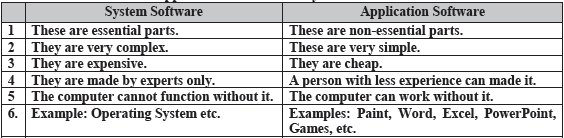
Question: Write the difference between Application Software and System Software?
Answer: The differences between application software and system software are:
Question: Write a note on Hardware.
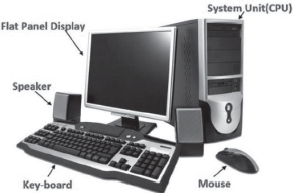
Answer: The physical components/parts of a computer are called hardware, for example: keyboard, mouse, monitor, printer, etc. We can touch and feel these parts, and these parts also occupy space. A computer system is made up by the inter-connection of these physical components. Hardware alone cannot do anything. The hardware needs instructions to work.
Hardware and Software Printable Worksheets and Exercises for Class 6 Computer Science
Mastering Hardware and Software with Printable Worksheets
Access structured practice worksheets for Hardware and Software aligned with the 2026 CBSE curriculum. These downloadable exercises for Class 6 Computer Science help students build accuracy and reinforce core concepts for upcoming school tests.
Verified Solutions and NCERT Alignment
Built using official NCERT guidelines for Class 6 Computer Science, these practice sheets provide reliable academic support. Cross-reference your completed work with our detailed solutions to learn standard answer-writing formats for CBSE exams.
Additional Study Resources for Class 6 Computer Science
Follow up your worksheet practice by attempting the interactive online MCQ tests for Hardware and Software to evaluate your execution speed. All printable assignments and revision sheets on our platform are updated for the 2026 session and available free of charge.
FAQs
You can download the latest chapter-wise printable worksheets for Class 6 Computer Science Hardware and Software for free from StudiesToday.com. These have been made as per the latest CBSE curriculum for this academic year.
Yes, Class 6 Computer Science worksheets for Hardware and Software focus on activity-based learning and also competency-style questions. This helps students to apply theoretical knowledge to practical scenarios.
Yes, we have provided solved worksheets for Class 6 Computer Science Hardware and Software to help students verify their answers instantly.
Yes, our Class 6 Computer Science test sheets are mobile-friendly PDFs and can be printed by teachers for classroom.
For Hardware and Software, regular practice with our worksheets will improve question-handling speed and help students understand all technical terms and diagrams.