

Chapter-wise Worksheets for Class 3 Computers: Know Your Computer
Access comprehensive chapter-wise worksheets for Know Your Computer using the CBSE Class 3 Computer Know Your Computer Worksheet. Designed to align with the 2026-27 academic syllabus for Class 3 Computers, these printable practice sets help students reinforce key concepts and improve their overall exam readiness.
Practice Class 3 Computers Worksheets: Know Your Computer
View or download the dedicated CBSE Class 3 Computer Know Your Computer Worksheet resource below. Engaging with these practice papers under focused study conditions ensures continuous academic progress and mastery of the 2026-27 curriculum for Know Your Computer.
TOPIC – KNOW YOUR COMPUTER
Name the following :
Question. Converts hard copy into soft copy- ___________
Answer : Scanner
Question. It helps to listen music – ____________
Answer : Speakers
Question. 2 Input device - __________, ___________
Answer : mouse , scanner
Question. 2 Output device - _________, ___________
Answer : monitor, speakers
Rearrange the Jumble words :
Question. MNOTIOR - ___________
Answer : MONITOR
Question. SACNENR - ___________
Answer : SCANNER
Question. HRADAWER - ___________
Answer : HARDWARE
Question. MUOSE - ___________
Answer : MOUSE
Question. KYEOBARD – ___________
Answer : KEYBOARD
Question. JYOTSCIK - ___________
Answer : JOYSTICK
Missing letters :
Question. S _ E _ K _R S
Answer : P, A, E
Question. S _ F T _ A _ E
Answer : O, W, R
Question. F _O_ P Y
Answer : L, P
Question. P _I _ T _ R
Answer : R, N, E
Question. P E _ D R _V E
Answer : N, I
Question. D _T _
Answer : A, A
Fill in the blanks :
Question. Printer makes a _________ copy of the processed information on paper.
Answer : Permanent
Question. _______is used to play games on computer.
Answer : Joystick
Question. ________ is known as VDU.
Answer : Monitor
Question. __________ is a pointing device .
Answer : Mouse
Question. Hardware equipment include ______and ___________.
Answer : CPU and Keyboard
Q.1. Write the LOGO command for the following:
a. Move the turtle forward by 40 steps _________________________
b. Move the turtle backward by 20 steps _________________________
c. Rotate the head of the turtle towards right direction by 90 steps _________________________
d. Rotate the head of the turtle towards left Direction by 45 steps _________________________
e. Hide the turtle _________________________
f. Make visible the hidden turtle _________________________
g. Lift the turtle’s pen from screen _________________________
h. Put the turtle’s pen down on the screen _________________________
i. To erase everything from the graphic area _________________________
j. To bring the turtle to the middle of the screen _________________________
1 -Fill in the blanks :--
a- A group of instructions given to the computer to make it work are called software .
b- Two basic parts of the computer are hardware and software.
c- We can listen to sound using speakers and head phones.
d- Hardware devices can be classified as input devices , output devices, Storage devices and processing unit.
e- Input (Data + Instructions) + Processing = Output ( information)
2- Draw hardware devices used to :---
A- Input data :--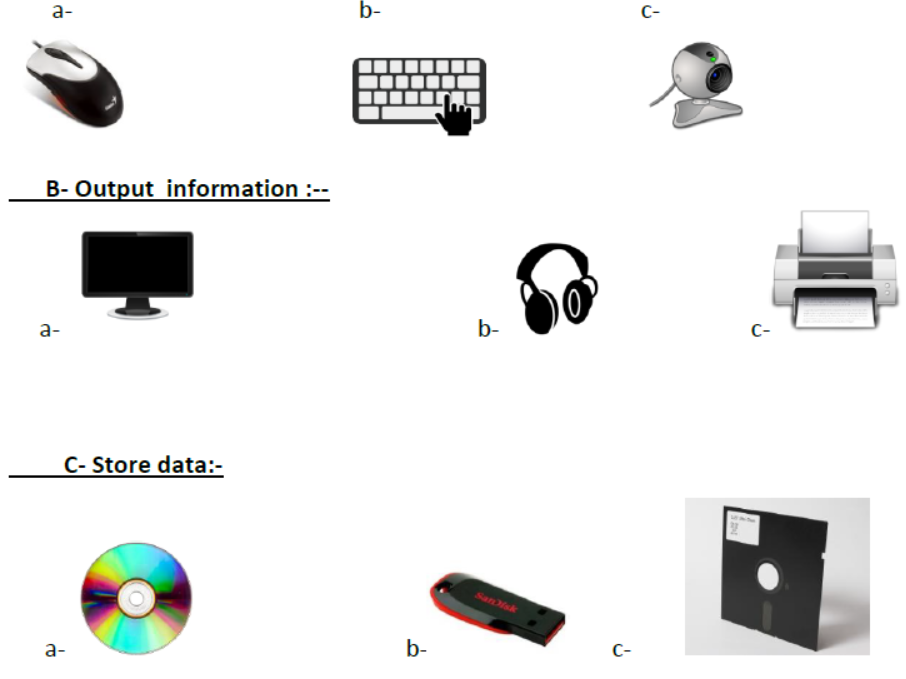
Write the full form of the following abbreviations :
Question. PD
Answer : Pen Drive.
Question. UPS
Answer : Uninterrupted Power Supply.
Question. DVD
Answer : Digital Versatile Disc.
Question. VDU
Answer : Visual Display Unit.
Question. USB
Answer : Universal Serial Bus.
True/False :
Question. A joystick is used to listen to music.
Answer : False
Question. A Keyboard has 105 keys.
Answer : True
Question. A scanner is used to play games on computer.
Answer : False
Question. A mouse usually has two buttons.
Answer : True
Question. Monitor is an input device.
Answer : False
Very Short Answer Type Questions :
Question. What is computer?
Answer : A computer is a device which runs on electricity and is used to process the data.
Question. What is the function of CPU?
Answer : CPU is called the brain of the computer. It performs calculations and comparisons.
Question. What is the difference between Scanner and Printer?
Answer :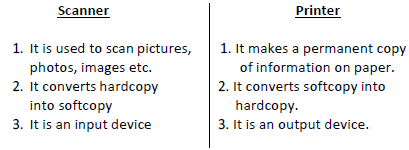
Question. Name two components of a computer.
Answer : 1. Hardware
2. Software
1. Fill the correct word in the blanks.
Booting, Mouse pointer, Start, Windows, Operating system
a. _________ is the most common operating system.
b. _________ is a small arrow on the computer screen, which moves when you move your mouse.
c. ______________ controls overall working of the computer.
d. The _________ button is found on the extreme left corner of the taskbar.
e. _________ is the process in which operating system is loaded into computer’s memory.
2. Unscramble the scrambled words:
a. ESOUM __________
b. NSDOWIW ___________
c. INGARTEPO MESYTS_________
d. RTSATER __________
e. KEDSOPT _________
3. State whether the following sentences are True or False:
a. Linux is one of the most popular operating system software. ______
b. The mouse pointer is a small arrow on the computer screen. ______
c. Booting means that the computer shuts down and starts up again immediately. _______
d. Icon is a long colourful bar located at the bottom of the desktop. _______
e. The notification area does not include the volume bar. _______
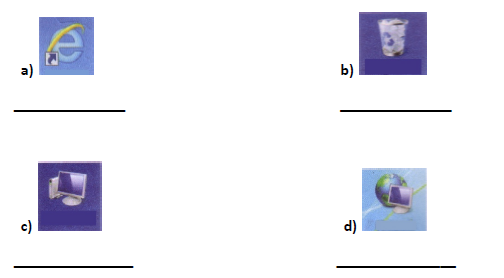
A- Fill in the blanks:----
1- Tired 6- hospitals
2- Records 7-four
3- LCD 8-printer
4- Ticket reservation 9-multi tasking
5- Machine 10-control unit
B- Write True or False:-
1- False 6-False
2- False 7-False
3- False 8-False
4- False 9-False
5- False 10-False
Download Class 3 Computers Know Your Computer Practice Worksheets
Download Chapter Worksheets: Class 3 Computers
Review targeted practice exercises for Class 3 Computers Know Your Computer. Curated to match official CBSE guidelines, these printable problem sets support daily revision and improve overall test readiness.
Concept Clarification for Know Your Computer
Designed around the official curriculum for Class 3 Computers, these practice sheets guarantee standard compliance. Reviewing step-by-step solutions after completion sharpens your accuracy and clarifies complex sub-topics within Know Your Computer.
Effective Revision Strategies for School Exams
Consistent engagement with these exercises builds familiarity with recurring exam themes. If specific areas within Know Your Computer cause trouble, utilize our dedicated NCERT solutions for Class 3 Computers to clear up doubts immediately.
FAQs
You can download the latest chapter-wise printable worksheets for Class 3 Computers Know Your Computer for free from StudiesToday.com. These have been made as per the latest CBSE curriculum for this academic year.
Yes, Class 3 Computers worksheets for Know Your Computer focus on activity-based learning and also competency-style questions. This helps students to apply theoretical knowledge to practical scenarios.
Yes, we have provided solved worksheets for Class 3 Computers Know Your Computer to help students verify their answers instantly.
Yes, our Class 3 Computers test sheets are mobile-friendly PDFs and can be printed by teachers for classroom.
For Know Your Computer, regular practice with our worksheets will improve question-handling speed and help students understand all technical terms and diagrams.