

Chapter-wise Worksheets for Class 3 Computers: Tricky Terms
Review targeted academic worksheets with the CBSE Class 3 Computer Tricky Terms Worksheet. Built according to official educational standards for the 2026-27 term, these downloadable Class 3 Computers resources support effective daily practice and detailed self-evaluation for Tricky Terms.
Practice Class 3 Computers Worksheets: Tricky Terms
Navigate directly to the solved Computers worksheets using the digital viewer below. Each practice set includes detailed step-by-step solutions, allowing students to instantly cross-check their work and identify areas requiring further revision.
(Learn Tricky terms, Memory bytes and all Exercises from L-2, 3)
I. Fill in the blanks:
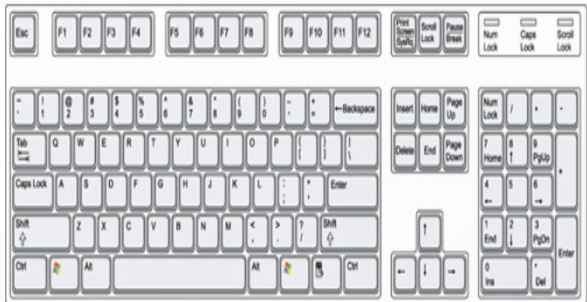
1) Keyboard is an ___________________ device.
2) Delete, Backspace, Enter are examples of _________________________ keys.
3) Arrow keys are also known as__________________________________________.
4) Number keys on right- hand side is known as _____________________________.
5) We use ________________ key to erase anything on the right side of the cursor.
6) We use _______________ key to erase anything on the left side of the cursor.
7) _______________________ is a collection of computer programs that perform some tasks on a computer system.
8) ____________________________________________ is a popular operating system.
9) __________________________ is used to store a group of files.
10) Start menu is divided into _____________________ and _____________________ .
II. Match the following:
1) To type capital letters 26 ( )
2) LINUX Single –user OS ( )
3) Windows 98 Caps lock ( )
4) Function keys Multi –user OS ( )
5) Alphabet keys 12 ( )
III. State whether True or False:
1) We can change the position of task bar _________
2) Start button is placed at the right of the taskbar. _________
3) Multi-user OS are used at homes. __________
4) The letters on the keyboard are arranged in A-Z alphabetical order
Tricky Terms Printable Worksheets and Exercises for Class 3 Computers
Daily Practice Questions for Class 3 Computers
Access structured practice worksheets for Tricky Terms aligned with the 2026 CBSE curriculum. These downloadable exercises for Class 3 Computers help students build accuracy and reinforce core concepts for upcoming school tests.
Detailed Answers for Class 3 Computers Tricky Terms
Designed around the official curriculum for Class 3 Computers, these practice sheets guarantee standard compliance. Reviewing step-by-step solutions after completion sharpens your accuracy and clarifies complex sub-topics within Tricky Terms.
Complete Your Chapter Revision
Wrap up your chapter revision by testing your knowledge against standard objective question formats. Explore our full library of free, up-to-date printable assignments to maximize your academic results in upcoming CBSE evaluations.
FAQs
You can download the latest chapter-wise printable worksheets for Class 3 Computers Tricky Terms for free from StudiesToday.com. These have been made as per the latest CBSE curriculum for this academic year.
Yes, Class 3 Computers worksheets for Tricky Terms focus on activity-based learning and also competency-style questions. This helps students to apply theoretical knowledge to practical scenarios.
Yes, we have provided solved worksheets for Class 3 Computers Tricky Terms to help students verify their answers instantly.
Yes, our Class 3 Computers test sheets are mobile-friendly PDFs and can be printed by teachers for classroom.
For Tricky Terms, regular practice with our worksheets will improve question-handling speed and help students understand all technical terms and diagrams.