

Class 3 Computers Practice Sheet: CBSE Class 3 Computer Software Worksheet
Access comprehensive chapter-wise worksheets for Software using the CBSE Class 3 Computer Software Worksheet. Designed to align with the 2026-27 academic syllabus for Class 3 Computers, these printable practice sets help students reinforce key concepts and improve their overall exam readiness.
Download Software Worksheet PDF with Answers
View or download the dedicated CBSE Class 3 Computer Software Worksheet resource below. Engaging with these practice papers under focused study conditions ensures continuous academic progress and mastery of the 2026-27 curriculum for Software.
TOPIC – COMPUTER SOFTWARE
Answer The Following Questions In One Word :
Question. Raw facts entered into a computer system.
Answer : Input
Question. It is an interface between hardware and software
Answer : Operating system
Question. Name any two storage devices.
Answer : Pen drive,CD
Question. Name any one software that you have used.
Answer : MS Paint
Question. The visual auditory or textile perception comes after processing the raw facts.
Answer : Output
Question. The process of transforming input into useful information.
Answer : Processing
Write The Full Form Of The Following Abbreviations :
Question. ALU
Answer : Arithmetic Logic Unit
Questionc. ATM
Answer : Automated Teller Machine
Question. PD
Answer : Pen Drive
Question. UPS
Answer : Uninterrupted Power supply
Multiple Choice Questions :
Question. To calculate things you use the ______ program.
(a) Calculator
(b) WordPad
Answer : A
Question. Windows is an operating ______ .
(a) Mouse
(b) System
Answer : B
Question. The paint program is an example of ______ .
(a) Hardware
(b) Software
Answer : B
Question. Software is a set of ______ .
(a) Programs
(b) Soft toys
Answer : A
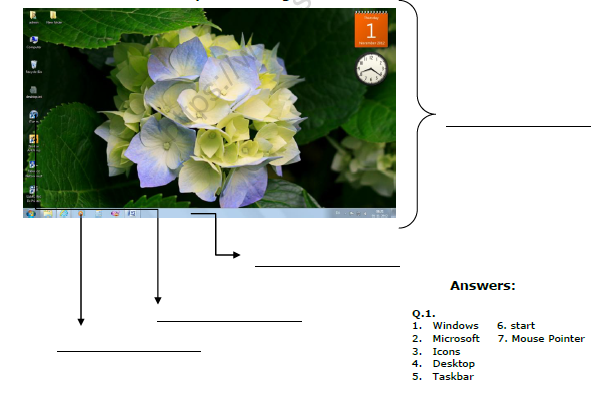
Q.1. Fill in the blanks
1. _________________________ is the most popular operating System that is being used today.
2. Windows 7 is the latest version of operating System developed by _________________________
3. The small pictures on the desktop are ___________________________
4. First stable screen that appears after switching on the computer is called the _____________________________
5. Long bar at the bottom of the desktop that contains the start button at the left corner is called the ________________________
6. The _______________________ menu, lists all the installed programs in the computer.
7. Small arrow that appears on the desktop is called _______________________
Q.2. Label the different parts of the given screen.
1-Fill in the blanks:-----
a- Arithmetic logical Unit performs mathematical calculations and comparisons in CPU.
b- Control Unit controls the data flow.
c- Memory unit is used for storage of data and information.
d- Software is a set of instructions given to the computer to do a particular work.
e- There are two types of software.
1- System software 2- Application software.
f- System software is a set of programs that controls the overall working of a computer.
g- Operaing system is a part of System software that makes a computer run.
h- Application software helps to do a specific type of work.
i- Any software cannot be touched or seen.
J- Input and Output devices are also known as computer peripherals
2-Unscramble the following words:----
a- CANERSN SCANNER
b- RYMEMO MEMORY
c- EBAMWC WEBCAMERA
d- YSJTICKO JOYSTICK
e- HONECROPMI MICROPHONE
f- LGPITHEN LIGHTPEN
*NEW WORDS:-
1- Hardware 2- Software 3- Physical 4- storage 5- scanner 6- devices
7- speakers 8- compact 9-intel 10- system 11- operating 12-Application
*DEFINE THE TERMS:-
1-HARDWARE:- The physical parts of a computer that we can touch and see are called hardware.
2-INPUT DEVICES:- Special types of hardware devices that are used to input words, numbers ,sound or picture into a computer, are called input devices.
3-OUTPUT DEVICES:-The devices which display the information and results are Called output devices.
4-STORAGE DEVICES:- The devices used for storing data are called storage devices.
5- OPERATING SYSTEM:- It is a part of System software that makes a compute run.
*ANSWER THE FOLLOWING QUESTIONS:-
Question. Define the term software. Name its types.
Answer: Software is that part of computer which cannot be seen and touched .It is of Two types -----1-Application 2- System software.
Question. What is a storage device? Give any one example.
Answer: The device used for storing data are called storage device .For eg.- CD, Hard disk.
Question. What do we call the hardware devices that are used to enter words, numbers or pictures?
Answer: The hardware device that are used to enter words ,numbers or pictures are Called as input device.
Question. Which application software is used for typing and making corrections in the text?
Answer: Word pad is used for typing and making corrections in the text.
Question. Name the program used for performing calculations.
Answer: Calculator is a program used for performing calculations.
Question. Write two basic parts of a computer system.
Answer: Two basic parts of a computer system are:-1-Hardware 2- Software
Question. In how many parts hardware of computer is classified?
Answer: Hardware of a computer is classified into three parts:-
Input ,Output and storage devices.
Question. Name some Input devices.
Answer: Trackball , Scanner , Web camera , Microphone ,Light Pen ,Joystic
Question. Name some output devices.
Answer: Monitor , Printer , Speaker.
Question. Name some storage devices.
Answer: Compact Disk ,Hard Disk , Pen Drive.
Question. Define System software.
Answer: System software is a set of programs that controls the overall working of a Computer.
Question. Define Application software.
Answer: The software that is designed to do a specific type of work is called Application software.
CBSE Class 3 Computers Worksheets for Software
Download Chapter Worksheets: Class 3 Computers
Review targeted practice exercises for Class 3 Computers Software. Curated to match official CBSE guidelines, these printable problem sets support daily revision and improve overall test readiness.
Concept Clarification for Software
Built using official NCERT guidelines for Class 3 Computers, these practice sheets provide reliable academic support. Cross-reference your completed work with our detailed solutions to learn standard answer-writing formats for CBSE exams.
Effective Revision Strategies for School Exams
Follow up your worksheet practice by attempting the interactive online MCQ tests for Software to evaluate your execution speed. All printable assignments and revision sheets on our platform are updated for the 2026 session and available free of charge.
FAQs
You can download the latest chapter-wise printable worksheets for Class 3 Computers Software for free from StudiesToday.com. These have been made as per the latest CBSE curriculum for this academic year.
Yes, Class 3 Computers worksheets for Software focus on activity-based learning and also competency-style questions. This helps students to apply theoretical knowledge to practical scenarios.
Yes, we have provided solved worksheets for Class 3 Computers Software to help students verify their answers instantly.
Yes, our Class 3 Computers test sheets are mobile-friendly PDFs and can be printed by teachers for classroom.
For Software, regular practice with our worksheets will improve question-handling speed and help students understand all technical terms and diagrams.