

Chapter-wise Worksheets for Class 3 Computers: All Chapters
Review targeted academic worksheets with the CBSE Class 3 Computer Practice Worksheet. Built according to official educational standards for the 2026-27 term, these downloadable Class 3 Computers resources support effective daily practice and detailed self-evaluation for All Chapters.
Practice Class 3 Computers Worksheets: All Chapters
View or download the dedicated CBSE Class 3 Computer Practice Worksheet resource below. Engaging with these practice papers under focused study conditions ensures continuous academic progress and mastery of the 2026-27 curriculum for All Chapters.
Q.1. Fill in the blanks
1. A ________________ is an electronic machine that takes instructions from us and gives the result after processing.
2. All the physical parts that can be touched and are attached to the computer are called _________________________.
3. Set of instructions that tell the computer how to do a particular task are called ________________________.
4. Collection of raw and unorganized facts is called ______________
5. The meaningful and organised form of data is called ________________________.
6. A computer works on the following principle : INPUT _________________________ OUTPUT
7. Name any two :
a. Hardware : ______________________________ , _________________________
b. Software : ______________________________ , __________________________
8. The hardware component that allow you to enter data and instructions into a computer is called an _________________ device.
9. The hardware component that shows you the final result is called an _________________ device.
10. Input device with many small buttons to enter data into the computer is called a ____________________________.
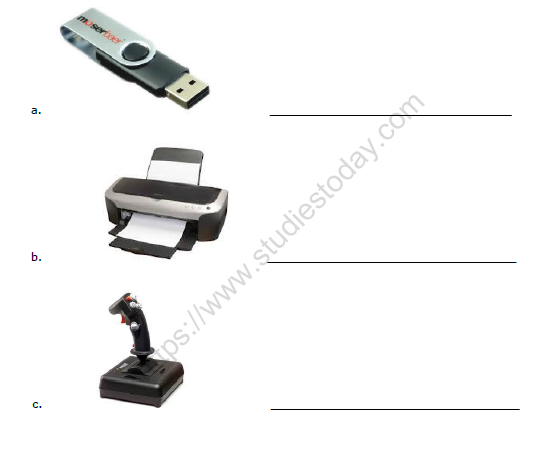
A. Check the Right Answer
a. What extension do we get when a file is saved in Microsoft Paint?
(a) xls
(b) png
(c) bmp
(d) ppt
b. What is the shortcut key for Undo command?
(a) Ctrl+Y
(b) Ctrl+X
(c) Ctrl+W
(d) Ctrl+Z
c. Which shortcut key is used to add a Ruler to line up and measure the picture?
(a) Ctrl+Y
(b) Ctrl+X
(c) Ctrl+W
(d) Ctrl+R
d. Which tool is used to increase or decrease the size of a picture?
(a) Text
(b) Magnifier
(c) Color
(d) Brush
e. In Microsoft Paint, what is the default background colour of a text box?
(a) Blue
(b) Yellow
(c) Pink
(d) Transparent
B. Fill in the blanks :
a. We can copy a color from any existing object using the ………………… tool.
b. To select any irregularly shaped part of the picture, we use the …………………… tool.
c. ……...… means to increase or decrease the view size of an object on the screen in any ratio.
d. The selection box can be removed by clicking ………... the selected area.
e. To open an already saved file, we use the Open option present in the ………. Button menu.
f. After selecting the Text tool, the …………tab appears on the Ribbon.
g. The Shapes group is present on the ………...…… tab.
h. ………..… tool is used to select any irregularly shaped part of a picture.
i. The Gridlines option is present on the ………….. tab.
j. The ………… tool is used to write some text on the Paint window.
C. State True (T) or False ( F)
a. To clear all the objects from the Drawing area, click on the Select > Erase all.
..................
b. The shortcut key to Redo a command is Ctrl+Z.
..................
c. The name of a file appears on the taskbar.
..................
d. To change the line style of a shape click on the Size tool.
..................
e. Click on the Zoom out option to increase the view size.
..................
D. Answer the following
a. In which group do we select any shape for drawing?
b. In Paint, where does the Paste command place the picture in the drawing area?
c. Name the Selection tool that is used to select the object in a rectangular form.
d. Which tool is used to select the area or the object, which has not been selected in the picture?
e. Which shortcut key is used to reverse the effect of Undo command?
f. Which shortcut key is used to save a file?
g. Mention the shortcut key to create a new file.
h. Which shortcut key is used to open an already saved file?
i. Which tool is used to erase a part of the drawing?
j. Where is the Zoom Slider bar located in the Paint window?
A. Choose the correct word and write in the space provide.
Ans-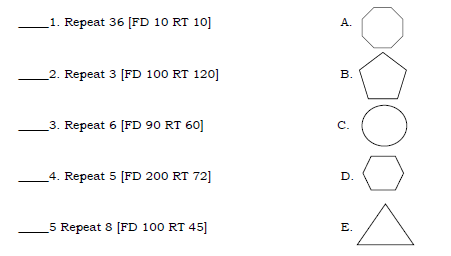
1. C 2. E 3. D
Q 1. Draw a computer on a chart paper and write the name of its parts.
Q 2. Collect the pictures of input / output and storage devices and make a scrap book.
A. MCQ :
a. What extension do we get when a file is saved in Microsoft Paint?
(a) xls
(b) png
(c) bmp
(d) ppt
b. What is the shortcut key for Undo command?
(a) Ctrl+Y
(b) Ctrl+X
(c) Ctrl+W
(d) Ctrl+Z
c. In Microsoft Paint, what is the default background colour of a text box?
(a) Blue
(b) Yellow
(c) Pink
(d) Transparent
d. Which type of keys are used to perform specific tasks?
(a) Numeric Keys
(b) Alphabetic keys
(c) Special Keys
(d) Function Keys
B. Fill in the blanks :
a. We can copy a color from any existing object using the ………………… tool.
b. To select any irregularly shaped part of the picture, we use the …………………… tool.
c. ……...… means to increase or decrease the view size of an object on the screen in any ratio.
d. A standard keyboard is also known as ………… keyboard.
e. Ctrl, Alt, Esc keys are examples of ………………… keys.
f. After selecting the Text tool, the …………tab appears on the Ribbon.
g. The Shapes group is present on the ………...…… tab.
h. ………..… tool is used to select any irregularly shaped part of a picture.
i. The Gridlines option is present on the ………….. tab.
j. The ………… tool is used to write some text on the Paint window.
C. State True (T) or False ( F)
a. To clear all the objects from the Drawing area, click on the Select > Erase all.____________________
b. The shortcut key to Redo a command is Ctrl+Z. __________________
c. The name of a file appears on the taskbar. ____________________
d. The Number keys are typed with the help of Shift key. ____________________
e. The alphabet keys are arranged in the sequential order in a keyboard. ____________________
f. We press the Caps Lock key along with the number key to type the symbol printed on it. ____________________.
D. Answer the following
a. In which group do we select any shape for drawing?
b. In Paint, where does the Paste command place the picture in the drawing area?
c. Name the Selection tool that is used to select the object in a rectangular form.
d. Which tool is used to select the area or the object, which has not been selected in the picture?
e. Which shortcut key is used to reverse the effect of Undo command?
f. Which key is used to erase a letter after the cursor position?
g. Name the keyboard which can be rolled up and carried along.
h. Which is the longest key on a keyboard?
i. How many Shift keys are there on a keyboard?
j. On which side is the Numeric keypad present on a keyboard?
*NEW WORDS:-- ( Write two times vertically)
1-information 2- calculations 3- research 4- defence 5- design
6-animated 7- processing 8- storage 9- arithmetic 10-accuracy
*DEFINE THE TERMS:-
1- INPUT:- The data and instructions , which we enter using an input device into a computer , is called Input.
2- PROCESSING:- After entering data and instructions in a computer , the CPU works on the input to give a meaningful information .This is called Processing.
3- OUTPUT:- When data is processed in a CPU to give useful information, it is known as output.
*ANSWER THE FOLLOWING:-
Question. What is a computer?
Answer: Computer is a machine that works with data and instructions given by the User. It works on IPO cycle.
Question. How do you enter data and instructions into a computer?
Answer: A keyboard and mouse is used to enter data and instructions into a computer.
Question. What do we call the information , that you enter into the computer?
Answer: The information , we enter into the computer is known as INPUT.
Question. Which part of a computer shows the output?
Answer: Monitor shows the output.
Question. Name the device that is known as brain of a computer.
Answer: The CPU is the brain of computer.
Question. List any two features of computer.
Answer: 1- A computer works very fast.
2-It stores large amount of data.
Question. Mention any two disadvantages of a computer.
Answer: Disadvantage of computers are :-
1-It does not have IQ.
2- It is a costly device.
Question. What is a monitor ? Name the types of monitor.
Answer: A monitor looks like a TV screen. It displays the work that we do on a Computer .It also displays the result and movement of the mouse pointer On the screen .It is also known as VDU.There are three types of monitors.
1- CRT monitor 2- LCD monitor 3- LED monitor.
Question. Define CPU . How many parts it has and write function of each.
Answer: CPU is the brain of a computer .It does all calculations and displays the result on the monitor.It also stores a lot of information.
A CPU is made up of three main parts . They are MU,CU AND ALU.
1-MU:- In this unit we can store information or data .The data and instructions
Are also stored in the memory unit , which are to be processed.
2-CU:- It controls and manages the working of all the parts of a computer.
3-ALU:-This unit performs all arithmetic calculations .It also performs logical Operations.
Q.1. Complete the steps to open Paint Program:
a. Click on ________________ button.
b. Click on all _____________________.
c. Click on _________________________.
d. Click on _________________________.
Q.2. Label the screen.
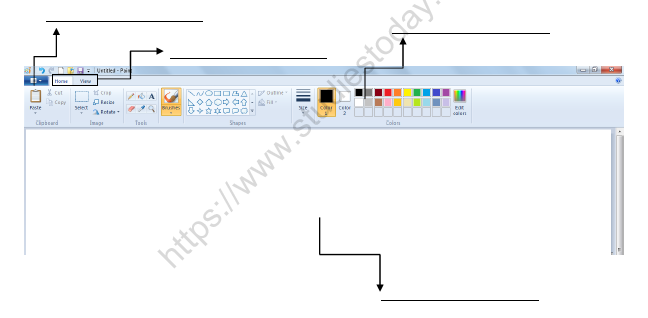
Q.3. Fill in the blanks.
1. ____________________________ and _____________________ are the two tabs in the Paint program.
2. __________________ command is used to create the mirror image of the picture.
3. _______________________ tool is used to cut the selected part of the image.
4. ______________________ tool is used to get a bigger and closer view of the image.
5. ____________________ tool is used to rotate the position of the image.
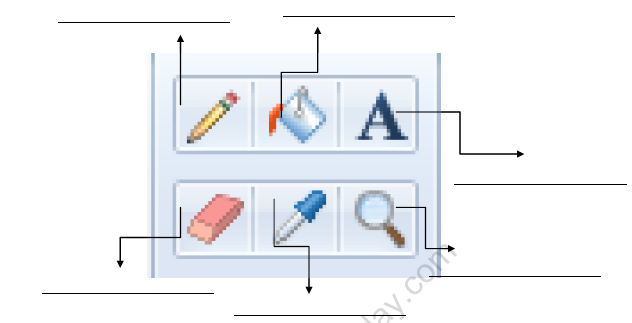
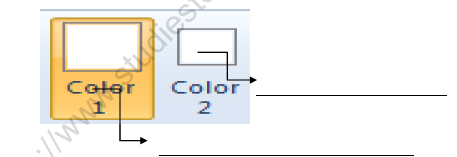
1-Name the devices used for each of the following:---
A- A device commonly seen in video parlour for playing games.
Answer: JOYSTICK
B- A device used to record our voice and other sounds in a computer.
Answer: MICROPHONE
C- A device that can read words , pictures or numbers from paper and Store them in a computer.
Answer: SCANNER
D- A device used to hear sounds and music stored in a computer.
Answer: SPEAKERS
2- Write answers in one word:---
A- What do we call the hardware devices that are used to enter words ,numbers or pictures?
Answer: INPUT DEVICES
B- Which application software is used for typing and making correction In the text ?
Answer: WORDPAD
C- Name the program used for performing calculation?
Answer: CALCULATOR
D- Which application software is used for drawing picture?
Answer: MS PAINT
E- Name a device to store huge amount of data in the computer.
Answer: HARD DISK
3- State true or false.:----
A- The software that can do a specific type of work is called system software.
Answer: FALSE
B- scanner is input device.
Answer: TRUE
C- Paint program is used for drawing pictures.
Answer: TRUE
D- Paint program is an application software.
Answer: TRUE
E- The device through which we get output are called input devices.
Answer: FALSE
A. Fill in the blanks :
1. ………….are used to open specific programs or documents.
2. Arranging the desktop items in a proper order is called …..
3. ………. are the labelled pictures on a Desktop screen.
4. The …………… button gives quick access to documents, Windows applications, Help etc.
5. The long horizontal bar at the bottom of a desktop is known as ……………………
6. …………………… means turning off a computer.
7. When we right-click on the desktop, the ………………… appears.
8. The ..........................is the first screen of Windows, which appears when the computer is switched on.
9. To arrange the icons on the desktop, ................... click on the blank area.
10. Pressing Windows key + D key combination, .......................... all the open windows.
B. State True (T) or False ( F)
1. Windows 7 is the latest version of Windows.
2. Taskbar is located at the top of the desktop.
3. Triple-click on an item to select it.
4. We can open only one program window at a time.
5. We cannot switch from one program to another.
6. The Show desktop button is present on the extreme left of the taskbar.
7. To change the desktop background, left-click on the blank area of the desktop.
8. The clock is present on the left side of the Status Bar.
9. The clock is present on the left side of the Taskbar.
10. Single-clicking on the icon opens the window.
C. Answer the following
1. Which company developed Windows?
2. Who is the founder of Microsoft?
3. What appears on a computer screen when a computer remains idle for a certain period of time?
4. On which side of the Taskbar do we find the Start button?
5. Which key combination is used to minimize all open windows?
6. What indication do we get when an icon is selected?
7. What is the latest version of Windows?
8. Which option do we select from the Shortcut menu to change the desktop background?
9. What do we call the process of loading the Operating System?
10. What is the right side of the Taskbar known as?
D. Check the Right Answer
1. What do we call the rectangular frame that helps in viewing different programs on the screen?
a. Desktop
b. Windows
c. Icons
d. Frame
2. Which software controls and manages all the operations of a computer?
a. Application Software
b. Operating System
c. Utility Software
d. None of these
3. What happens when a computer remains idle for a short interval?
a. It Shuts down
b. It Restarts
c. Screen Saver appears
d. None of these
4. Which of the following mouse pointer shapes is used for pointing, selecting, and dragging the items on the screen?
a. Busy
b. I Beam
c. Four-Headed Arrow
d. Normal
5. On which side of the desktop is the Taskbar located?
a. At the top
b. At the bottom
c. On the left
d. On the right
1. Fill in the blanks:-
a. Hardware and software help the computer to___________ .
b. ___________is a set of programs or instructions.
c. There are two types of software: Application software and___________ .
d. System software is like a___________ .
Answer.
a. Work
b. Software
c. System software
d. Manager
2. Re-arrange the jumble words:-
a. A L I P P A T C I O N __________________
b. W D I O N W S __________________
c. N E O T A P D __________________
d. S W F O A T R E ___________________
e. P I N A T ___________________
f. S E C P I F C I ____________________
Answer.
a. APPLICATION
b. WINDOWS
c. NOTEPAD
d. SOFTWARE
e. PAINT
f. SPECIFIC
3. Missing letters:-
a. C__ L C__ L A__ O R
b. M A__ A G__ R
c. O__ E__ A T__ N G
d. P R__ G R__ M S
e. S Y__ T__ M
f. H__ R D__ A__ E
Answer.
a. C A L C U L A T O R
b. M A N A G E R
c. O P E R A T I N G
d. P R O G R A M S
e. S Y S T E M
f. H A R D W A R E
4. Define the following terms:-
a. Software- Software is the set of instructions that tell a computer what to do.
b. System software- System software is the manager of the computer system.
c. Application software- Does some specific work only.
A. Name the types of software .
Ans– There are two types of software
1. Application software
2. System software
B. Difference between Hardware and software ?
Ans - Hardware - The part of computer which can be physically touched are called Hardware.
Example-: Monitor , CPU, Scanner etc.
Software - The part of computer which cannot be seen or touched are called software.
Example-: M.S paint , M.S windows etc.
C. Give an example each of Application software and system software.
Ans- Application software - Paint , Calculator System software - windows 7 , windows XP
D. Difference between Application software and system software ?
Ans - Application software -- It help us in doing some special work.
System software - It controls the overall activities of the computer.
E. Write the use of following Application software -: Calculator , Notepad
Ans- Calculator - Calculator software is used for calculations in computer.
Notepad - Notepad software is used to making notes in computer system.
Q.1 Fill in the blanks:
1. To type numbers using the numeric keypad on the right side of the keyboard, the ________ key should be on.
2. The first screen which appears when Windows is loaded is called _________________.
3. _____________ clicking on the icon opens the window.
4. The ____________ manages the overall working of the computer.
5. _________ displays the processed information.
Q.2 Write down the names of the keys used for the following:
1. To erase the character to the right of the cursor position
2. To move the cursor to the next line
3. To place the cursor at the end of the line
4. To move the cursor to the top of the document
5. To move the cursor or page down by one screen
Q.3 Write T for True and F for False:
1. WordPad is a System Software.
2. There are two Enter keys on the keyboard.
3. F12 is a Cursor Control key.
4. Windows XP is the latest version of Windows.
5. Show Desktop button is present on the extreme left of the taskbar.
Q.4 Match the following:
1. System Software a. Keyboard
2. Application b. Pen Drive
3. Input Device c. Windows 7
4. Output Device d. Calculator
5. Storage Device e. Printer
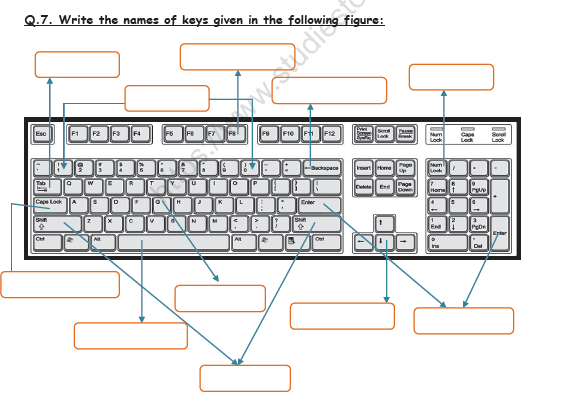
Q.1 Fill in the blanks:
1. To type numbers using the numeric keypad on the right side of the keyboard, the NumLock key should be on.
2. The first screen which appears when Windows is loaded is called Desktop.
3. Double clicking on the icon opens the window.
4. The operating system manages the overall working of the computer.
5. Monitor displays the processed information.
Q.2 Write down the names of the keys used for the following:
1. To erase the character to the right of the cursor position Delete Key
2. To move the cursor to the next line Enter key
3. To place the cursor at the end of the line End Key
4. To move the cursor to the top of the document Ctrl + Home
5. To move the cursor or page down by one screen Page Down key
Q.3 Write T for True and F for False:
1. WordPad is a System Software. F
2. There are two Enter keys on the keyboard. T
3. F12 is a Cursor Control key . F
4. Windows XP is the latest version of Windows. F
5. Show Desktop button is present on the extreme left of the taskbar. F
Q.4 Match the following:
1. System Software a. Keyboard (3)
2. Application b. Pen Drive (5)
3. Input Device c. Windows 7 (1)
4. Output Device d. Calculator (2)
5. Storage Device e. Printer (4)
Q.5 Answer in one word or sentence:
1. Which key is used to give spaces between the words? Space bar key
2. How many function keys are there on the keyboard? 12 Function keys
3. Which program manages all the jobs of the computer? Operating system
Free CBSE Practice Worksheets: Class 3 Computers All Chapters
Mastering All Chapters with Printable Worksheets
Access structured practice worksheets for All Chapters aligned with the 2026 CBSE curriculum. These downloadable exercises for Class 3 Computers help students build accuracy and reinforce core concepts for upcoming school tests.
Verified Solutions and NCERT Alignment
Designed around the official curriculum for Class 3 Computers, these practice sheets guarantee standard compliance. Reviewing step-by-step solutions after completion sharpens your accuracy and clarifies complex sub-topics within All Chapters.
Additional Study Resources for Class 3 Computers
Wrap up your chapter revision by testing your knowledge against standard objective question formats. Explore our full library of free, up-to-date printable assignments to maximize your academic results in upcoming CBSE evaluations.
FAQs
You can download the latest chapter-wise printable worksheets for Class 3 Computers All Chapters for free from StudiesToday.com. These have been made as per the latest CBSE curriculum for this academic year.
Yes, Class 3 Computers worksheets for All Chapters focus on activity-based learning and also competency-style questions. This helps students to apply theoretical knowledge to practical scenarios.
Yes, we have provided solved worksheets for Class 3 Computers All Chapters to help students verify their answers instantly.
Yes, our Class 3 Computers test sheets are mobile-friendly PDFs and can be printed by teachers for classroom.
For All Chapters, regular practice with our worksheets will improve question-handling speed and help students understand all technical terms and diagrams.