

Chapter-wise Worksheets for Class 8 Computer Science: Memory Units & Comp Generations
Explore structured practice materials through the CBSE Class 8 Computer Science Memory Units & Comp Generations Worksheet. Tailored for Class 8 learners, utilizing these Computer Science worksheets ensures thorough preparation and strengthens problem-solving accuracy before final school evaluations.
Practice Class 8 Computer Science Worksheets: Memory Units & Comp Generations
Access the complete worksheet PDF for Class 8 Computer Science below. Regular practice with these targeted academic tasks builds familiarity with standard question patterns and helps secure higher marks in final school examinations.
short answer type of questions:
Question: Write the names of 4th Generation Computers.
Answer: Fourth Generation Computers use VLSI based Integrated Circuits. Some of main computers of these generations are given below:
- IBM PC
- Apple II
- CRAY I
- CRAY II
- CRAY-X/MP
Question: Name the types of Memory.
Answer: Memory is the storage space in Computer where data and instructions are stored. Memory is divided into a number of small portions which are called Cells. Each cell has a unique address. Memory can be divided broadly into following two types:
a. Internal Memory
b. External Memory
Question: Explain the fifth generation of computers.
Answer: Time period of fifth generation is from 1989 to till now. The computers of this generation uses ULSI based Integrated Circuits. Microprocessor chips were used in these computers. These chips have more than 10 million components. The computers of this generation are based on the Artificial Intelligence software. There are many types of fifth generation computers, such as Notebook, Desktop, Workstations, and Super-Computers etc.
Question: What are Tracks?
Answer: Tracks are the important elements of physical structure of a magnetic disk. The surface of a disk is divided into a number of invisible concentric circles. These circles are called Tracks. The number of tracks may vary according to the capacity of the disk. These tracks are numbered from outward to inward starting from zero.
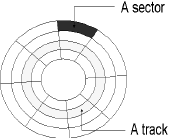
Question: What are Sectors?
Answer: Sectors are the important elements of physical structure of a magnetic disk. Each track of magnetic disk is further divided into smaller parts, which are called Sectors. Each track may have 8 or more sectors in it. Each sector has the capacity to store 512 bytes.
Question: Write the main features and characteristics of First Generation of Computers.
Answer: Following are the main features and characteristics of First Generation of Computers:
1. Vacuum Tubes were used as main processing components in the computers of this Generation.
2. Electromagnetic Relay Memory was used as primary memory in the computers of this Generation.
3. Punch cards were used as Secondary Memory in the computers of this Generation.
4. Computers of this generation were very large in size and they are also very costly.
5. Computers of this generation produce a large amount of heat.
6. These computers were very unreliable.
Question: Write the names of areas which are included in AI.
Answer: AI stands for Artificial Intelligence. It is a new branch of Computer Science which enables computers to think like human beings. Common areas of AI are as given below:
- Robotics
- Game Playing
- Expert System
- Understanding Human Languages
Question: Name the various types of ROM.
Answer: ROM is a Primary Memory. It stands for Read Only Memory. ROM can be divided into the following types:
- MROM (Masked Read Only Memory)
- PROM (Programmable Read Only Memory)
- EPROM (Erasable and Programmable Read Only Memory)
- EEPROM (Electrically Erasable and Programmable Read Only Memory)
Question: Explain the External Memory.
Answer: External memory is also known as Secondary Memory or Auxiliary Memory or Permanent Memory. Data can be stored permanently in this memory. It is a Non-Volatile memory whose contents do not lost even after the switching off the computer system. CPU cannot use this memory directly. Secondary Memory is cheaper than primary memory, but it is slower in speed as compared to primary memory. Secondary memory is of Magnetic and Optical type.
CBSE Class 8 Computer Science Worksheets for Memory Units & Comp Generations
Download Chapter Worksheets: Class 8 Computer Science
Access structured practice worksheets for Memory Units & Comp Generations aligned with the 2026 CBSE curriculum. These downloadable exercises for Class 8 Computer Science help students build accuracy and reinforce core concepts for upcoming school tests.
Concept Clarification for Memory Units & Comp Generations
Each worksheet draws directly from authorized standard textbooks to maintain academic accuracy. Evaluating your finished exercises against expert-verified solutions helps master the formal presentation standards expected in school evaluations.
Effective Revision Strategies for School Exams
Wrap up your chapter revision by testing your knowledge against standard objective question formats. Explore our full library of free, up-to-date printable assignments to maximize your academic results in upcoming CBSE evaluations.
FAQs
You can download the latest chapter-wise printable worksheets for Class 8 Computer Science Memory Units & Comp Generations for free from StudiesToday.com. These have been made as per the latest CBSE curriculum for this academic year.
Yes, Class 8 Computer Science worksheets for Memory Units & Comp Generations focus on activity-based learning and also competency-style questions. This helps students to apply theoretical knowledge to practical scenarios.
Yes, we have provided solved worksheets for Class 8 Computer Science Memory Units & Comp Generations to help students verify their answers instantly.
Yes, our Class 8 Computer Science test sheets are mobile-friendly PDFs and can be printed by teachers for classroom.
For Memory Units & Comp Generations, regular practice with our worksheets will improve question-handling speed and help students understand all technical terms and diagrams.