

Official CBSE Practice Papers for Class 7 Computer Science
Explore authentic exam practice materials through the CBSE Class 7 Computer Science Sample Paper Set 05. Tailored for Class 7 learners, utilizing these Computer Science sample papers ensures thorough preparation and strengthens time management skills before final CBSE evaluations.
Solved Model Papers for Computer Science
Access the complete sample paper PDF for Class 7 Computer Science below. Regular practice with these targeted mock exams builds familiarity with expected question patterns and chapter weightage to help secure higher marks.
CBSE Class 7 Computer Science Sample Paper Set E. It’s always recommended to practice as many sample papers as possible before the examinations. Students can download the sample papers and also question papers of previous years to practice and score better marks in examinations. Refer to other links too for more sample papers.
Q1. Multiple Choice Questions
i. Which of the following options is not available in panel property window?
a) FPS
b) Repeat
c) Color pallete
d) Frames Total
ii. Virus programs are self?
a) Destructive
b) Operative
c) Erasing
d) Replicating
iii. CLS command is used to?
a). Put comments in a program
b). Remove a command
c). Erase the text output area
d) Executes the program
iv. An E-mail address cannot contain?
a) Space
b) Letter
c) Digits
d) @
v. What is the RGB value of white colour ?
a) 1,255,0
b) 255,0,0
c) 255,255,255
d) 0,255,0
vi. Which operator is used to obtain quotient?
a) %
b) /
c) >
d) #
vii. In an E-Mail which option is used to send a copy of mail to more than one recipient?
a) cc
b) to
c) body
d) send
Q2. Fill in the blanks 8
i. By default, tupi shows only _________ layer in the exposure sheet.
ii. __________ option is used to draw filled shapes.
iii. ____________ option is used to change the state of an object from opaque to translucent.
iv. The dimension of Graphics Output Area is ___________.
v. One drive was previously known as ______________.
vi In BASIC-256 we can switch between the Text output area and Graphics output area using _______________ button.
vii __________ collects information about users without their knowledge.
viii. ___________ is the founder of Twitter.
Q3. Write full forms of the following:
i. GNP
ii. CRM
iii. BCC
Q4. Give one example of each:
i. E-Learning site: ____________
ii. E-Commerce website: ____________
iii. Programming Language: ____________
iv. Storage Device: ____________
v. Operating system: ____________
vi. Boot virus: ____________
Q5. Vidhi wants to protect her system from virus attack. Which software she should use and explain any two task performed by that software.
Q6. Define the following:
i. Modulus operator
ii. Export option in Tupi 2d
iii. Step statement
iv. IF.. THEN statement
v. Cookies
vi. Position Tween
Q7. Answer the following questions
i. Why do we need layers in Tupi-2D (write any two points)?
ii. Write any two functions of object library?
iii. Write any two differences between sound and say statement?
iv. Write the shortcut/function keys for the following in Tupi-2d:
i. To view the project in full screen
ii. To move back to animation module
v. a) Differentiate between frame by frame animation and tween animation?
b) Write any two ways to flip an object.
c) How will you rotate an object in Tupi 2d
vi. Identify the following antivirus softwares and write their names
a) b)
vii. Write two differences between Trojan Horse and worm? 2
viii. Anjana has drawn an object on Tupi Screen. She wants that during animation, she wanted to know the total number of frames used in that scene. Suggest her correct way that can meet her requirement .
ix. a) How to add a new contact in Gmail? 2
b) Differentiate between replying and forwarding an E-Mail (any one)
SECTION -B
Basic-256
Q1. Who developed BASIC-256?
Q2. Sushil wants to draw a polygon in BASIC-256. Which command he should use? Explain with syntax and example.
Q3. Explain Unconditional transfer control statement with syntax and example.
Q4 Write a program in Basic-256
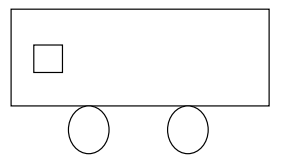
i. To print the sum of squares of numbers between 1 to 10 using FOR... NEXT loop.
ii. To print the product of odd numbers between 1 to 20 using WHILE.. END WHILE loop.
iii. Draw the given figure.
Q5. Give the output of the following program:
a. CLS
FOR Z=50 TO 25 STEP -7
PRINT I
PRINT “**********”
NEXT Z
END
b. CLS
A=10
START:
N=A^2
PRINT N
A=A+1
IF A<50THEN GOTO START
END IF
END
Q6. Write an algorithm to check whether the entered year is leap or not.
Q7. Identify the errors in the following statements
i. CLG
COLOUR RED
FONT VERDANA 10,65
POLY {150,100,170,150,134,200)
END
ii. CLS
B
FOR X 3, 6
PRINT WELCOME
NEXT X
GOTO B
END
Q8. Convert the flow chart into program using WHILE.....END WHILE

Please click the link below to download CBSE Class 7 Computer Science Sample Paper Set E.
Download CBSE Sample Papers: Class 7 Computer Science
Class 7 Computer Science CBSE Class 7 Computer Science Sample Paper Set 05 PDF Download Guide
Review model practice papers for Class 7 Computer Science. Working through the CBSE Class 7 Computer Science Sample Paper Set 05 under simulated test conditions at home ensures complete familiarity with upcoming school evaluations.
Key Advantages of Solving CBSE Class 7 Computer Science Sample Paper Set 05
- Original Practice Material: Access unique questions for Computer Science designed to challenge your understanding.
- Self-Assessment: Evaluate scores per set to pinpoint weak zones in Class 7 Computer Science.
- Exam Completion Skills: Routine problem sets train you to manage test duration efficiently without stress.
How to Analyze Your Performance in CBSE Class 7 Computer Science Sample Paper Set 05
- Self-Evaluation: Score your answers using official guidance to track your academic progress.
- Mistake Correction: Class 7 pupils must re-solve questions answered incorrectly to master the correct method.
- Continuous Practice: Take additional Computer Science sample modules online to maximize preparedness for CBSE evaluations.
FAQs
You can download the complete PDF for CBSE Class 7 Computer Science Sample Paper Set 05 for free from StudiesToday.com. Our resources for Class 7 Computer Science are updated for the latest academic session and follow the official exam pattern.
Yes, CBSE Class 7 Computer Science Sample Paper Set 05 comes with detailed, teacher-verified solutions. We have provided step-by-step answers for Computer Science to help students of Class 7 understand correct methodology and marking scheme.
Practicing this Computer Science paper helps in time management and identifying important topics. For Class 7, solving mock papers is the best way to gain confidence and reduce exam-day anxiety.
Yes, all our study materials for Class 7 Computer Science are provided in a mobile-friendly PDF format. You can easily download CBSE Class 7 Computer Science Sample Paper Set 05 on your mobile device.