

Official CBSE Exam Papers for Class 11 Informatics Practices
Access comprehensive previous year question papers for Class 11 Informatics Practices using the CBSE Class 11 Informatics Practices Question Paper Set 12 Solved. Designed to align with the 2026-27 CBSE academic guidelines, these solved papers help students assess their exam readiness and understand official marking schemes.
Solved Previous Year Papers for Informatics Practices
Navigate directly to the solved Informatics Practices question papers using the digital viewer below. Each practice set includes detailed solutions, allowing students to instantly cross-check their work and identify areas requiring further revision.
1.
(a) State the use of RJ45 Port.
(b) Write the function of Biometric sensor.
(c) Give any two examples of System Software.
(d) Name any two types of Operating System.
(e) Give a short note on Unicode.
2.
(a) Give a short note on Interpreters.
(b) Distinguish between a text editor and a word processor.
(c) What is meant by CIA? Explain.
(d) Give a short note on e-waste and explain any three methods of its disposal.
(e) Explain (i) Virus (ii) Worms. How do they spread? What damages do they cause?
3.
(a) What is the most suitable component in NetBeans to accept multiline text?
(b) What is the use of Project Window in NetBeans?
(c) Akshita designed a form in NetBeans. She placed a button component jButton1 and gave a caption QUIT. Write a code in Java to terminate the application on clicking the QUIT button.
(d) Explain the use of getText() and parseInt() methods in Java.
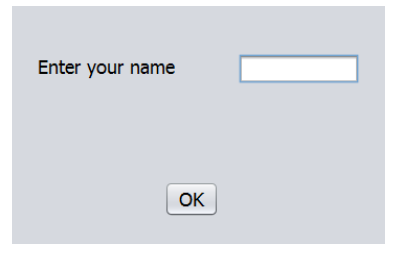
(e) Identify the various components used in the form. List the various properties of the controls used to design the following form.
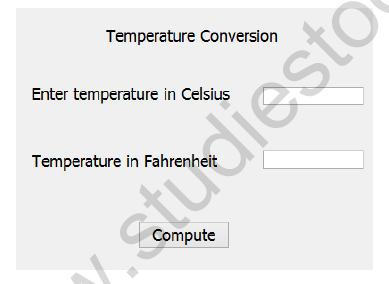
(f) Sharmila designed the following form to perform temperature conversion. Write the code in Java to convert the temperature in Celsius stored in jTextField1 to Fahrenheit and display the result in jTextField2 on clicking Compute (jButton1) button. (F = C*1.8 + 32)
4.
(a) Expand SQL.
(b) Identify Primary key in a STUDENT table with fields Admno, Name and Marks.
(c) What do you mean by cardinality of a table ? Explain with an example.
(d) Write a command in SQL to create a table SHOP with fields Itemcode (integer), ItemName (20 characters), Qty (integer) and Price (decimal number). Make Itemcode as Primary key.
(e) Give the output of the following SQL commands
(i) SELECT LENGTH(‘GOODLUCK’);
(ii) SELECT ROUND(45.678,2);
(iii) SELECT INSTR(‘KARISHMA’,’SH’);
(iv) SELECT MONTH(‘2016-11-23’);
5.
(a) Name any two DDL commands in SQL.
(b) Shankar typed the following SQL command to change the data type of a field Category to 20 characters in BOOK table. But it resulted in error. Correct the command.
MODIFY TABLE BOOK Category CHAR(20);
(c) Explain any two string functions in MYSQL with examples.
(d) Write an SQL command to display the details of salesmen who are from city ‘Mysore’ (City field) in SALESMAN table in descending order of Commission.
(e) Consider the table GYM with the fields PrCode(Product Code), PrName (Product Name), UnitPrice and Manufacturer. Write SQL commands for (i) to (iv)
(i) To add a new Product with PrCode= P104 and PrName = TreadMill
(ii) To remove a Product with PrCode ‘P102’
(iii) To increase the UnitPrice by 5 for the Product whose Code is ‘P105’
(iv) To display the details of Products whose name starts with ‘V’ and ends with ‘r’
6.
(a) Consider the following table
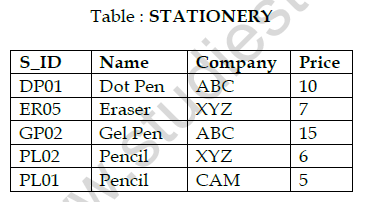
Write SQL Commands for (i) to (vi) based on the above table
(i) Display the different companies from the table.
(ii) Display the details of items whose price is above 5 from the company ‘XYZ’
(iii) Display the names of the items whose ID starts with ‘P’
(iv) Display name and price of the items supplied by the company ‘ABC’
(v) Display the ID and Price *3 of all items. Give the column alias as ‘New Price’ for Price*3
(vi) Display the details of items whose Price is in the range 4 to 8
(b) Give the output of the following SQL commands based on the above table STATIONERY
(i) SELECT S_ID, Name FROM STATIONERY WHERE S_ID=’PL01’;
(ii) SELECT Name, Price FROM STATIONERY WHERE Name LIKE ‘E%’;
(iii) SELECT Name FROM STATIONERY WHERE Price < 10;
(iv) SELECT S_ID FROM STATIONERY WHERE Company = ‘CAM’;
(c) Consider the following table

Write SQL Commands for (i) to (vi) based on the above table
(i) Display the day of the month of the launchdate from the table.
(ii) Display the year from launchdate from the table.
(iii) Display three letters from second letter in Description field.
(iv) Display Description of dresses in lower case.
(v) Display name of the day of launchdate for formal shirt.
(vi) Display the current date and time.
(d) Give the output of the following SQL commands based on the above table DRESS
(i) SELECT DESCRIPTION FROM DRESS WHERE PRICE IS NULL;
(ii) SELECT DCODE FROM DRESS WHERE LAUNCHDATE>’2015-01-01’;
(iii) SELECT DCODE FROM DRESS ORDER BY LAUNCHDATE;
(iv) SELECT DESCRIPTION FROM DRESS WHERE DESCRIPTION LIKE ‘FOR%’;
Please click on below link to download CBSE Class 11 Informatics Practices Question Paper Set L Solved
Practice Exam Question Papers for Class 11 Informatics Practices CBSE Class 11 Informatics Practices Question Paper Set 12 Solved
Previous Year Question Papers: Class 11 Informatics Practices
Explore downloadable past papers for Class 11 Informatics Practices. Utilizing the CBSE Class 11 Informatics Practices Question Paper Set 12 Solved ensures complete preparedness by offering clear insights into historical question styles and marking expectations.
Boost Your Exam Score with Past Papers
Practicing past question sets under timed home conditions helps refine pacing and time management skills, ensuring you complete your Informatics Practices examination comfortably within the official duration.
Enhance Practice with Sample Papers & Solutions
Download digital copies of these papers for convenient offline revision anywhere. Cross-check your completed steps against our expert solution guides to ensure complete accuracy.
FAQs
The CBSE Class 11 Informatics Practices Question Paper Set 12 Solved is available for download on StudiesToday.com. It includes complete set with all sections so that Class 11 students can practice with the exact same paper that came in the CBSE exams.
Yes, the solutions for CBSE Class 11 Informatics Practices Question Paper Set 12 Solved are prepared by subject matter experts as per official marking scheme. Class 11 students will understand the structure of answers and 'step-marks' methodology Informatics Practices.
Solving previous year papers like CBSE Class 11 Informatics Practices Question Paper Set 12 Solved is important to understand repeat themes and question difficulty levels of Informatics Practices. It helps Class 11 students to test their time management skills too.
Yes, where applicable, CBSE Class 11 Informatics Practices Question Paper Set 12 Solved is available in both English and Hindi mediums. All students from Class 11 can access Informatics Practices study material in their preferred language.
No, all previous year question papers on StudiesToday, including CBSE Class 11 Informatics Practices Question Paper Set 12 Solved, are provided free of charge in mobile-friendly PDF.