

Revision Notes for Class 6 Computer Science: HTML
Access comprehensive revision notes for HTML using the CBSE Class 6 Computer Science HTML Notes. Designed to align with the 2026-27 academic syllabus for Class 6 Computer Science, these concept summaries help students streamline their exam preparation and review complex topics efficiently.
Review HTML for Class 6 Computer Science
Access the complete concept summary PDF for HTML below. Regular review of these targeted notes builds familiarity with complex Class 6 Computer Science themes and helps secure higher marks in final school evaluations.
CBSE Class 6 HTML. Learning the important concepts is very important for every student to get better marks in examinations. The concepts should be clear which will help in faster learning. The attached concepts will help the student to understand the chapter and score better marks in the examinations.
CHAPTER-6 HTML
What is HTML?
HTML is a computer language invented to allow website creation. The websites can then be viewed by anyone else connected to the Internet. It is relatively easy to learn, with the basics being accessible to most people in one sitting and quite powerful in what it allows you to create. HTML is used to build the websites or web based applications
HTML stands for Hyper Text Markup Language.
• HyperText is the method by which you move around on the web by clicking on special text called hyperlinks which bring you to the next page.
• Markup is what HTML tags do to the text inside them. They mark it as a certain type of text for example italicized text.
How does it work?
HTML consists of a series of short codes typed into a text-file called as tags. The text is then saved as html file, and viewed through a browser like Internet Explorer. This browser reads the file and translates the text into a visible form, hopefully rendering the page as the author had intended.
Some of the most popular HTML editors, such as FrontPage or Dreamweaver will let you create pages more or less as you write documents in Word or whatever text editor you are using.
Essential HTML Tags
There are four sets of HTML tags that form the basic structure needed for every HTML file:
• <html></html>
• <head></head>
• <title></title>
• <body></body>
<html> </html>
This basically defines the document as web page. It also identifies the beginning and end of the HTML document. All other tags must fall between the html tags.
<head> </head>
The header contains information about the document that will not appear on the actual page, such as the title of the document, the author etc.
<title> </title>
The title tag defines the title that will appear in the title bar of your web browser. The title must appear between the head tags.
<body> </body>
The body tags contain all the information and other visible content on the page. All your images, links and plain text must go between the <body> and </body> tags.
You may also be interested in the basic tags for adding content and headings.
Example:
Below is a basic html document. Notice that everything falls between the html tags, the title appears within the head of the document, and that the body comes after the head.
1. Open Notepad.
2. Type the HTML program as given below.
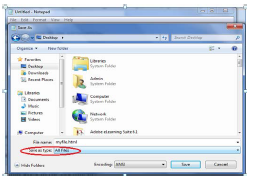
3. Click file->Save as

4. Select Desktop, type the file name as myfile.html and select All files in Save as type box and Click on save.
Your HTML file will be save to desktop
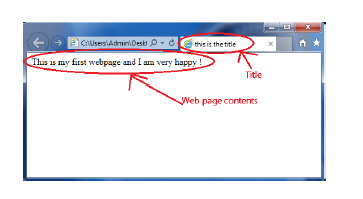
5. Double click on the file(as shown below) and your webpage is ready for display.
Empty tag and Container tag
A container tag has two ends (an opening and a closing) whereas an empty tag doesn't. The paragraph tag is an example of a container tag:
<p>Our paragraph text here.</p>
The image tag is a good example of an empty tag.
<img src="kvslogo.png" >
See how the initial paragraph tag (<p>) has a corresponding end tag? The text in between is "contained" by the tag.
The majority of tags are "container" tags. They have an opening and a closing tag.
However, a few tags are "self-contained" or "empty" tags in that they have an opening tags but not a closing one.
They common ones are:
• <br> = break
• <img> = image
• <meta> = metadata within an HTML document.
WORKSHEET
Fill in the blanks with correct option
<BR>, <HTML>, header, .html, container, tag, title, body, empty , web programming
1. Extension of a HTML file is……………………
2. Predefined command in HTML is knows as…………………
3. HTML is a ………………………language.
4. All HTML programs must have………………tag the begging of program.
5. The ………………contains information about the document that will not appear on the actual page.
6. The ………… tag must appear between the head tags.
7. The ……………tags contain all the information and other visible content on the page.
8. A ……….……………tag has an opening and a closing end.
9. A…………………tag doesn't have a closing end.
10....................is an example empty tag.
Lab Assignment / Project
1. Create a HTML page that contains your name, class, father’s name, mother’s name etc. Save this HTML file to Desktop and test the result.
Solve the crosswords using the words from the lesson

Please click the link below to download CBSE Class 6 HTML.
Download CBSE Revision Notes: Class 6 Computer Science HTML
About HTML Revision Notes
Explore reliable chapter overviews for HTML tailored for Class 6 learners. Use these structured points to grasp difficult themes and ensure solid preparation for upcoming assessments.
How to Use These Revision Notes
Each chapter summary is structured around standard CBSE textbooks, allowing students to check their understanding and clarify complex ideas early in their revision.
Enhance Practice with MCQs and Worksheets
Follow up your revision by attempting the interactive online Computer Science MCQ test and practice worksheets for this chapter to verify your mastery. All platform resources are free to access.
FAQs
You can download the teacher prepared revision notes for CBSE Class 6 Computer Science HTML Notes from StudiesToday.com. These notes are designed as per 2026-27 academic session to help Class 6 students get the best study material for Computer Science.
Yes, our CBSE Class 6 Computer Science HTML Notes include 50% competency-based questions with focus on core logic, keyword definitions, and the practical application of Computer Science principles which is important for getting more marks in 2026 CBSE exams.
Yes, our CBSE Class 6 Computer Science HTML Notes provide a detailed, topic wise breakdown of the chapter. Fundamental definitions, complex numerical formulas and all topics of CBSE syllabus in Class 6 is covered.
These notes for Computer Science are organized into bullet points and easy-to-read charts. By using CBSE Class 6 Computer Science HTML Notes, Class 6 students fast revise formulas, key definitions before the exams.
No, all study resources on StudiesToday, including CBSE Class 6 Computer Science HTML Notes, are available for immediate free download. Class 6 Computer Science study material is available in PDF and can be downloaded on mobile.