

Download CBSE Class 6 Computer Science Sample Papers
Explore authentic exam practice materials through the CBSE Class 6 Computer Science Sample Paper Set 10. Tailored for Class 6 learners, utilizing these Computer Science sample papers ensures thorough preparation and strengthens time management skills before final CBSE evaluations.
Access CBSE Sample Papers and Solutions
Navigate directly to the solved Computer Science model papers using the digital viewer below. Each practice set includes detailed solutions, allowing students to instantly cross-check their work and identify areas requiring further revision.
CBSE Class 6 Computer Science Sample Paper Set J. Sample Papers are the very important for every student. The sample papers should be practiced to gain extra marks in examinations. The sample papers have been prepared based on summative assessment1 and summative assessment 2 pattern. The sample papers have been prepared based on pattern of last year examinations and as per latest changes in the syllabus. Students, teachers and parents can download all CBSE educational material and very well prepared worksheets from this website. All CBSE educational material is developed by our panel of teachers, have also been submitted by CBSE teachers and students.
Q1. Fill ups:-
a. ________ spreadsheets are better than the manual ones.
b. There are ________ worksheets in a workbook by default.
c. _______ is the extension of an Excel file.
d. Click on _____________ button to select a row.
e. We can increase or decrease the ________ of a row.
f. ________ key is used to select non-adjacent rows/columns.
g. The address of last cell in a worksheet is ______________.
h. ________ is an example of font type.
i. The symbol that appears on applying currency style is ____.
j. In _____ series, step value is multiplied with the number.
Q2. Define the following:- (1 * 6 = 6)
a. Auto format b. Autofill c. Workbook
d. Formula Bar e. Cell f. Range
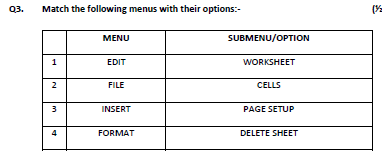
Q4. Write shortcuts for the following:- (1 * 4 = 4)
a. To open a new excel file
b. To edit contents of a cell
c. To open the format cells dialog box
d. To delete cell contents
Q5. Name:- (2 * 2 = 4)
a. Any four components of Excel screen
b. Any four options present on the formatting toolbar
Q6. Explain the types of data available in Excel. Gove example of each type as well. (3)
Q7. Amit wants to format a list of marks in such a way that the marks less than 40 are displayed in blue colour and underlined. What steps should he follow to do it? (3)
Q8. Write the use of :- (2 * 3 = 6)
a. Freezing headings
b. Save an Excel file as a web page
c. Print preview option
Q9. Write the steps to do the following:- (2 * 6 = 12)
a. To insert two blank rows between row 8 and 9
b. To increase the width of columns E and F
c. To generate a series of 10 even numbers starting from number 2
d. To apply 2 decimal places and a thousand separator to cell A5
e. To print active sheet
f. To insert a new worksheet and change its name to “EXAM”
IT NEWS
1) Which website is “education solutions provider”? ½
2) Give full form of HDS . ½
3) At what price will IBM buy cloud HR software from Kenexa? ½
4) Which company will launch two 10.6-inch tablet computers? ½
Please click the below link to access CBSE Class 6 Computer Science Sample Paper Set J.
CBSE Class 6 Computer Science Sample Paper Set 10 & Sample Question Papers for Class 6 Computer Science
Class 6 Computer Science CBSE Class 6 Computer Science Sample Paper Set 10 PDF Download Guide
Review model practice papers for Class 6 Computer Science. Working through the CBSE Class 6 Computer Science Sample Paper Set 10 under simulated test conditions at home ensures complete familiarity with upcoming school evaluations.
Key Advantages of Solving CBSE Class 6 Computer Science Sample Paper Set 10
- Exam Blueprint: Understand mark allocations and structural guidelines relevant to Class 6 evaluations.
- Targeted Improvement: Identify weak areas in Class 6 Computer Science requiring focused revision.
- Pacing & Precision: Practice mixed question formats to build execution speed and ensure timely paper completion.
How to Analyze Your Performance in CBSE Class 6 Computer Science Sample Paper Set 10
- Review Solutions: Evaluate your completed papers using expert-verified guidance inside our solution sets.
- Target Weaknesses: Class 6 students should analyze missed questions to rectify conceptual misunderstandings.
- Deep Revision: Re-read sections in the NCERT book for Class 6 Computer Science to clear doubts before solving items again.
FAQs
You can download the complete PDF for CBSE Class 6 Computer Science Sample Paper Set 10 for free from StudiesToday.com. Our resources for Class 6 Computer Science are updated for the latest academic session and follow the official exam pattern.
Yes, CBSE Class 6 Computer Science Sample Paper Set 10 comes with detailed, teacher-verified solutions. We have provided step-by-step answers for Computer Science to help students of Class 6 understand correct methodology and marking scheme.
Practicing this Computer Science paper helps in time management and identifying important topics. For Class 6, solving mock papers is the best way to gain confidence and reduce exam-day anxiety.
Yes, all our study materials for Class 6 Computer Science are provided in a mobile-friendly PDF format. You can easily download CBSE Class 6 Computer Science Sample Paper Set 10 on your mobile device.