CBSE Class 1 Computer Science Using A Mouse Worksheet

Read and download the CBSE Class 1 Computer Science Using A Mouse Worksheet in PDF format. We have provided exhaustive and printable Class 1 Computers worksheets for Using A Mouse, designed by expert teachers. These resources align with the 2025-26 syllabus and examination patterns issued by NCERT, CBSE, and KVS, helping students master all important chapter topics.

Chapter-wise Worksheet for Class 1 Computers Using A Mouse

Students of Class 1 should use this Computers practice paper to check their understanding of Using A Mouse as it includes essential problems and detailed solutions. Regular self-testing with these will help you achieve higher marks in your school tests and final examinations.

Class 1 Computers Using A Mouse Worksheet with Answers


 Using a Mouse
Q1.Identify the parts of computer and write their names:
 
1. What finger is placed on the left mouse button? __________________________
 
2. What finger is placed on the right mouse button? _________________________
 
3. Where do we fix the tail of the mouse? _________________________________
 
4. What do we call the small arrow moving on the monitor? _____________________
 
5. Write any two uses of mouse. _________________________________________
 
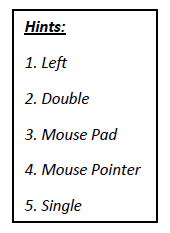
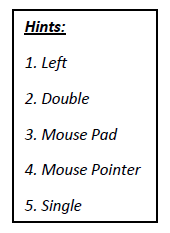
Q2. Fill in the blanks using the hints given in the box:
CBSE Class 1 Computer Science Worksheet - Using a Mouse
 
1. _________________ clicking opens the item.
 
2. _________________ clicking selects the item.
 
3. ‘Click’ means pressing the _________________ button on the mouse.
 
4. The mouse is kept on a _______________.
 
5. The small arrow which we see on the monitor is called _____________________.
 
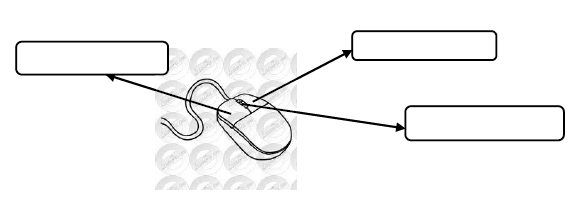
Q3.Label the parts of mouse given in the following figure:
 CBSE Class 1 Computer Science Worksheet - Using a Mouse
Q1.Identify the parts of computer and write their names:
 
1. What finger is placed on the left mouse button? Index button
 
2. What finger is placed on the right mouse button? Middle finger
 
3. Where do we fix the tail of the mouse? CPU
 
4. What do we call the small arrow moving on the monitor? Mouse Pointer
 
5. Write any two uses of mouse. Draw pictures and open and select icons on the desktop.
 
Q2. Fill in the blanks using the hints given in the box:
CBSE Class 1 Computer Science Worksheet - Using a Mouse
 
1. Double clicking opens the item.
 
2. Single clicking selects the item.
 
3. ‘Click’ means pressing the left button on the mouse.
 
4. The mouse is kept on a mouse pad.
 
5. The small arrow which we see on the monitor is callednt Mouse poier.
 
Q3.Label the parts of mouse given in the following figure:

CBSE Class 1 Computer Science Worksheet - Using a Mouse
 

CBSE Computers Class 1 Using A Mouse Worksheet

Students can use the practice questions and answers provided above for Using A Mouse to prepare for their upcoming school tests. This resource is designed by expert teachers as per the latest 2026 syllabus released by CBSE for Class 1. We suggest that Class 1 students solve these questions daily for a strong foundation in Computers.

Using A Mouse Solutions & NCERT Alignment

Our expert teachers have referred to the latest NCERT book for Class 1 Computers to create these exercises. After solving the questions you should compare your answers with our detailed solutions as they have been designed by expert teachers. You will understand the correct way to write answers for the CBSE exams. You can also see above MCQ questions for Computers to cover every important topic in the chapter.

Class 1 Exam Preparation Strategy

Regular practice of this Class 1 Computers study material helps you to be familiar with the most regularly asked exam topics. If you find any topic in Using A Mouse difficult then you can refer to our NCERT solutions for Class 1 Computers. All revision sheets and printable assignments on studiestoday.com are free and updated to help students get better scores in their school examinations.

Where can I download the 2025-26 CBSE printable worksheets for Class 1 Computers Chapter Using A Mouse?

You can download the latest chapter-wise printable worksheets for Class 1 Computers Chapter Using A Mouse for free from StudiesToday.com. These have been made as per the latest CBSE curriculum for this academic year.

Are these Chapter Using A Mouse Computers worksheets based on the new competency-based education (CBE) model?

Yes, Class 1 Computers worksheets for Chapter Using A Mouse focus on activity-based learning and also competency-style questions. This helps students to apply theoretical knowledge to practical scenarios.

Do the Class 1 Computers Chapter Using A Mouse worksheets have answers?

Yes, we have provided solved worksheets for Class 1 Computers Chapter Using A Mouse to help students verify their answers instantly.

Can I print these Chapter Using A Mouse Computers test sheets?

Yes, our Class 1 Computers test sheets are mobile-friendly PDFs and can be printed by teachers for classroom.

What is the benefit of solving chapter-wise worksheets for Computers Class 1 Chapter Using A Mouse?

For Chapter Using A Mouse, regular practice with our worksheets will improve question-handling speed and help students understand all technical terms and diagrams.