

Revision Notes for Class 5 Computers: More In Word
Access comprehensive revision notes for More In Word using the CBSE Class 5 Computer Science More In Word Notes. Designed to align with the 2026-27 academic syllabus for Class 5 Computers, these concept summaries help students streamline their exam preparation and review complex topics efficiently.
Review More In Word for Class 5 Computers
Navigate directly to the revision notes for More In Word using the digital viewer below. Each summary is structured to highlight high-weightage sections, allowing students to instantly access critical definitions and focus on core exam topics.
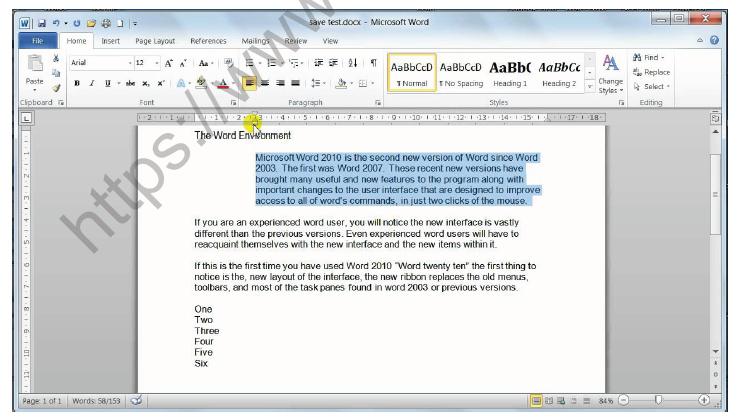

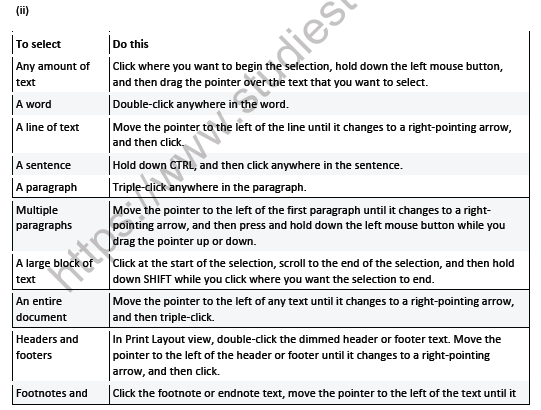
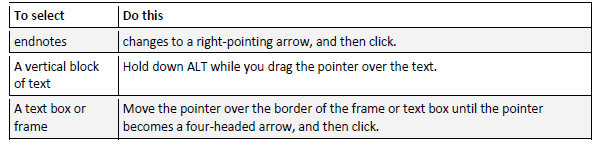
(iii) Select text in different places
You can select text or items in a table that are not next to each other. For example, you can select a paragraph on one page and a sentence on a different page.
1. Select some text or an item in a table.
2. Hold down CTRL while you select any additional text or item in a table that you want.
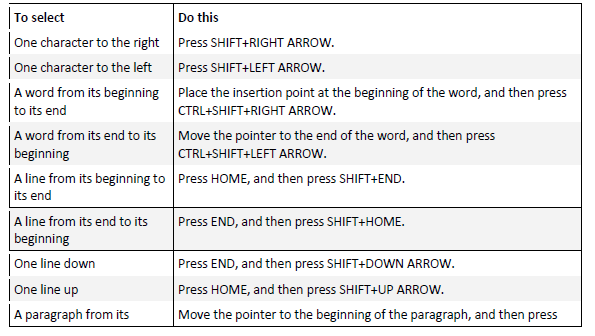
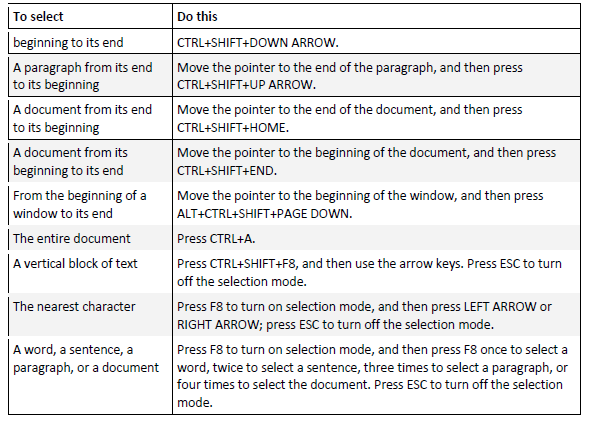
Select text by using the keyboard
Select text in the body of a document
NOTE To select an entire document, press CTRL+A.
Moving:-
• Moving is also known as Cut and Paste. It allows you to remove selected text from the document/paragraph and place it to different location.
To cut and paste a block of text:
• Select the text you want to move.
• Click the Cut button on the Standard toolbar. or in Keyboard Press Ctrl + X
• Place the insertion point where you want the text inserted.
• Click the Paste button. in Keyboard Press Ctrl + V
Copying
Copying text can be useful if you need to duplicate words you have already typed as it saves time and effort. Follow these step-by-step instructions to copy and paste text
Step 1: Open an existing Word document or start a new document and type your text.
Step 2: To copy text, it will need to be selected or highlighted with the mouse first. When the mouse pointer is moved over a text area, the pointer will change from an arrow to a ‘text select’ or ‘I-beam’ icon.
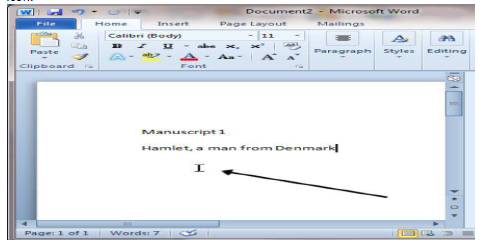
Step 3: Select your text so that it’s highlighted.
Step 4: Copy the text by clicking on the copy icon at the left-hand side of the formatting ribbon.
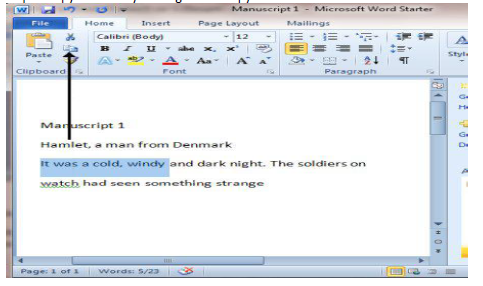
Step 5: Use the mouse to move the cursor to where you wish to paste the copied text.
Step 6: Click Paste to insert the copied text in its new place in your text.
Please click the link below to download pdf file for CBSE Class 5 Computer Science More In Word Notes
Study Material and Revision Notes for Class 5 Computers More In Word
About More In Word Revision Notes
Explore reliable chapter overviews for More In Word tailored for Class 5 learners. Use these structured points to grasp difficult themes and ensure solid preparation for upcoming assessments.
How to Use These Revision Notes
Built using the official NCERT book for Class 5 Computers, these notes provide reliable academic guidance. Pair your summary review with our recommended NCERT solutions to master optimal problem-solving approaches.
Enhance Practice with MCQs and Worksheets
Wrap up your chapter revision by testing your knowledge against standard question formats. Everything on our platform is provided free of charge.
FAQs
You can download the teacher prepared revision notes for CBSE Class 5 Computer Science More In Word Notes from StudiesToday.com. These notes are designed as per 2026-27 academic session to help Class 5 students get the best study material for Computers.
Yes, our CBSE Class 5 Computer Science More In Word Notes include 50% competency-based questions with focus on core logic, keyword definitions, and the practical application of Computers principles which is important for getting more marks in 2026 CBSE exams.
Yes, our CBSE Class 5 Computer Science More In Word Notes provide a detailed, topic wise breakdown of the chapter. Fundamental definitions, complex numerical formulas and all topics of CBSE syllabus in Class 5 is covered.
These notes for Computers are organized into bullet points and easy-to-read charts. By using CBSE Class 5 Computer Science More In Word Notes, Class 5 students fast revise formulas, key definitions before the exams.
No, all study resources on StudiesToday, including CBSE Class 5 Computer Science More In Word Notes, are available for immediate free download. Class 5 Computers study material is available in PDF and can be downloaded on mobile.